Deployment Plan for Release to Production TableCheck
.This document explains the deployment plan of the TableCheck x HungryHub & SevenRooms x HungryHub integrations project to the production environment.
Pre-Deployment Steps
- Create Pull Request (PR) from feat/tablecheck-sevenrooms-integration to main branch
[
github.com
https://github.com/hungryhub-team/hh-server/pull/5167
](https://github.com/hungryhub-team/hh-server/pull/5167)
- Synchronize feat/tablecheck-sevenrooms-integration with main branch
- Ask for review from other team members
Deployment Steps
1. Update the config for these keys in the production environment (ask @Malikal)
TABLECHECK_AUTH_ID=HC3NTB0B77ACKL5WTTP6LMJONI76UL54XD5MP1NH
SEVEN_ROOMS_CLIENT_ID=69b9ef281fd9d47eedafa06898afd32905be411e38d8818b6ca2f0bf5a629cfeaa528457393eb32fc5981a52d62edf07659f839a49047c2a0788f06ebe2d1c5d
SEVEN_ROOMS_CLIENT_SECRET=dc36ecad57cd3f166da18912776f6ac24812b4729ab9df3413ca82fff06c6d8c9899eb8026d1b0dd52b9acb54599fc76f1f0c068c8df2babda2ed49402b96770
Notes:
There is no need to fill in the actual values for now, but the keys must exist before we merge the PR. 2. Merge and squash the PR into the main branch 3. Announce to the teams that the TableCheck & SevenRooms integrations project is deploying to production
Post-Deployment Steps
1. Create a new application for the TableCheck and SevenRooms vendor on https://hungryhub.com/oauth/applications
-
* Click the New Application button and fill out the form for the TableCheck and SevenRooms vendor. Here is an example of the staging form
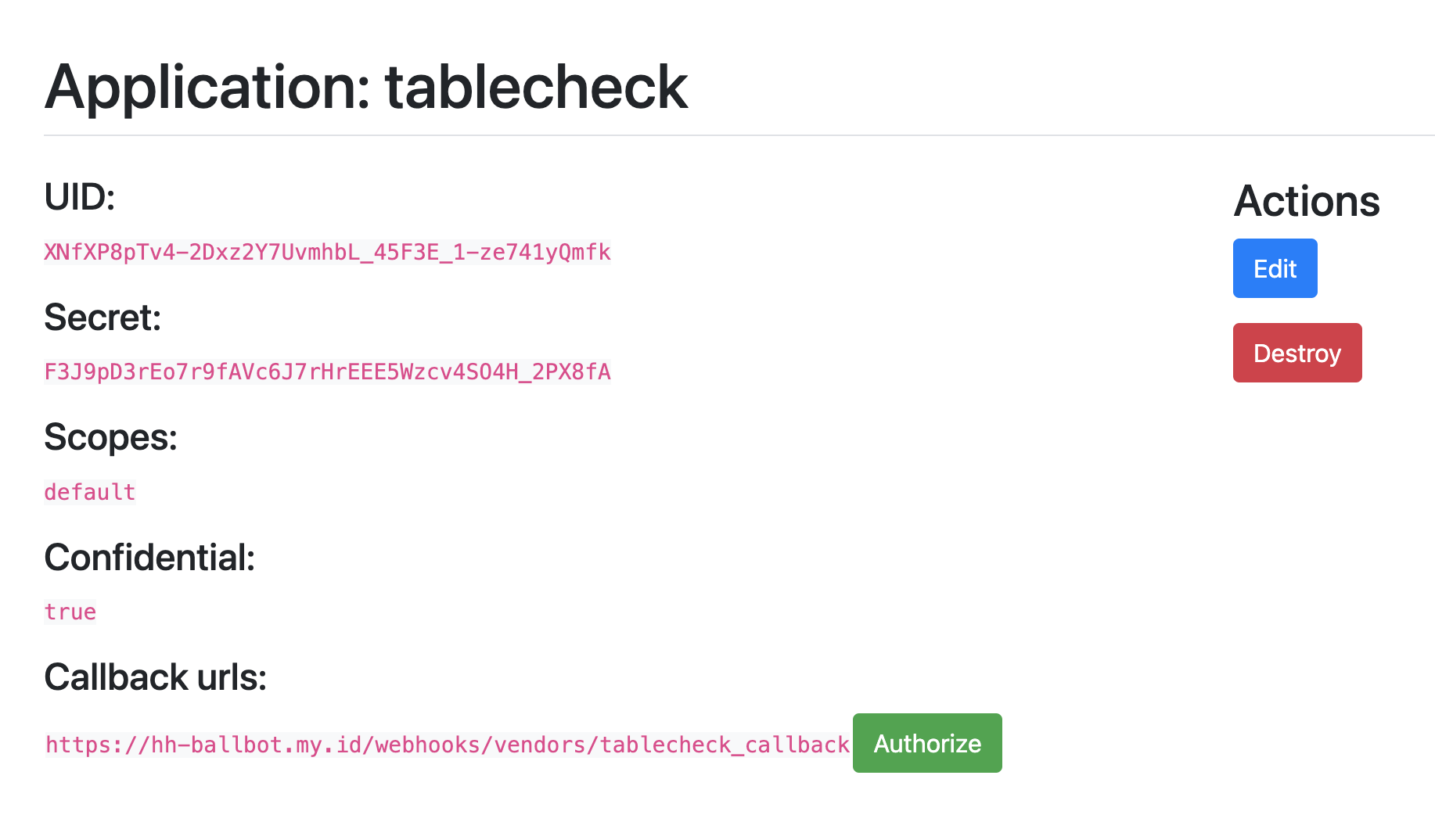 Form:
Form:
-
1. For TableCheck- Name: tablecheck
- Redirect URI: use TableCheck webhook production URL [for now can use the staging: https://hungryhub.com/webhooks/vendors/tablecheck_callback]
- Confidential: checklisted
- Scopes: default
- For SevenRooms
- Name: sevenrooms
- Redirect URI: use SevenRooms webhook production URL [for now can use the staging: https://hungryhub.com/webhooks/vendors/seven_rooms_callback]
- Confidential: checklisted
- Scopes: default
2. Fill out the TableCheck & SevenRooms API Host field in the admin setting (https://hungryhub.com/admin/settings?locale=en)
example:

 3. Setup restaurant testing on production (ref: Private (https://app.clickup.com/9003122396/docs/8ca1fpw-30116/8ca1fpw-33016))
4. Enable webhook for TableCheck & SevenRooms
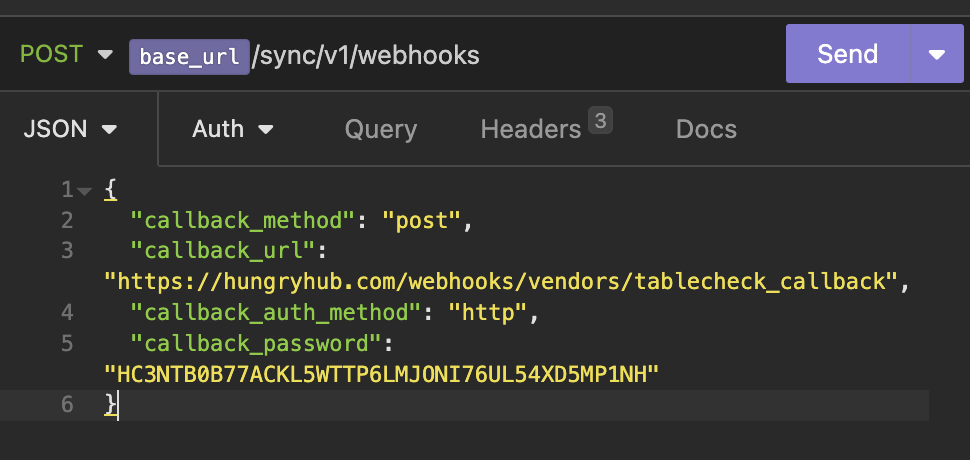
a. For TableCheck (ref: https://api.tablecheck.com/api/sync/v1/docs#/webhooks/createWebhook)
3. Setup restaurant testing on production (ref: Private (https://app.clickup.com/9003122396/docs/8ca1fpw-30116/8ca1fpw-33016))
4. Enable webhook for TableCheck & SevenRooms
a. For TableCheck (ref: https://api.tablecheck.com/api/sync/v1/docs#/webhooks/createWebhook)
-
* endpoint API: [https://api.tablecheck.com/api/sync/v1/webhooks](https://api.tablecheck.com/api/sync/v1/webhooks)- callback_url: https://hungryhub.com/webhooks/vendors/tablecheck_callback
- callback_passwod:
HC3NTB0B77ACKL5WTTP6LMJONI76UL54XD5MP1NH(same with env value TABLECHECK_AUTH_ID) b. For SevenRooms: https://docs.google.com/forms/d/e/1FAIpQLSd_8lW7qYrMl_t6C3YSH-XHAabkPoL2wW6_huYBAb7mzcfzQA/viewform