Personas & User Scenarios
What's happening right now?
Booking Package have some differences and inconsistency flow happened both front end and back end. This paragraph will demonstrate what is happening to our current booking process.
When a user can begin the booking process by choosing any package from Store Page, the system does not remember which package he/she has previously selected after the user inputs the party size, date and time. What happens here is inconsistency and creating confusion. Didn't I just choose the package? Which package did I choose? Why do I have to choose it again?
Furthermore, the logic is separated depending on the Package Type, let me explain it for you.
For All You Can Eat (AYCE) Package Type
This one is simple, the package quantity is always calculated from the party size in 1:1 ratio.
So, no matter how many people, just select the package once. Then, the user can proceed to the checkout page.
For Party Pack (PP) Package Type
This is a bit complicated, the system has to check two variables. First, the Party Size (PAX). Second, he Party Size Per Pack (which is determined by the package setting).
So, If the user's PAX is 5 and Party Size Per Pack is 2. User has to + the package amount to 3, in order to increase Total Party Size Per Pack to 6 (2*3). The Party Size Per Pack has be higher than the selected PAX for the user to be able to proceed to the checkout page.
It is this way because the system is designed in a way that the AYCE Party Size Per Pack is always 1 and AYCE Package Type cannot be mix'n'matched. So, user can choose package only once and the system will summarize it and take customer to checkout page, but Party Pack cannot calculate like this.
To conclude, this alone, are just 2 from 4 package type (not yet include gift card, and voucher in market place) which are our core product which plays a major part on generating revenue. The inconsistency of the process flow is blocked customers to develop their behavior and experience, as a product manager myself, I still have to take a while to explain the differences of the process to others. Not to mention the customers, they will confuse more than us for sure.
So, What will we do?
We will change the flow of how AYCE and PP package interact with party size selection, customers have to select package first then party size.
To change make Party Pack auto calculate like AYCE is quite impossible, but
we can make AYCE to behave like PP.
Which means customers will have to select quantity of AYCE
New Flow Example
System will look at two variables
TMA = total maximum allowance (old: party size per pack)
PAX = party size (as usual)
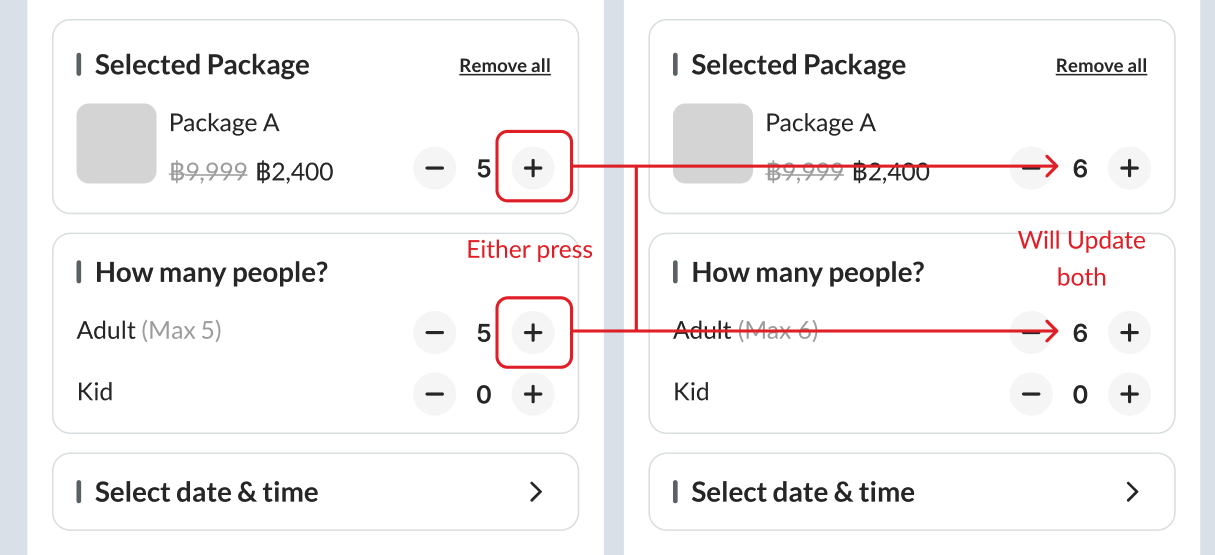
Case #1 TMA == PAX
This case happens when package's maximum allowance(max person) = 1 was selected. (happened most of the time in AYCE, and PP(omakase package))
 (pic from package setting in admin dashboard)
So, in the new booking process, either customer add more package or add more people it both will change. Because TMA it has to be exact same as PAX in order to make a booking.
Case #2 TMA != PAX
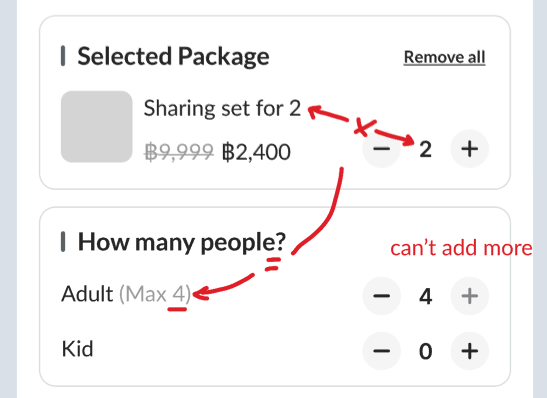
This case will happen when customer select package that have maximum allowance (party size) more than 1 (happened most of the time in Party Pack, Mix'n Match booking process)
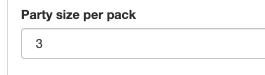 (pic from package setting in admin dashboard)
So, in the new booking process, customer can + PAX until it's equal to TMA only.
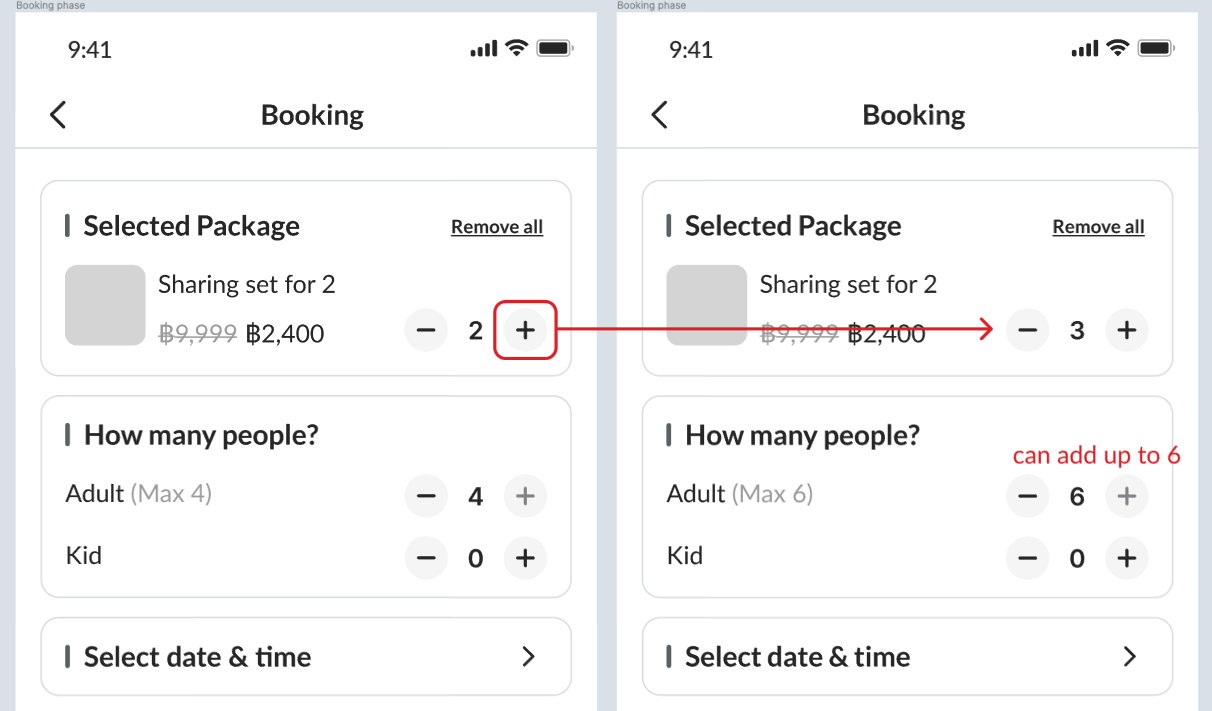
If customer want to add more PAX
they'll have to increase TMA by + the package quantity first, then add PAX after
Ordinary Cases
(i) If it's can not Mix'n Match
In this scenario, Pat already selected AYCE package. Then, Pat press +Add another package. There is a text pop-up informed that "This package can not Mix'n Match, do you want to change the package?, and CTA is cancel and Change to this package. In this case, Pat press change package
(ii) Want to add more package
Pat want to add more package to this booking process, there is an Add Package button, Pat tapped on that, it's redirect Pat to store landing page
(iii) Want to remove the package?
Pat wanted to change the package. Pat notice that when Pat press +Add, it changes from + to > - 1 + . So, Pat just tap - and select the new package.
(iv) Wrong Move!
After Pat navigated to booking process page, Pat go strait to choose date and time, but not thong happened, because "Input party size in order to check date and time" is labeled in this section.
(V) I have kids
By add kid amount to party size, Total price will also include kids price
B...But, How about Big group? (BG)
From now on, big group will have same flow as non-big group booking
However, instead of confirm booking button will change to send request.
Allotment management from back end will remain the same.
Scenarios
Some Inspiring Story
Well written novel-like with poor grammar background story
As a customer, Pat wants to Dine at some place no matter what date is (because Pat is so free, he can go any day). So, Pat navigated to X Restaurant landing page. Then, he found package that interested him, the price was the first thing struck his eye. Pat wanted to know more about this package. So, he pressed on the package for further information. The system direct Pat to package landing page.
…After Pat knows enough about this package, he desired to book this one. So he confidently press the + Add button (due to package landing was well designed for informing user). 🐳
One bottom overlay appear, showing amount of the package pat added and book button besides. In this case, pat want's just one package, so pat press book.
There is one page slides-in, THE NEW BOOKING PROCESS, mainly Pat see tree sections in this page. Pat can tell that first section is WHAT package that pat have chosen. The second sections is about WHO/how many going to dine. Then, the third section is WHEN pat wanted to go dine for this package.
Multiple Pack?
like explained in case #1 & #2
Back to the restaurant landing page, this time Pat wanted to select two party pack packages. So pat press + Add under the first package this he wanted. Then, that bottom overlay appear like earlier, still showing "amount of the selected and book button. But Pat is not press Book because Pat wanted to add another package.
So pat press +add on another Package. That bottom overlay update the information, now amount is "2", then Pat press book
Starting the process
After pressing book, There is one page slides-in, THE NEW BOOKING PROCESS, mainly Pat see tree sections in this page. Pat can tell that first section is WHAT package that pat have chosen. The second sections is about WHO/how many going to dine. Then, the third section is WHEN pat wanted to go dine for this package.
In the Process#1
Ordinary every sunny-day process
After what happens above, Pat starts with first section. It displayed selected package, pat can tell it's the same package because it has the same name, and the price is the same.
Next, second section. shows field to input adults/ kid as a number
( - 1 + ), Pat tried to tap on the number, there was keyboard pop-up to enter the quantity as number only.
Then, the last section. Pat has to select date and time. So, when he tapped that there is another slide-in page for selecting the date and time, it is new UI, but from the experience, Pat knows exactly what he have to do. At first there is no time slot to select yet, so Pat select the date first, then time slot is appeared after that. After Pat select date and time he want swiftly, Pat pressed confirm date and time
Lastly, The system direct back to BOOKING PROCESS with three sections again, it's all updated now. Pat will press Checkout
In the Process#2
Add people/ Change Time
Mean while before Pat press Checkout__...
Pat got called by Tompi. He wants to join the dine. So, Pat have to Add one more people in the second section. So, Pat pressed + then amount changed form "1" to "2"
Then, there is error message on the third section asking pat to change the time, it says "This time is not available"* So, Pat have to change the time slot by repeat third section process, but without re-select the date.
Out of scope
Don't mind information below, we put that down to narrow the scope.