Google E2E with Prepayment
🧾 History
| Date | Changes | Link | By |
|---|---|---|---|
| 28th March 2024 | List of Changes Integrate Google E2E with Hungry Hub | Private (https://app.clickup.com/9003122396/docs/8ca1fpw-7922/8ca1fpw-36936) | Umam |
| 10th June 2024 | List of Changes Add 2 conditions for payment Restaurant with Payment (Prepayment or deposits) Restaurant without payment Match the design for checkout page into new design | Private (https://app.clickup.com/9003122396/docs/8ca1fpw-7922/8ca1fpw-53536) | Umam |
| Aug 11, 2025 | List of Changes | This PRD | Umam |
📕 About
| Context | Google E2E is a platform that enables users to make direct reservations for various services especially for restaurant without leaving Google search results or the Google Map. Since it will be integrated to Hungry Hub. We want to help user for making the booking. |
|---|---|
| Problem | User wants to make the booking at the restaurant without leaving Google search results or the Google Map |
| Solution | User can book using Google E2E and integrate it with Hungry Hub |
| Name of Feature | Reserve with Google (Google E2E) |
| Objective | Display Reserve a Table Button on the Google search results or the Google MapsReserve with Google Page Confirmation Page Redirect to HH Checkout Page |
| Gains | Integrating with Google E2E can increase the visibility of restaurants listed on Hungry Hub, as users can make direct reservations through Google search results and Google Maps. Users can easily make reservations without leaving the Google platform, resulting in a smoother and more convenient booking experience. |
| Pains | Integrating with Google E2E may require technical expertise and resources Relying on Google E2E for reservations means being dependent on the functionality and policies of a third-party platform, which could introduce risks if there are service disruptions or changes in policies |
| Figma Link | https://www.figma.com/file/ENTkVcEM6rwhxGGMCoCyAc/Pending-payment-for-Reserve-with-Google?type=design&node-id=0%3A1&mode=design&t=ol8CzzK0c5E1hIoK-1 |
| Available Platform | Web (Desktop & Mobile view) |
| Sprint | 36 |
| Related PRD | Client Side : Private (https://app.clickup.com/9003122396/docs/8ca1fpw-7922/8ca1fpw-36936) |
| Out of Scope | Sprint 36 : Send Email for Restaurant with payment (phase 2) |
📚 Glosarium
Restaurant with payment ➝ Require prepayment Restaurant without payment ➝ Doesn't require prepayment
🎯 User Story & Requirement
Display Reserve a Table Button on the Google search results or the Google Maps
| User Story | Requirement |
|---|---|
As a user, i want to book restaurant (in hungyhub) on the Google E2E when i search on the google map or google search.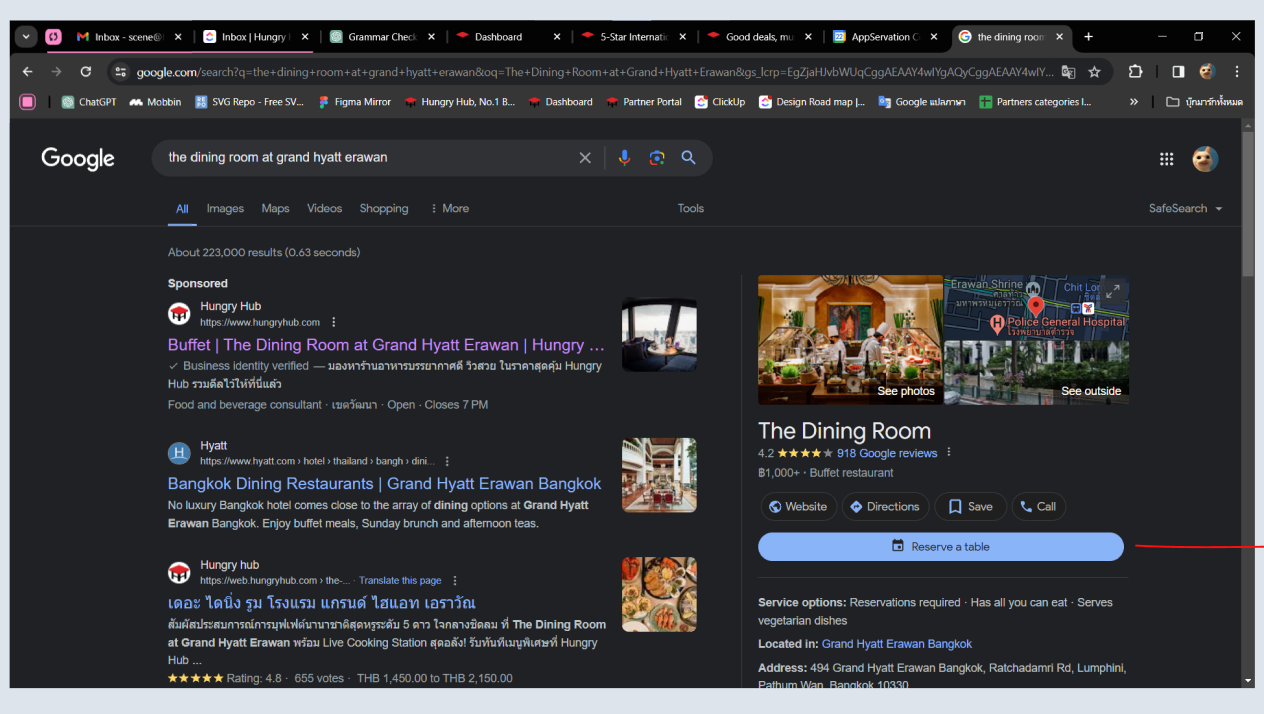 | Provide Reserve a Table Button on the restaurant detail/description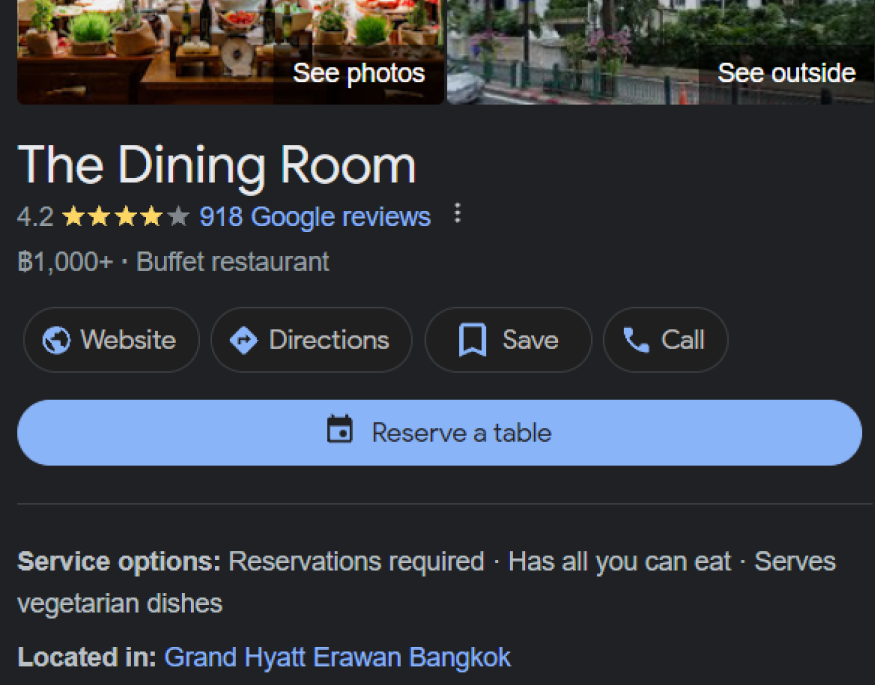 |
Reserve with Google Page
| User Story | Requirement |
|---|---|
As a user, after i click Reserve a Table Button, i will be redirected to Google E2E Page. i want to complete my booking.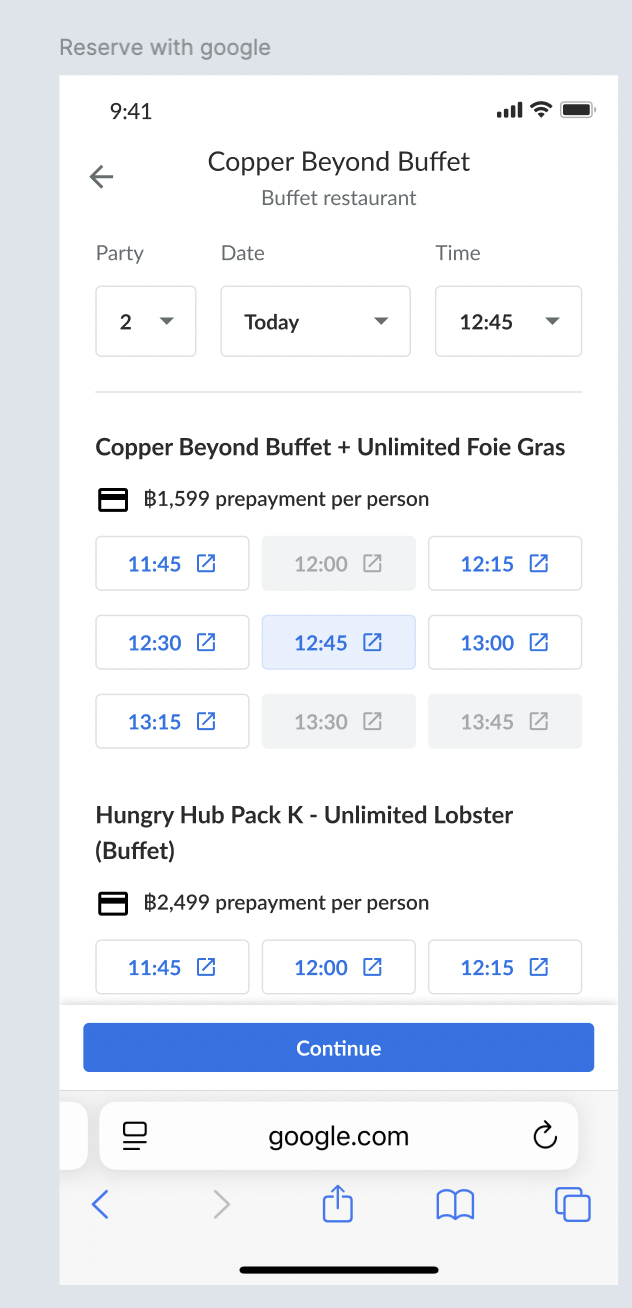 | Provide some options for dining date Party Size Date Time 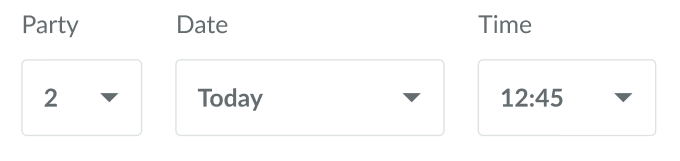 Display packages Package Name/Nickname We have format for displaying that, please kindly check the table below Available Time Provide 6 time slots → because user chooses 12:45 at the top section. so, the time slot provided have 6 time slots with 12:45 as a center. different time every 15 minutes before and after Match with the inventory → if full/not provided, make it disable/inactive 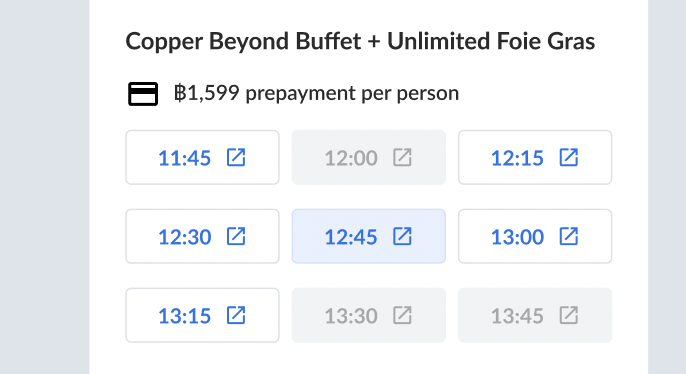 User can click Continue ButtonGet a pending payment email → new design Go to HH checkout page |
| All You Can Eat | Party Pack |
|---|---|
The displayed package will follow this format " Package name/nickname (Buffet) - ฿price/Person"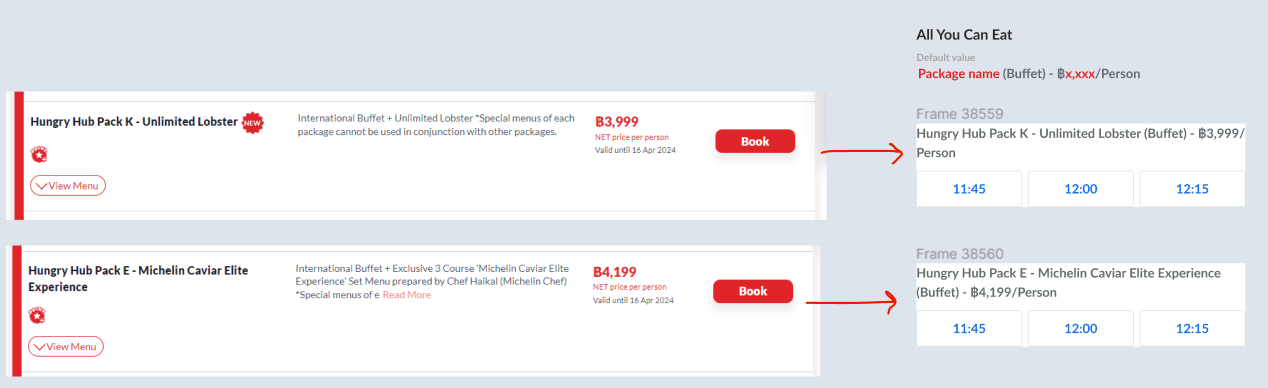 | The displayed package will follow this format "Sharing Set for number of party size people - ฿price/Set"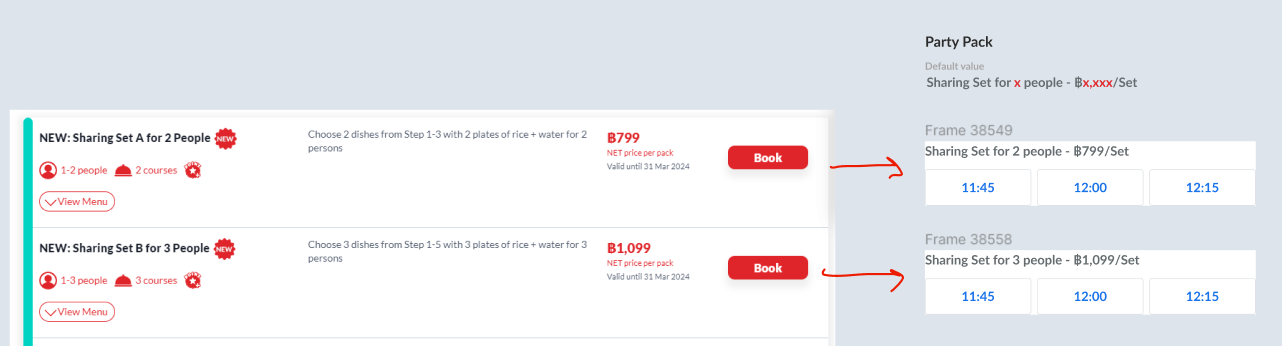 |
| Note : if google e2e can't follow the HH format, HH format can follow google e2e format instead Make sure the preview on admin dashboard is same with google e2e |
Confirmation Page
| User Story | Requirement |
|---|---|
As a user, after i click the Continue Button. the pop up will be appeared. i have to fill out all of the required information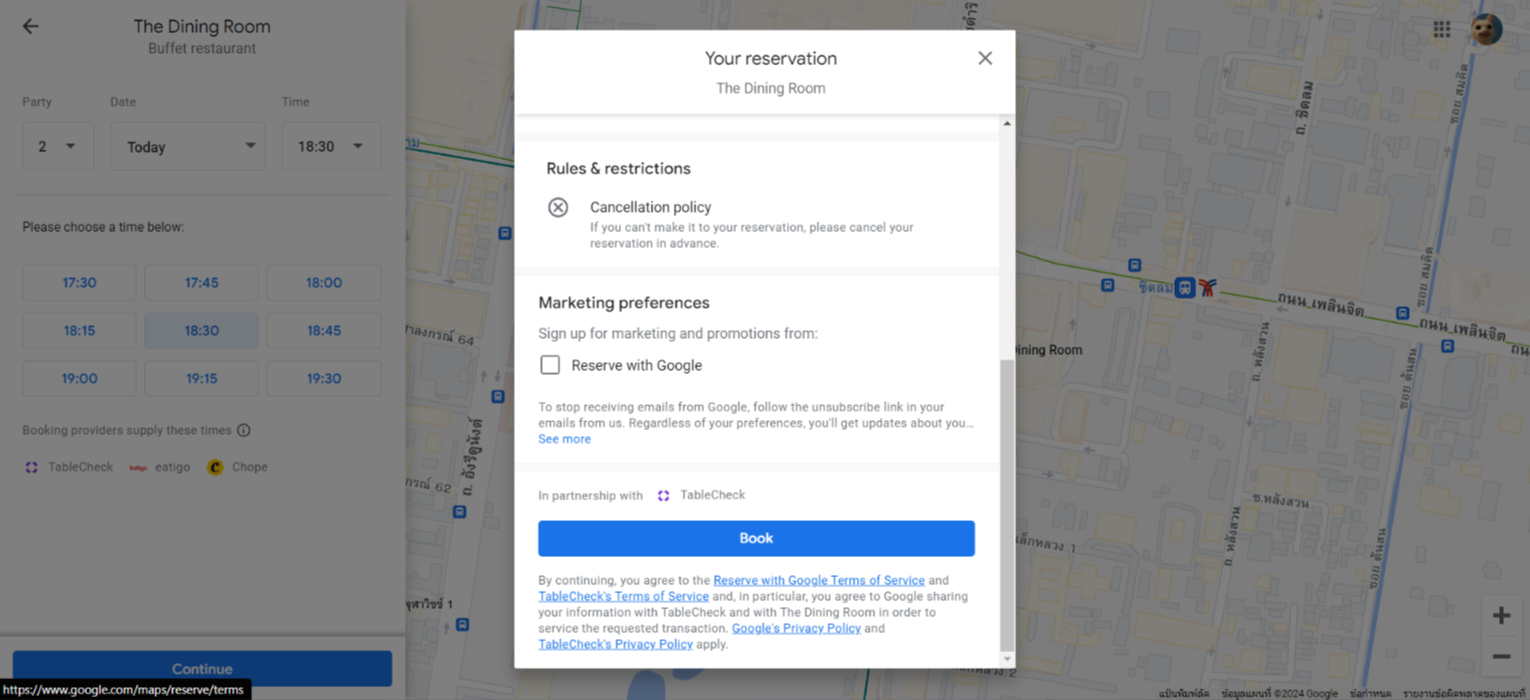 | Handled on google side Provide personal information formProvide book button |
Redirect to HH Checkout Page
| User Story | Requirement |
|---|---|
As a user, after i click the Book Button. it will redirect to HH checkout page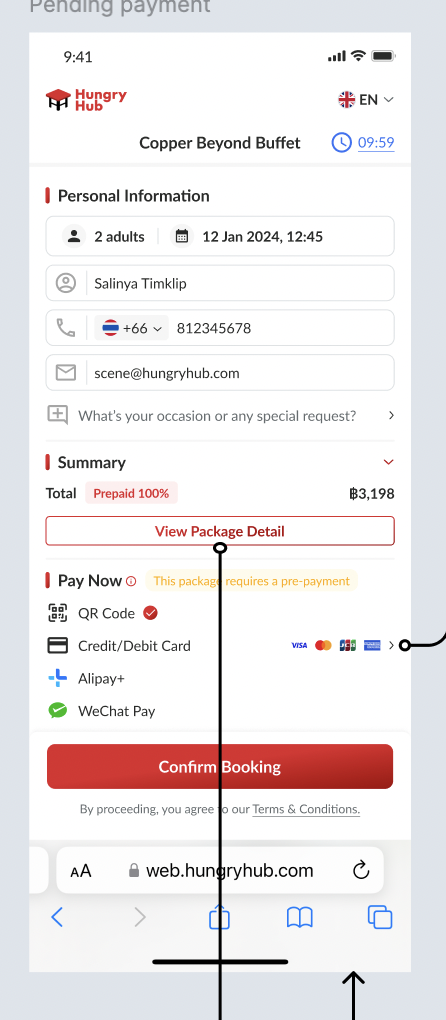 | Assume as a guest user Provide form with prefill information from google e2e booking (editable) Can expand/collapse as usual Display the package price summary Add View Package Detail buttonRedirect to detail package page (see the table below) Only can use prepayment/pay now 100% All payment methods available (based on the settings on HH admin dashboard setting) Credit card → functioned normally (same logic as existing) Can't save card Still can delete card After confirm the booking, will go to payment confirmation and redirect to booking confirmation after the payment was completed |
After i click view package detail . go to Detail Package Page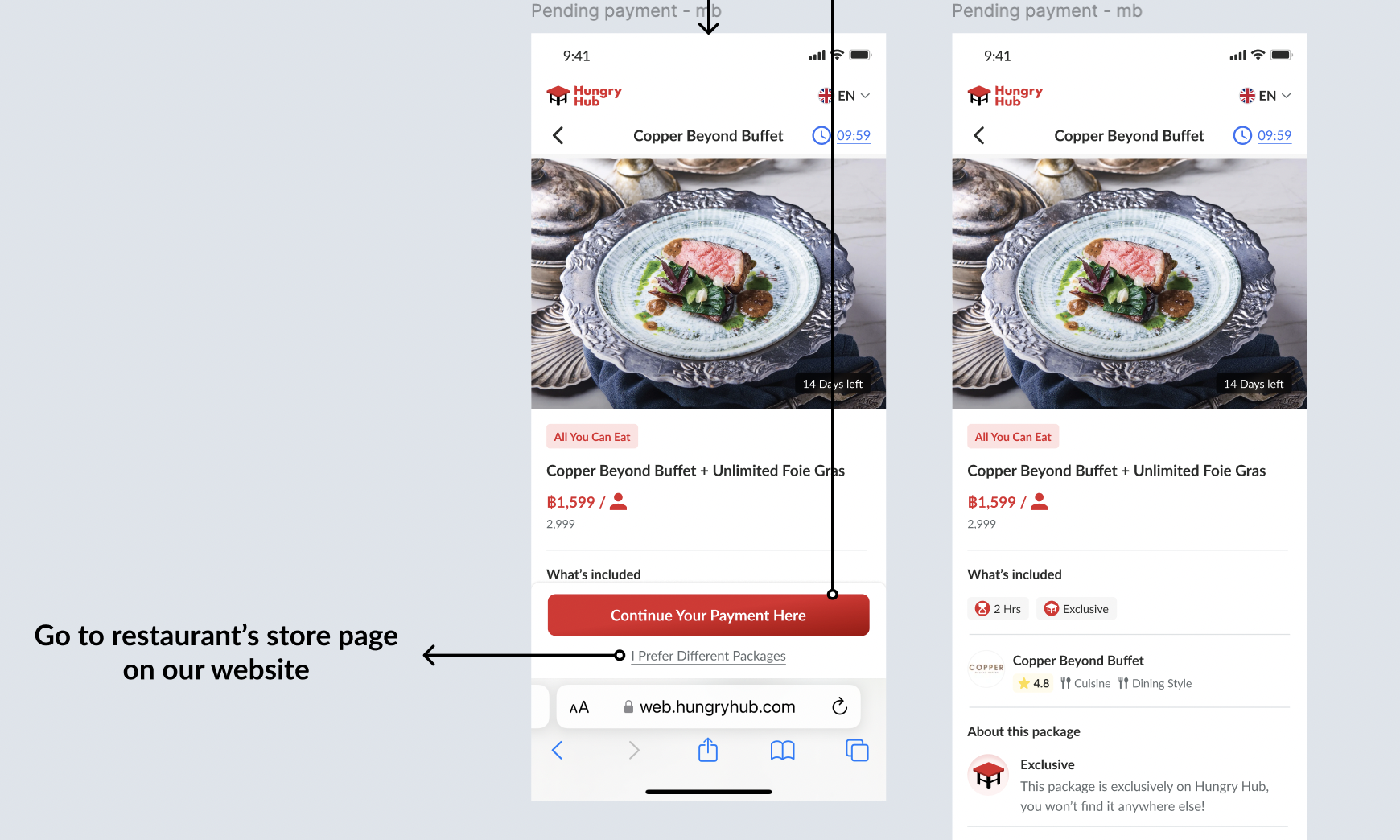 | Add header that indicates Back button → redirect to checkout page (previous page) Restaurant name Pending payment duration (10 minutes) Sticky button below Continue Your Payment Here button → redirect to checkout page (previous page)I Prefer Different Packages button → go to new tab, open current restaurant store page, but it's not related anymore with google e2e.Still can continue the pending payment from google, since we use new tab and we don't close the existing pending payment page tab |
| Time is over → When the payment was expired | Show this UI to clarify that the payment was expired (can use pop up overlay if faster implementation) Go to restaurant’s store page on our website 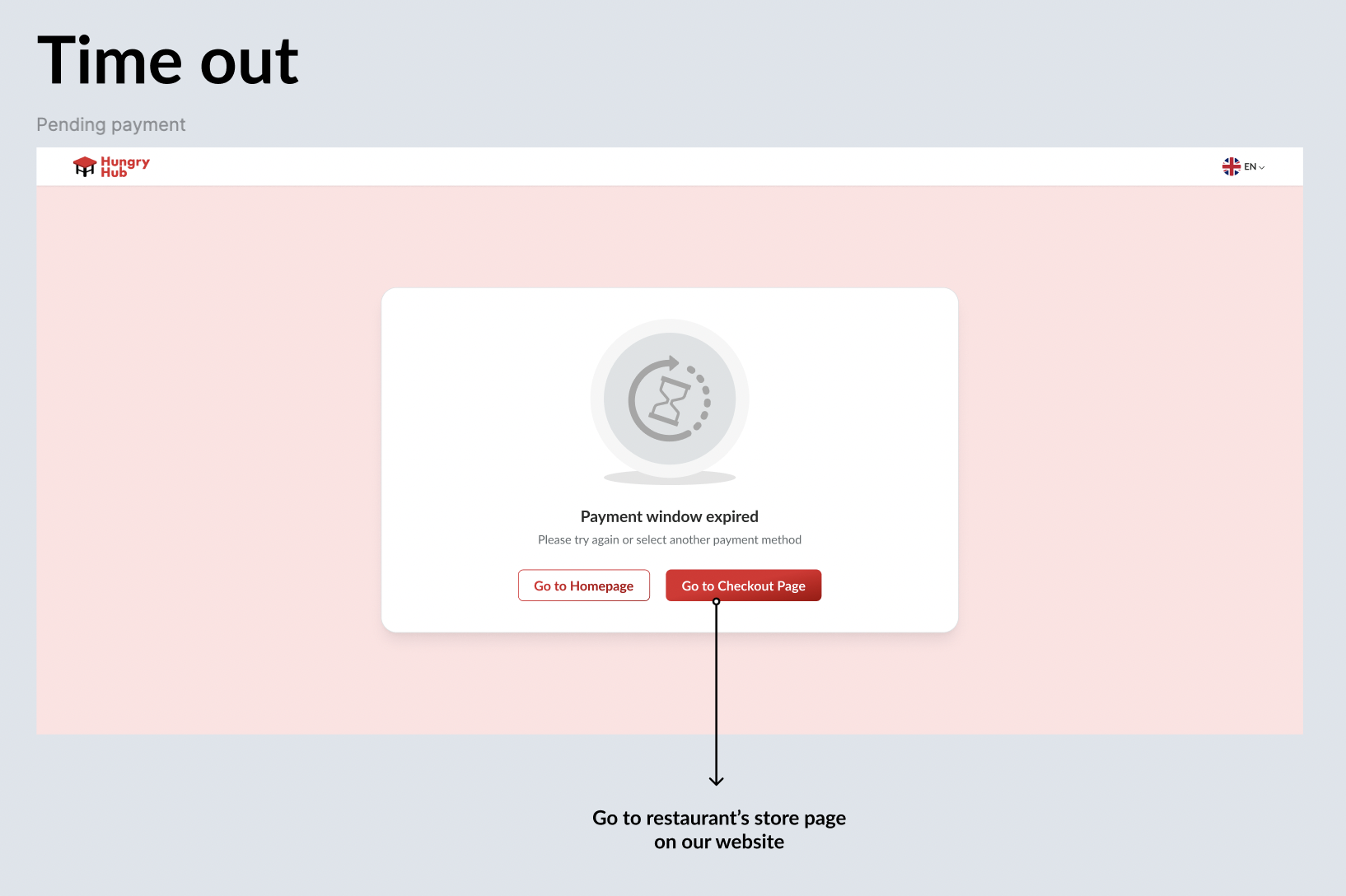 |
| Edit Booking | Follow the google's rule If can do edit booking on HH side, can implement. |
| Mix and Match | Can't on google side |
| Dynamic pricing | No need |
❓ FAQ
| Question | Answer |
|---|---|
| when the nickname is empty, we should use English or Thai package's name? | for reaching universal user, prefer using english as priority. but can it be set based on the language being used when accessing Google? Google Setting : Thai ➝ Nickname : Thai Google Setting : English and all languages except Thai ➝ Nickname : English |
| How about mobile view? | Mostly, the designs and flows are same, pls kindly check the figma |
| How about client side? | Client Side : Private (https://app.clickup.com/9003122396/docs/8ca1fpw-7922/8ca1fpw-36936) |