How to make Dine In Reservation API Side
API or Insomnia Version
Private (https://app.clickup.com/9003122396/docs/8ca1fpw-15242/8ca1fpw-16242)
💡 If you want to try booking using API version you have to download the insomnia master https://github.com/hungryhub-team/insomnia-master and import it into your Insomnia App
- If you want to create reservation using user, you can register first using this endpoint
{{ base_api }}/users.jsonyou can pick 4 type of sign up. You can check the codeapp/controllers/api/v5/users_controller.rband we use Doorkeeper gem.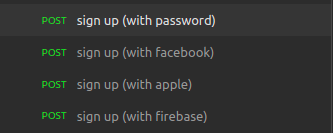
- If you already have account you can sign in using
{{ base_url }}/oauth/token.json
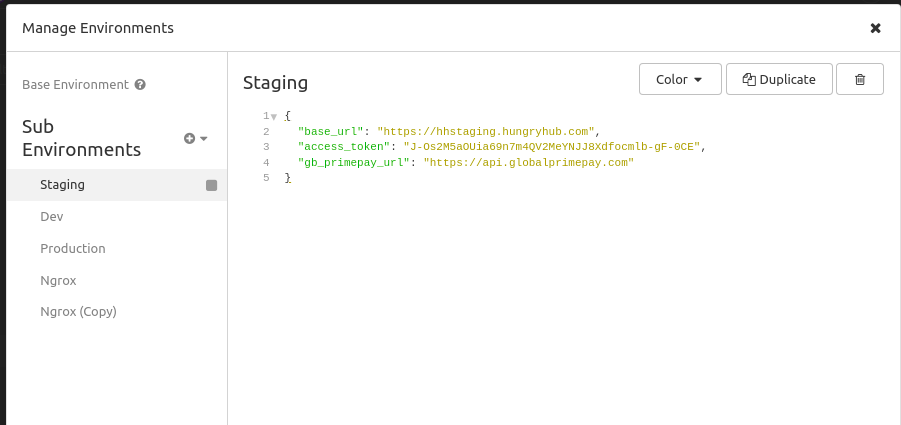
💡 If you already sign up or sign in copy the “access_token” and paste into environment → access_token
-
* You have to choose the restaurant, you can get the restaurant ID from admin dashboard or you can get from `{{ base_api }}/suggest.json`you can check the details code on `app/controllers/api/v5/pages_controller.rb` - After you get the restaurant ID check detail restaurant using
{{ base_api }}/restaurants/{restaurant_id}.json - Check the available date on
{{ base_api }}/restaurants/{restaurant_id}/find_available_dates.jsonpick the date that availability is true
{
"minor_version": "{{ minor_version  }}",
"date": "2022-10-19",
"adult": 2,
"kids": 0,
"for_dine_in": true,
"for_delivery": true
}
- Then find available package on
{{ base_api }}/restaurants/{restaurant_id}/find_available_packages.json
{
"minor_version": "{{ minor_version  }}",
"date": "2022-10-19",
"start_time": "12:15",
"adult": 2,
"kids": 0,
"for_dine_in": true,
"for_delivery": true
}
- On user view when you already pick the date time and package it will create temporary reservations
{{ base_api }}/temporary_reservations.jsonapp/controllers/api/v5/temporary_reservations_controller.rb- it will create reservation but the
is_temporaryandfor_locking_systemis true - when the reservation created, the
is_temporaryandfor_locking_systemwill updated to false - this feature is created for locking the table, so if the user need time to pay or to complete the reservation details they still have table left for them.
- Pick the data from all endpoint above to create the reservation on
{{ base_api }}/reservations.json- Create Reservation has 2 version
app/controllers/api/v5/reservations_controller.rb:- If the reservation already have temporary reservation it will use version 2
- If the reservation doesn’t have temporary reservation it will use version 1
- Create Reservation has 2 version
{
	"minor_version": "{{ minor_version  }}",
	"access_token": "n5RS_eh-4eVmz3P99pWFv8e6UO3UdKGR0uq7bklqrfQ",
	"provider": "hungryhub",
	"source": "hh_ios",
	"channel": "appsflyer",
	"reservation": {
		"restaurant_id": 997,
		"date": "2022-10-19",
		"start_time": "12:15",
		"adult": 1,
		"kids": 0,
		"special_request": "",
		"promo_code": "",
		"voucher_code": "",
		"service_type": "pick_up",
		"distance_to_restaurant": 0
	},
	"address": {
		"detail": "",
		"lat": 0,
		"lon": 0,
		"name": "",
		"note_for_driver": ""
	},
	"packages": [
		{
			"id": 3599,
			"quantity": 1,
			"menu_sections": []
		}
	],
	"big_group": false,
	"omise_payment_type": "promptpay"
}
- You have to mark as paid manually from
admin/reservationsit will update charge status to “successful” and update reservation audit comment into “Marked ad paid by admin”app/services/mark_reservation_as_paid_service.rb- Reservation Audit is used to track the reservation activities, when it updated
- And you can check the reservation details on here
{{ base_api }}/reservations/{reservation_id}.json
{
	"minor_version": "{{ minor_version  }}",
	"source": "hh_ios",
	"channel": "hungryhub",
	"guest_user": {
		"name": "guest",
		"email": "guestddd@gmail.com",
		"phone": "0869770065"
	},
	"reservation": {
		"restaurant_id": 997,
		"date": "2022-10-19",
		"start_time": "13:30",
		"adult": 1,
		"kids": 0,
		"special_request": "",
		"promo_code": "",
		"voucher_code": "",
		"service_type": "pick_up",
		"distance_to_restaurant": 0
	},
	"address": {
		"detail": "",
		"lat": 0,
		"lon": 0,
		"name": "",
		"note_for_driver": ""
	},
	"guests_attributes": [
		{
			"name": "asdasd",
			"phone": "081239123"
		}
	],
	"packages": [
		{
			"id": 3608,
			"quantity": 1,
			"menu_sections": []
		}
	]
}
- Then you can check the reservation details on
{{ base_api }}/reservations/{encrypted_reservation_id}/detail.json