How to Manage Package
we have 4 active package type: ayce = All you can eat pp = Party pack xp = xperience hah = hungry at home
How to create package
- Open Admin dashboard
- Click menu Package
- Pick your package type (ayce, pp, xp or hah)
- Click Create
- Make sure you fill in the mandatory field (country, name, description, reservation duration, minimum seat, maximum seat, commission, payment) and fill the (menu type if the package have menu)
- Click create, and you will redirected to new form
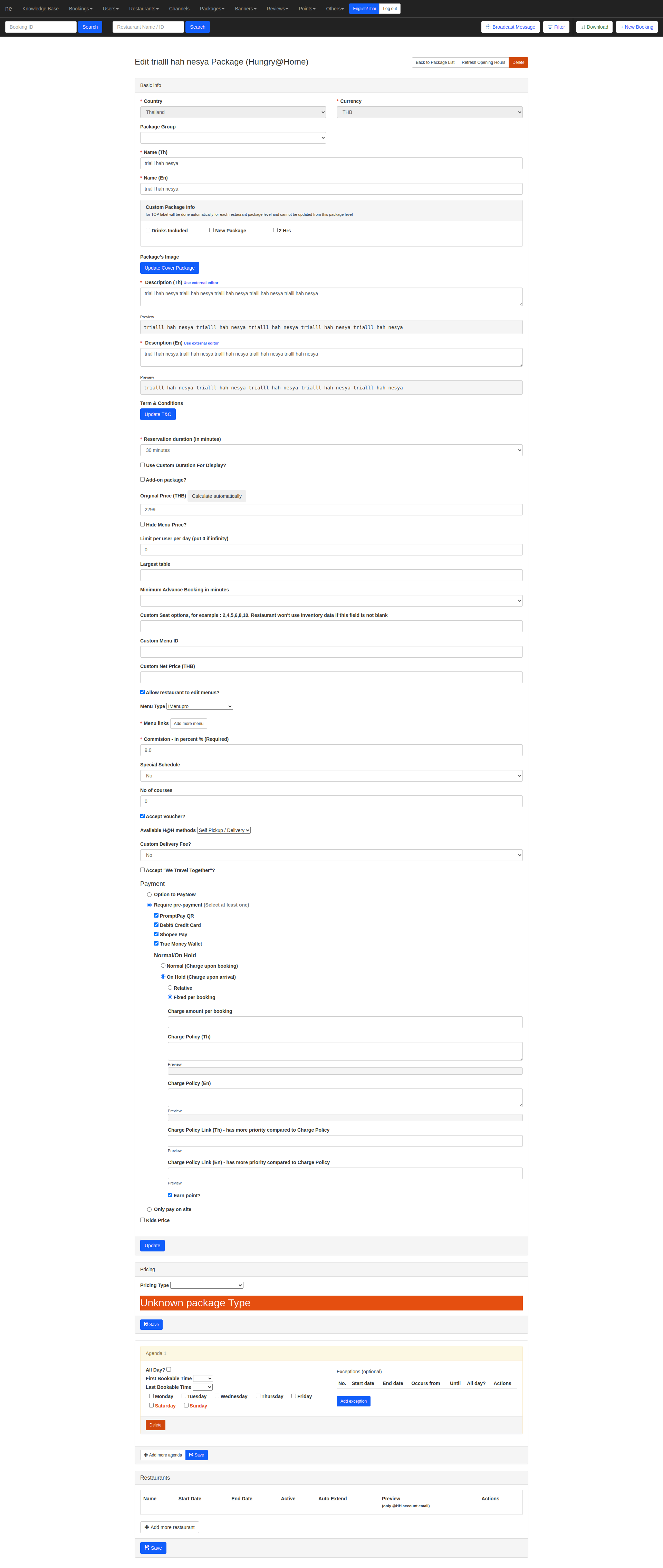
- Fill the pricing, agenda, and the restaurant that use this package
- when you pick the restaurant, make sure to check the active, because is not gonna show on web if your active not checked
- if you want to check the package before it release to customer check the "preview", you can check the package on website with hungryhub but its still invisible for customer
- if you want the package to constantly active you should check the auto extend, and it will make the package doesn't have expire date
- For saving the package please consider that each section have a save or update button, so make sure you click the correct save button
- after save back to Restaurant ➝ Restaurant List ➝ action ➝ clear cache
How to edit package
- Open Admin dashboard
- Click menu Package
- Pick your package type (ayce, pp, xp or hah)
- Pick the package that you want to edit
- Edit the package
- For saving the package please consider that each section have a save or update button, so make sure you click the correct save button
- after save back to Restaurant ➝ Restaurant List ➝ action ➝ clear cache
How to add package group
- Open Admin dashboard
- Click menu Package ➝ package group
- Click "add new"
- fill the package group name, and pick the package type
- Go to Package ➝ pick your package type (ayce, pp, xp or hah)
- Pick the package that you want to add to package group ➝ click edit
- Fill the
Package Groupand click update on that section - For saving the package please consider that each section have a save or update button, so make sure you click the correct save button
- after save back to Restaurant ➝ Restaurant List ➝ action ➝ clear cache
How to check package
- Make sure you have already clear cache of the restaurant
- Open hungryhub web
- Search the restaurant
- If you want to check the preview package you should log in using hungryhub email
- Open the restaurant and check the package
- If you can't book the package, please check the restaurant setting
Restaurant ➝ restaurant list ➝ action ➝ edit
check the allow booking? make sure it checked
if not, you can't create a booking from that restaurant
- If the package shows correctly and you can book the package it means that the package you created was correct