How To Use Icon Setting - Admin
Glossarium
- The Icon order is from left to right
- There's 2 type of Icon:
- Tag base: You can select the redirection URL for the icon based on the restaurant tag
- URL base: You can insert the URL that will redirect the user when they click the icon
How to create Icon Setting
- Open
https://hh-engineering.my.id/admin/search_icons - Click Add New Search Icon
- Fill the Name, Type, URL(if you pick URL base), and Image
- Click Save
How to hide and unhide Icon Setting
- Open
https://hh-engineering.my.id/admin/search_icons - Pick the Icon Setting that you want to hide
- Click this icon
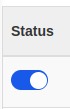
- If the icon colour was blue, the setting was visible.
- If the icon colour was grey, the setting would be hidden.
How to change the Icon Setting order
- Open
https://hh-engineering.my.id/admin/search_icons - Pick the Icon Setting that you want to change the order setting
- Click this icon
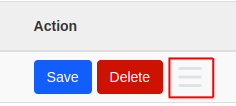
- Drag the Icon setting up and down
- The higher the order, the earlier the Icon will appear
How to delete Icon Setting
- Open
https://hh-engineering.my.id/admin/search_icons - Pick the Icon Setting that you want to delete
- Click Delete ➝ Confirm
- The icon will be successfully deleted