Search Desktop
Description / Background
The search feature in our application is slow and consumes a lot of memory on the server because it uses many heavy queries. Therefore, we are redesigning and rewriting the code for the search feature, using Kafka and OpenSearch to optimize the search process. We will combine all necessary data for the search into a single restaurant object, eliminating the need for repeated queries. Kafka will be used to send the summarized data, which will then be stored in OpenSearch as the new database.
Glossary
Objectives
- User can see and use the search bar on the homepage
- User can see search suggestions when clicking the search bar
-
- Users can see and click the list of search icons below the search bar
- User can see and click the “Discover More” icon below the search bar
- User can see the list of search options on the left section of the search page
- User can combine multiple search by checking them
- User can see and pick Offers availability options
- User can see and pick Package type options
- User can see and pick Facilities options
- User can see and pick package price options
- User can see and pick price options
- User can see and pick cuisine options
- User can see and pick dining style options
- user can see and pick location options
Scope
Location
How to find ..
How to set ..
Sequence Diagram / Flow
ERD
Backend Implementation
Kafka Topics
- hh.search.restaurantTags: Stores restaurant tag data
- hh.search.restaurants.availability: Stores inventory data
- hh.search.restaurants: Stores restaurant data
- hh.search.restaurants.tags: Stores tag data
Kafka Operations
- index: Full reindex of the documents with new data
- create: Add new documents to the index
- update: Update documents in the index
- delete: Delete documents from the index
Frontend Implementation
Price Value on The Card
Previously before we released hybrid. We use value from price_summaries instead of price_and_pricing_type.
"price_summaries": [
					{
						"lowest_price": "฿500",
						"highest_price": "฿1,150",
						"package_type": "ayce",
						"pricing_type": "per_pack",
						"product_type": "package"
					},
					{
						"lowest_price": "฿1,200",
						"highest_price": "฿1,200",
						"package_type": "hah",
						"pricing_type": "per_pack",
						"product_type": "package"
					},
					{
						"lowest_price": "฿1,200",
						"highest_price": "฿1,200",
						"package_type": "pp",
						"pricing_type": "per_pack",
						"product_type": "ticket"
					},
					{
						"lowest_price": "฿500",
						"highest_price": "฿1,150",
						"package_type": "ayce",
						"pricing_type": "per_person",
						"product_type": "package"
					},
					{
						"lowest_price": "฿1,200",
						"highest_price": "฿1,200",
						"package_type": "hah",
						"pricing_type": "per_person",
						"product_type": "package"
					},
					{
						"lowest_price": "฿250",
						"highest_price": "฿250",
						"package_type": "pp",
						"pricing_type": "per_person",
						"product_type": "ticket"
					},
					{
						"lowest_price": "฿1,200",
						"highest_price": "฿1,200",
						"package_type": "hah",
						"pricing_type": "per_set",
						"product_type": "package"
					}
				],
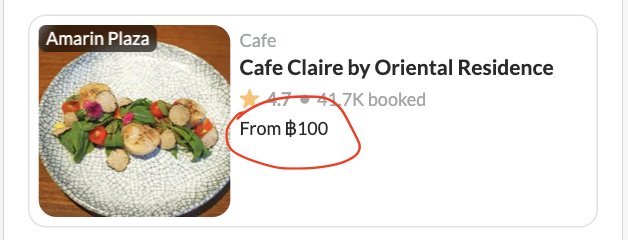
price_and_pricing_type is only shows the lowest price per person of the restaurant available package. But price_summaries is more than just that.
Logic that we use to handle price_summaries:
- pricing_type
- package_type
- lowest
- highest
Let’s focus on pricing_type and package_type first. If the user applies this filter. We will show the lowest price based on pricing_type.
 So, if we checked this filter we’ll update the price_filter[price_type] only:
price_filter[price_type]: per_pack
can leave min and max empty, cause we only need to handle the UI not affected to backend.
So, if we checked this filter we’ll update the price_filter[price_type] only:
price_filter[price_type]: per_pack
can leave min and max empty, cause we only need to handle the UI not affected to backend.
// packType based on applied filter package_type (if any)
// summaries from price_summaries data
// priceType based on applied filter default use per_person.

function getLowestPackType(packType, summaries, priceType) {
    const type = priceType.trim() !== '' ? priceType : 'per_person';

    // this handle xp and pp because they have different price per pack and person
    const summaryList = summaries.filter(summary =>
        (summary.packageType === 'pp' || summary.packageType === 'xp') &&
        summary.pricingType === type
    );

    const contains = packType ? summaryList.filter(summary =>
        packType.includes(summary.packageType)
    ) : summaryList;

    const lowest = contains.length > 0 ? contains.reduce((min, summary) =>
        parseInt(min.lowestPrice.replace(/\D+/g, ''), 10) < parseInt(summary.lowestPrice.replace(/\D+/g, ''), 10) ? min : summary
    ) : summaryList[0];

    return lowest;
}
So, if the filter user per_pack, we’ll show price per_pack in card. In case the filter has selected package type we’ll show the price of selected package.
Update Search 2.0 relate with convert tag to keyword (9 Jan 2024)
https://app.clickup.com/9003122396/docs/8ca1fpw-30616/8ca1fpw-33656
PRD & Task
https://github.com/hungryhub-team/hh-server/pull/5692
https://github.com/hungryhub-team/hh-server/pull/5549
https://github.com/hungryhub-team/hh-search/pulls?q=is%3Apr+is%3Aclosed