Search Feature
Description / Background
The search feature in our application is slow and consumes a lot of memory on the server because it uses many heavy queries. Therefore, we are redesigning and rewriting the code for the search feature, using Kafka and OpenSearch to optimize the search process. We will combine all necessary data for the search into a single restaurant object, eliminating the need for repeated queries. Kafka will be used to send the summarized data, which will then be stored in OpenSearch as the new database.
Glossary
https://app.clickup.com/9003122396/docs/8ca1fpw-35796/8ca1fpw-41516
Objectives
- Implement new search system logic using OpenSearch instead of direct database queries to improve search performance.
- Create a new project
hh-searchto do the search logic using Typescript, and GraphQl for the API language. - The hungryhub client side will not access the search API from the
hh-server, they will all access it directly fromhh-search. - We are setting up apache kafka to sync the data between
hh-serverandhh-search. - The new search will have search by :
- name (restaurant, location or menu name)
- number of people
- date and time
- city
- cuisine
- dining style
- locations
- distance
- offers availability
- package type
- facilities
- package price
- price and price range
- User can see the campaigned restaurant in the search result
- This search feature has a flipper on the client side web, so we can turn it on or off.
- User can sort the search result by:
- most relevant
- lower price
- highest price
- most loved
- most booked
- nearest first
Used Technology
Kafka
https://app.clickup.com/9003122396/docs/8ca1fpw-35356/8ca1fpw-41116
BullMQ
BullMQ is a Node.js library that implements a fast and robust queue system built on top of Redis that helps in resolving many modern age micro-services architectures.
OpenSearch
OpenSearch is a distributed search and analytics engine that supports various use cases, from implementing a search box on a website to analyzing security data for threat detection. The term distributed means that you can run OpenSearch on multiple computers. Search and analytics means that you can search and analyze your data once you ingest it into OpenSearch. No matter your type of data, you can store and analyze it using OpenSearch.
https://opensearch.org/docs/latest/about/
How to Install HH-Search
https://app.clickup.com/9003122396/docs/8ca1fpw-35416/8ca1fpw-41196 https://app.clickup.com/9003122396/docs/8ca1fpw-33656/8ca1fpw-38896
Different Between Old and New Search
Old Search system

New Search system

hh-server handles the core application logic and sends updates to Kafka whenever the data changes.
Kafka acts as a message broker, ensuring all services stay in sync. Every time data on Admin Dashboard updated hh-server will send event to kafka. The hh-search service uses these updates to keep its search index current, pulling data from Redis and storing it in OpenSearch for fast searching. The frontend web app then uses GraphQL to fetch search results from hh-search, providing users with quick and accurate results. This setup ensures that data is always up-to-date, cached efficiently, and searchable in real-time.
Sequence Diagram / Flow
ERD
Backend Implementation
https://app.clickup.com/9003122396/docs/8ca1fpw-35356/8ca1fpw-41116
On backend we are using GraphQL instead of REST for search system. GraphQL is a query language for your API, and a server-side runtime for executing queries using a type system you define for your data.
Frontend Implementation
Adding urql lib in to the project so FE can consume the GraphQl API.
https://commerce.nearform.com/open-source/urql/docs/
PRD & Task
https://docs.google.com/document/d/1A0TWnkruiBE9NZ8B-PJKTJwvPoapiq6mWZQQnqDVgqA/edit
https://app.clickup.com/t/86cu711gy https://app.clickup.com/t/86cu77twt https://app.clickup.com/t/86ctva7ug
https://github.com/hungryhub-team/hh-server/pull/5692
https://github.com/hungryhub-team/hh-server/pull/5692
https://github.com/hungryhub-team/hh-server/pull/5549
https://github.com/hungryhub-team/hh-server/pull/5549
https://github.com/hungryhub-team/hh-search/pulls?q=is%3Apr+is%3Aclosed
https://github.com/hungryhub-team/hh-search/pulls?q=is%3Apr+is%3Aclosed
Design
https://www.figma.com/design/u4I3pUY6RR318x3XYiVNQy/Search-2.0-(App)?m=auto&t=6Q79y2AC5AMOZOI9-6https://www.figma.com/design/xI2931FaU8rYUuwMY4BzVz/Search-2.0-(Desktop)?m=auto&t=6Q79y2AC5AMOZOI9-6
Kafka Integration
Description / Background
The search feature in our application is slow and consumes a lot of memory on the server because it uses many heavy queries. Therefore, we are redesigning and rewriting the code for the search feature, using Kafka and OpenSearch to optimize the search process. We will combine all necessary data for the search into a single restaurant object, eliminating the need for repeated queries. Kafka will be used to send the summarized data, which will then be stored in OpenSearch as the new database.
What is Kafka
[Apache Kafka Apache Kafka: A Distributed Streaming Platform. https://kafka.apache.org/
](https://kafka.apache.org/)
[Event Streaming in Rails with Kafka Do you need to process a lot of data in real time? Event streaming is a pattern that could help. David Sanchez walks us through how to do event streaming in Rails with Apache Kafka, the popular open-source event strea… https://www.honeybadger.io/blog/event-streaming-rails-kafka/
](https://www.honeybadger.io/blog/event-streaming-rails-kafka/)
How to install Kafka
STEP 1: GET KAFKA
Download the latest Kafka release and extract it:
$ tar -xzf kafka_2.13-3.8.0.tgz
$ cd kafka_2.13-3.8.0
STEP 2: START THE KAFKA ENVIRONMENT
Generate a Cluster UUID
$ KAFKA_CLUSTER_ID="$(bin/kafka-storage.sh random-uuid)"
Format Log Directories
$ bin/kafka-storage.sh format -t $KAFKA_CLUSTER_ID -c config/kraft/server.properties
Start the Kafka Server
$ bin/kafka-server-start.sh config/kraft/server.properties
STEP 3: CREATE A TOPIC TO STORE YOUR EVENTS
before you can write your first events, you must create a topic. Open another terminal session and run:
$ bin/k/afka-topics.sh --create --topic quickstart-events --bootstrap-server localhost:9092
All of Kafka’s command line tools have additional options: run the kafka-topics.sh command without any arguments to display usage information
STEP 4: WRITE SOME EVENTS INTO THE TOPIC
Run the console producer client to write a few events into your topic. By default, each line you enter will result in a separate event being written to the topic.
$ bin/kafka-console-producer.sh --topic quickstart-events --bootstrap-server localhost:9092
>This is my first event
>This is my second event
STEP 5: READ THE EVENTS
Open another terminal session and run the console consumer client to read the events you just created:
$ bin/kafka-console-consumer.sh --topic quickstart-events --from-beginning --bootstrap-server localhost:9092
This is my first event
This is my second event
You can stop the consumer client with Ctrl-C at any time.
TERMINATE THE KAFKA ENVIRONMENT
Stop the producer and consumer clients with Ctrl-C, if you haven’t done so already.
If you also want to delete any data of your local Kafka environment including any events you have created along the way, run the command:
$ rm -rf /tmp/kafka-logs /tmp/zookeeper /tmp/kraft-combined-logs
[Apache Kafka Apache Kafka: A Distributed Streaming Platform. https://kafka.apache.org/quickstart#quickstart_send
](https://kafka.apache.org/quickstart#quickstart_send)
Library
we are using karafka gem
https://github.com/karafka/karafka
Glossary
Objectives
Backend Implementation
Kafka Topics
- hh.search.restaurantTags: Stores restaurant tag data
- hh.search.restaurants.availability: Stores inventory data
- hh.search.restaurants: Stores restaurant data
- hh.search.restaurants.tags: Stores tag data
Kafka Operations
- index: Full reindex of the documents with new data
- create: Add new documents to the index
- update: Update documents in the index
- delete: Delete documents from the index
PRD & Task
Search Desktop
Description / Background
We are redesigning the search page to enhance user experience by creating a clean, minimalistic interface that focuses on simplicity and functionality. Prioritizing accessibility and brand consistency, the redesign aims to make the search process more intuitive and efficient, ultimately increasing user satisfaction and engagement.
Glossary
https://app.clickup.com/9003122396/docs/8ca1fpw-35796/8ca1fpw-41516
Objectives
- User can see and use the search bar on the homepage
- User can see the search suggestion when user click the
- Users can see and click the list of search icons below the search bar
- User can see and click the “Discover More” icon bellow search bar
- User can see the list of search options on the left section of the search page
- User can combine multiple search by checking them
- User can see and pick Offers availability options
- User can see and pick Package type options
- User can see and pick Facilities options
- User can see and pick package price options
- User can see and pick price options
- User can see and pick cuisine options
- User can see and pick dining style options
- user can see and pick location options
Scope
Search page, search suggestion when user click search bar
Sequence Diagram / Flow
-
ERD
-
Backend Implementation
-
Frontend Implementation
Price Value on The Card
Previously before we released hybrid. We use value from price_summaries instead of price_and_pricing_type.
"price_summaries": [
					{
						"lowest_price": "฿500",
						"highest_price": "฿1,150",
						"package_type": "ayce",
						"pricing_type": "per_pack",
						"product_type": "package"
					},
					{
						"lowest_price": "฿1,200",
						"highest_price": "฿1,200",
						"package_type": "hah",
						"pricing_type": "per_pack",
						"product_type": "package"
					},
					{
						"lowest_price": "฿1,200",
						"highest_price": "฿1,200",
						"package_type": "pp",
						"pricing_type": "per_pack",
						"product_type": "ticket"
					},
					{
						"lowest_price": "฿500",
						"highest_price": "฿1,150",
						"package_type": "ayce",
						"pricing_type": "per_person",
						"product_type": "package"
					},
					{
						"lowest_price": "฿1,200",
						"highest_price": "฿1,200",
						"package_type": "hah",
						"pricing_type": "per_person",
						"product_type": "package"
					},
					{
						"lowest_price": "฿250",
						"highest_price": "฿250",
						"package_type": "pp",
						"pricing_type": "per_person",
						"product_type": "ticket"
					},
					{
						"lowest_price": "฿1,200",
						"highest_price": "฿1,200",
						"package_type": "hah",
						"pricing_type": "per_set",
						"product_type": "package"
					}
				],
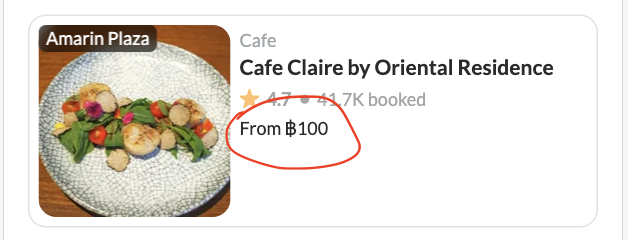
price_and_pricing_type is only shows the lowest price per person of the restaurant available package. But price_summaries is more than just that.
Logic that we use to handle price_summaries:
- pricing_type
- package_type
- lowest
- highest
Let’s focus on pricing_type and package_type first. If the user applies this filter. We will show the lowest price based on pricing_type.
 So, if we checked this filter we’ll update the price_filter[price_type] only:
price_filter[price_type]: per_pack
can leave min and max empty, cause we only need to handle the UI not affected to backend.
So, if we checked this filter we’ll update the price_filter[price_type] only:
price_filter[price_type]: per_pack
can leave min and max empty, cause we only need to handle the UI not affected to backend.
// packType based on applied filter package_type (if any)
// summaries from price_summaries data
// priceType based on applied filter default use per_person.

function getLowestPackType(packType, summaries, priceType) {
    const type = priceType.trim() !== '' ? priceType : 'per_person';

    // this handle xp and pp because they have different price per pack and person
    const summaryList = summaries.filter(summary =>
        (summary.packageType === 'pp' || summary.packageType === 'xp') &&
        summary.pricingType === type
    );

    const contains = packType ? summaryList.filter(summary =>
        packType.includes(summary.packageType)
    ) : summaryList;

    const lowest = contains.length > 0 ? contains.reduce((min, summary) =>
        parseInt(min.lowestPrice.replace(/\D+/g, ''), 10) < parseInt(summary.lowestPrice.replace(/\D+/g, ''), 10) ? min : summary
    ) : summaryList[0];

    return lowest;
}
So, if the filter user per_pack, we’ll show price per_pack in card. In case the filter has selected package type we’ll show the price of selected package.
Update Search 2.0 relate with convert tag to keyword (9 Jan 2024)
https://app.clickup.com/9003122396/docs/8ca1fpw-30616/8ca1fpw-33656
PRD & Task
https://app.clickup.com/t/86cu711gy
Design
API Blueprint
-
New Query
-
DB Schema / Database Migration
-
Improvement:
-
Search Suggestion V2
https://app.clickup.com/t/86ctva7rz
Objective
This document is created to share the knowledge regarding the how to search suggestion v2 works including its algorithm and its details.
Requirements
The API frame work using FastAPI, for search engine we use whoosh.
- Python 3.9
- Script and other requirements are stored here *
Algorithm
Indexing
The Indexing algorithm is built by a series of processes. The processes describe in following picture :
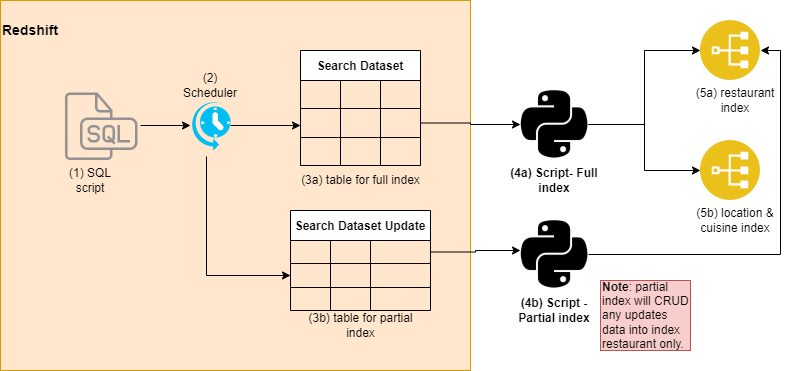 First stage – Redshift
In redshift we set scheduler that run every hour to capture any updates from data. There are three table are generated to store those data. Each table has it own purpose, we use search_dataset & search_dataset_misc) to full indexing restaurant and locations/cuisines, respectively. On the other hand, search_dataset_update only provide a hourly updates it suitable for partial indexing. However, this table only update restaurant index and leave the location/cuisines unchanged. The queries to create this table stored in here
First stage – Redshift
In redshift we set scheduler that run every hour to capture any updates from data. There are three table are generated to store those data. Each table has it own purpose, we use search_dataset & search_dataset_misc) to full indexing restaurant and locations/cuisines, respectively. On the other hand, search_dataset_update only provide a hourly updates it suitable for partial indexing. However, this table only update restaurant index and leave the location/cuisines unchanged. The queries to create this table stored in here
Second stage – Whoosh indexing
After we built the dataset, another step is indexing in python. Initial Indexing can be done by run this script [](<
[
github.com
https://github.com/hungryhub-team/hh_fastapi/blob/main/indexing.py
](https://github.com/hungryhub-team/hh_fastapi/blob/main/indexing.py)
>).
Moreover, this we can also run indexing by requesting the API using post method to http://{{api_url}/reindex_search_suggestion?all=true, as well as
http://{api_url}/reindex_search_suggestion?all=false
for partial indexing.
Searching
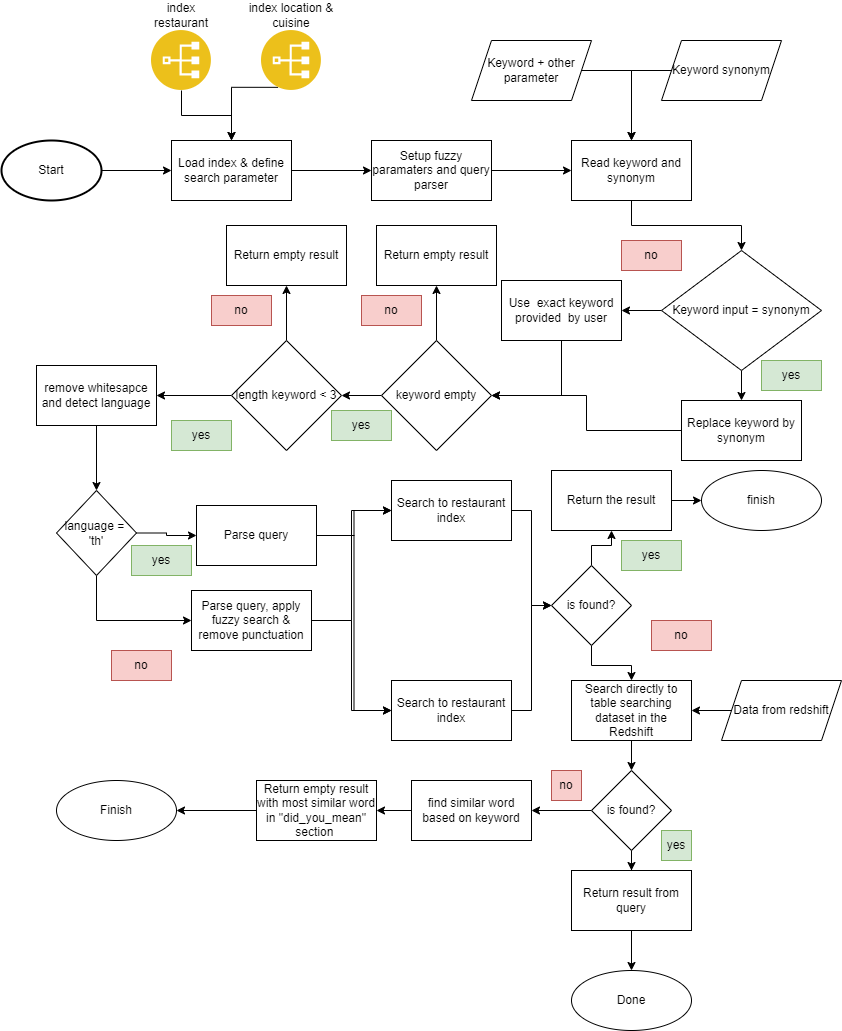
Algorithm The step of the algorithm is quite complex, we will explain it in summary as follow:
- Pre-loaded As the Fastapi apps starting up we load apps, files and code such as:
- Whoosh index
- Whoosh query parser definition and fuzzy parameter
- Fastapi-cache with aioredis
- Asyncpg with database engine
- Searching process In the nutshell the search suggestion was a combination from several search process. The summary of the processes are explained as follow
- Cleaning the keyword from whitespace and punctuation.
- Read synonym from https://tinyurl/hh_synonym.
- Read from whoosh index.
- If whoosh index returned empty result, the next step is we query directly to the DB.
- If the keyword is not found in index and DB we search the most similar result and return it in the did_you_mean section Please be noted fuzzy and did_you_mean only working good in English keywords. The full picture of the algorithm are show in Figure 2. Searching algorithm.
https://github.com/hungryhub-team/hh_fastapi/blob/main/indexing.py
https://github.com/hungryhub-team/hh_fastapi/tree/main/queries
https://github.com/hungryhub-team/hh_fastapi*
Restaurant with Ads label on the search result
Description / Background
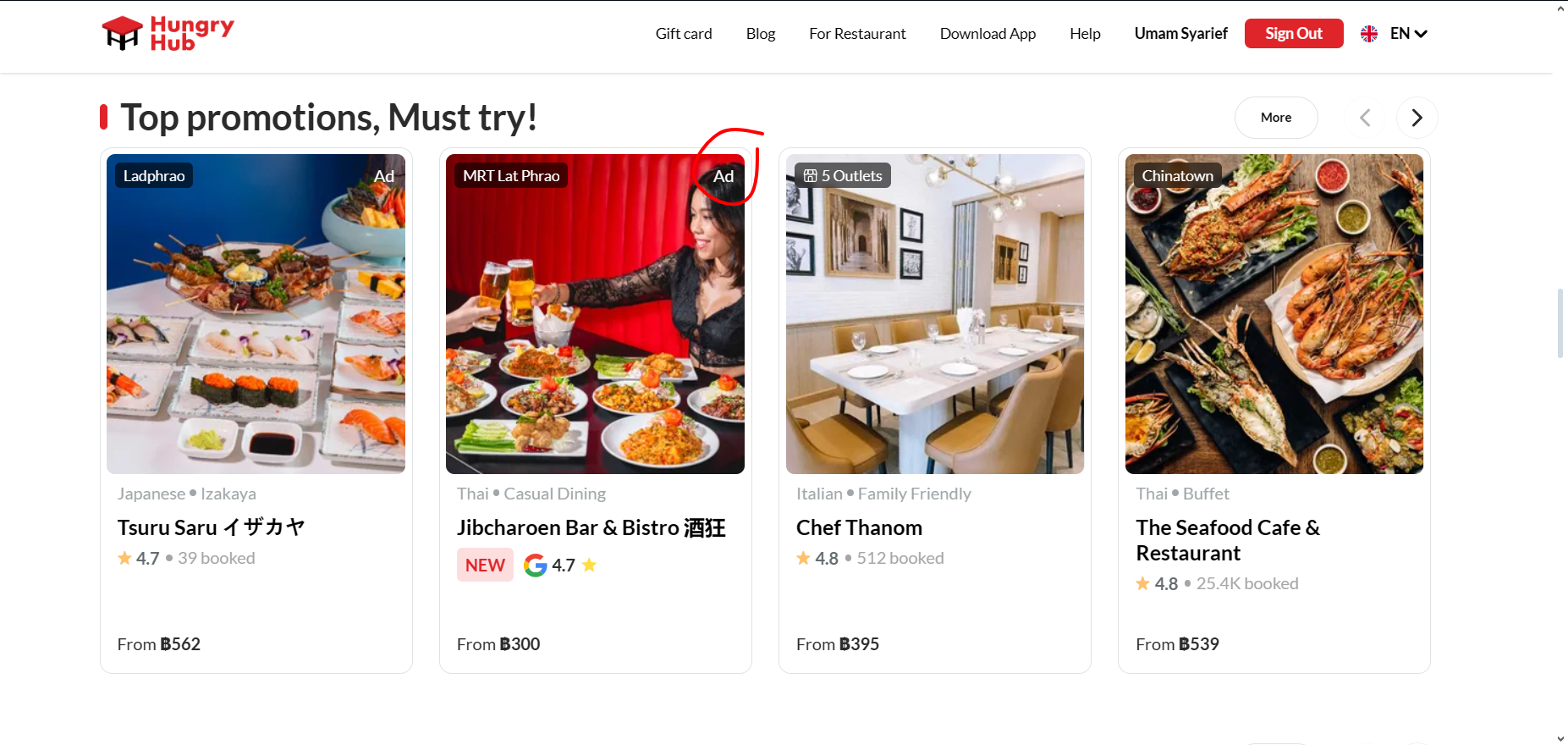
To increase visibility and promote sponsored listings, we are introducing a feature where restaurant cards labeled as “Ad” will be prioritized in search results and suggestions. This will ensure that advertisements are more prominently displayed, helping to drive engagement with these sponsored entries while maintaining a clear and transparent user experience.
Glossary
https://app.clickup.com/9003122396/docs/8ca1fpw-35796/8ca1fpw-41516
Objectives
- User can see the “Ad” labelled restaurant on homepage
- User can see “Ad” labelled restaurant on search suggestion (on progress)
- user can see the “Ad” labelled restaurant on search result
- The system will sort the search results and search suggestion of restaurants with “Advertisement” labelled first.
Scope
Homepage, search suggestion, search page
Sequence Diagram / Flow
-
ERD
-
Backend Implementation
- change “Ad” response default to 20 data per page
- Remove
after_saveandafter_destroycallbacks on advertisement model - Add
after_create, after_update and after_destroycallbacks on advertisement model - Add validation
changed_attributesto return the process if there’s no attributes changed - Add
adsattribute on hh_search event service - Remove
ads_rankfrom hh_search event service - Add
ads_attributemethod on hh_search event service to send the ads data to hh_search - Remove ads_location condition on
app/workers/schedule_workers/check_advertisement_record_worker.rb - Remove metthod send_update_ads_rank_event on
app/workers/schedule_workers/check_advertisement_record_worker.rb - Add params to graphql schema
- Add the ads query to restaurant search logic
- Add ads example response on search doc
https://github.com/hungryhub-team/hh-server/pull/6014
https://github.com/hungryhub-team/hh-search/pull/45
Frontend Implementation
- Add adsLocation params on search restaurant and group landing page
- Remove
"enableNewSearch":false, "enableNewSearchSuggest":false}from env - Add search no result found page
- Change search suggestion api from old search to hh-search
- Delete adsMapper file
- Allow duplicate ads restaurant on search result every 20 restaurants
https://github.com/hungryhub-team/hh-pegasus/pull/941
PRD & Task
https://app.clickup.com/t/860r20b9z
Design
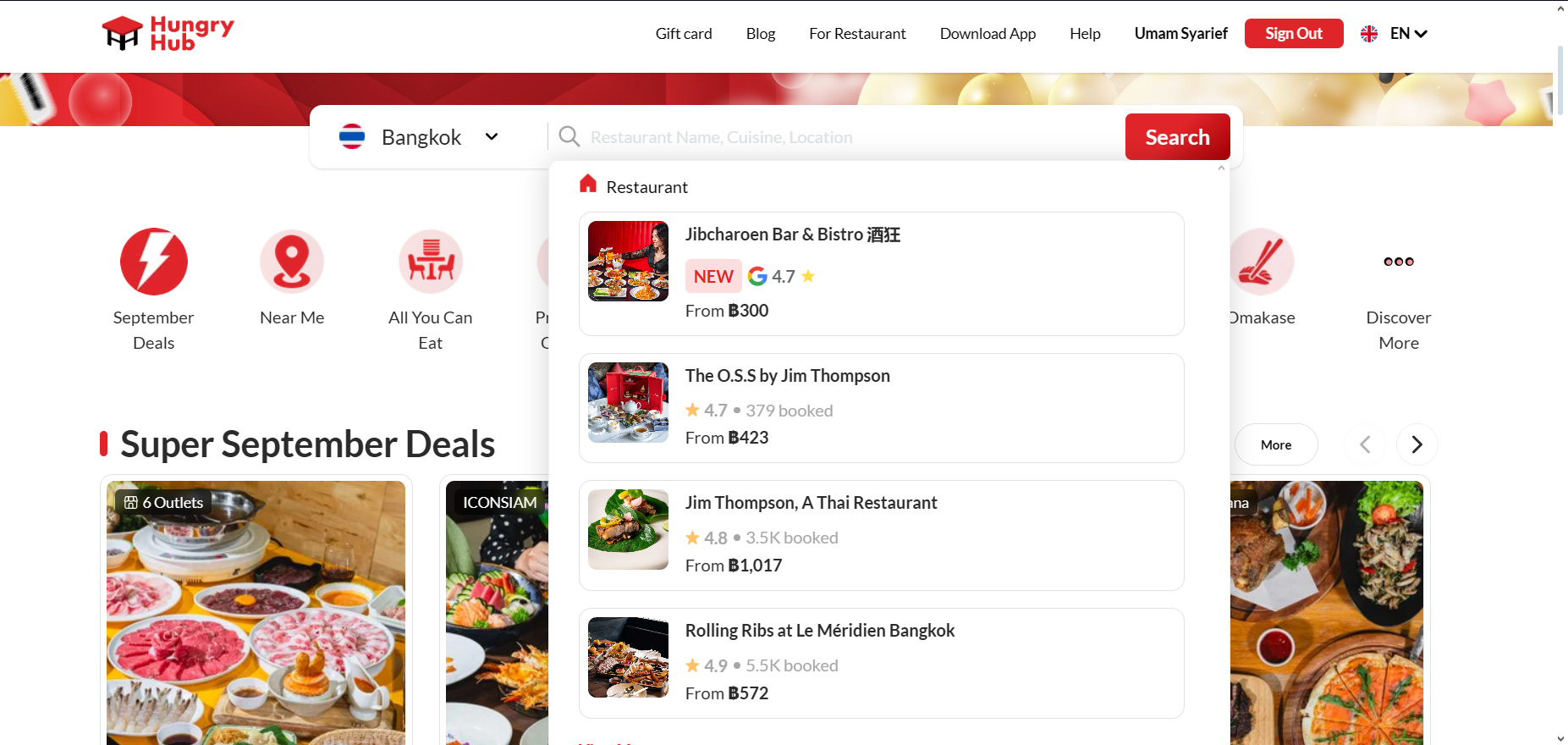
Search suggestion :
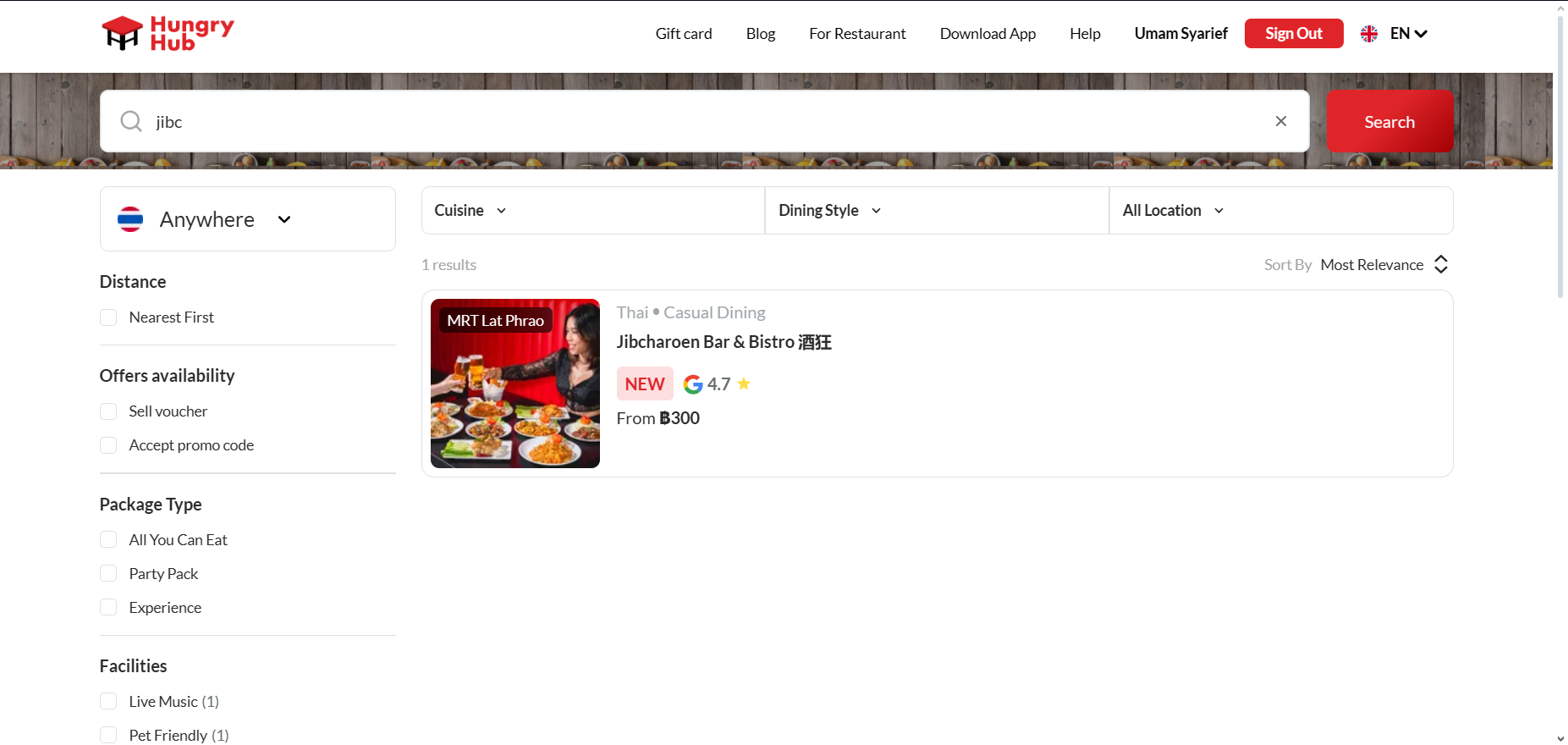
Search Result :
API Blueprint
| Method | Path | URL | Description | Payload |
|---|---|---|---|---|
New Query
DB Schema / Database Migration
Improvement:
| NO | Date Time | What Changed | Description |
|---|---|---|---|
Search Result Priority Logic
Description / Background
Search result logic
Glossary
https://app.clickup.com/9003122396/docs/8ca1fpw-35796/8ca1fpw-41516
Objectives
- User can see the search result
- Logic Flow:
- Restaurant with ads label
- Exact Match (Restaurant Name, Cuisine)
- Exact Match Priority: If the query you are typing exactly matches the restaurant name, cuisine or location, these results should appear at the top. This ensures that the most relevant results are immediately visible.
- Partial Match Weighting: If the search partially matches the restaurant name, cuisine, location or menu items, these should be ranked next. For example, if someone types in “Italian”, any restaurant that serves Italian food should be highlighted, even if it’s not in the name.
- Location Proximity (Same City, Nearby)
- Same City Boost: Restaurants in the same city as the user’s current location or the location they are searching for should be ranked higher. This is particularly important for platforms where location-based services are crucial.
- Nearby Alternatives: If there are fewer exact matches, prioritize results that are geographically close to the searcher’s location.
- Popularity (Review Scores, Sales)
- High Review Scores: Restaurants with higher review scores should be prioritized. Positive reviews indicate quality and customer satisfaction, which enhances user trust.
- Sales and Popularity: Restaurants with higher sales or those that are frequently booked should also rank higher. This indicates their popularity and reliability.
- Dining Style & Restaurant Type (User Preferences)
- Match to User Preferences: If the user has a history of preferring certain dining styles or restaurant types, those should be boosted in the ranking. For instance, if a user often searches for fine dining, fine dining options should appear higher when the query is more general.
- Facilities & Tags (Matching Needs)
- Facilities that Match Needs: Restaurants with facilities or tags that match the user’s preferences (e.g., kid-friendly, parking available) should be ranked higher. These are crucial for users with specific requirements.
- Popular Tags Boost: Tags or facilities that are generally popular among users should also get a slight boost. This includes things like “rooftop view,” “live music,” or “vegan options.”
- Menu & Description (Relevance to Query)
- Description Match: If the search terms are found within the restaurant’s description or menu, these should be given consideration, especially if the match is strong.
- Menu Specificity: For queries related to specific dishes or menu items, prioritize restaurants that highlight those dishes prominently.
- Personalization (Past User Behavior)
- Past Behavior and History: If the user is logged in and has a search or booking history, use that data to personalize the search results. Prioritize restaurants similar to those they’ve liked or booked in the past.
- Type of Search
- General vs. Specific: Adjust the ranking based on how specific the query is. For a general query like “dinner,” weight the factors like location and review scores higher. For specific queries like “Sushi near me,” prioritize restaurant name, cuisine, and proximity.
Scope
Location
How to find ..
How to set ..
Sequence Diagram / Flow
ERD
Backend Implementation
- Update search query and filter boost
https://github.com/hungryhub-team/hh-search/pull/44/files
Frontend Implementation
-
PRD & Task
https://app.clickup.com/t/86cwa3y6x
Design
-
API Blueprint
| Method | Path | URL | Description | Payload |
|---|---|---|---|---|
New Query
DB Schema / Database Migration
Improvement:
| Feature Name | Date | What Changed | Description |
|---|---|---|---|