Loyalty Points Expiry and Highlight Tier.
Description / Background
Each user will be awarded a point upon making a booking of over 100 THB. These points, generated through the loyalty program, will not expire. However, in certain instances, the accumulation of points in a user account may result in anomalies within the tier structure. In order to address this, an expiration date will be implemented for points accrued through the loyalty program, and updates will be made to highlight the loyalty section even more. The expiration date for the loyalty program has already been implemented; however, it is still experiencing some issues, which will be addressed in a subsequent update.
Glossary
N/A
Objectives
- There used to be an expiry date in the loyalty program but it hasn’t been implemented yet, so it’s still active now.
- If there is no booking within 4 months, the points will expire and become 0.
- The expiration loyalty point is 4 months from when users get their points.
- The expiration loyalty tier is 4 months from when users get the new tier.
- Expiry date is always at the end of the month (even if they get point at the beginning of the month).
- All the point that expiry on August 2024, will be round up to the end of Sep 2024.
- Example: The point expires on 10 Aug 2024, after the new system is up and running, the expiration date will be updated to 30 Sep 2024.
- All points with expiry dates after September 2024 will be rounded up to the end of their month expiry date after our system update.
- Example: The point expires on 10 Nov 2024, after the new system is up and running, the expiration date will be updated to 30 Nov 2024.
- All the points that expire on 30 Sep 2024 will receive the minus (-) point from the total of their active points, so we can deduct the point and reset it to 0.
- Add one more page at the last slides on on-boarding page (app only)
- Display the tier on the homepage
- Add Additional cases for tier on the homepage
- Display the tier on the checkout page
- Display the tier on the booking confirmation page
- Display the tier on the booking confirmation email
- Display Alert Before 1 Week Expired Date
Scope
- Updating the expiry date logic on point loyalty program
- Update the design so the user can see more about the loyalty program on the homepage, checkout page, profile page, booking confirmation page, booking confirmation email, on-boarding page on app.
Location
On the homepage, checkout page, profile page, booking confirmation page, booking confirmation email, on-boarding page on app.
Sequence Diagram / Flow
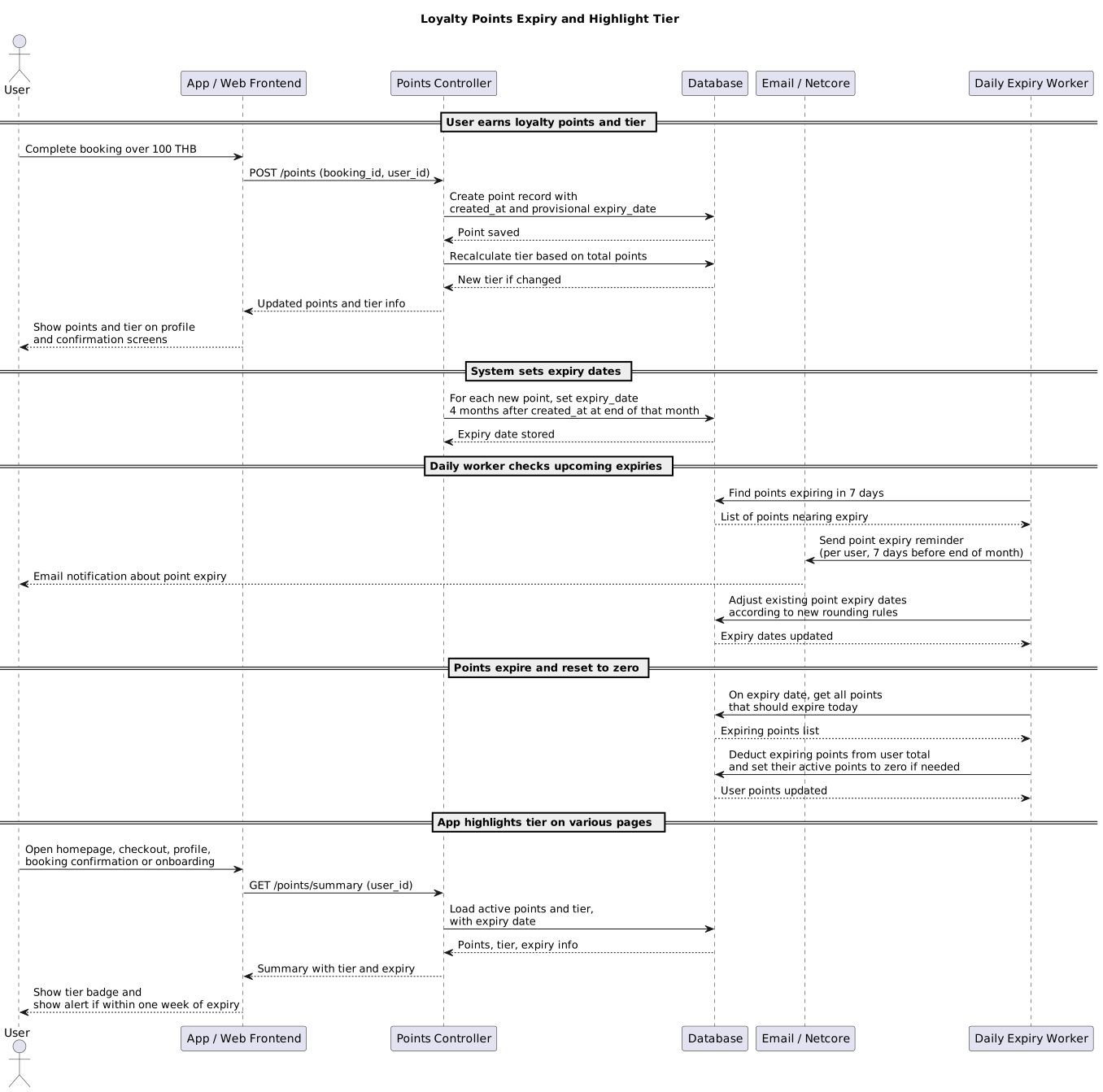
ERD
N/A
Backend Implementation
- Add new tier related images
- Add expiry logic on point controller
app/controllers/api/v5/points_controller.rb - Add image tier logic on reservation decorator
- Add logic to send the notification (7 days before expired) to user that the point almost expired
- Add logic to save the expiry point date, 4 months after it created and the date is in the end of that month
- Send the expiry notification on netcore
- Add logic to extend the existing point
- Change all the old point image on email to new tier related image
- Add new email template for notify point expiration
- Add worker that run everyday at 8 AM, to check the point expiry and send the point expiry reminder
https://github.com/hungryhub-team/hh-server/pull/5740#discussion_r1740594942
Frontend Implementation
See PR: hh-pegasus/pull/693
PRD & Task
https://app.clickup.com/9003122396/docs/8ca1fpw-7922/8ca1fpw-40216
https://app.clickup.com/t/86cvywr5n
Design
API Blueprint
N/A
New Query
N/A
DB Schema / Database Migration
- Add new user_benefit_expires table
def change
    create_table :user_benefit_expiries do |t|
      t.integer :user_id
      t.integer :user_loyalty_id
      t.integer :total_points
      t.datetime :expires_at
      t.datetime :reminder_d7

      t.timestamps
    end
      end
- Change
point_totalandpoint_pendingcolumn type on reward table
Improvement:
N/A