Loyalty Level
Description / Background
Our users are increasing and to provide benefits to our users, we will create a tier for users. With this tier, it can provide our users with benefits, from discounts, Flash sales, paying with points, and can also provide benefits for us namely users will continue to use our platform and also make new users register, not just using with “guest”.
On the existing loyalty level, the flash sale benefit is still not implemented.
Glossary
-
* HUNGER level was renamed as RED level- Loyalty level = Tier
- Outlet = Restaurant
- last loyalty level is from top_loyalty_level_id
Objectives
- User can get loyalty level
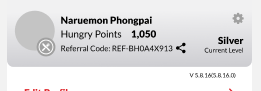
- User can see their tier on their profile
- User can see the tier benefits on Profile ➝ Benefits
- User can check how many bookings they need to complete the next level on Profile ➝ Benefits
- User get benefits based on their tier
- The system will restart the tier every 4 months from user gets latest level
- User can regain their last level if they meet the condition to regain
- User can maintain their level by book 1 time on that period of time
- User get points after booking and reviewing based on their tier (buying giftcard is not included)
- User get vouchers (VIM) based on their tier if they are first 5 reviews of a restaurant
- User get points from referral program based on their tier
- User get special offers for each tier
- Admin can see the loyalty level setting on admin dashboard
- Admin can edit the loyalty level setting
- Admin can see user tier on Booking list
- Admin can see user tier on User list
- User Last level is recorded, so system can use that to regain the latest level
- Level can only drop by 1 tier example from Gold to Silver
- The level can’t drop from gold to red, but it can drop from gold ➝ silver ➝ red
- User level red can’t drop level, because red is the lowest level
How to find Loyalty Level
Admin Side:
Admin can check the Loyalty setting on : Admin ➝ Others ➝ Loyalty Level
Admin can check user loyalty point history on : Admin ➝ Users ➝ User overview ➝ Pick userID ➝ action ➝ show Check on Voucher tab or Point History tab (based on the rewards type)
User Side:
User can check the loyalty level on their profile, and check the tier benefit on Profile ➝ Benefits By default it will show user current level benefits.
List of Reward Features
by default :
- per 100 Baht booking, user receive 1 TH point.
- per 1 SGD booking, user receive 1 SG point.
- 1 TH point = 1 THB
- 1 SG point = 1 cents or 0.01 S$
Starting in XXX 2025, the acquisition tier will be removed by spending X amount of money. Users can only level up by making X number of bookings.
| Tier | Acquisition | Within 4 months | Dine-in + Delivery points | First 5 reviews of a restaurant | Reviews | Referral program |
|---|---|---|---|---|---|---|
| Maintain | Regain | Rating only TH | Rating only SG | +3 photos TH | +3 photos SG | Code owner (Sender) TH |
| Booking | Spending ฿ | Spending S$ | Booking | Booking | Spending ฿ | Spending S$ |
| RED | - | - | - | - | - | - |
| SILVER | 2 | 5.000 | - | 1 | 1 | - |
| GOLD | 5 | 25.000 | - | 1 | 3 | 15.000 |
| PLATINUM | 12 | 100.000 | - | 1 | 3 | 50.000 |
How to set Loyalty Level
WE CAN’T CREATE NEW LOYALTY LEVEL FROM ADMIN
Admin can edit the Loyalty level on: Admin ➝ Others ➝ Loyalty Level
https://hungryhub.com/admin/loyalty_levels?locale=en
How to check History Level
We can check the history level by asking BE team to check the user loyalty_level_expiry_date on the Loyalty Level table. After that we can manually calculate the Loyalty Level period by reducing the date by 4 months. Once we know the user’s period, we can check how many bookings or how much they spend in each period, so we can check whether the tier is right or wrong.
If the user’s top_loyalty_level_id is the same as the loyalty_level_id, the user is still at the same level as the last period. If the top_loyalty_level_id was bellow the loyalty_level_id user will be categorised as downgrade, and will need to regain.
Design
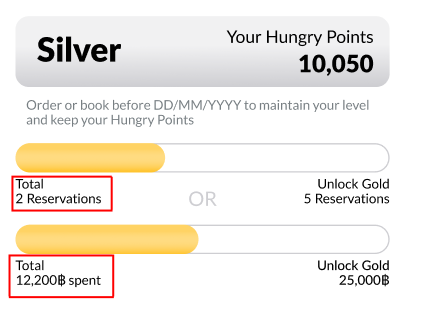
User can see how many booking and total spend they need to unlock the next level here:
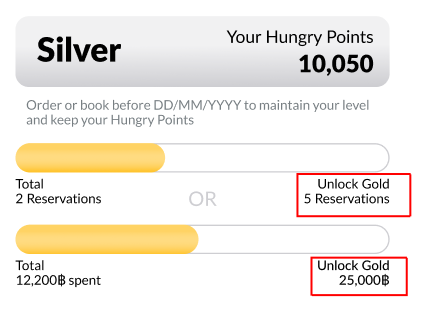
The colour of the user’s progress bar will match the colour theme of the next level, and the bottom left of the progress bar will show the number of bookings and total spending.
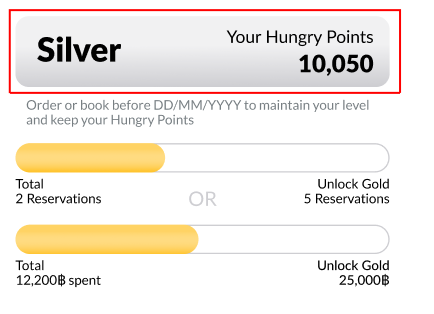
User can see their level expiry date :
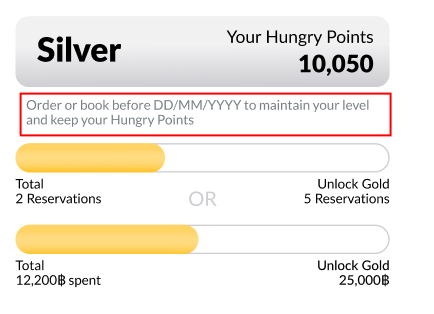
User can see their current level and points here: