Flipper
Glossary
- Flipper: A feature toggle that allows enabling or disabling specific features.
- search by PDT : search feature using people date and time
- OTP Verification : A one-time password verification used to ensure that the user is using the valid Thailand number.
List of Flipper Features
https://app.clickup.com/9003122396/docs/8ca1fpw-34576/8ca1fpw-40036
Features
FE Flipper
We have 2 flippers on FE .env file.
#![allow(unused)]
fn main() {
PUBLIC_APP_FEATURES='{"enablePdt":true,"enableOTPVerification":true}'
}
The flipper was on the PUBLIC_APP_FEATURES parameter value.
"enablePdt":true➝ If this flipper is enabled, the frontend will display the search by PDT feature on both the home and search pages."enableOTPVerification":true➝I If this flipper is enabled, the frontend will will use OTP verification when user book table for the first time. You have to ask FE team to change this flipper.
BE Flipper
We use https://www.flippercloud.io/docs/ to implement Feature Toggling ability on our Backend side (hh-server)
How to Manage BE Flippers
Opening BE Flipper:
- Open Admin Dashboard
- Click Others menu
- Click Flipper
- You will redirect to flipper page
Adding a New BE Flipper:
- Open Admin Dashboard
- Click Others menu
- Click Flipper
- You will redirect to flipper page
- Click Add Feature button
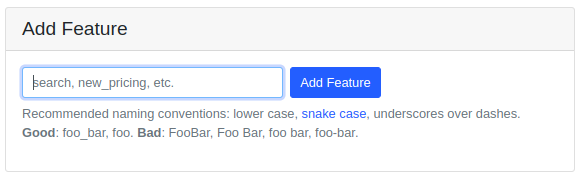
- Add the new Flipper name ➝ Click Add Feature button.
- Add an actors (Restaurant ID) if needed
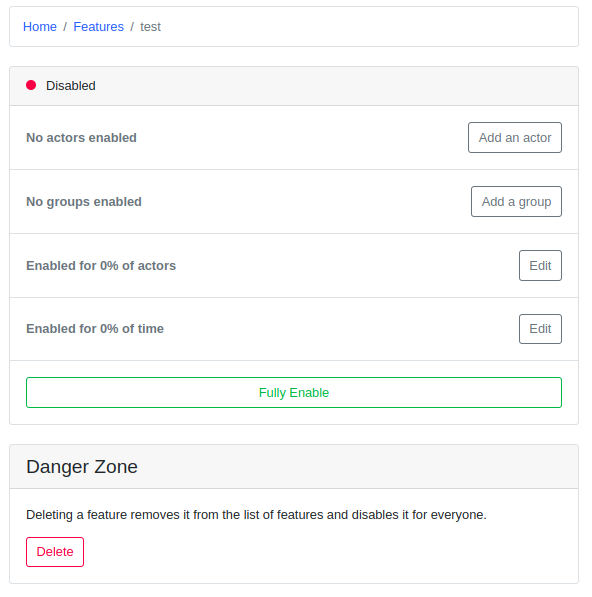
- Click Fully Enable to enable the feature.
You can’t add random name on Flipper, it will do nothing if the name is not the same as on the code one.
List of Flipper Features
FE Flipper
- enablePdt ➝ to enable search PDT feature
- enableOTPVerification ➝ to enable OTP verification on checkout page
BE Flipper
- enable_mapbox ➝ to enable mapbox feature
- enable_preselect_menu ➝ to enable preselect menu feature
- seven_rooms ➝ to allow the restaurant to use sevenroom inventory
- tablecheck ➝ to allow the restaurant to use tablecheck inventory
- voucher_in_marketplace ➝ to enable voucher in marketplace feature
- enable_store_page ➝ to enable new store page feature
- enable_use_new_checkout ➝ to enable new checkout feature
- kiosque ➝ create kiosque checkin data
- mongo_db_sync_enable ➝ to allow mongodb to sync restaurant data
- enable_save_cc ➝ enable save cc feature
- enable_save_address ➝ enable save address feature
- reviews_v2 ➝ to show Disclose Review only
- enable_group_landing_page → to enable the group landing page feature
- enable_preselect_menu →to enable the special menu feature on checkout page
- google_reserve_e2e → to enable the google end to end integration
- kafka_producer_hhsearch → to enable the system to send the event for hhsearch using kafka
- kafka_producer_inventory_hhsearch → to enable send the event for inventory hhsearch using kafka
- use_kaleyra_io →to enable the kaleyra for SMS profider
- weeloy → to enable the weeloy integration
- wechatpay_merchant → to enable the wechatpay for specific restaurant id
- enable_omise_th_payment_for_sg_cc → to enable the omise thailand payment for Singapore user.