Add-On Package Technical Documentation
https://www.figma.com/design/HFWUL1wrPoe92uMxPJDYml/Add-On-Client-Side?node-id=0-1&node-type=canvas&t=9BmpVhslmkYbCz31-0 There are several changes for add-on package features:
Restaurant Package
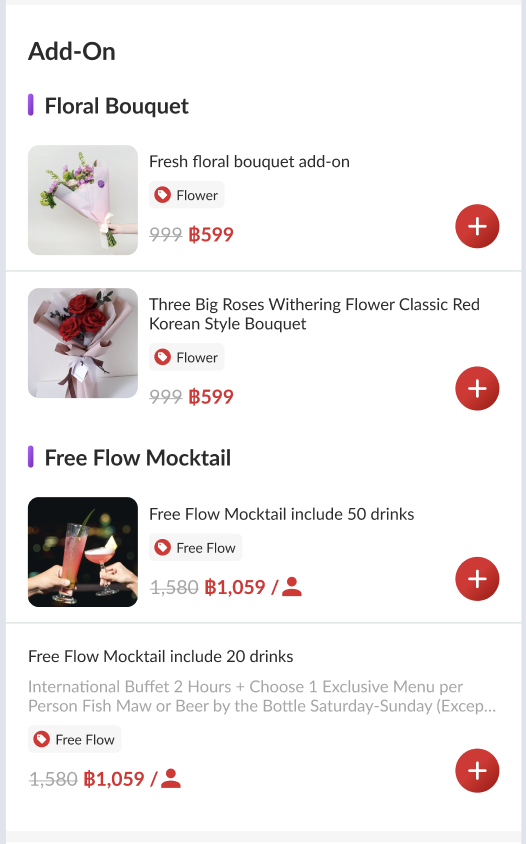
We’ll have a new section in the restaurant package. Since we don’t have an API yet, we can use a fake API first.
Implementation tasks:
- Create Model/Object Add On Package
- Create API request for Add On:
- Set up UI for Add On with that API and object
Detail Package
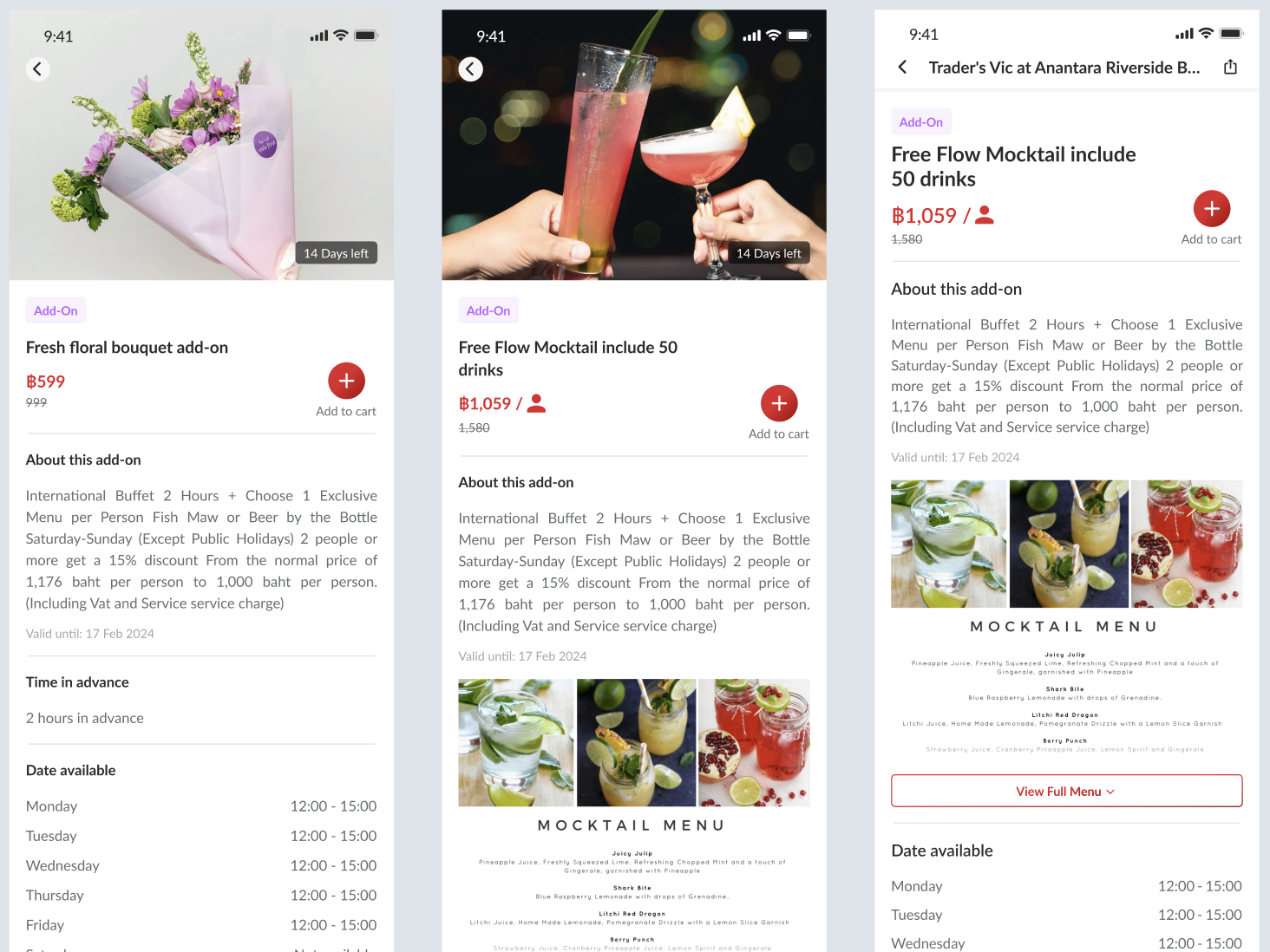
Similar like our existing:
Add To Cart
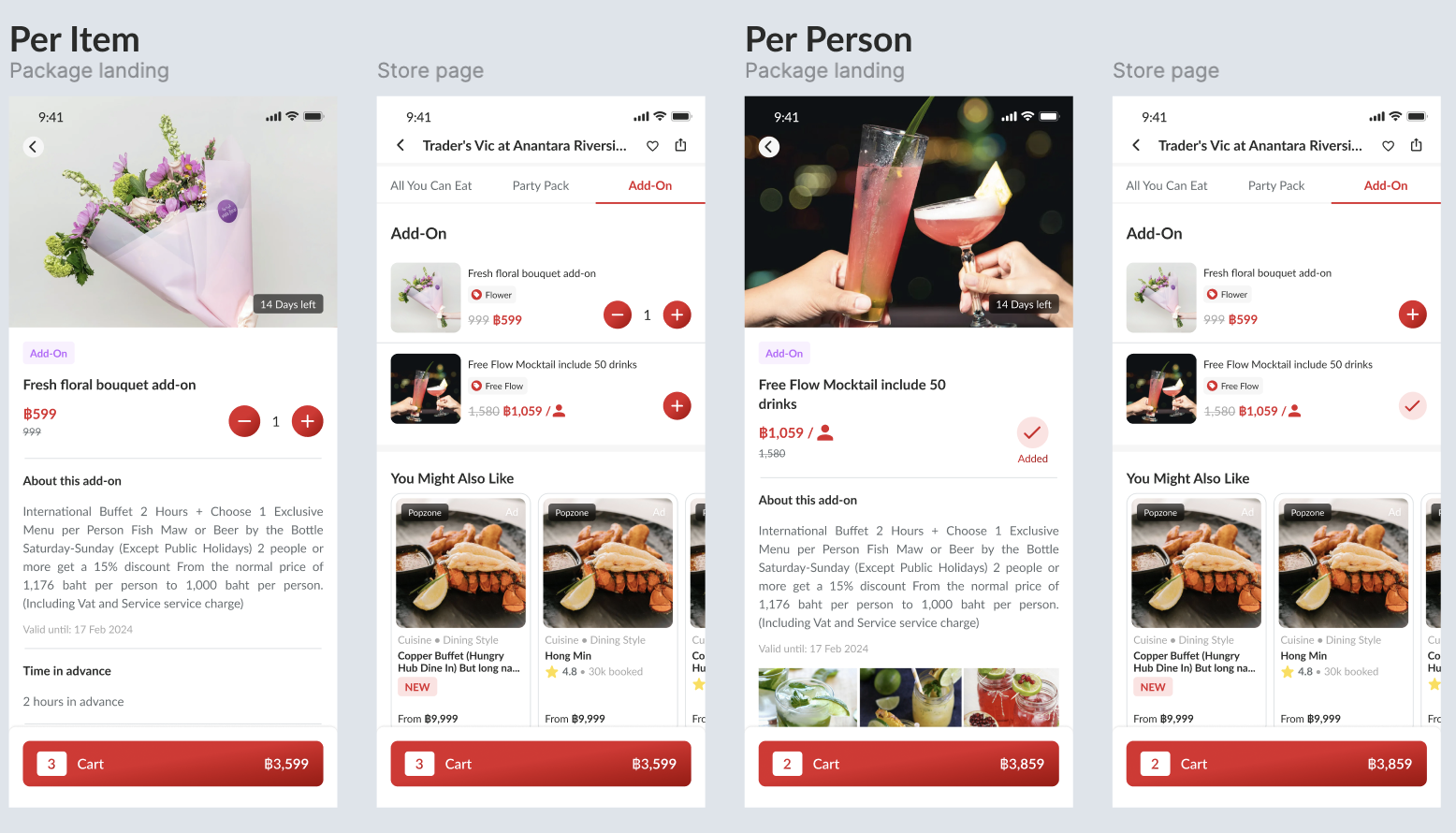
Check the price_type parameter to determine the pricing model:
- If
price_typeisper_person: set quantity equal to the adult count - If
price_typeisper_item: set quantity based on the user-selected quantity
Apply the appropriate price calculation logic based on this parameter before adding to cart.
Booking Flow
The booking flow for add-on packages follows these steps:
- User selects add-ons from the available list on the store page.
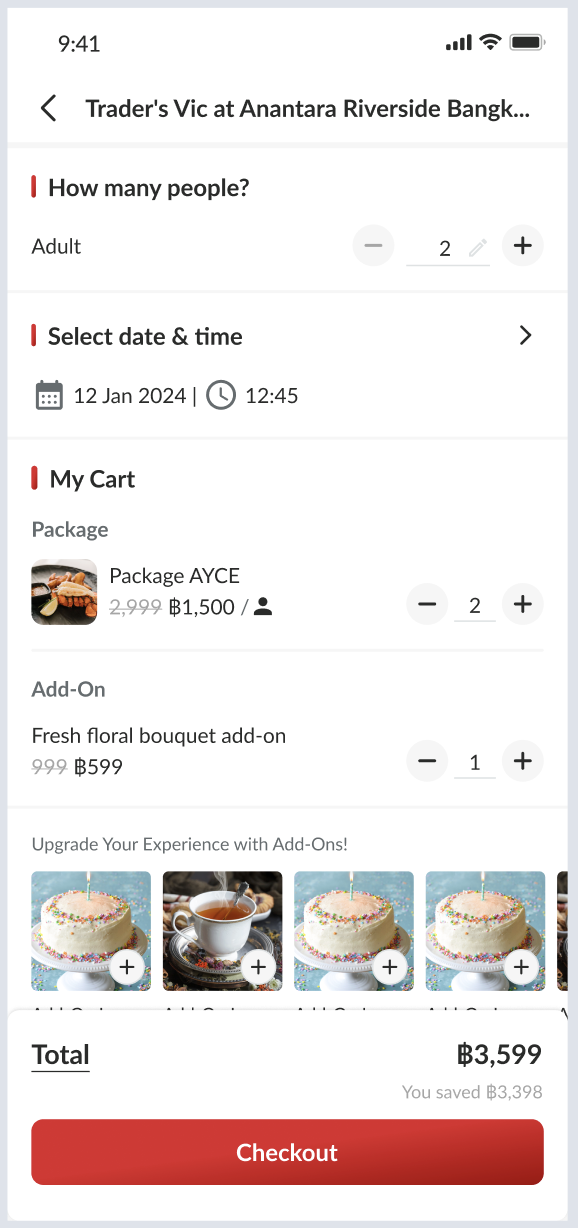
- Selected add-ons are added to the cart along with the main package.
- The cart calculates the total price including add-ons.
- At checkout, the add-on details are included in the reservation payload.
- On the confirmation page, the booking summary displays all selected add-ons.
Backend Update
Required API:
- Create add-on package list (for store page)
- Create add-on package detail (for detail add on)
- Adjust calculate package price (for cart and checkout page)
- Adjust validate voucher (for offers checkout page)
- Adjust reservation API payload, calculation, and serializer (for confirmation page)
Required Object Add-On Package:
- id
- package group
- name th/en/cn
- description th/en/cn
- images cover
- term and condition
- minutes in advance
- custom menu id (optional)
- menu (type, link, etc) same as package
- hide_menu_price
- price type
- original price
- selling price
- commission
- kids price
- kids price policy
- currency
- type code
- type name
- opening hours
- outlets
- is_visible_for_staff
- last booking was made
- start date
- end date
- updated at
- created at
- rank (based on package list)
- custom label (based on Figma client)
- limit setting (phase 2)
API add-on package list
Create API to get list of add on packages. It can be like this: API: {base api}/add_on_packages.json?restaurant_id=1146&locale=en&is_visible_for_staff=true Fake: https://hungryhub-team.github.io/fake-json/addon-package.json Response:
{
	"data": [],
	"status": true,
	"message": null
}
(since it too long can see on that fake json)
API add-on package detail
Create API to get list of add on packages. It can be like this: API: {base api}/add_on_packages/{id}.json?locale=en Fake: https://hungryhub-team.github.io/fake-json/addon-package/1.json Response:
{
	"data": {},
	"status": true,
	"message": null
}
(since too long can see on that fake json)
Adjust API calculate package price
We need to add a new parameter on API calculate price: Before:
{
	"adult": 2,
	"kids": 0,
	"package_bought": [
		{
			"id": "4402",
			"quantity": 2
		}
	],
	"reservation_date": "2024-12-18"
}
After:
{
	"adult": 2,
	"kids": 0,
	"package_bought": [
		{
			"id": "4402",
			"quantity": 2
		}
	],
	"add_on_bought": [
		{
			"id": "123",
			"quantity": 2
		}
	],
	"reservation_date": "2024-12-18"
}
If per person, quantity = adult if per item based on user-selected quantity
Updated Response:
{
	"status": true,
	"message": "",
	"data": {
		"charge_price": 100,
		"currency": "SGD",
		"total_price": 200,
		"charge_amount_type": "relative",
		"charge_percent": 50,
		"charge_type": "on_hold",
		"original_delivery_fee": 0,
		"delivery_fee": "0",
		"delivery_fee_currency": "THB",
		"delivery_fee_in_baht": "0",
		"delivery_fee_per_km_in_baht": 10,
		"free_delivery_fee_threshold_in_baht": 0,
		"delivery_radius": 5,
		"total_package_price": 152,
		"selected_packages": [
			{
				"id": 214,
				"restaurant_package_id": "4402",
				"name": "Romantic Dinner",
				"quantity": 2,
				"type": "adult",
				"price": 15000,
				"base_price": 7500
			}
		],
		"selected_add_ons": [
			{
				"id": 123,
				"restaurant_add_on_id": "4402",
				"name": "Flower",
				"quantity": 1,
				"type": "per_item",
				"price": 5000,
				"base_price": 5000
			}
		],
		"total_point_earn": 1,
		"is_dine_in": true,
		"used_voucher_amount_by_hh": 0,
		"used_voucher_amount_by_restaurant": 0,
		"voucher_deductibles": [],
		"used_vouchers": []
	}
}
Adjust API validate voucher
We need to add a new param on API validate price: Before:
{
	"restaurant_id": "997",
	"adult": 2,
	"kids": 0,
	"service_type": "dine_in",
	"voucher_code": [
		"TESTNOLIMIT"
	],
	"packages": [
		{
			"id": "4340",
			"quantity": 2,
			"menu_sections": []
		}
	],
	"reservation_date": "2024-06-15"
}
After:
{
	"restaurant_id": "997",
	"adult": 2,
	"kids": 0,
	"service_type": "dine_in",
	"voucher_code": [
		"TESTVOUCHER"
	],
	"packages": [
		{
			"id": "4340",
			"quantity": 2,
			"menu_sections": []
		}
	],
	"add_ons": [
		{
			"id": "123",
			"quantity": 1
		}
	],
	"reservation_date": "2024-12-18"
}
The response similar to calculate price, but we update data on meta.calculate
	"meta": {
		"calculate": {
			"charge_price": 185,
			"currency": "THB",
			"total_price": 185,
			"charge_amount_type": "relative",
			"charge_percent": 100,
			"charge_type": "on_charge",
			"original_delivery_fee": 0,
			"delivery_fee": 0,
			"delivery_fee_currency": "THB",
			"delivery_fee_in_baht": "0",
			"delivery_fee_per_km_in_baht": 10,
			"free_delivery_fee_threshold_in_baht": 1000,
			"delivery_radius": 15,
			"total_package_price": 2300,
			"selected_packages": [
				{
					"id": 214,
					"restaurant_package_id": "4402",
					"name": "es kopyor EN",
					"quantity": 2,
					"type": "adult",
					"price": 15000,
					"base_price": 7500
				}
		    ],
			"selected_add_ons": [
				{
					"id": 123,
					"restaurant_package_id": "123",
					"name": "Flower",
					"quantity": 1,
					"type": "per_item",
					"price": 5000,
					"base_price": 5000
				}
			],
			"total_point_earn": 31,
			"is_dine_in": true,
			"used_voucher_amount_by_hh": 115,
			"used_voucher_amount_by_restaurant": 0,
			"voucher_deductibles": [],
			"used_vouchers": [
				{
					"id": 5953,
					"name": "TESTVOUCHER",
					"voucher_code": "TESTVOUCHER",
					"amount": 15,
					"usage_type": "one_time",
					"for_package": true
				}
			]
		},
		"total_voucher_amount": 0
	}
Update
Find Available Add-Ons based on Date, Time, and Restaurant Add-On IDs
API: {{ base_api }}/restaurants/{restaurant_id}/find_available_add_ons.json HTTP Method: GET or POST Payload:
{
	"date": "2025-02-25",
	"start_time": "12:00",
    "restaurant_add_on_ids": [1,2,3], // send empty array [] to check for all restaurant add-ons in the restaurant
    "is_visible_for_staff": true // for preview mode (only can be access by @hungryhub account if true)
}
Response: Success with available add-ons
{
    "data": [
        {
            "id": "19",
            "type": "restaurant-addon-packages",
            "attributes": {
                "menus": {
                    "type": "unknown",
                    "data": []
                },
                "start_date": "2025-02-01",
                "end_date": "2025-04-07",
                "created_at": "2025-02-06T09:13:12.000Z",
                "updated_at": "2025-02-06T09:13:24.000Z",
                "hh_menu_v2_html_preview_link": "",
                "hh_menu_addon_id": "",
                "package_group": {},
                "name": "Add On with Special Agenda EN - Per Person",
                "description": "Description EN",
                "images": {
                    "cover": {
                        "url": null
                    }
                },
                "term_and_condition": {
                    "url": null
                },
                "minutes_in_advance": 15,
                "custom_menu_id": null,
                "menu_type": null,
                "price_type": "per_person",
                "original_price": {
                    "price": 120.0,
                    "currency": "THB",
                    "format": "฿120"
                },
                "selling_price": {
                    "price": 100.0,
                    "currency": "THB",
                    "format": "฿100"
                },
                "commission": "5.0",
                "kids_price": false,
                "kids_price_policy": [
                    {
                        "id": 19,
                        "price": 5.0,
                        "policy": "Policy En 1"
                    },
                    {
                        "id": 20,
                        "price": 10.0,
                        "policy": "Policy En 2"
                    }
                ],
                "type_code": "add_on",
                "type_name": "Add On",
                "is_visible_for_staff": false,
                "last_booking_was_made": null,
                "opening_hours": [
                    {
                        "day_name": "Monday",
                        "schedule": {
                            "open": "08:00",
                            "close": "15:00"
                        }
                    },
                    {
                        "day_name": "Tuesday",
                        "schedule": {
                            "open": "08:00",
                            "close": "15:00"
                        }
                    },
                    {
                        "day_name": "Wednesday",
                        "schedule": {
                            "open": "closed",
                            "close": "closed"
                        }
                    },
                    {
                        "day_name": "Thursday",
                        "schedule": {
                            "open": "closed",
                            "close": "closed"
                        }
                    },
                    {
                        "day_name": "Friday",
                        "schedule": {
                            "open": "08:00",
                            "close": "12:00"
                        }
                    },
                    {
                        "day_name": "Saturday",
                        "schedule": {
                            "open": "07:00",
                            "close": "18:30"
                        }
                    },
                    {
                        "day_name": "Sunday",
                        "schedule": {
                            "open": "closed",
                            "close": "closed"
                        }
                    }
                ],
                "custom_label": {
                    "name": "",
                    "icon_url": "",
                    "description": "",
                    "type": "custom label"
                },
                "custom_labels": []
            }
        }
    ],
    "success": true,
    "message": null
}
Succes but no available add-ons
{
    "data": [],
    "success": true,
    "message": null
}
Similar to this API: https://hungryhub-team.github.io/fake-json/addon-package.json
This API can be used to “Upgrade Your Experience with Add-Ons”. To make sure add-ons that show up are the add-ons that are available on that date and time.
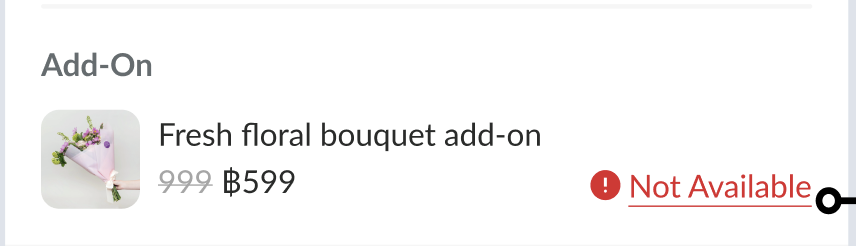
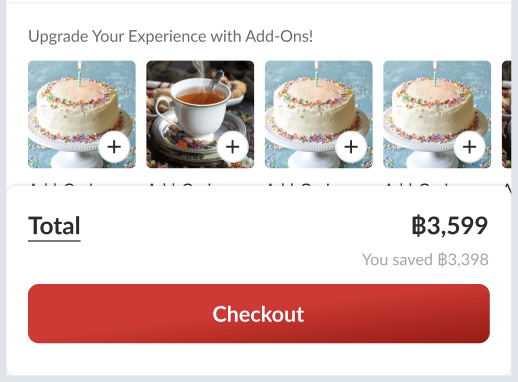 Also, we can compare with the selected add-on, if the selected add-on is not available on the array response, we can show “not available” alert.
Hybrid Changes
Since we had new selected data from booking process we’ll update onCheckout response. Event: onCheckout Response:
// existing response
"add_ons": [
			{
				"id": 123,
				"name": "Flower",
				"quantity": 1,
				"type": "per_item",
				"selling_price": "559",
				"currency": "THB",
			}
		]
	}
// existing response
iOS and android will send back that payload to doSetupData again.
Adjust reservation API payload and response
For reservation we’ll adjust payload a little bit similar like validate voucher. Payload:
// existing payload
"add_ons": [
		{
			"id": "123",
			"quantity": 1
		}
	],
// existing payload
And the reservation object will have something like this:
// existing payload
"selected_add_ons": [
				{
					"id": 123,
					"restaurant_package_id": "123",
					"name": "Flower",
					"quantity": 1,
					"type": "per_item",
					"price": 5000,
					"base_price": 5000
				}
			],

// existing payload