Add-On
Description / Background
The add-on feature enhances customer satisfaction by allowing users to customize their booking packages with additional options. Customers can only book add-on when they book a package, and they can choose from various add-on like special dishes or services. Users can select multiple add-on, and if an add-on is priced per person, the total cost will match the number of people in the booking. This feature provides a personalized experience for customers and helps restaurants offer a better dining experience
Glossary
https://app.clickup.com/9003122396/docs/8ca1fpw-35796/8ca1fpw-41516
Objectives
- User can add the Add-on when they book the package.
- User cannot book add-on without the package.
- User can see Add-on picture(if any), name, price and the price type (per item or per person).
- User can see the Add-on picture(if any), name, price, price type (per item or per person), description, valid date (if any), time in advance, menu(if any), available date, and the T&C on add-on landing page.
- User can pick more than 1 Add-on.
- Add-on can be per person or per item.
- Add-on can be set to specific date/time, so user cannot select if it’s not time yet.
- Add-on can have kids price.
- When an Add-on is priced per person, the system will multiply the price by the number of guests in the booking
- From BE perspective an Add-on similar to a package.
- Admin can manage Add-on from Admin Dashboard ➝. Packages ➝ Add-on
- Admin can add Restaurant to Add-on.
- Admin can check Add-on list from specific restaurant on Restaurant Package List
Restaurant List ➝ click Action ➝ pick Packages.
- Admin can see the Add-on from a booking on package details
- Owner can see the Add-on from a booking on package details
- Admin can search Add-on by ID, Name, Date, Outlet Name, Selling Price, Add-on type, Limit selling on Add-on Overview.
Scope
All platform
How to find Add-On
Admin Dashboard
-
On Booking details
You can find Add-on that user book on the Package Details.
-
Add-On settings
Open Admin Dashboard ➝ Packages ➝ Add-On
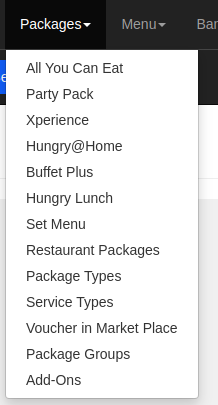
-
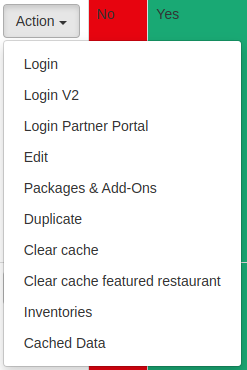
Restaurant, Package & Add-Ons list
Open Admin Dashboard ➝ Restaurants ➝ Restaurant List ➝ Pick Restaurant ➝ Action ➝ Packages
Client
- You can find Add-on on the Store page
- You can find Add-on section on the cart
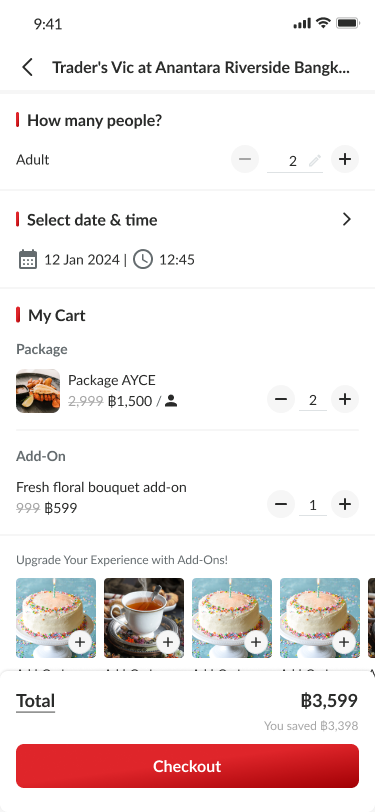
- You can find the Add-On Information on booking confirmation
How to set the Add-on
- Open Admin Dashboard ➝ Packages ➝ Add-on
- Click Create New Add-On button
- Fill the form (the form is the same as you create package)
- Price setting:
- Per Person the price being charged by how many people that arrive on
- Per item
- Price setting:
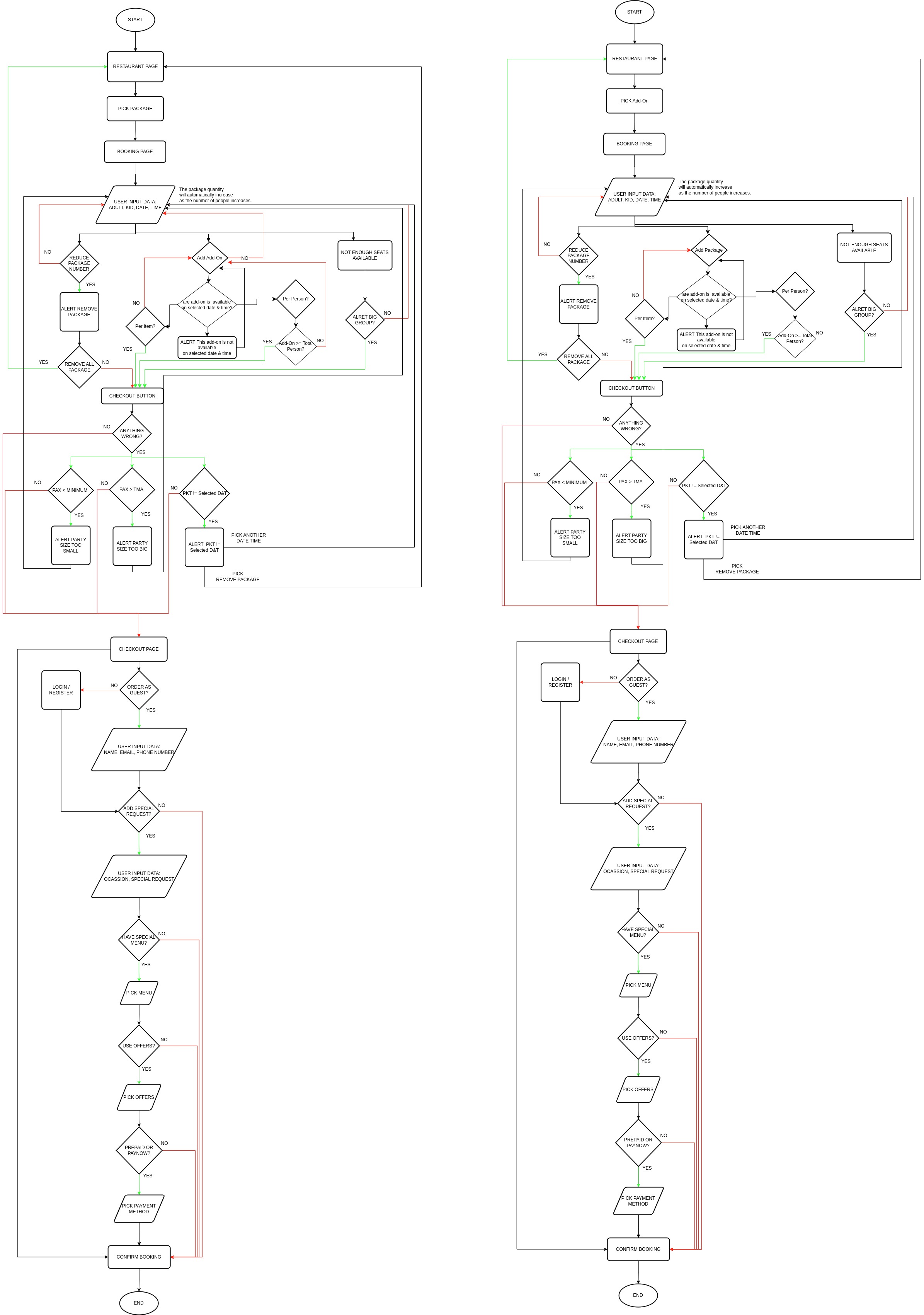
Sequence Diagram / Flow
ERD
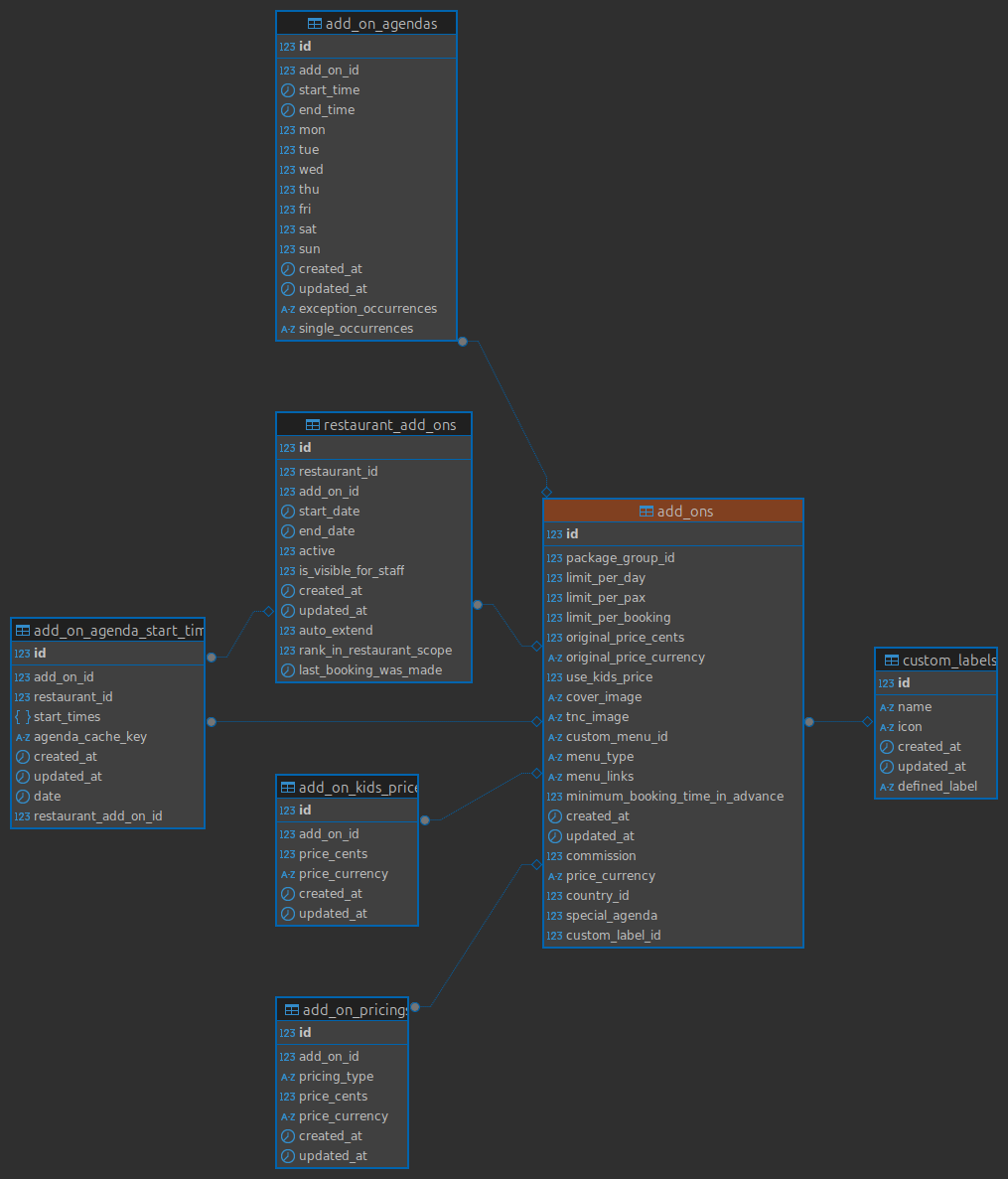
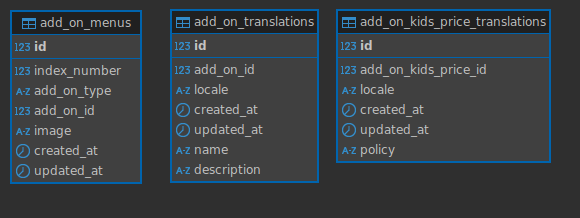
Backend Implementation
- A new attribute
add_onshas been added to theReservationSerializerclass. - The
add_onsattribute checks ifobject.add_on_objis present:- If
add_on_objis blank, it returnsnil. - Otherwise, it maps over
formatted_add_onsto construct a hash with the following details:color_code: A constant value fromAddOns::AddOn::COLOR_CODE.price_data: Includesnet_price,quantity, andpricing_typevalues derived fromadd_on.nameandrestaurant_add_on_id: Information fromadd_on.restaurant_id: Retrieved from theobject.
- If
- The
Moneyclass for formatting prices has been replaced with theHhMoneyclass. - The logic for appending “S” to prices in SGD currency has been removed.
- In both workers, the code previously used the
findmethod to retrieve anAgendaStartTimeobject using a combination ofidandrestaurant_id.This has been replaced with thefind_bymethod - for
HhPackage::AgendaStartTime,findwas replaced withfind_by - A conditional
next unless agenda_start_timewas added after thefind_by. - This ensures that if no record is found (
agenda_start_timeisnil), the remaining logic for that record is skipped, preventing potential errors. - Introduces
add_on_paramsto handle restaurant add-ons, which include attributes likeidandquantity. - Updated
update_package_bookingandcreate_package_reservationmethods to includeadd_on_params. - Added a new method
add_on_paramsto extract permitted add-on parameters from the request. - Added processing logic for add-ons in the
calculate_package_pricemethod, leveraging a newAddOnServices::Processor. - Introduced a new
RestaurantAddOnsControllerto handle operations related to restaurant add-ons. - Modified to accept and handle add-ons during reservation creation.
- Added logic to validate, process, and save add-ons.
- Enhanced to update add-on metadata during reservation updates.
- Added logic to remove add-ons when the parameter is an empty array.
- Updated the
HhMoneyclass to introduce adefault_formatmethod with improved formatting options (e.g., dropping trailing zeros for specific currencies). - Deprecated the older
formatmethod in favor ofdefault_format. - Added constants for currency codes (
THB,SGD,USD) in theCountrymodel for better maintainability. - Added a new route for
restaurant_add_ons, with an index endpoint. - Added a new serializer (
RestaurantAddOnSerializer) to handle API responses for restaurant add-ons.
https://github.com/hungryhub-team/hh-server/pull/6422/files
https://github.com/hungryhub-team/hh-server/pull/6432/files
https://github.com/hungryhub-team/hh-server/pull/6464/files
Hybrid Implementation
- update onCheckout response.
Event: onCheckout
Response:
// existing response
"add_ons": [
			{
				"id": 123,
				"name": "Flower",
				"quantity": 1,
				"type": "per_item",
				"selling_price": "559",
				"currency": "THB",
			}
		]
	}
// existing response
iOS and android will send back that payload to doSetupData again.
For reservation, adjust payload a little bit similar like validate voucher. Payload:
// existing payload
"add_ons": [
		{
			"id": "123",
			"quantity": 1
		}
	],
// existing payload
And the reservation object will have something like this:
// existing payload
"selected_add_ons": [
				{
					"id": 123,
					"restaurant_package_id": "123",
					"name": "Flower",
					"quantity": 1,
					"type": "per_item",
					"price": 5000,
					"base_price": 5000
				}
			],

// existing payload
https://github.com/hungryhub-team/hh-ios-fix/pull/2068
https://github.com/hungryhub-team/hh-android/pull/1936
Partner Portal Implementation
- A new function
getAddOnsis implemented insrc/api/booking.jsto fetch restaurant add-ons dynamically. - These add-ons are integrated into the booking creation and editing flows.
- New localization strings for add-ons are added in Chinese (
cn), English (en), and Thai (th). Examples include:- “Add-On Name”
- “Please choose an add-on”
- “Add Add-On”
- “Add More Add-On”
- The
restaurantAddOnsFormarray is introduced in thebookingForm.store.jsto manage add-ons for the booking process. - Add-on details are fetched and stored, such as
id,quantity, and pricing attributes. - Add-ons are incorporated into payloads for booking creation and editing.
- A new component,
AddOnForm.vue, is created to handle add-on inputs. - Integration of the
AddOnFormcomponent into booking-related pages likeCreateBooking.vueandEditBooking.vue. - Booking Creation Flow:
- The
restaurant_add_onsfield is added to the payload inCreateBooking.vueto include selected add-ons during the booking process.
- The
- Booking Editing Flow:
- Add-ons can now be updated in the booking editing process.
- A similar
restaurant_add_onsfield is added to the payload inEditBooking.vue.
- Updates to the
v-forloop for displaying add-ons::keyis changed from the index (i) toaddOn.idfor better reactivity.
- Removed the
hideEditButtonlogic and related computed property. - The
AddOnFormcomponent is integrated, allowing users to manage add-ons directly in this form. - Corrected a function typo from
fetchcAddOnstofetchAddOnsinAddOnForm.vue. - Removed unnecessary
console.logstatements inbookingForm.store.js. - Adds a new field for “HH Menu API URL.”
- Updates the environment configurations to include the
hhMenuApiUrlfor different environments such as engineering, ballbot, production, etc. - Updates the logic for fetching and saving environment-related data.
https://github.com/hungryhub-team/book-bite/pull/787/files
Frontend Implementation
- Modifications are made to the payload schemas to include add-ons.
- The schemas in
createBooking.ts,calculateCharge.ts,createBookingLocking.ts,getBookingDetail.ts, andvalidateVouchers.tsare updated to handleaddOns. - Several new files are introduced, including components and utilities for managing add-ons, such as
findAvailableAddOn.ts,getAddOnPackages.ts,getAddOnSection.ts, and Vue components likeAddOnCartHandler.vue,AddOnDescriptionMenu.vue,AddOnNotAvailableAlert.vue, etc. - New CSS styles and icons are added to support the visual representation of add-ons, such as gradients and borders for add-on packages.
- Existing components like
ChargeItem.vue,ChargeItem2.vue,BookingCard.vue,EmptyCart.vue,PackageNotAvailable.vue,TotalPrice.vue,BannerButton.vue,Breadcrumb.vue,VerticalLine.vue,PackageBadge.vue,PackageCartHandler.vue,PackageDescriptionMenu.vue,PackageDescriptionModal.vue,PackageTnC.vue,PackageToolbarDesktop.vue,PackageTypeColor.vue,PackageTypeText.vue,TypeBadge.vue, and others are modified to accommodate add-ons. - Functional changes in booking and charge calculation methods to handle add-ons.
- Methods in
calculateCharge.ts,createBookingLocking.ts,createBooking.ts,validateVouchers.ts, and related components are updated to process add-ons. - New utilities and services are added for managing add-ons, including fetching available add-ons, calculating charges, and validating add-ons.
- Updates in restaurant-related components and services to include add-ons.
- New sections and views for add-ons are integrated into the restaurant detail pages.
- The booking process is updated to include add-ons in the selection, validation, and checkout processes.
- New components and modifications in existing ones ensure add-ons are seamlessly integrated into the booking flow.
- Translation files are updated to include new terms related to add-ons in multiple languages.
- Code refactoring and enhancements to support the new add-on feature, including updates in navigation, modals, and validation logic.
- The event is sent to the platform when the SearchSuggestionPage component is mounted.
- It includes a payload with a message derived from the placeholder.value.
https://github.com/hungryhub-team/hh-pegasus/pull/1164
https://github.com/hungryhub-team/hh-pegasus/pull/1624/files
https://github.com/hungryhub-team/book-bite/pull/787/files
https://github.com/hungryhub-team/book-bite/pull/788
Notes for development process
Restaurant Package
We’ll have a new section in the restaurant package. Since we don’t have API yet. We can use fake API first. Todo:
- Create Model/Object Add On Package
- Create API request for Add On:
- Setup UI for Add On with that API and object
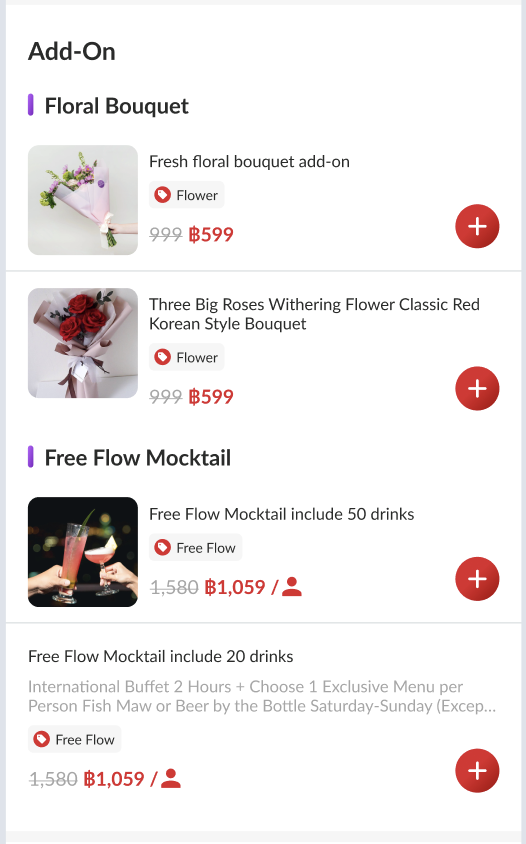
Detail Package
Similar like our existing:
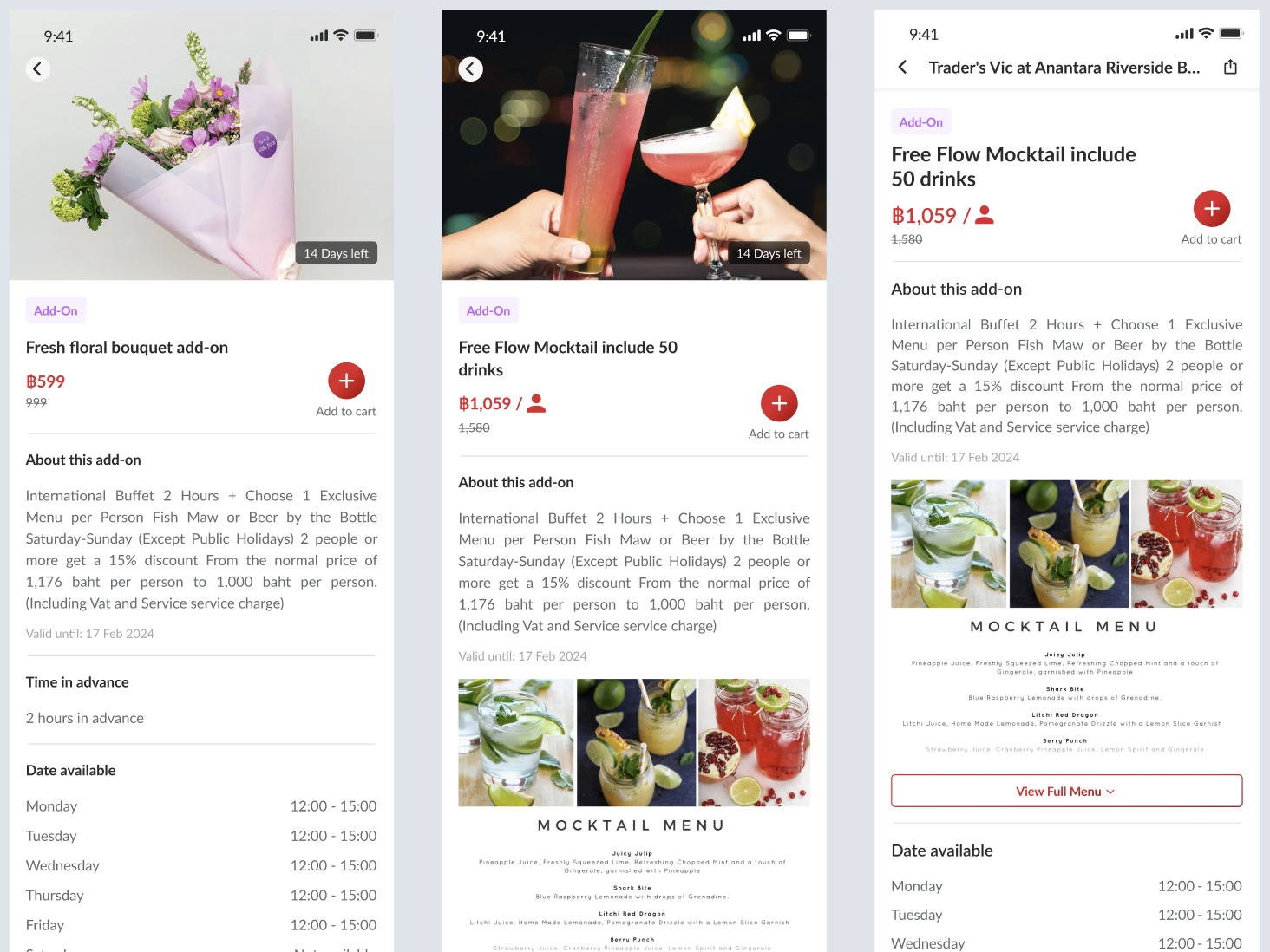
Add To Cart
Check param price_type is the package per person or per item.
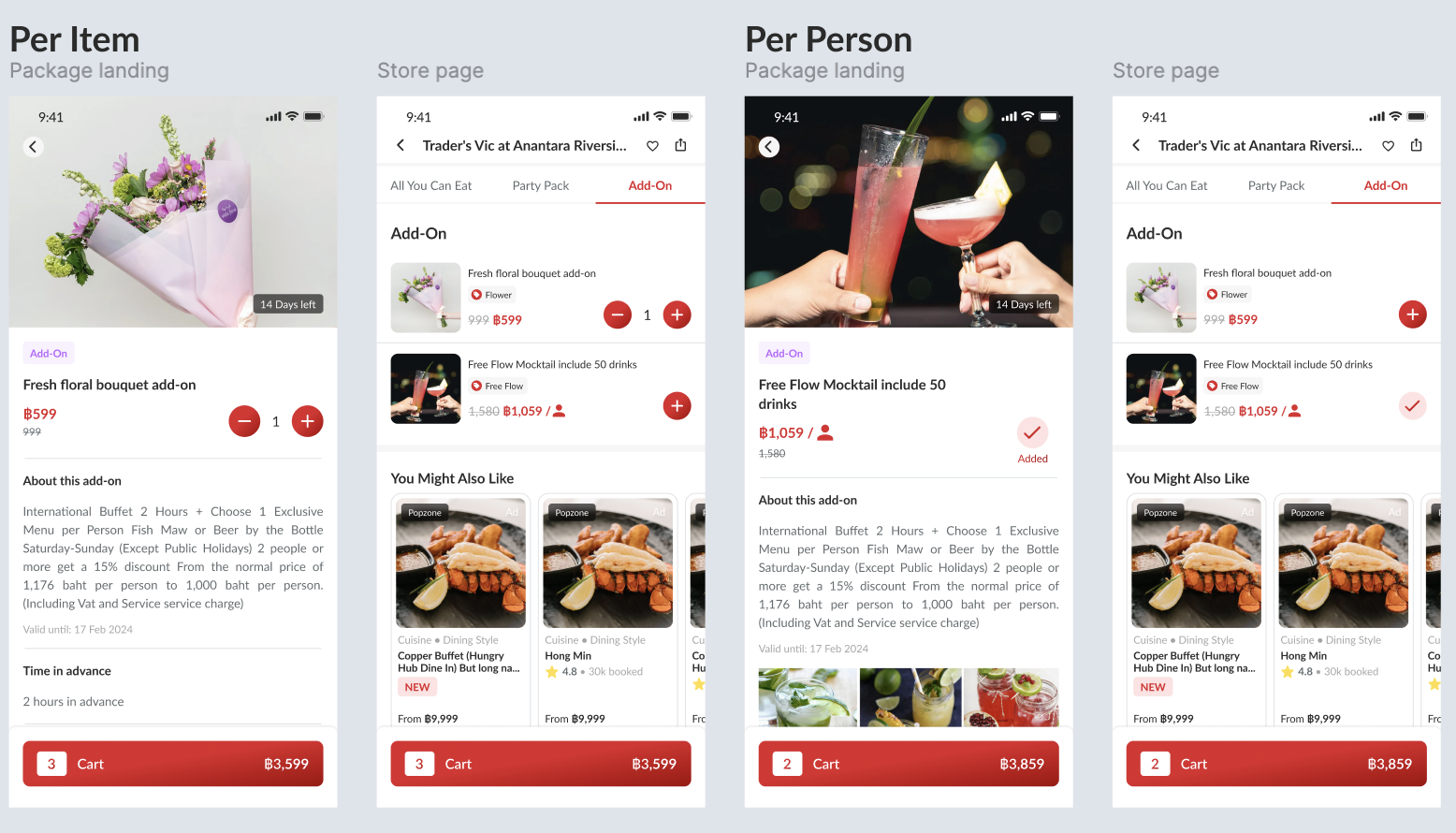
Booking Flow
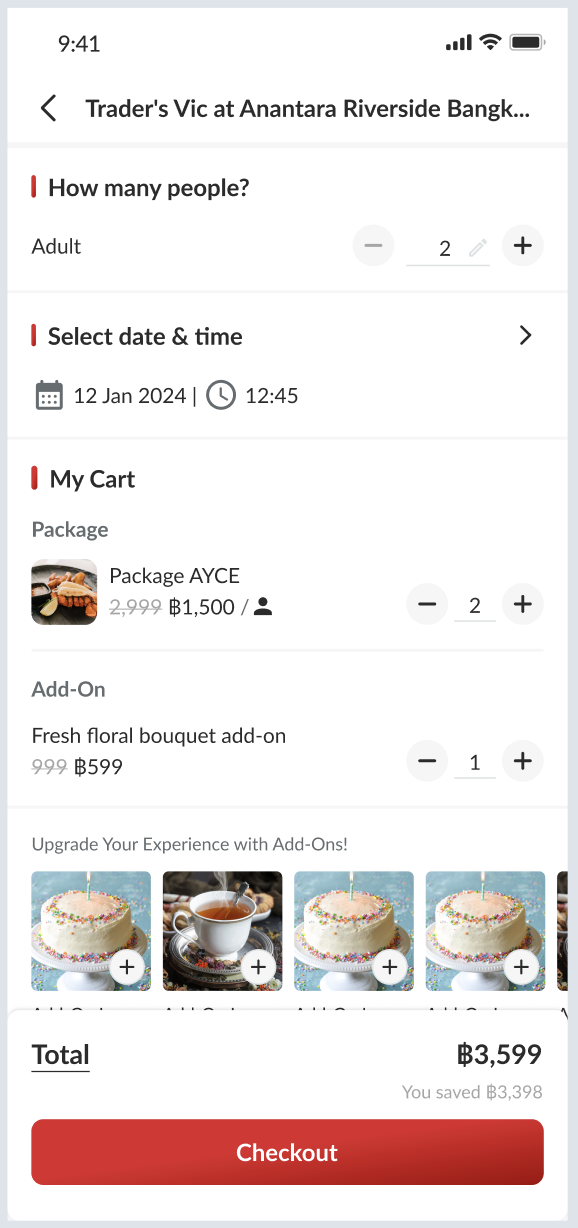
Backend Update
Required API:
- Create add-on package list (for store page)
- Create add-on package detail (for detail add on)
- Adjust calculate package price (for cart and checkout page)
- Adjust validate voucher (for offers checkout page)
- Adjust reservation API payload, calculation, and serializer (for confirmation page)
Required Object Add-On Package:
- id
- package group
- name th/en/cn
- description th/en/cn
- images cover
- term and condition
- minutes in advance
- custom menu id (optional)
- menu (type, link, etc) same as package
- hide_menu_price
- price type
- original price
- selling price
- commission
- kids price
- kids price policy
- currency
- type code
- type name
- opening hours
- outlets
- is_visible_for_staff
- last booking was made
- start date
- end date
- updated at
- created at
- rank (based on package list)
- custom label (based on Figma client)
- limit setting (phase 2)
API add-on package list
Create API to get list of add on packages. It can be like this: API: {base api}/add_on_packages.json?restaurant_id=1146&locale=en&is_visible_for_staff=true Fake: https://hungryhub-team.github.io/fake-json/addon-package.json Response:
{
	"data": [],
	"status": true,
	"message": null
}
(since it too long can see on that fake json)
API add-on package detail
Create API to get list of add on packages. It can be like this: API: {base api}/add_on_packages/{id}.json?locale=en Fake: https://hungryhub-team.github.io/fake-json/addon-package/1.json Response:
{
	"data": {},
	"status": true,
	"message": null
}
(since too long can see on that fake json)
Adjust API calculate package price
We need to add new param on API calculate price: Before:
{
	"adult": 2,
	"kids": 0,
	"package_bought": [
		{
			"id": "4402",
			"quantity": 2
		}
	],
	"reservation_date": "2024-12-18"
}
After:
{
	"adult": 2,
	"kids": 0,
	"package_bought": [
		{
			"id": "4402",
			"quantity": 2
		}
	],
	"add_on_bought": [
		{
			"id": "123",
			"quantity": 2
		}
	],
	"reservation_date": "2024-12-18"
}
If per person, quantity = adult if per item based on user-selected quantity
Updated Response:
{
	"status": true,
	"message": "",
	"data": {
		"charge_price": 100,
		"currency": "SGD",
		"total_price": 200,
		"charge_amount_type": "relative",
		"charge_percent": 50,
		"charge_type": "on_hold",
		"original_delivery_fee": 0,
		"delivery_fee": "0",
		"delivery_fee_currency": "THB",
		"delivery_fee_in_baht": "0",
		"delivery_fee_per_km_in_baht": 10,
		"free_delivery_fee_threshold_in_baht": 0,
		"delivery_radius": 5,
		"total_package_price": 152,
		"selected_packages": [
			{
				"id": 214,
				"restaurant_package_id": "4402",
				"name": "Romantic Dinner",
				"quantity": 2,
				"type": "adult",
				"price": 15000,
				"base_price": 7500
			}
		],
		"selected_add_ons": [
			{
				"id": 123,
				"restaurant_add_on_id": "4402",
				"name": "Flower",
				"quantity": 1,
				"type": "per_item",
				"price": 5000,
				"base_price": 5000
			}
		],
		"total_point_earn": 1,
		"is_dine_in": true,
		"used_voucher_amount_by_hh": 0,
		"used_voucher_amount_by_restaurant": 0,
		"voucher_deductibles": [],
		"used_vouchers": []
	}
}
Adjust API validate voucher
We need to add a new param on API validate price: Before:
{
	"restaurant_id": "997",
	"adult": 2,
	"kids": 0,
	"service_type": "dine_in",
	"voucher_code": [
		"TESTNOLIMIT"
	],
	"packages": [
		{
			"id": "4340",
			"quantity": 2,
			"menu_sections": []
		}
	],
	"reservation_date": "2024-06-15"
}
After:
{
	"restaurant_id": "997",
	"adult": 2,
	"kids": 0,
	"service_type": "dine_in",
	"voucher_code": [
		"TESTVOUCHER"
	],
	"packages": [
		{
			"id": "4340",
			"quantity": 2,
			"menu_sections": []
		}
	],
	"add_ons": [
		{
			"id": "123",
			"quantity": 1
		}
	],
	"reservation_date": "2024-12-18"
}
The response similar to calculate price, but we update data on meta.calculate
	"meta": {
		"calculate": {
			"charge_price": 185,
			"currency": "THB",
			"total_price": 185,
			"charge_amount_type": "relative",
			"charge_percent": 100,
			"charge_type": "on_charge",
			"original_delivery_fee": 0,
			"delivery_fee": 0,
			"delivery_fee_currency": "THB",
			"delivery_fee_in_baht": "0",
			"delivery_fee_per_km_in_baht": 10,
			"free_delivery_fee_threshold_in_baht": 1000,
			"delivery_radius": 15,
			"total_package_price": 2300,
			"selected_packages": [
				{
					"id": 214,
					"restaurant_package_id": "4402",
					"name": "es kopyor EN",
					"quantity": 2,
					"type": "adult",
					"price": 15000,
					"base_price": 7500
				}
		    ],
			"selected_add_ons": [
				{
					"id": 123,
					"restaurant_package_id": "123",
					"name": "Flower",
					"quantity": 1,
					"type": "per_item",
					"price": 5000,
					"base_price": 5000
				}
			],
			"total_point_earn": 31,
			"is_dine_in": true,
			"used_voucher_amount_by_hh": 115,
			"used_voucher_amount_by_restaurant": 0,
			"voucher_deductibles": [],
			"used_vouchers": [
				{
					"id": 5953,
					"name": "TESTVOUCHER",
					"voucher_code": "TESTVOUCHER",
					"amount": 15,
					"usage_type": "one_time",
					"for_package": true
				}
			]
		},
		"total_voucher_amount": 0
	}
Update
Find available add-ons based on date and time
API: {{ base_api }}/restaurants/{id}/find_available_addons.json Payload:
{
	"date": "2025-02-25",
	"start_time": "12:00"
}
Response:
Similar to this API: https://hungryhub-team.github.io/fake-json/addon-package.json
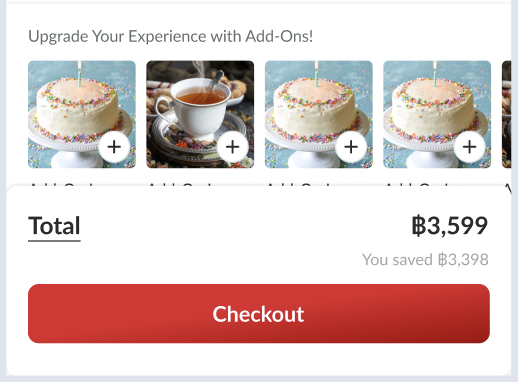
This API can be used to “Upgrade Your Experience with Add-Ons”. To make sure add-ons that show up are the add-ons that are available on that date and time.
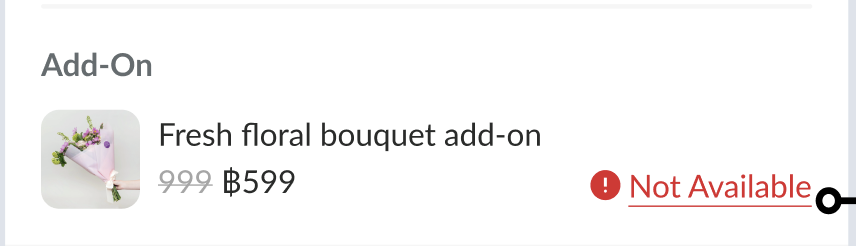
 Also, we can compare with the selected add-on, if the selected add-on is not available on the array response, we can show “not available” alert.
Hybrid Changes
Since we had new selected data from booking process we’ll update onCheckout response. Event: onCheckout Response:
// existing response
"add_ons": [
			{
				"id": 123,
				"name": "Flower",
				"quantity": 1,
				"type": "per_item",
				"selling_price": "559",
				"currency": "THB",
			}
		]
	}
// existing response
iOS and android will send back that payload to doSetupData again.
Adjust reservation API payload and response
For reservation we’ll adjust payload a little bit similar like validate voucher. Payload:
// existing payload
"add_ons": [
		{
			"id": "123",
			"quantity": 1
		}
	],
// existing payload
And the reservation object will have something like this:
// existing payload
"selected_add_ons": [
				{
					"id": 123,
					"restaurant_package_id": "123",
					"name": "Flower",
					"quantity": 1,
					"type": "per_item",
					"price": 5000,
					"base_price": 5000
				}
			],

// existing payload
Design
https://www.figma.com/file/HFWUL1wrPoe92uMxPJDYml/Add-On-Client-Side?type=design&node-id=0-1&mode=design&t=eSc3OWoeVzWYVYMA-0https://www.figma.com/file/2AifYqyASQ7bw1YpAshoiL/Add-On-Admin%2FOwner-Dashboard?type=design&node-id=2-2&mode=design&t=HDDSgIgfsZndGbzf-0
PRD & Task
https://app.clickup.com/9003122396/docs/8ca1fpw-11562/8ca1fpw-35556 https://app.clickup.com/9003122396/docs/8ca1fpw-7922/8ca1fpw-35516 https://app.clickup.com/t/86cudx6p1 https://app.clickup.com/t/86cxeeqz9
API Blueprint
| Method | Path | URL | Description | Payload | Response |
|---|---|---|---|---|---|
| GET | {{base_url}}/admin/add_ons/:id.json | { “success”: true, “message”: null, “data”: { “id”: 1, “package_group_id”: 123, “minimum_booking_time_in_advance”: 30, “name”: { “en”: “Testing Add On Title En”, “th”: “Testing Add On Title Th”, “cn”: “Testing Add On Title Cn” }, “description”: { “en”: “Testing Add On Description En”, “th”: “Testing Add On Description Th”, “cn”: “Testing Add On Description Cn” }, “cover_url”: “/uploads/add_ons/add_on/tnc_image/1/karayama-logo.jpg”, “tnc_url”: “/uploads/add_ons/add_on/tnc_image/1/karayama-logo.jpg” } } | |||
| POST | {{base_url}}/admin/add_ons.json | { “add_on”: { “name_en”: “Testing Add On Title En”, “name_th”: “Testing Add On Title Th”, “name_cn”: “Testing Add On Title Cn”, “description_en”: “Testing Add On Description En”, “description_th”: “Testing Add On Description Th”, “description_cn”: “Testing Add On Description Cn”, “package_group_id”: 123, “minimum_booking_time_in_advance”: 30 // in minutes // TODO: add another attributes } } | { “success”: true, “message”: “Add on created successfully”, “data”: { “id”: 3, “package_group_id”: 123, “minimum_booking_time_in_advance”: 30, “name”: { “en”: “Testing Add On Title En”, “th”: “Testing Add On Title Th”, “cn”: “Testing Add On Title Cn” }, “description”: { “en”: “Testing Add On Description En”, “th”: “Testing Add On Description Th”, “cn”: “Testing Add On Description Cn” }, “cover_url”: “”, “tnc_url”: “” } } | ||
| PUT => for batch update PATCH => for partial update | {{base_url}}/admin/add_ons/:id.json | { “add_on”: { “name_en”: “Testing Add On Title En”, “name_th”: “Testing Add On Title Th”, “name_cn”: “Testing Add On Title Cn”, “description_en”: “Testing Add On Description En”, “description_th”: “Testing Add On Description Th”, “description_cn”: “Testing Add On Description Cn”, “package_group_id”: 12, “minimum_booking_time_in_advance”: 60 // TODO: add another attributes } } | { “success”: true, “message”: “Add on updated successfully”, “data”: { “id”: 1, “package_group_id”: 12, “minimum_booking_time_in_advance”: 60, “name”: { “en”: “Testing Add On Title En”, “th”: “Testing Add On Title Th”, “cn”: “Testing Add On Title Cn” }, “description”: { “en”: “Testing Add On Description En”, “th”: “Testing Add On Description Th”, “cn”: “Testing Add On Description Cn” }, “cover_url”: “”, “tnc_url”: “/uploads/add_ons/add_on/tnc_image/1/karayama-logo.jpg” } } | ||
| DELETE | {{base_url}}/admin/add_ons/:id.json | { “success”: true, “message”: “Add-on deleted successfully”, “data”: null } |
New Query
DB Schema / Database Migration
- New
add_onstable - New
add_on_agenda_start_timestable - New
add_on_agendastable - New
add_on_custom_labelstable - New
add_on_kids_pricestable - New
add_on_menustable - New
add_on_opening_hourstable - New
add_on_pricingstable - New
restaurant_add_onstable - New
reservation_add_onstable - Add
is_add_oncolumn onHhPackage::Package::HungryAtHometable - Update the
self_pickupcondition intoadd_on - Add
add_onselected_add_ons,column onreservation_propertiestable
Improvement:
| Feature Name | Date | What Changed | Description |
|---|---|---|---|