Benchmarking
Description / Background
The Benchmarking feature provides restaurants with visibility into their performance compared to similar restaurants and competitors. This feature motivates restaurants to improve by offering transparent, comparative insights and encourages alignment with market trends through healthy competition within similar categories.
The system displays performance data and average spend per person metrics over time, comparing restaurants against:
- Similar Tags: Restaurants grouped by primary cuisine, dining style, and city
- Competitors: Manually assigned competing restaurants
Objectives
- Motivate restaurants to improve performance through transparent, comparative insights
- Encourage restaurants to align with market trends
- Promote healthy competition within similar categories
- Provide partners with data-driven decision support
- Calculation Logic:
- Comparison Base
- All months/weeks are compared against the oldest month/week in the selected range
- The base period always shows “Base” instead of 0%
- Performance Report (GMV Growth):
- Monthly:
((Current Month GMV - Base Month GMV) / Base Month GMV) × 100 - Weekly:
((Current Week GMV - Base Week GMV) / Base Week GMV) × 100
- Monthly:
- Average Spend Per Person Report:
- Monthly:
((Current Month avg spend - Base Month avg spend) / Base Month avg spend) × 100 - Weekly:
((Current Week avg spend - Base Week avg spend) / Base Week avg spend) × 100
- Monthly:
- Using the restaurant’s localized currency for
Average Spend Per PersonandPerformance reports
- Comparison Base
- Similar Tags Group:
- Automatically grouped based on:
- Primary cuisine tag (e.g., “Japanese”)
- Primary dining style tag (e.g., “Rooftop”)
- City from restaurant settings (e.g., “Bangkok”)
- Uses the average of all restaurants with each tag/city
- Automatically grouped based on:
- Competitor Group:
- Manually set per restaurant in Edit Restaurant Page
- Searchable dropdown for restaurant names
- Can be displayed anonymously or by real name
- When you filter monthly report the default value will be 3 months
- The Data Source Range is the last 12 months
- The Airbyte data refresh is scheduled to run every 2 hours.
- Benchmark data will automatically show the currency based on the restaurant’s default currency setting.
Scope
- Performance report (GMV growth)
- Average spend per person report
- Monthly and weekly views
- Similar tags and competitor comparisons
- Branch-specific filtering for group login
Location
Partner Portal -> Analytics -> Benchmark
How to find Benchmarking data
- Open Partner Portal.
- Go to Analytics.
- Click Benchmark.
- Select filters:
- Data View: Monthly / Weekly
- Date Range: 2-6 periods
- Data Type: All / Similar Tags / Competitors
- Branch (for group login)
- Click Submit.
How to set competitors
- Open Admin Dashboard -> Edit Restaurant Page.
- Find Benchmark section.
- Assign competitors from searchable dropdown.
- Optional: enable Show as Anonymous.
If no competitors are assigned, competitor section is hidden in Partner Portal.
Sequence Diagram / Flow
This sequence diagram shows how filter criteria are sent from Partner Portal to backend services and then mapped into benchmark response tables.
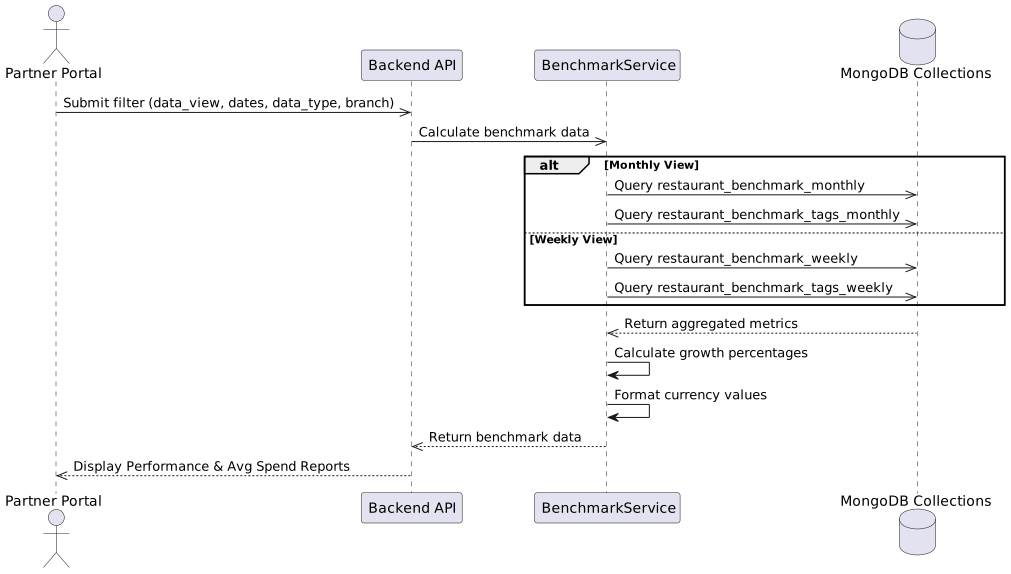
Data Sources
Pre-aggregated MongoDB collections:
restaurant_benchmark_monthlyrestaurant_benchmark_tags_monthlyrestaurant_benchmark_weeklyrestaurant_benchmark_tags_weekly
PostgreSQL tables:
restaurantsrestaurant_tagsrestaurant_restaurant_tags
Partner Portal Implementation
UI Components
- Added Benchmark page under Analytics.
- Added monthly/weekly date pickers.
- Added data type filter.
- Added table styling with performance indicators.
Data Handling
- Added report store integration.
- Added loading and skeleton states.
- Added branch selector for group login.
Localization
- Added i18n translations (en, th, zh, ms).
https://github.com/hungryhub-team/book-bite/pull/997
Backend Implementation
- Added MongoDB monthly/weekly collection accessors to MongoDbService::Connection:
restaurant_benchmark_monthlyrestaurant_benchmark_tags_monthlyrestaurant_benchmark_weeklyrestaurant_benchmark_tags_weekly
- Enhanced CalculateService to use pre-aggregated collections for improved performance
- Implemented robust period generation with MongoDB lookup and fallbacks
- Added
generate_monthly_periodsmethod with MongoDB query for month labels - Added
generate_weekly_periodsmethod using ISO 8601 week numbers - Implemented fallback period generators when MongoDB data is unavailable
- Refactored
fetch_restaurant_metricto query pre-aggregated collections - Refactored
fetch_tag_metricto query pre-aggregated collections - Added
build_match_criteria_for_restaurantfor building MongoDB queries - Added
build_match_criteria_for_tagfor building MongoDB queries - Implemented
generate_month_numbershelper for date range calculations - Implemented
generate_week_numbershelper using ISO 8601 standards - Added comprehensive error handling and APM error reporting
- Updated service documentation with detailed examples and return types
- Added unit tests for MongoDB accessors and helper methods
- Included spec for service initialization and validation
- Updated currency formatting to display whole numbers without decimal places
- Fixed GMV value handling by converting MongoDB decimals to cents accurately
- Updated average spend per person formatting to show whole numbers
- Modified
format_currency_valueto convert decimal amounts to cents - Enhanced
format_currency_with_symbolto useno_cents: trueoption - Updated method documentation to clarify decimal-to-cents conversion
- Improved consistency in benchmark report currency display
- Removed the hardcoded current_restaurant = current_staff.restaurants.first.
- The benchmark service call now passes the real assigned restaurants list instead of restaurants: [].
- Keeps the guard clause that returns 422 when staff has no assigned restaurants (“No restaurants assigned to staff”).
- Added by_city_id scope.
- Added
fetch_city_aggregated_metrics(city_id, periods):- Aggregates GMV, reservations, covers, restaurant counts, avg spend/person, etc.
- Adds GMV growth % vs base period when grouping results.
- Added
fetch_tag_aggregated_metrics(tag_id, country_id, periods):- Uses
ARRAY JOIN tag_ids AS tag_idto filter tags efficiently. - Scopes by country_id (so tag benchmark compares within the same country).
- Also calculates growth % in grouped output.
- Uses
- Added
period_label_columnrequirement (subclasses specify month_label / week_label). - Replaced
.findwith.detectin a couple places (behavior is effectively the same). - Tag benchmark fetch now calls
fetch_tag_metrics_clickhouse(tag.id, restaurant.country_id, ...)so results are scoped to the restaurant’s country. - City benchmark fetch now comes from
restaurant_model.fetch_city_metrics(...)(aggregation) instead ofcity_model. - Removed
tag_modelandcity_modelselection methods entirely (since restaurant MV is used for everything). extract_metric_valuesupdated to handle aggregation result keys:- For
:gmv, it now prefers:sum_gmv(aggregation output) then falls back to:gmv.
- For
format_currency_valueno longer always returns Thai Baht formatting.- It detects currency from
rest.default_currency || rest.currency_code || 'THB'. - Uses HhMoney to format output (no cents), supports currencies like THB, SGD, MYR, USD.
- For nil/zero value: returns formatted zero in the correct currency (e.g.
฿0,S$0,RM0,$0). - For non-integer values from ClickHouse: converts decimal amount to cents and rounds before formatting.
- Adds ClickhouseQueryService to centralize ClickHouse batch querying.
PRD & Task
Design
Partner Portal Desktop - Benchmark
API Blueprint
| Method | Path | URL | Description | Payload |
|---|---|---|---|---|
| GET | /benchmark | /api/v1/benchmark | Fetch benchmark data for selected restaurant/date range | data_view_type, start_month/start_date, end_month/end_date, data_type, restaurant_id (optional) |
Request Parameters
{
  "data_view_type": "monthly|weekly",
  "data_type": "all|tags|competitor",
  "start_month": "2025-09",
  "end_month": "2025-11",
  "start_date": "2025-09-01",
  "end_date": "2025-09-30",
  "restaurant_id": 1198
}
DB Schema / Database Migration
No new database migrations required.
Improvement
No additional improvements recorded yet.