RSpec
Getting started with RSpec
https://learning.oreilly.com/library/view/the-rails-5/9780134657691/ch23.xhtml#sec23_3
How to run specific spec
I recommend using the rspec command directly rather than going through any rake tasks that RSpec defines because it’s a bit faster. The rspec command can take one or more arguments—files, directories, or file globs. For file globs, all matching files are run:
**rspec**  **spec/models/project_spec.rb**  **spec/models/task_spec.rb
#** RSpec makes it easy to run a single spec. All you need to do is add the line number to the file along with a colon:
**rspec**  **spec/models/task_spec.rb:5**
use focus tag
  it "should run when I ask for focused tests", focus: true do
 	end

 	fit "should not run when I ask for focused tests" do
 	end
rspec --tag focus
If you want to exclude tags, you prefix the tag name with a tilde:
rspec --tag ~focus
Run the failed test only
rspec --only-failures
rspec --next-failure
Execute RSpec automatic (Hot reload) You can use the Guard gem, but sometimes it will crash when we try to install it in our app.
bundle exec guard
it will auto load the rspec code when you update the code. Reference Read more at https://learning.oreilly.com/library/view/rails-5-test/9781680505566/f_0149.xhtml
Testing Legacy Code
https://learning.oreilly.com/library/view/rails-5-test/9781680505566/f_0155.xhtml https://learning.oreilly.com/library/view/working-effectively-with/0131177052/
Tips running RSpec faster
Use Guard gem
and update the Gemfile like this by adding --next-failure
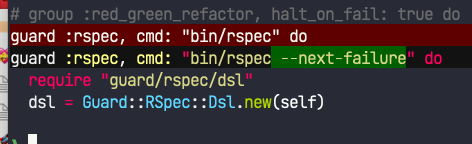
# run this on terminal
bundle exec guard
it will auto load the rspec code when you update the code. You can read this for references. https://www.betterspecs.org/ We manipulate time using Timecop gem
it "prevent review notif to be sent before the dining time" do
end
Manipulate token in API V5
include_examples 'api_v5_mock_user'
use this to override the token on controller, so they think it was valid.