How to add a new authentication on an API
See https://github.com/doorkeeper-gem/doorkeeper doc before you continue
add before_action :doorkeeper_authorize! to the controller, for example:
then you will find the resource using the following code
user = User.find_by id: doorkeeper_token.resource_owner_id
Then add Access Token and Access Grant tables to the resource, following is an example to add doorkeeper tables to User table (https://doorkeeper.gitbook.io/guides/ruby-on-rails/getting-started)
  # Doorkeeper setup <https://doorkeeper.gitbook.io/guides/ruby-on-rails/getting-started>
  has_many :access_grants,
           class_name: 'Doorkeeper::AccessGrant',
           foreign_key: :resource_owner_id,
           dependent: :delete_all # or :destroy if you need callbacks

  has_many :access_tokens,
           class_name: 'Doorkeeper::AccessToken',
           foreign_key: :resource_owner_id,
           dependent: :delete_all # or :destroy if you need callbacks
then update the routes (config/routes.rb)
use_doorkeeper scope: 'admin_auth'
the scope will affect the URL, for example, the generated routes of that code is:
#                                                           GET             /admin_auth/authorize/native(.:format)                                                     doorkeeper/authorizations#show
#                                                           GET             /admin_auth/authorize(.:format)                                                            doorkeeper/authorizations#new
#                                                           DELETE          /admin_auth/authorize(.:format)                                                            doorkeeper/authorizations#destroy
#                                                           POST            /admin_auth/authorize(.:format)                                                            doorkeeper/authorizations#create
#                                                           POST            /admin_auth/token(.:format)                                                                doorkeeper/tokens#create
#                                                           POST            /admin_auth/revoke(.:format)                                                               doorkeeper/tokens#revoke
#                                                           POST            /admin_auth/introspect(.:format)                                                           doorkeeper/tokens#introspect
#                                                           GET             /admin_auth/applications(.:format)                                                         doorkeeper/applications#index
#                                                           POST            /admin_auth/applications(.:format)                                                         doorkeeper/applications#create
#                                                           GET             /admin_auth/applications/new(.:format)                                                     doorkeeper/applications#new
#                                                           GET             /admin_auth/applications/:id/edit(.:format)                                                doorkeeper/applications#edit
#                                                           GET             /admin_auth/applications/:id(.:format)                                                     doorkeeper/applications#show
#                                                           PATCH           /admin_auth/applications/:id(.:format)                                                     doorkeeper/applications#update
#                                                           PUT             /admin_auth/applications/:id(.:format)                                                     doorkeeper/applications#update
#                                                           DELETE          /admin_auth/applications/:id(.:format)                                                     doorkeeper/applications#destroy
#                                                           GET             /admin_auth/authorized_applications(.:format)                                              doorkeeper/authorized_applications#index
#                                                           DELETE          /admin_auth/authorized_applications/:id(.:format)                                          doorkeeper/authorized_applications#destroy
#                                                           GET             /admin_auth/token/info(.:format)                                                           doorkeeper/token_info#show
then create a new application at http://localhost:3000/oauth/applications
You have to insert your URI from other application to authorization e.g.: https://localhost:3000/oauth2/callback
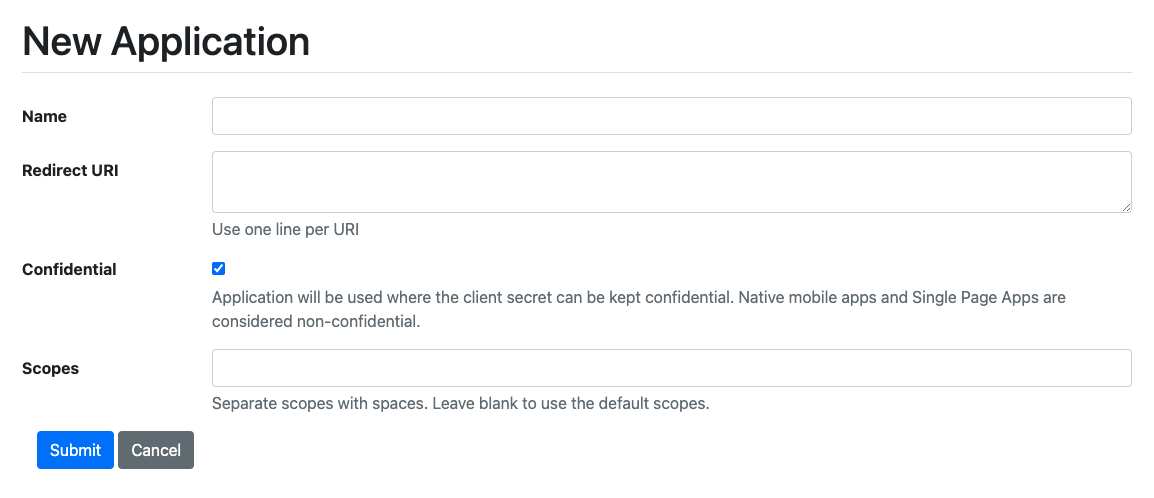
for the scopes, you can use “default”
Create a new rails app to test the authentication
After you create the new application, it will show the application name. Click it for the details. It contains a UID and a Secret that you can use in your application.
You must include UID and Secret on your controller that you insert into the Redirect URI. e.g.: Oauth2Controller
This is an example of the code on the controller:
class Oauth2Controller < Api::V1::ApplicationController
  def callback
    key = params[:code]
    if key.blank?
      param = {
        message: 'please click menu button again to authorize'
      }
      redirect_to "#{Figaro.env.FRONTEND_HOST}/error#{param.to_param}",
                  allow_other_host: true
    else
      client = OAuth2::Client.new("#{Figaro.env.OAUTH2_UID}",
                                  "#{Figaro.env.OAUTH2_SECRET}",
                                  token_url: '/admin_auth/token.json',
                                  site: "#{Figaro.env.SERVER_HOST}",
                                  scopes: 'default')
      access_token = client.auth_code.get_token("#{key}", redirect_uri: "#{Figaro.env.BACKEND_HOST}/oauth2/callback")
      redirect_to "#{Figaro.env.FRONTEND_HOST}/auth?token=#{access_token.token}",
                  allow_other_host: true
    end
  end
end
You can test if your Redirect URI works by clicking "Authorize.” And it will redirect to sign in page if your device token is not authorized You have to create new owner or use one off owner data on your DB. Then you have to create local storage to store the token, and then redirect to another URL that you want: e.g. :
checkToken() {
			if(this.$route.query.token) {
				this.success = true;
				localStorage.setItem("access_token", this.$route.query.token);

				let redirectUri = localStorage.getItem('redirect');
				setTimeout(() => {
					localStorage.removeItem('redirect');
					window.location = redirectUri;
				}, 3000);
			}
		}
If the user has already logged in, then it will receive a token and the FE Web will get the token like
https://hh-menu-frontend-staging.netlify.app/auth?token=3SzxoEyxA0Jz9mZkYNZF1L039LxW3oNHXiKgo1C2CGY to redirect to the URL that you want.
../Image-Video/Backend/How_to_add_a_new_authentication_on_an_API_20250820150322_video1064252165.mp4