[external] Restaurant Package Display: API to UI Attribute Mapping Guide
This document details the process for mapping package attributes from an API response to their corresponding display elements on user interfaces for restaurant packages.
API Endpoint:
GET /api/vendor/v1/restaurant_packages.json?restaurant_id={restaurant_id}
GET /api/vendor/v1/restaurants/{restaurant_id}/find_available_packages.json?locale=en
Parameters:
restaurant_id: The ID of the restaurant for which you want to find packages.
Example Request:
GET /api/vendor/v1/restaurant_packages.json?restaurant_id=997
GET /api/vendor/v1/restaurants/997/find_available_packages.json?locale=en
Example Response:
{
  "data": [
  {
    "id": "31784",
    "type": "restaurant_packages",
    "attributes": {
      "restaurant_id": 997,
      "original_price": {
        "price": null,
        "currency": "thb",
        "format": ""
      },
      "name": "NEW: AYCE Buffet with 1 Premium Dish & Free Flow Drinks 2 Hours!",
      "rules": [
        {
          "price_description": "",
          "price": "฿1,499",
          "min_seat": 2,
          "max_seat": "Infinity",
          "per_pack": null,
          "duration": 120,
          "kids_price_rate": 50
        }
      ]
    }
    ...
  }
  ],
  "success": true,
  "message": null
}
CDN Endpoint:
Production: https://images.hungryhub.com
Venus staging: https://hh-partner.sgp1.digitaloceanspaces.com
Package Card Mobile UI
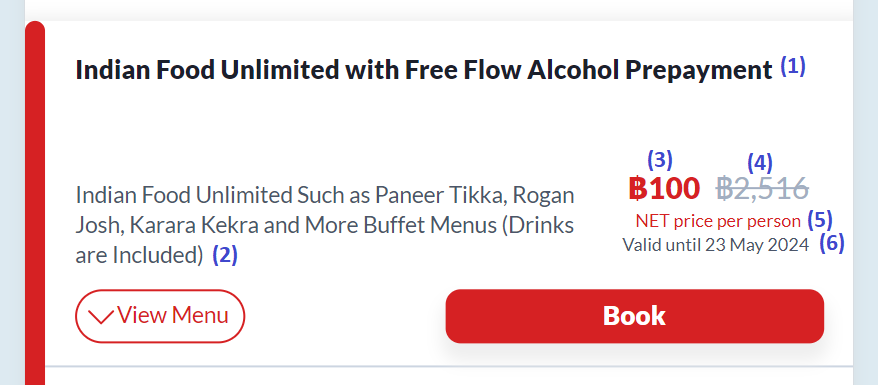
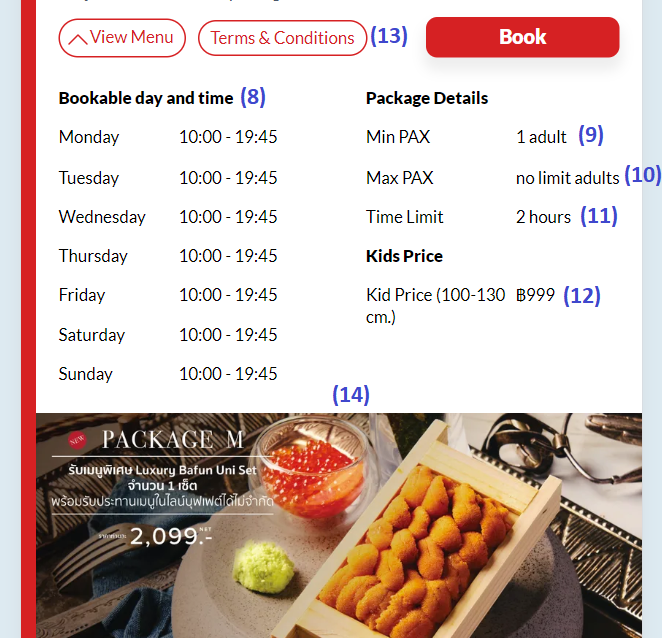
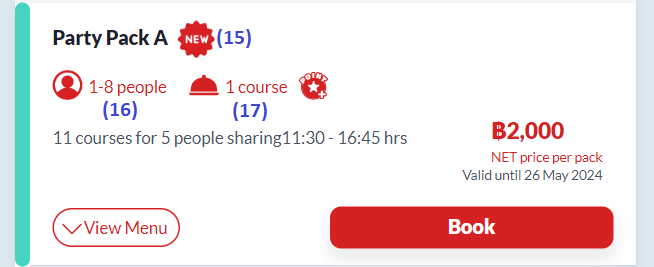
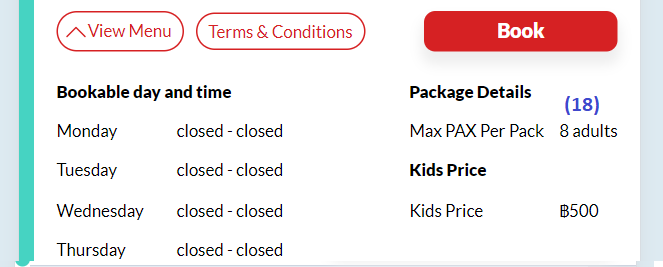
Attributes
| No | Description | Attributes | Notes |
|---|---|---|---|
| (1) | Package name | name | |
| (2) | Package description | description | |
| (3) | Discounted price | rules[rules.length - 1].price | Last object/element of rules |
| (4) | Original price | original_price | Show original price only if it's more expensive than discounted price |
| (5) | Pricing type | pricing_type | NET price per pack/person |
| (6) | Valid until | end_date | YYYY-MM-DD |
| (8) | Bookable day and time | opening_hours | If open or closed is null/undefined, show "N/A" (Not Available) |
| (9) | Min pax | rules[0].min_seat / package_info.min_pax | If the package has rules attributes, use the first object of rules attributes If the package doesn't have rules attributes, use package_info.min_pax |
| (10) | Max pax | rules[rules.length -1].max_seat / package_info.max_pax | If the package has rules attributes, use the last object of rules attributes If the rules[rules.length -1] equals to "Infinity", show "No limit" instead If the package doesn't have rules attributes, use package_info.max_pax |
| (11) | Time limit | package_info.time_limit | Show time limit if the package_type is ayce |
| (12) | Kids price | kids_price_v2 | Show kids price if kids_price_v2 attributes exist and accept_kids equals to true in restaurant API (/vendor/v1/restaurants/{id}.json) |
| (13) | Terms & conditions | package_info.tnc_link | Check terms & conditions explanation |
| (14) | Menu | hh_menu_v2_html_preview_link menus | Check menu explanation below |
| (15) | New restaurant icon | custom_labels.icon_url | If the URL doesn't contain "http", it's necessary to add domain |
| (16) | Package per pack rules | rules[0].per_pack | Only show if per_pack in the first rules is not null If is_accept_many_quantity equals to true and max pax per pack (18) is greater than 1, show "1-max pax per pack(18)" Else, show max pax per pack |
| (17) | Course | no_of_courses | Only show if course is not null |
| (18) | Max pax per pack | rules[0].per_pack / package_info.per_pack | If the package has rules attributes, use the first object of rules If the package doesn't have rules attributes, use package_info.per_pack |
Terms & Conditions Explanation
Example Response:
https://hungryhub.com/uploads/restaurants/tc/image/110/tc.png
or
/uploads/hh_package/package/ayce/tnc_image/1277/Terms___Condition_AYCE__2_.png
Sometimes the response doesn't contain http, so it is necessary to add the domain (in CDN Endpoint section) to the URL.
Example response on hh-venus:
/uploads/hh_package/package/ayce/tnc_image/1277/Terms___Condition_AYCE__2_.png
Final URL will be:
https://hh-partner.sgp1.digitaloceanspaces.com/uploads/hh_package/package/ayce/tnc_image/1277/Terms___Condition_AYCE__2_.png
Example response on production:
/uploads/hh_package/package/ayce/tnc_image/3937/AYCE_TC.png
Final URL will be:
https://images.hungryhub.com/uploads/hh_package/package/ayce/tnc_image/5103/AYCE_TC.png
Menu Explanation
Menu can be displayed by using image, iMenuPro, or Menu V2.
- Show menu using image Attributes:
rules
If menus.type contains image or img and menus.data.img exist, show menu.
Example response:
"menus": {
     "type": "image",
     "data": {
     "img": [
           {
            "thumb": "/uploads/hh_package/package_menu/image/17325/breakfast-cafe-menu.png",
            "original": "/uploads/hh_package/package_menu/image/17325/breakfast-cafe-menu.png"
           }
         ]
      }
 },
Notes:
- If the URL doesn't contain "http", it's necessary to add domain (same as T&C)
- Show menu as image if hh_menu_v2_html_preview_link is empty string
2. Show menu using Menu V2 Attributes:
hh_menu_v2_html_preview_link
If hh_menu_v2_html_preview_link exist, fetch/create http request using hh_menu_v2_html_preview_link as the URL to get the real HH menu link. Extract the response body as text, it will be used as iframe source. Example:
fetch(hh_menu_v2_html_preview_link)
   .then((response) => response.text())
   .then((text) => {
      real_hh_menu_v2 = text;
    })
)
<iframe
  src="real_hh_menu_v2"
></iframe>
3. Show menu using iMenuPro Attributes:
rules
If menus.type contains imenupro and menus.data.imenupro exist, show menu.
Example response:
"menus": {
   "type": "imenupro",
    "data": {
        "imenupro": [
            {
                "loaded": false,
                "link": "https://hh-venus.my.id/en/restaurant_packages/1619/menu.html?updated_at=hh_package%2Frestaurant_packages%2F1619-20240502082134000000"
            }
         ]
     }
}
Menu will be displayed in iframe using menus.data.imenupro.link
Notes:
- If menus.type contains image or img, manipulate link in data by adding
?imenupro_only=true
Get Cities
This document outlines the procedure for mapping package attributes retrieved from an API response to their corresponding display elements on user interfaces, specifically for the "Get List Cities" functionality.
API Endpoint :
Below is the endpoint provided for retrieving the list of cities:
Url : {{base_url}}/api/vendor/v1/cities.json
Response :
example response :
{
    "data": [
        {
            "id": "1",
            "type": "cities",
            "attributes": {
                "name": "Bangkok",
                "home_description": "Come 4 pay 3, Deal Dee Very March!",
                "icon": {
                    "url": "https://images.hungryhub.com/uploads/city/icon/1/Bangkok.png"
                }
            }
        },
        {
            "id": "2",
            "type": "cities",
            "attributes": {
                "name": "Chiang Mai",
                "home_description": "No.1 Dining App for Special Occasions",
                "icon": {
                    "url": "https://images.hungryhub.com/uploads/city/icon/2/Chiangmai.png"
                }
            }
        }
    ],
    "success": true,
    "message": null
}
Restaurant Detail Information
This document describes the procedure for mapping package attributes retrieved from an API response to the appropriate display elements in the user interface, specifically for the “restaurant details” functionality.
API Endpoint:
URL: {{base_url}}/api/vendor/v1/restaurants/{{restaurant_id}}.json?locale={{lang}}&include_pictures=true
The following is an example of the response returned by the above API:
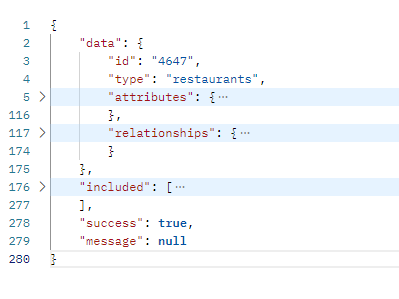
Data Mapping
Restaurant Detail / Product Information
- Restaurant Name
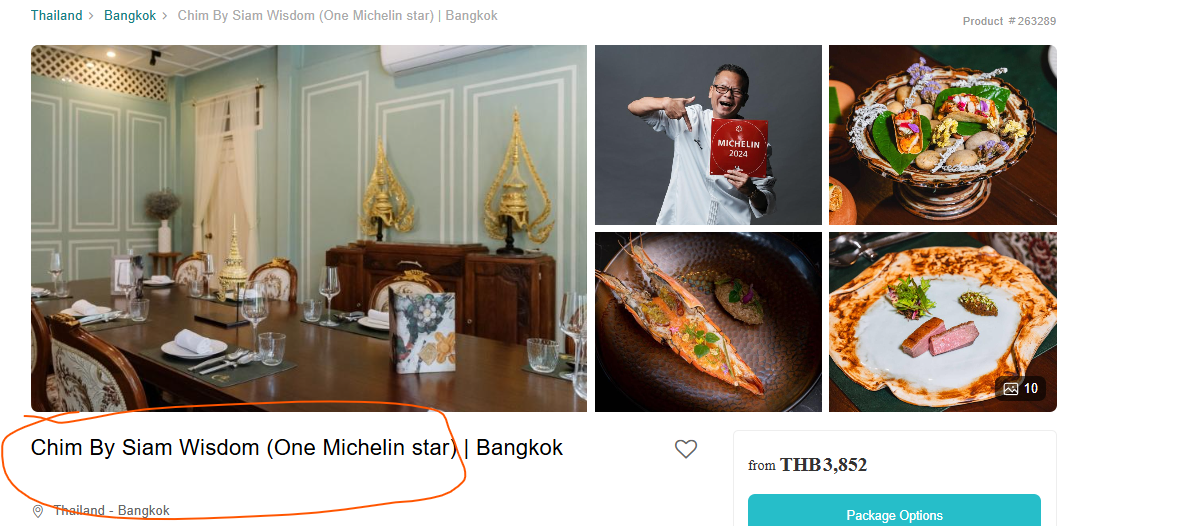 To retrieve the restaurant name, use the following attribute:
 data.attributes.name
Alternatively, if a specific language is required, you can utilize data.attributes.names, which contains objects for each available language. For example:
data.attributes.names.enfor Englishdata.attributes.names.thfor Thaidata.attributes.names.cnfor Chinese This approach allows you to select the desired language-specific value directly.
2. Restaurant's city of origin
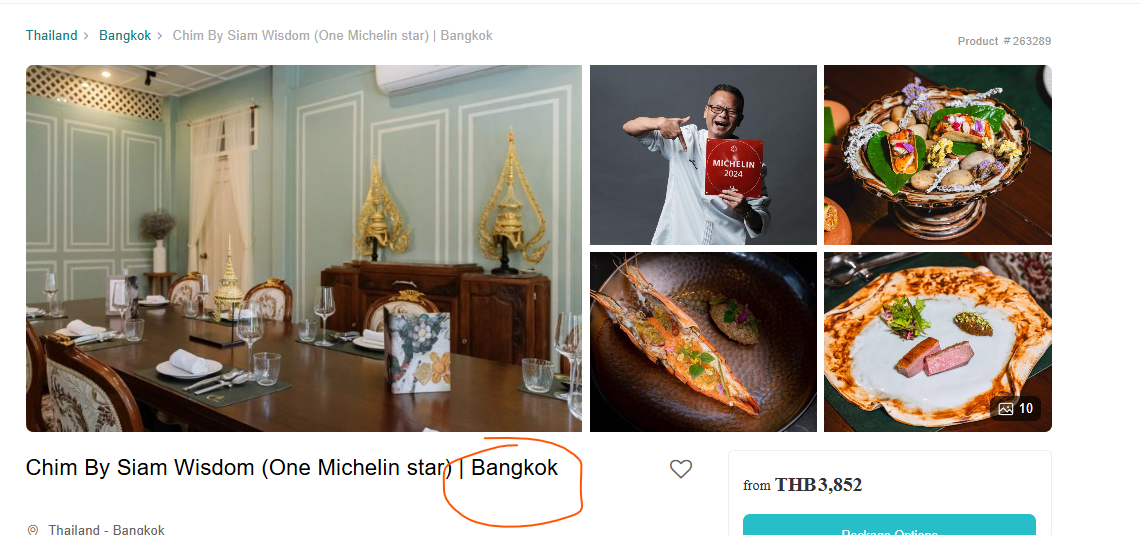 To determine the restaurant's city of origin, you can use
 data.attributes.city_id and match the city_id value against the corresponding results from the API response Get Cities (https://doc.clickup.com/d/h/8ca1fpw-33036/3e552c1a079c66d/8ca1fpw-44456)
3. Restaurant Images
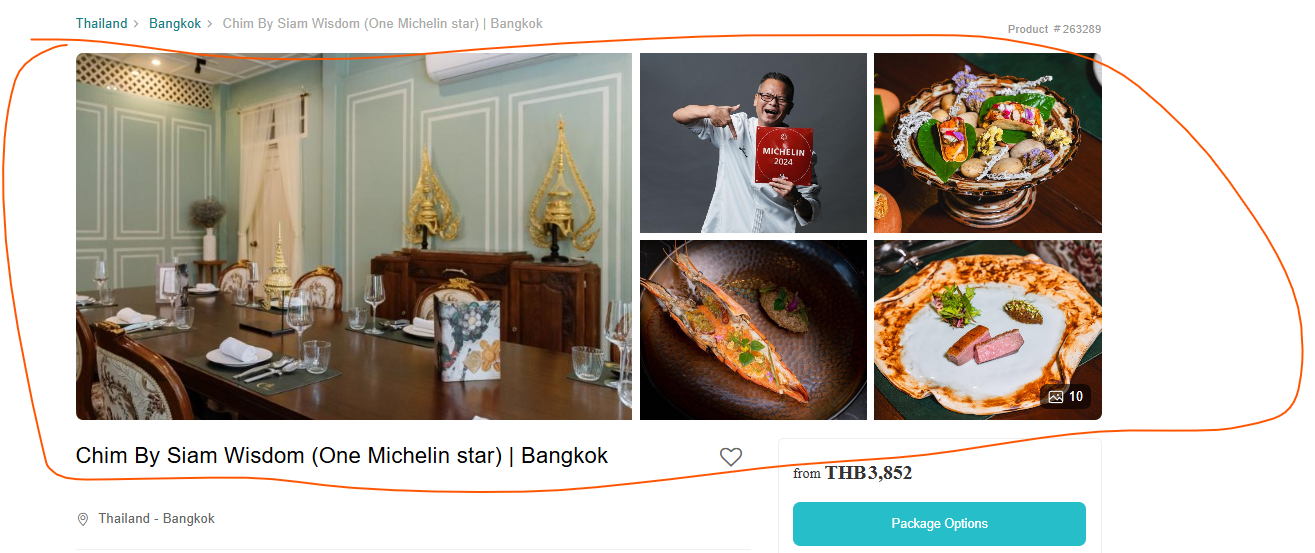 To display restaurant images, utilize the
 included attribute, which is an array containing the necessary details. Specifically, use included[].attributes.image_url, but only under the condition that included[].type equals restaurant_pictures.
4. Restaurant Description
To display the restaurant description, you can use data.attributes.description.
The following is a complete explanation of the api data.attribute
| No | Attribute Name | Description |
|---|---|---|
| 1 | id | Unique identifier for the restaurant. |
| 2 | lat | Latitude coordinate of the restaurant's location. |
| 3 | lng | Longitude coordinate of the restaurant's location. |
| 4 | largest_table | Maximum seating capacity for a single table. |
| 5 | branch_id | Identifier for the branch, if applicable. |
| 6 | min_party_size | Minimum number of people required for a booking. |
| 7 | name | Default name of the restaurant. |
| 8 | names | Names of the restaurant in different languages (e.g., English, Thai, Chinese). |
| 9 | slug | SEO-friendly identifier for the restaurant. |
| 10 | is_favorited | Indicates whether the restaurant is marked as a favorite by the user. |
| 11 | allow_booking | Specifies if the restaurant accepts bookings. |
| 12 | availability | Current availability status of the restaurant. eg: in stock |
| 13 | reviews_score | Average review score for the restaurant. |
| 14 | reviews_count | Total number of reviews for the restaurant. |
| 15 | map_location | URL to the Google Maps location of the restaurant. |
| 16 | accept_group_booking | Indicates if the restaurant accepts group bookings. |
| 17 | location | General location or area where the restaurant is situated. |
| 18 | primary_location | Object containing the primary location ID and name. |
| 19 | cuisine | General cuisine type offered by the restaurant. |
| 20 | primary_cuisine | Object containing the primary cuisine ID and name. |
| 21 | image_cover_url | URL for the cover image of the restaurant. |
| 22 | last_booking_was_made | Timestamp of the most recent booking made for the restaurant. |
| 23 | total_covers | Total seating capacity of the restaurant. |
| 24 | name_en | Name of the restaurant in English. |
| 25 | name_th | Name of the restaurant in Thai. |
| 26 | city_id | Identifier for the city where the restaurant is located. |
| 27 | address | Full address of the restaurant. |
| 28 | parking | Information on parking availability. |
| 29 | corkage_charge | Details about corkage fees for bringing external beverages. |
| 30 | days_in_advance | Number of days in advance bookings can be made. |
| 31 | ambience | Description of the restaurant's ambience, if provided. |
| 32 | small_note | Additional notes or remarks about the restaurant, if any. |
| 33 | accept_kids | Indicates whether the restaurant allows children. |
| 34 | booking_flow | Specifies the booking flow (e.g., date-first). |
| 35 | has_multiple_pricing | Indicates if the restaurant has multiple pricing tiers. |
| 36 | earn_point | Indicates if customers can earn points for bookings. |
| 37 | accept_voucher | Specifies if the restaurant accepts vouchers. |
| 38 | description | Detailed description of the restaurant, including key features and signature dishes. |
| 39 | custom_seats | Array specifying custom seating arrangements, if any. |
| 40 | logo_url | URL for the restaurant's logo. |
| 41 | custom_section_title | Title of a custom section for additional information. |
| 42 | custom_section_content | Content of a custom section, typically in HTML format. |
| 43 | available_package_types | Array specifying the types of packages available (e.g., "pp"). |
| 44 | reservation_duration_in_hours | Duration of a reservation in hours. |
| 45 | opening_hours | General opening hours of the restaurant, if provided. |
| 46 | opening_hours_today | Restaurant's opening hours for the current day. |
| 47 | weekday_opening_hours | Object detailing opening hours for each day of the week. |
| 48 | opening_hours_v2 | Alternative format for opening hours, if provided. |
| 49 | hashtags | Array of hashtags related to the restaurant (e.g., "Michelin Guide"). |
| 50 | videos | Array of video URLs related to the restaurant. |
| 51 | cuisines | Array of additional cuisines offered by the restaurant. |
| 52 | locations | Array of additional location details, including ID and title. |
| 53 | has_delivery_pricing_tier | Indicates whether the restaurant has pricing tiers for delivery. |
| 54 | phone | General contact phone number for the restaurant. |
| 55 | phone_for_delivery | Contact phone number specifically for delivery orders. |
| 56 | covid19_rating | Object containing COVID-19 safety ratings for cleanliness, social distancing, and staff protection. |
| 57 | tnc_image_url | URL for the terms and conditions image. |
| 58 | link | URL linking to the restaurant's page on the website. |
| 59 | price_summaries | Array of price summaries, including the lowest and highest prices, package types, and pricing type. |
How to When to Display the Kids quantity Button and Determine the Kids Price
Displaying the Kids Quantity Button In this step, we will outline the conditions under which the "Kids Quantity" button should be displayed.
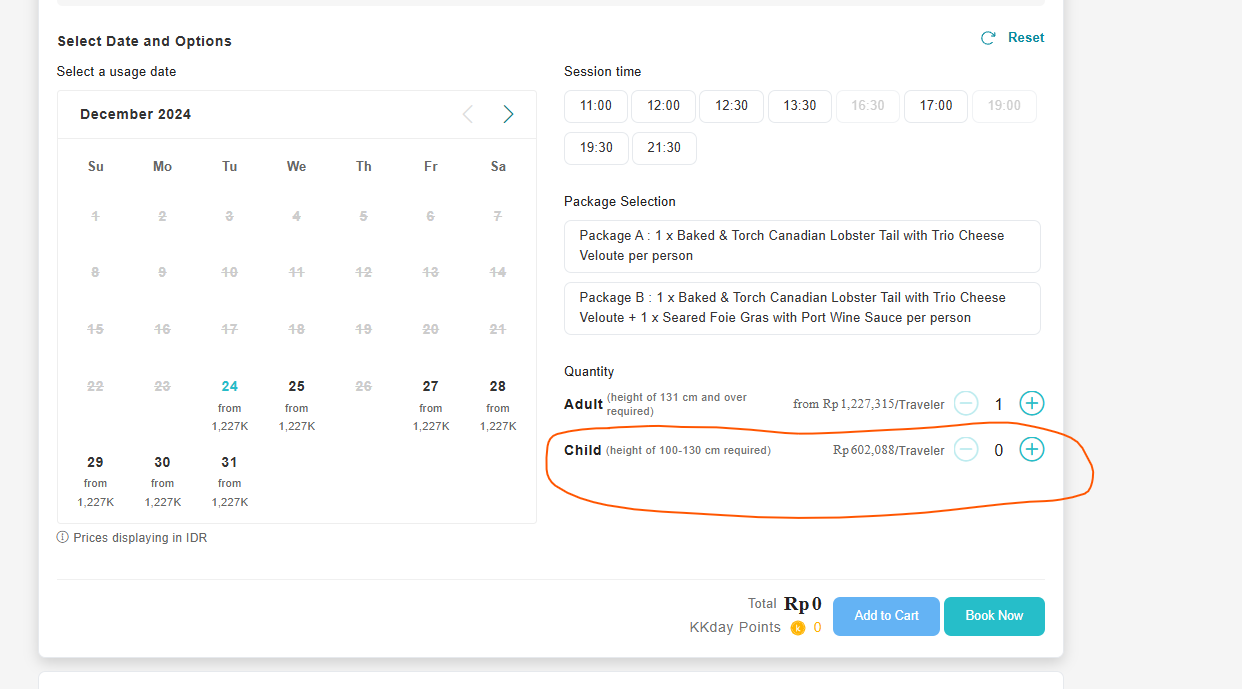
API to Fetch Restaurant Details
- To determine whether the "Kids Quantity" button should be displayed, query the following API:
{base_url}/api/vendor/v1/restaurants/{restaurant_id}.json?locale={lang}&include_pictures=true. Key Attribute: Examine thedata.attributes.accept_kidsattribute within the restaurant-level data. This attribute is a boolean: -
* If **true**, the restaurant accommodates kids, and the "Kids Quantity" button should be displayed.- If false, the button should not be displayed.
Determining the Kids Price
After hitting the following API:
{base_url}/api/vendor/v1/restaurant_packages.json?restaurant_id={id}&include_restaurant=true.
Use these two attributes to determine the kids price

- Key Attributes:
data.attributes.use_kids_price:- If false, the kids' price will be equivalent to the normal/adult price.
- If true, proceed to the next step.
data.attributes.kids_price_v2:- This attribute contains an array of objects. Iterate through this array to find the object with the highest
price_valueattribute. - The highest
price_valuefrom this array will be used as the kids' price.
- This attribute contains an array of objects. Iterate through this array to find the object with the highest
By following these steps, you can correctly determine whether to display the "Kids Quantity" button and compute the appropriate pricing for kids.
Comemore Payless Feature
Description
The "Come More, Pay Less" feature is designed to offer group discounts based on predefined pricing logic. When enabled, larger groups benefit from a reduced per-person price by allowing some members to dine for free. This feature applies only to All-You-Can-Eat (AYCE) packages.
Attributes
There are two attributes used for the "Come More, Pay Less" feature in package API response:
comemore_payless(boolean) - Indicates whether the feature is enabled.pricing_groups(object) Defines the pricing logic when the feature is active.
These attributes are available from the following API:
Restaurant Packages API
GET {{base_url}}/api/vendor/v1/restaurant_packages.json?restaurant_id=4391
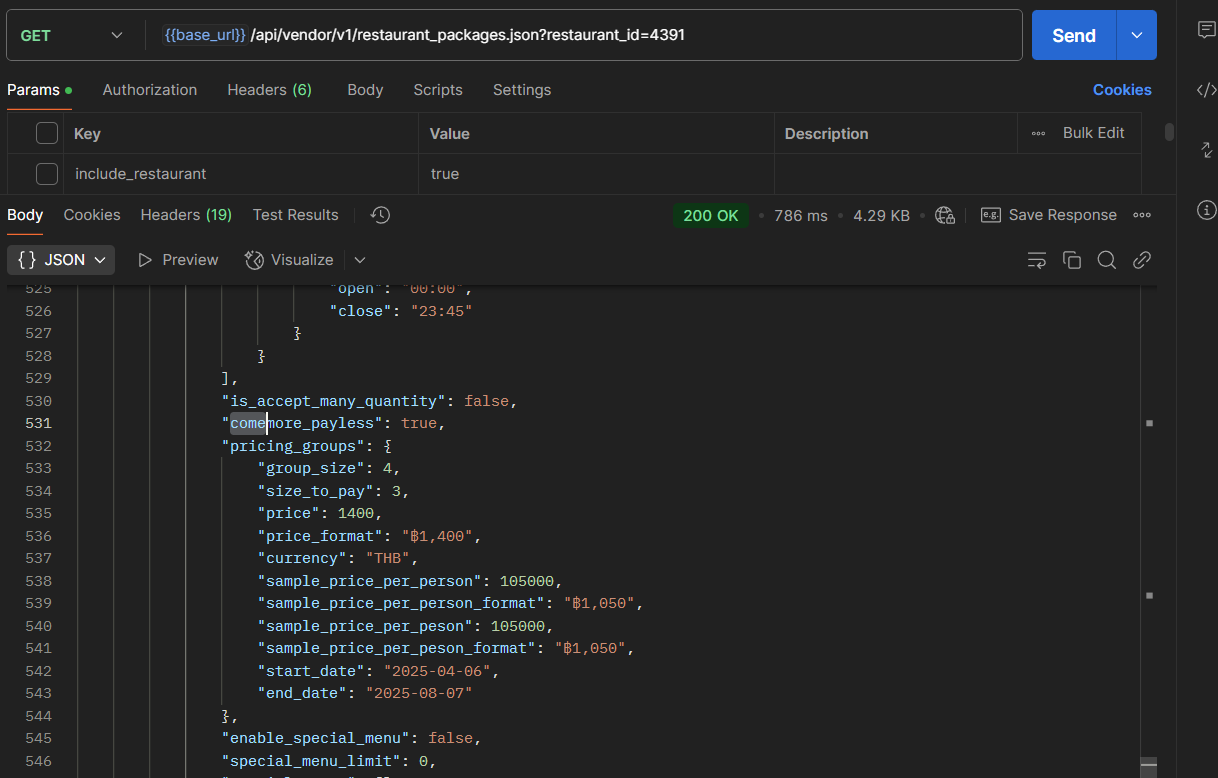
Behavior Based on comemore_payless Value
When comemore_payless is false:
- The pricing_groups attribute will be an empty object {}, indicating that the package follows standard pricing.
- The following is an example response when the feature is disabled:
{
  "come_more_pay_less": false,
  "pricing_groups": {}
}
When comemore_payless is true:
- The
pricing_groupsattribute contains key details defining the pricing logic. - The following is an example response when the feature is enabled:
{
  "come_more_pay_less": true,
  "pricing_groups": {
    "group_size": 4,
    "size_to_pay": 3,
    "price": 699,
    "price_format": "฿699",
    "currency": "THB",
    "sample_price_per_person": 524.25,
    "sample_price_per_person_format": "฿524.25",
    "start_date": "2023-10-01",
    "end_date": "2025-08-13"
  }
}
comemore_payless | pricing_groups | Pricing Behavior |
|---|---|---|
false | {} (empty object) | Standard pricing applies. |
true | Populated with pricing details | Discount applied based on group_size and size_to_pay. |
Pricing Logic
group_sizeandsize_to_pay: These attributes indicate that for everygroup_size(e.g., 4 people), the total price is calculated based onsize_to_pay(e.g., 3 people).
Pricing Calculation
- If the total number of people is a multiple of
group_size, the total price is determined by multiplyingsample_price_per_personby the total number of people. - If the total number of people exceeds
group_size, the firstgroup_sizepeople are charged usingsample_price_per_person × group_size, while any additional person beyond that is charged based on thepriceattribute.
Validity Period
- The feature is only applicable within the specified period, as defined by the
start_dateandend_dateattributes.
Calculate Package Price API
- In the
/api/vendor/v1/restaurants/:restaurant_id/calculate_package_price.jsonAPI, the displayed price automatically updates to reflect the new price after applying the "Come More, Pay Less" promotion. - Reservation Date Requirement
- To apply the "Come More, Pay Less" promotion correctly, you must provide the reservation date (
reservation_date). This is necessary because the promotion is configured with specific start and end dates in the admin dashboard, and the reservation date must fall within this valid date range to be eligible.
Request Example:
POST {{base_url}}/api/vendor/v1/restaurants/:restaurant_id/calculate_package_price.json

{
    "adult": 3,
    "kids": 2,
    "reservation_date": "2025-05-28",
    "package_bought": [
        {
            "id": "32677",
            "quantity": 3,
            "menu_sections": []
        }
    ]
}
- Selected Packages Attribute
- Additional details are available in the
selected_packagesattribute, which includes the discount received by the user under the typepromo. - Example response:
{
    "success": true,
    "message": null,
    "data": {
        "charge_price": 0,
        "charge_price_cents": 0,
        "currency": "THB",
        "total_price": 5000,
        "total_price_cents": 500000,
        "charge_amount_type": "",
        "charge_percent": 0,
        "charge_type": "",
        "total_package_price": 5000,
        "total_package_price_cents": 500000,
        "total_package_price_v2": 5000,
        "selected_packages": [
            {
                "id": 8086,
                "restaurant_package_id": "32677",
                "name": "Sharing Set for 3 People\tPrepaid",
                "quantity": 2,
                "type": "pack",
                "price": 1000000,
                "base_price": 500000,
                "dynamic_pricing_title": "Come 2 Pay 1"
            },
            {
                "id": 8086,
                "restaurant_package_id": "32677",
                "name": "Come more pay less",
                "quantity": 1,
                "type": "promo",
                "price": -500000,
                "base_price": 500000
            }
        ],
        "total_point_earn": 0,
        "is_dine_in": true,
        "charge_price_v2": 0,
        "total_price_v2": 5000,
        "used_voucher_amount_by_hh": 0,
        "used_voucher_amount_v2_by_hh": 0,
        "used_voucher_amount_by_restaurant": 0,
        "voucher_deductibles": [],
        "used_vouchers": [],
        "add_on_currency": "",
        "add_on_total_price": 0,
        "add_on_total_price_cents": 0,
        "add_on_total_price_v2": 0,
        "selected_add_ons": []
    }
}
How to Display the Menu Based on Attribute in the Package API Response
This guide explains how to dynamically render a restaurant menu based on the menu_type attribute returned in the package API response. Depending on the type, the menu can be displayed using images or an embedded iframe.
🔍 Overview
The menu_type attribute determines how the menu should be displayed. Based on its value, the system reads data from the menus and hh_menu_v2_html_preview_link attributes to extract the appropriate content—such as iMenupro links, image URLs, or HTML preview links—which are then rendered accordingly.
🧠 Logic Summary
The function checks the menu_type and sets the appropriate data for rendering:
Supported menu_type Values and Behaviors:
| menu type | Displayed As | Data Source |
|---|---|---|
| imenupro | iframe | attributes.menus.data.imenupro[*].link |
| img / image | attributes.menus.data.img[*].original | |
| menu_v2 | iframe | hh_menu_v2_html_preview_link → fetch → extract the url for iframe source |
| img_and_imenupro | iframe + | Combination of above |
| menu_v2_and_img | iframe + | Combination of above |
| menu_v2_and_imenupro | 2 iframes | iMenupro + Menu V2 |
🖼️ Rendering Strategy
1. Show Menu Using Image
Conditions:
menu_typeincludes"image"or"img"menus.data.imgis present
Example response:
"menus": {
  "type": "image",
  "data": {
    "img": [
      {
        "thumb": "/uploads/hh_package/package_menu/image/17325/breakfast-cafe-menu.png",
        "original": "/uploads/hh_package/package_menu/image/17325/breakfast-cafe-menu.png"
      }
    ]
  }
}
Notes:
- If image URLs don't include "http", prepend the domain (same rule as T&C links).
- Render
<img src="original">for each image.
2. Show Menu Using iMenuPro
Conditions:
menu_typeincludes"imenupro"menus.data.imenuprois present
Example response:
"menus": {
  "type": "imenupro",
  "data": {
    "imenupro": [
      {
        "loaded": false,
        "link": "https://hh-venus.my.id/en/restaurant_packages/1619/menu.html?updated_at=..."
      }
    ]
  }
}
Rendering:
- Use an iframe:
<iframe src="menus.data.imenupro[*].link"></iframe>
Notes:
- If
menus.typeincludes both"image"and"imenupro", append?imenupro_only=trueto the iMenuPro link to isolate it.
3. Show Menu Using Menu V2
Condition:
menu_typeincludesmenu_v2hh_menu_v2_html_preview_linkexists and is not empty Behavior:- Perform a fetch request to the
hh_menu_v2_html_preview_link - Extract the response as text and inject into an iframe Code:
fetch(hh_menu_v2_html_preview_link)
  .then(response => response.text())
  .then(url=> {
    real_hh_menu_v2 = url;
    // insert real_hh_menu_v2 into iframe src
  });
Rendering:
<iframe src="real_hh_menu_v2"></iframe>
💡 Combination Scenarios
img_and_imenupro or menu_v2_and_img
Render both image and iframe components. Respect the respective rendering logic for each content type.
menu_v2_and_imenupro
Render two iframes:
- One for iMenuPro
- One for Menu V2 (via fetch + extract as above)
✅ Summary
- Check
menu_typefrom the package response. - Based on
menu_type, determine sources: images, iMenuPro links, or Menu V2 links. - Render appropriately:
<img>for images<iframe>for iMenuPro and Menu V2
- If URLs are relative (e.g., image paths), prepend the correct domain.
- For mixed menu types, combine rendering strategies accordingly.