SparkLove Webhooks Integration
| HH Reservation Status | Detail | payload |
|---|---|---|
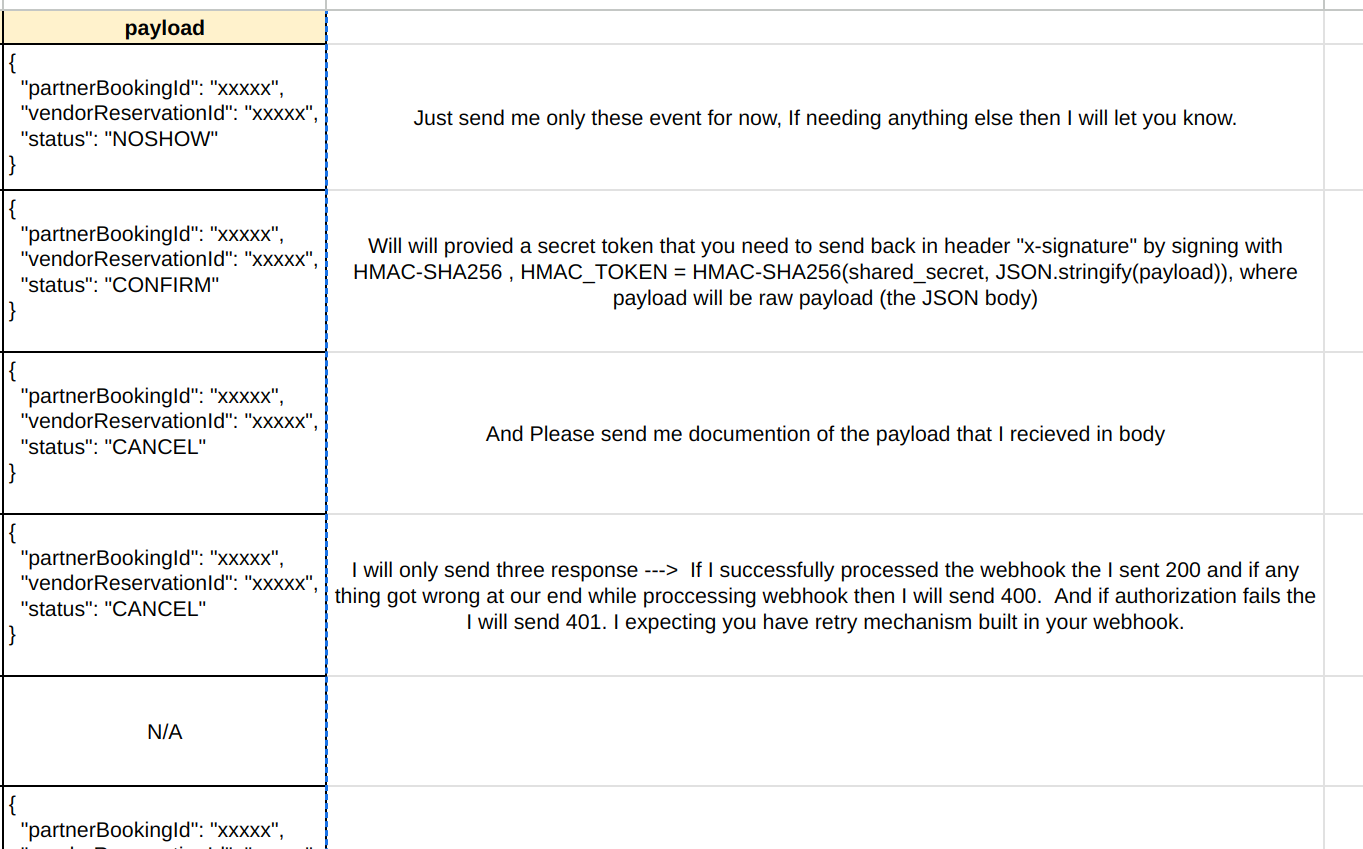
| no_show | Customer does not attend reservation; restaurant can mark reservation status to no_show | { "partnerBookingId": "xxxxx", "vendorReservationId": "xxxxx", "status": "NOSHOW" } |
| arrived | Customer attends reservation; restaurant changes reservation status to arrived. if restaurant do not mark reservation as arrived then after 24hrs we assume it is arrived and then send arrived status webhook | { "partnerBookingId": "xxxxx", "vendorReservationId": "xxxxx", "status": "ARRIVED" } |
| cancelled | Restaurant cancels reservation; status changes to cancelled | { "partnerBookingId": "xxxxx", "vendorReservationId": "xxxxx", "status": "CANCEL" } |
| rejected | Restaurant rejects reservation; status changes to rejected | { "partnerBookingId": "xxxxx", "vendorReservationId": "xxxxx", "status": "CANCEL" } |
| cancel_modified | If Customer updates reservation date/time, then we cancels old reservation with cancel_modified status and creates new reservation with pending_arrival status (reservation_id is changes however vendor_reservation_id remains the same for both reservation) | N/A |
| pending_arrival (restaurant change) | Restaurant updates reservation details (date/time etc) | { "partnerBookingId": "xxxxx", "vendorReservationId": "xxxxx", "status": "UPDATE", "date": "", "time": "", "adult": "", "child": "" } |
# **Webhook Integration Document**

## **Webhook Endpoint**
Please send all webhook events to the following endpoint:

- **Base URL Stagging**: ` https://absolutely-dashing-glowworm.ngrok-free.app`
- **Base URL Production**: `https://optimus.spark.love`


- **Endpoint URL**: `/payment/hh-webhook`
- **HTTP Method**: `POST`
- **Content Type**: `application/json`


- **Stagging secret**: `aG9yc2VmdW5ueWdhdmVjb2FzdHJhY2VkZXNlcnRwb2NrZXRoYWxsdGhvdXJpc2luZ3VuY2xlc29sdmVidXJzdGV4cGVjdHNlbGVjdGlvbnRoZXNlYnJlYWRhc25vaXNlYg==`

---

## **Authorization and Security**

To ensure secure communication, we require that all webhook requests be signed using HMAC with a shared secret. The signature should be included in the request headers.

### **Header Requirements**
- **Header Name**: `X-Signature`
- **Value**: HMAC-SHA256 hash of the payload, encoded as a hexadecimal string.

#### Example Header:
X-Signature: 5c68f9e7e85e9ab4a3e8b5b8c8e74a9291f2a9a1d3c9bdf6d394e0b315fab3a4
---

## **How to Generate the HMAC Signature**

1. Take the raw payload (the JSON body of the request).
2. Use the shared secret provided by us to hash the payload using the HMAC-SHA256 algorithm.
3. Encode the result as a hexadecimal string.
4. Include this hexadecimal string in the `X-Signature` header of the request.

### **Shared Secret**
The shared secret will be communicated securely via email or other agreed means. Use this secret to generate the HMAC signature.

---

## **Sample Code to Generate HMAC Signature**

Here’s a sample implementation in JavaScript for generating the HMAC signature:

```javascript
const crypto = require('crypto');

// Shared secret (provided by us)
const sharedSecret = 'secure-shared-secret';

// Raw payload (JSON string of the webhook body)
const payload = JSON.stringify({
    reservation_id: '12345',
    status: 'arrived',
    updated_at: '2024-12-21T10:00:00Z',
});

// Generate HMAC signature
const hmacSignature = crypto
    .createHmac('sha256', sharedSecret)
    .update(payload)
    .digest('hex');

console.log('Generated Signature:', hmacSignature);
Request Payload
Content Type
All webhook requests must use the Content-Type: application/json header.
Sample Payload
Below is an example of a payload you might send to the webhook endpoint:
{
    "reservation_id": "12345",
    "status": "arrived",
    "updated_at": "2024-12-21T10:00:00Z"
}
Field Descriptions
| Field | Type | Description |
|---|---|---|
reservation_id | String | Unique identifier for the reservation. |
status | String | Current status of the reservation (arrived, cancelled, etc.). |
updated_at | String | ISO 8601 timestamp of when the status was updated. |
Example Request
Full Request Example
Headers:
POST /payment/hh-webhook
Host: BASE_URL
Content-Type: application/json
X-Signature: 5c68f9e7e85e9ab4a3e8b5b8c8e74a9291f2a9a1d3c9bdf6d394e0b315fab3a4
Body:
{
    "reservation_id": "12345",
    "status": "arrived",
    "updated_at": "2024-12-21T10:00:00Z"
}
Response
Our server will respond with one of the following status codes:
| Status Code | Description |
|---|---|
200 OK | The webhook was received and processed successfully. |
400 Bad Request | The request payload is invalid or malformed. |
401 Unauthorized | The X-Signature header is missing or does not match the computed signature. |
403 Forbidden | The request came from an unauthorized IP address (if IP whitelisting is enabled). |
Validation on Our Side
-
Verify the Signature:
- We will recompute the HMAC signature using the same shared secret and compare it with the
X-Signatureheader in the request. - If the signatures do not match, the request will be rejected with a
401 Unauthorizedresponse.
- We will recompute the HMAC signature using the same shared secret and compare it with the
-
Validate the Payload:
- We will ensure the payload adheres to the expected structure and contains all required fields.
-
Log All Requests:
- For audit and debugging purposes, all incoming webhook requests will be logged.
Example Implementation on Our Side
Below is how we process webhook requests in our system:
Node.js Code to Validate and Process the Webhook
import crypto from 'crypto';

// Shared secret (same as provided to the vendor)
const sharedSecret = 'secure-shared-secret';

// Webhook endpoint
app.post('/payment/hh-webhook', (req, res) => {
    const payload = JSON.stringify(req.body);
    const receivedSignature = req.headers['x-signature'];

    // Generate HMAC signature
    const computedSignature = crypto
        .createHmac('sha256', sharedSecret)
        .update(payload)
        .digest('hex');

    // Compare signatures
    if (computedSignature !== receivedSignature) {
        console.error('Invalid signature');
        return res.status(401).send('Unauthorized');
    }

    // Log and process the valid webhook
    console.log('Valid webhook received:', req.body);

    // Process the payload (e.g., update reservation in database)
    const { reservation_id, status, updated_at } = req.body;
    console.log(`Reservation ID: ${reservation_id}, Status: ${status}, Updated At: ${updated_at}`);

    res.status(200).send('Webhook received');
});
Retry Logic:
- If your webhook request fails (non-200 response), implement retry logic with exponential backoff to resend the event.