RWG prepaid Flow
RWG Prepaid Booking Flow
1. Callback URL
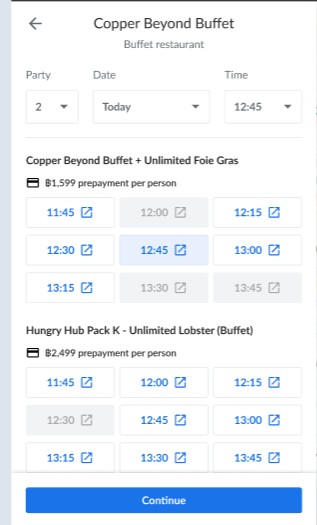 After the user clicks Continue on RWG, the backend processes the booking data and redirects the user to the following HH URL:
https://web.hungryhub.com/en/restaurants/${restaurants-slug}/package/${package-id}/web?partner=rwg&token=xxxxx
example :
https://web.hungryhub.com/en/restaurants/great-harbour-international-buffet-bangkok-thailand/package/29685/web?partner=rwg&token=xxxxx
Parameters:
partner— Identifier for the booking source.token— Authentication token for retrieving Booking information.
2. Retrieve User Information
The application will call the new api: Get Booking Info API using the provided token to fetch booking details.
example api :
api/vendor/v1/rwg-booking-info
3. API Response Format
The API returns reservation details in the following format:
{
  "user" : {
     "name": "lorem ipsum",
      "phone": "08xxxxx",
      "emal": "example@gmail.com"
     },
  "reservation": {
    "date": "2025-08-29",
    "adult": 3,
    "start_time": "19:00",
    "kids": 0,
    "restaurant_id": "3005"
  },
  "packages": [
    {
      "id": "29685",
      "quantity": 3,
      "menu_sections": [],
      "charge_policy": "",
      "type_code": "ayce"
    }
  ],
}
4. Temporary Reservation
The frontend retrieves the temporary reservation by calling:
GET /temporary_reservation.json
5. Users View
Once the temporary reservation data is loaded, the user is presented with the reservation / checkout view.
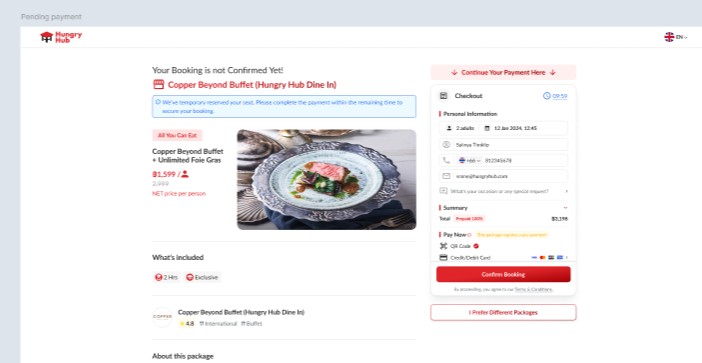
6. Booking Tracking
The frontend sends an additional payload to track the booking source as RWG.
POST /reservation.json
{
  "vendor_name": "rwg",
  "channel": "rwg"
}