Escalation Ticket QA Procedure
Escalation Ticket QA Procedure
This page contains the escalation ticket from the customer procedure.
- Every escalation issue will be shared to slack in the #bugreport channel.
- All tickets from the escalation issue will be added to the Defect Master List.
Flow:
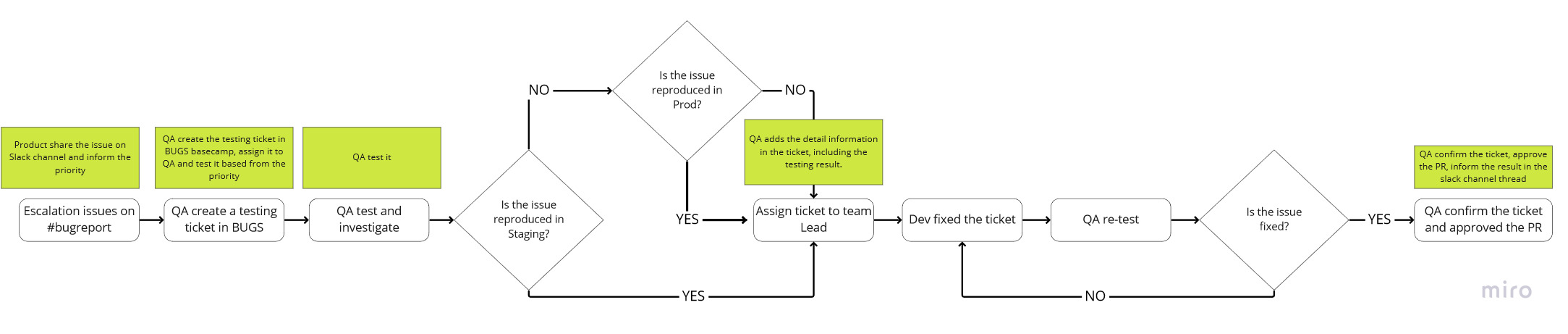
Description:
1. The product team.
The product should also share the priority of the issue (how urgent is the issue should be checked/fixed by the team from the product perspective) Priority list and the target to fix the issue:
-
* **P1: Critical**Definition: Critical, application crash, loss of data, and major loss of function preventing users from making a purchase across the platforms or affecting the majority of the users.- ETA:
- Must be checked by QA right away.
- Must be fixed by PRG on the same day.
- ETA:
-
* **P2: Major**Definition: Major loss of function in regard to making a purchase.- ETA:
- Must be checked by QA right away.
- Must be fixed by PRG within the next day.
- ETA:
-
* **P3: Minor**Definition: Minor loss of function that does not prevent users from making a purchase.- ETA:
- Must be checked by QA in 24 hours.
- Must be fixed by PRG within the next sprint (depending on the effort involved and the work PRGs currently working on).
- ETA:
-
  *   **P4: Suggestion**Definition: New suggestion/hardware problem.
  *   Feature suggestion: Assign to PM and they will evaluate, if worth the effort then move to Product Backlog and proceed to create PRD.
  *   Suggestion related to hardware/server/system: assign to EM and evaluates and proceed accordingly.
2. QA Team.
After the issue has been raised by the Product team, QA should start the test according to the priority and inform the product team when the issue will be checked. The priority:
- P1 and P2: Must be checked and reported as tickets right away
- P3 and P4: Should be checked and reported as tickets no longer than 24 hours. (tips: can be checked before the end of the day or before the next day starts) If the issue still can’t be checked due to QA capacity, the issue request should be added to the QA backlog. What should QA do?
- QA should check/replicate the issue on the staging first, and if it cannot reproduce on staging, it should be checked on Prod.
- After QA checked the issue, QA should report the issue to the clickup.
- QA should follow the ticket standard.
- Title:
- Bug ID should follow the format
Priority | Platform | Year | Month | # - Example: P2IU2112001, which means P2 (priority), iOS for users (platform), 2021 (year) December (month), and Ticket number 1
- After the ID, the title can be following the QA ticket standard.
- Bug ID should follow the format
- Description:
- Issue link, the link can be copied from slack in the #bugreport channel.
- Add detailed issues from slack.
- Add the QA result, the template can be following the QA ticket standard.
- Title:
- Inform the PRG and let the PRG set the ETA to fix the issue.
- QA should follow the ticket standard.
- Once the issue is already fixed by PRG, QA should follow up on the issue accordingly.
- If the issue doesn’t fix yet, please inform the PRG and add the proving image/video to the ticket.
- When the issue is fixed, please close the ticket and approve the PR.
3. Programmer team.
After the PRG assigned the ticket, PRG should fix the ticket according to the priority of the product team.
- Add the estimation the ticket will be fixed in the ticket clickup. Please also consider the QA testing time so don’t give an estimate that’s too tight with the target. And if your estimation is longer than expected, please inform to the team.
- Use the standard follow-up ticket report.
- Please also inform the PR link to QA.