Sort Feature
Objective
To improve the relevance and personalization of restaurant search results by:
- Replacing the current “Most Relevance” sort (which uses top gmv) with a new “Recommended for You”(personalized sort).
- Introducing “Trending” as a separate and explicit sort option.
Scope
- Search Page
- Group Landing Page
- Admin Dashboard Settings
- Group Landing Page setting
Requirements
- Sort Option Changes
- Replace the existing logic “Most Relevance” with “Recommended for You” logic.
- Implement a new sort option labeled “Trending” (based on top GMV).
- Dropdown or tab toggle that clearly displays on client side
- Most Relevance
- Trending (place it under the most relevance for the order)
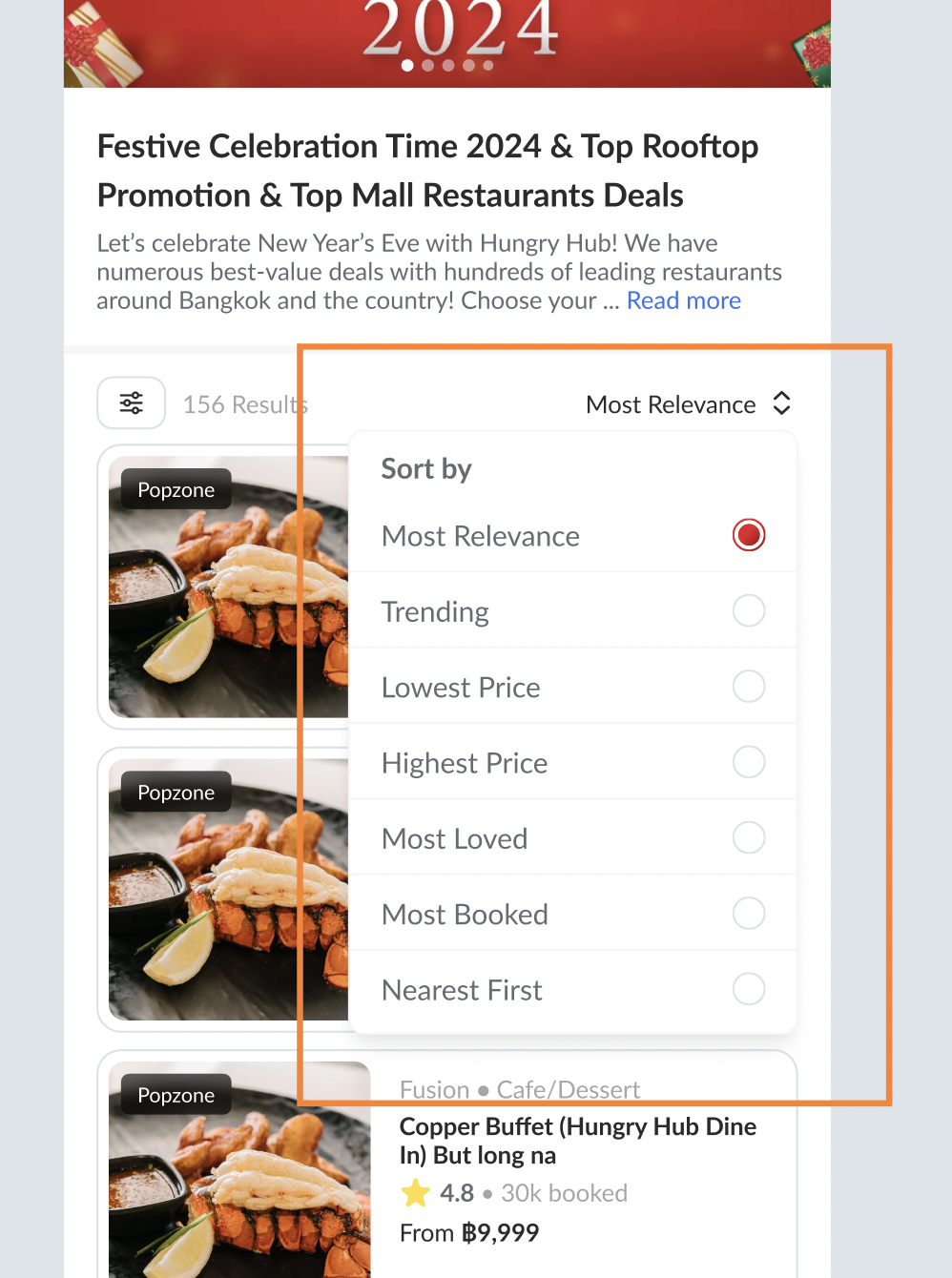
- Default Sort
- On both Search and Group Landing pages, “Most Relevance” becomes the default sort option (if user is logged in).
- Admin can still set it on the admin dashboard to set the default sorting on group landing pages
- For guest users (not logged in), fallback to “Trending”.
- On both Search and Group Landing pages, “Most Relevance” becomes the default sort option (if user is logged in).
Figma : https://www.figma.com/design/ZlOSzyS2MOYjP1ymvGQBvO/Sort-Feature?node-id=0-1&t=rNy2Cw7BIK5HEjcF-1