Reset Password Redesign
🧾 History
| Date | Changes | Link | By |
|---|---|---|---|
| 12th August 2024 | Redesign Login Page Redesign Reset Password Page Reset password Email Reset your password page on the web | This PRD | Umam |
📕 About
| Context | Reset password refers to the process of changing or recovering a forgotten password for a user account in hungryhub system |
|---|---|
| Problem | The design is less attractive and needs to be synchronized with the existing design style |
| Solution | Redesign the current design to new design that more suitable with the existing design style |
| Name of Feature | Reset Password Redesign |
| Objective | Redesign Login Page Redesign Reset Password Page Reset password Email Reset your password page on the web |
| Gains | A more attractive and consistent design will enhance the overall user experience, making it easier and more intuitive for users to reset their passwords |
| Pains | If the new design is not thoroughly tested across all platforms and devices, there might be inconsistencies that negatively impact the user experience |
| Figma Link | https://www.figma.com/design/e4FtfdeIA0ABgcTDpzrnz4/Reset-Password?node-id=0-1&t=0cu4QNBwqd5zsyPL-1 |
| Available Platform | Web and App |
| Sprint | TBD |
| Related PRD | Private (https://app.clickup.com/9003122396/docs/8ca1fpw-7922/8ca1fpw-40696) |
| Out of Scope | - |
🎯 User Story & Requirement
Redesign Login Page
| User Story | Requirement |
|---|---|
| As a user, i want to login to my account | Increase the font size to 14 ptNot a member? textJoin text buttonForgot password? text buttonAdd close button to close the login page and redirect to home page (implement to register page too) 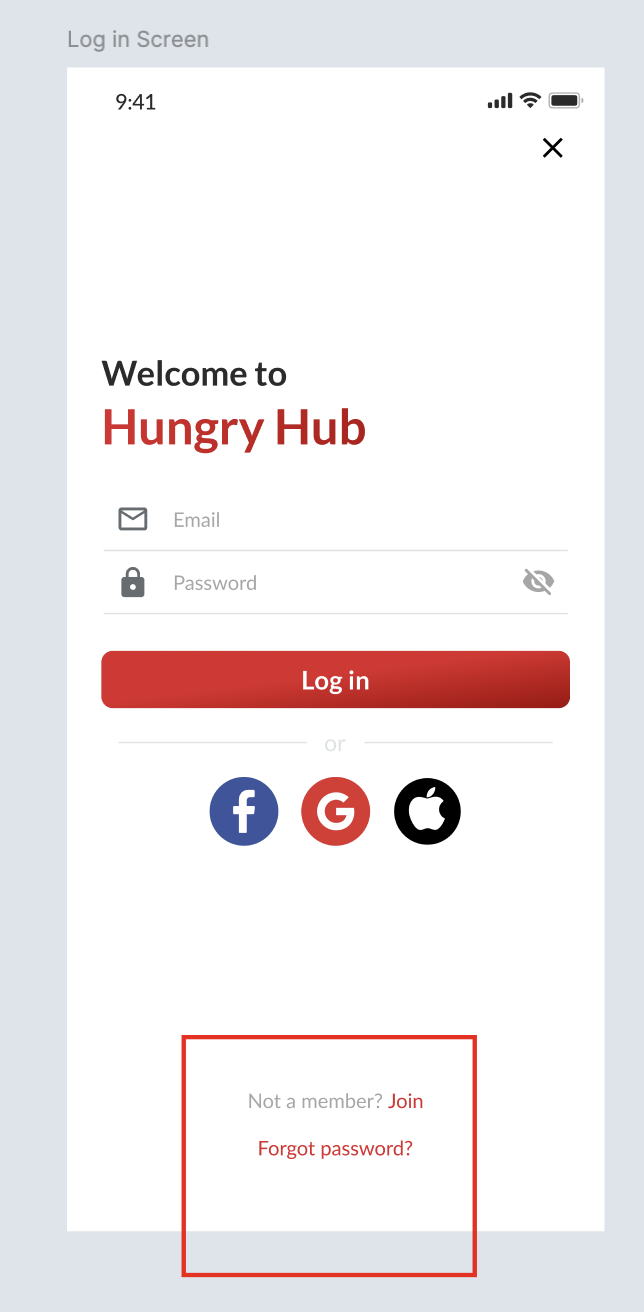 |
Redesign Reset Password Page
| User Story | Requirement |
|---|---|
As a user, i want to reset my password because i forget my password. so, i click the Forgot password? text button | There are some elementsForgot Your Password? titleEnter the email you registered with us. We will send an email with instructions to reset your password. descriptionEmail Field (with icon) Send button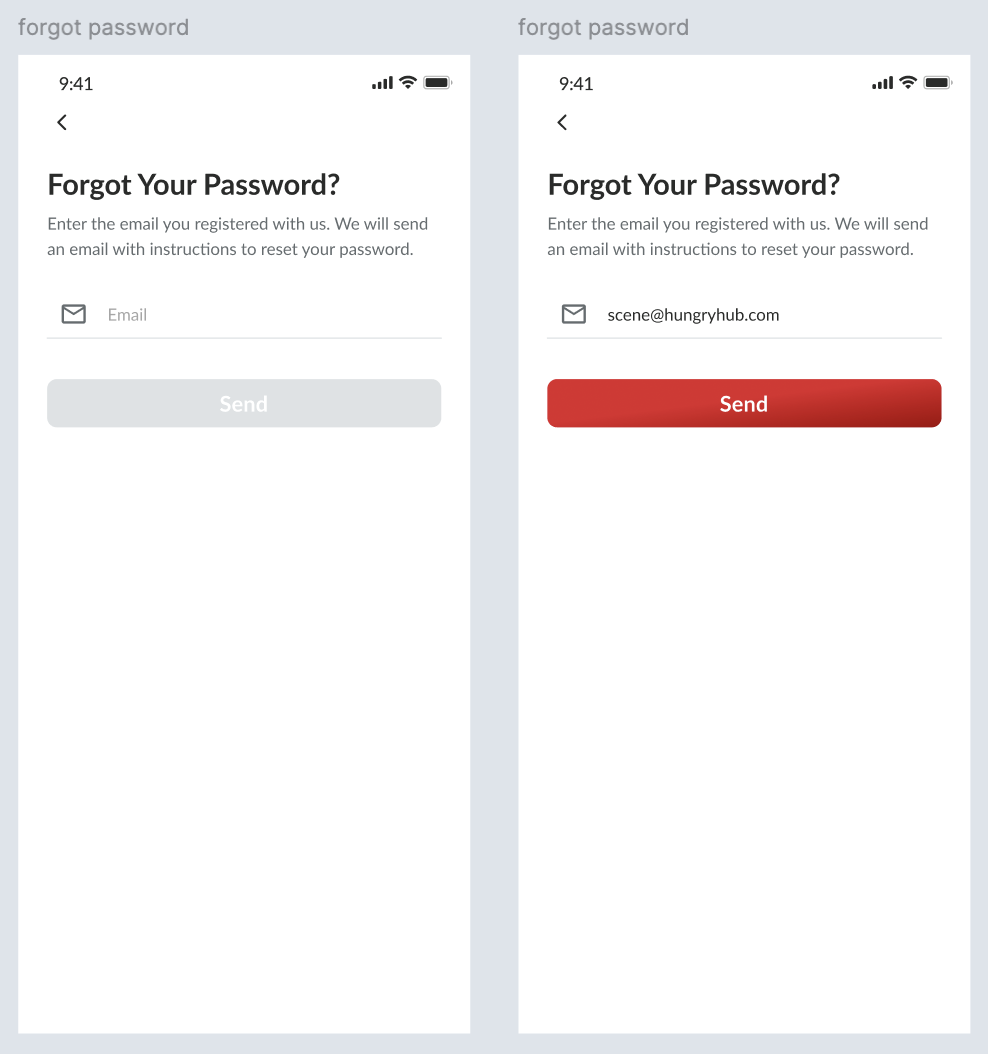 Display the error state under the email field (if there is an error) This email isn't registered with us. Please recheck and try again.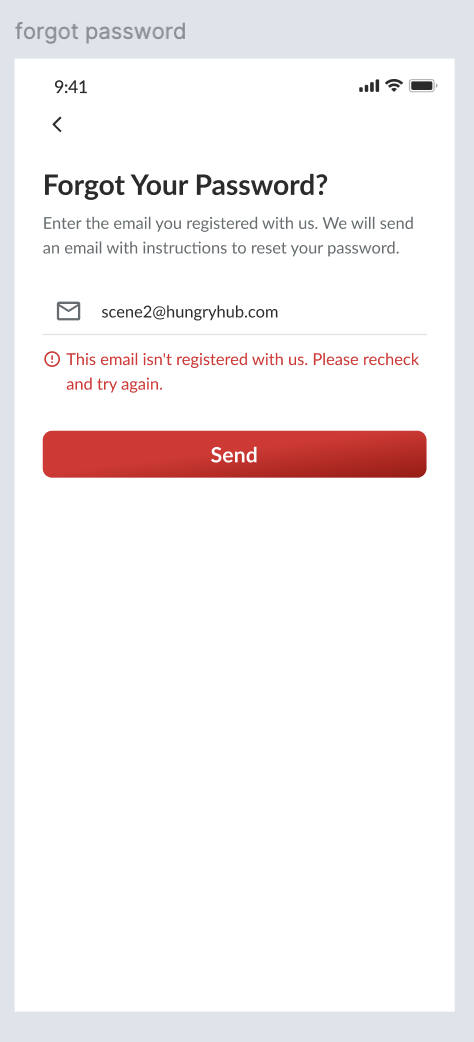 Display successful pop up if success, Send to email for reset password there is no changes for email, just follow the existing 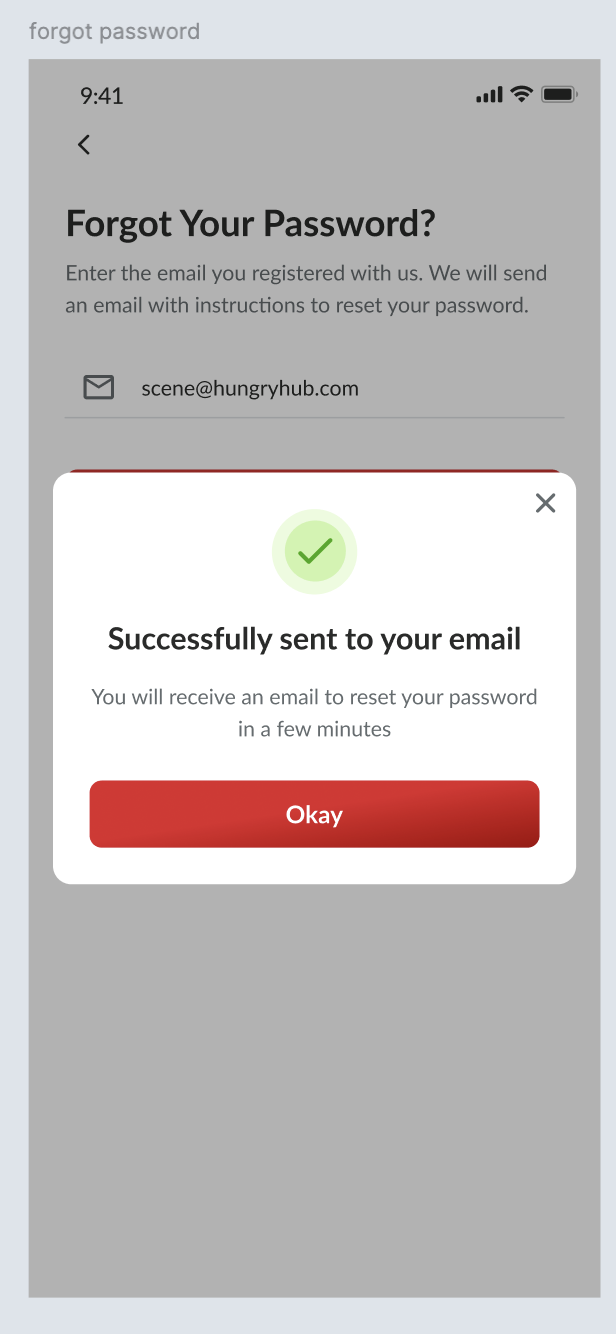 It will be implemented on web too... pls check on the figma |
Reset password Email
| User Story | Requirement |
|---|---|
There are some elementsRESET YOUR PASSWORDDear [Name]Password Reset TitleSeems like you forgot your password for Hungry Hub. If so, please click below to reset your password DescriptionReset Password buttonIf you did not request a password reset, you can safely ignore this email. descriptionAlternatively, you can directly paste this link in your browser: descriptionLink 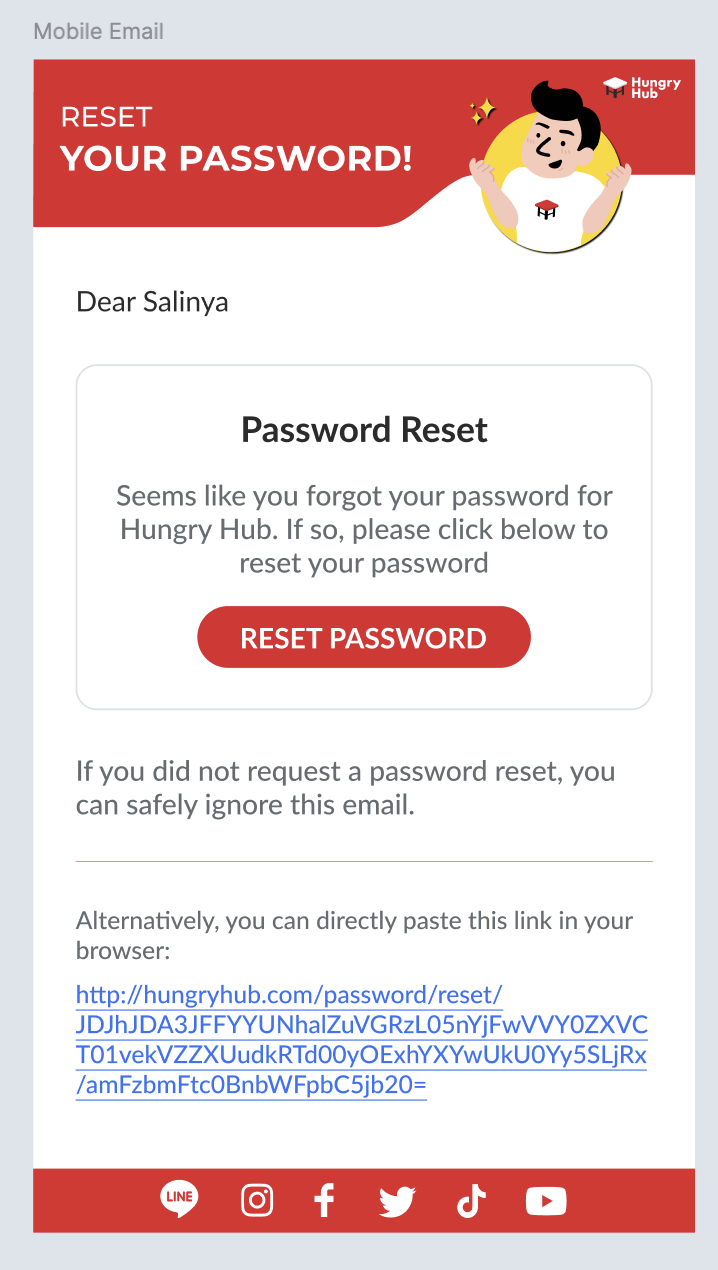 |
Reset your password page on the web
| User Story | Requirement |
|---|---|
| After click the reset password button on the email | Reset your password page on the web There are some elements Hungryhub Logo Forgot Your Password? titleEmail : [email name] description Email Field (with icon) Send button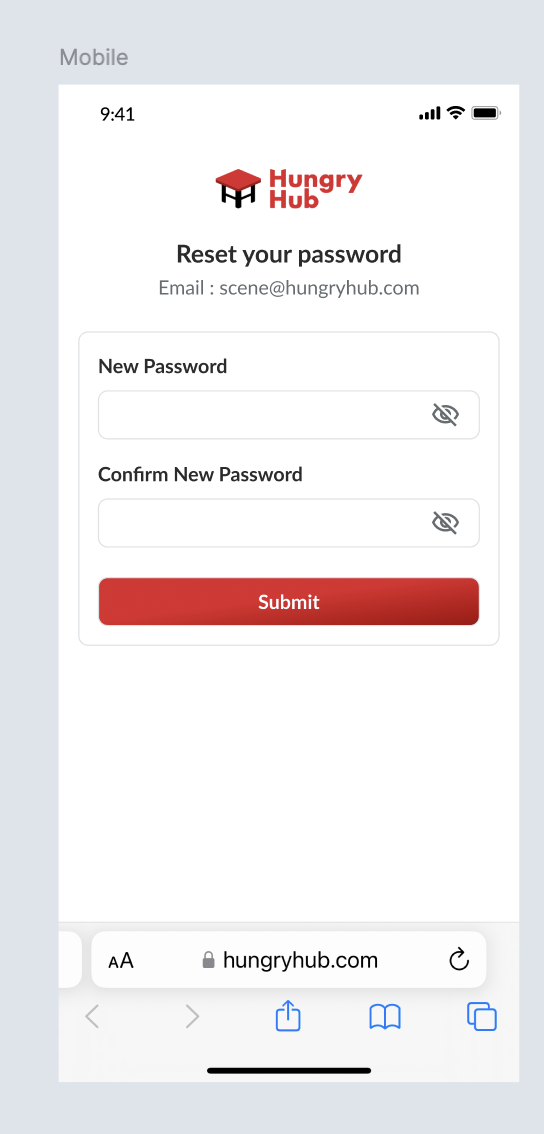 Display the error state under the email field (if there is an error) When the password doesn't match with the confirmation password Confirmation password doesn't match. Please try again.When new password is same with the current password Your new password must be different from the current password.Display successful pop up if success Success Icon Your password has been updated successfully TitleYou may leave this page DescriptionLog in Now button with arrow left iconRedirect to homepage and login automatically (can redirect to mobile app or website) If itsn't possible, just redirect the user to the login page on the homepage. 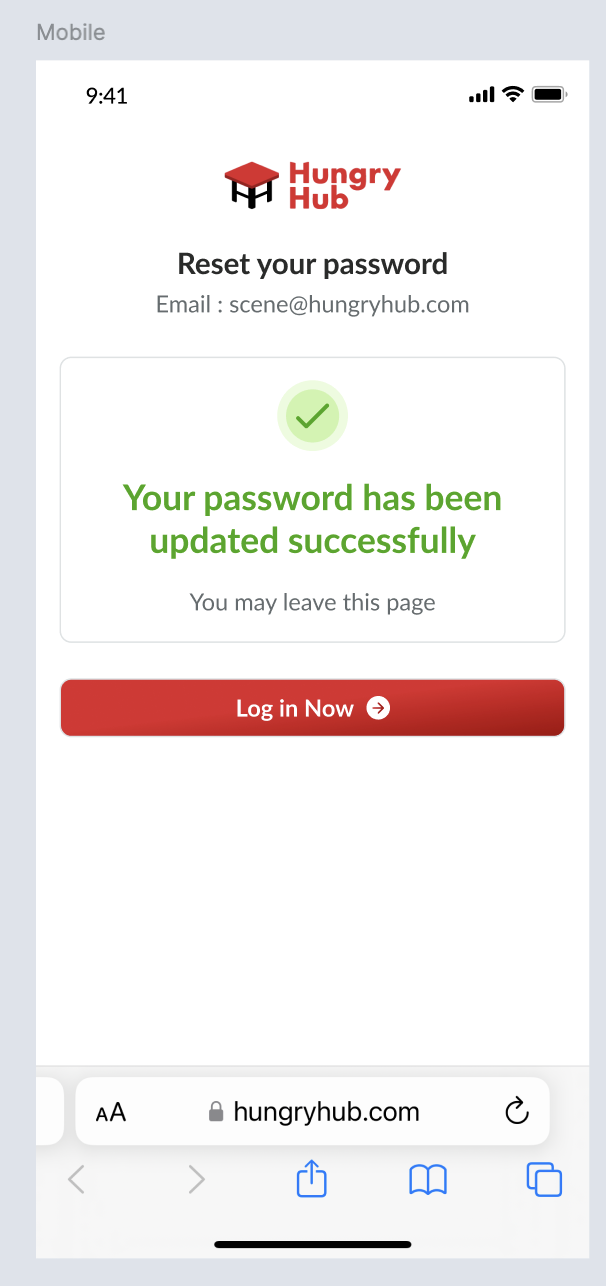 It will be implemented on desktop too... pls check on the figma |
❓ FAQ
| Question | Answer |
|---|---|