Google End to End Journey (Google E2E)
🧾 History
| Date | Changes | Link | By |
|---|---|---|---|
| 28 March 2024 | List of Changes Add settings on the edit restaurant page on admin side Add 3 top packages option and custom option | Private (https://app.clickup.com/9003122396/docs/8ca1fpw-11562/8ca1fpw-36956) | Umam |
| 8 April 2024 | List of Changes Move Google E2E settings to separate page (has own page). Due to performance consideration | This PRD | Umam |
📕 About
| Context | Google E2E is a platform that enables users to make direct reservations for various services especially for restaurant without leaving Google search results or the Google Map. Since it will be integrated to Hungry Hub. We want to help admin to adjust the setting for hungry hub admin side. |
|---|---|
| Problem | Admin wants to adjust Google E2E on the admin side |
| Solution | Help admins to manage Google E2E settings on the Hungry Hub admin side, we can provide several steps and features that make it easier to manage and customize reservations. |
| Name of Feature | Google End to End Journey (Google E2E) |
| Objective | Ensure the integration of Google E2E into Hungry Hub runs smoothly and meets the needs of admin Provide the ability for admins to customize Google E2E settings from the Hungry Hub admin side, including Top 3 packages and custom |
| Gains | Integrating with Google E2E can increase the visibility of restaurants listed on Hungry Hub, as users can make direct reservations through Google search results and Google Map. Users can easily make reservations without leaving the Google platform, resulting in a smoother and more convenient booking experience. |
| Pains | Integrating with Google E2E may require technical expertise and resources Relying on Google E2E for reservations means being dependent on the functionality and policies of a third-party platform, which could introduce risks if there are service disruptions or changes in policies |
| Figma Link | https://www.figma.com/file/ENTkVcEM6rwhxGGMCoCyAc/Pending-payment-for-Reserve-with-Google?type=design&node-id=418%3A698&mode=design&t=ol8CzzK0c5E1hIoK-1 |
| Available Platform | Web |
| Sprint | 36 |
| Related PRD | Client Side : Private (https://app.clickup.com/9003122396/docs/8ca1fpw-7922/8ca1fpw-36936) |
| Out of Scope | Sprint 36 Package with payment |
🎯 User Story & Requirement
Edit Google E2E Settings on the Restaurant List Page
| User Story | Requirement |
|---|---|
As an admin, i want to edit Google E2E setting on the restaurant list page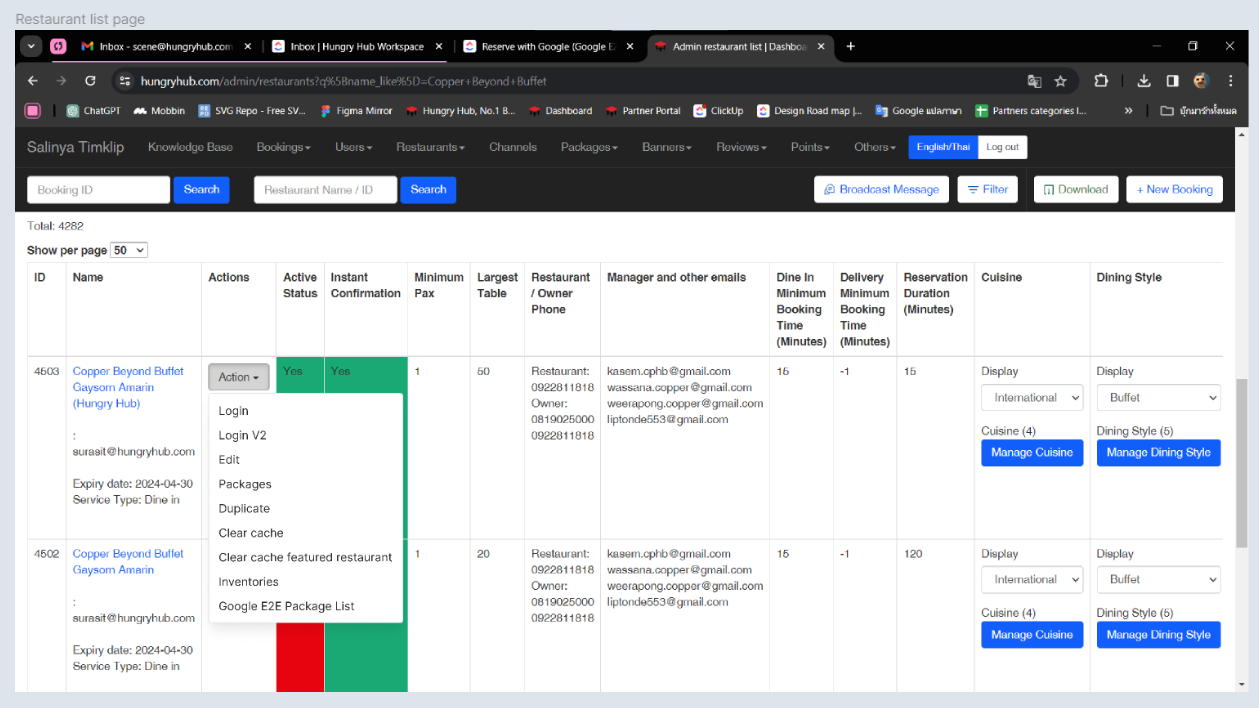 | Provide Google E2E Package List on the Action dropdown. |
Google E2E Package List Page
| User Story | Requirement |
|---|---|
As an admin, after i click Google E2E Package List on the Action dropdown. it will redirect to its own page. We can name it Google E2E Package List page .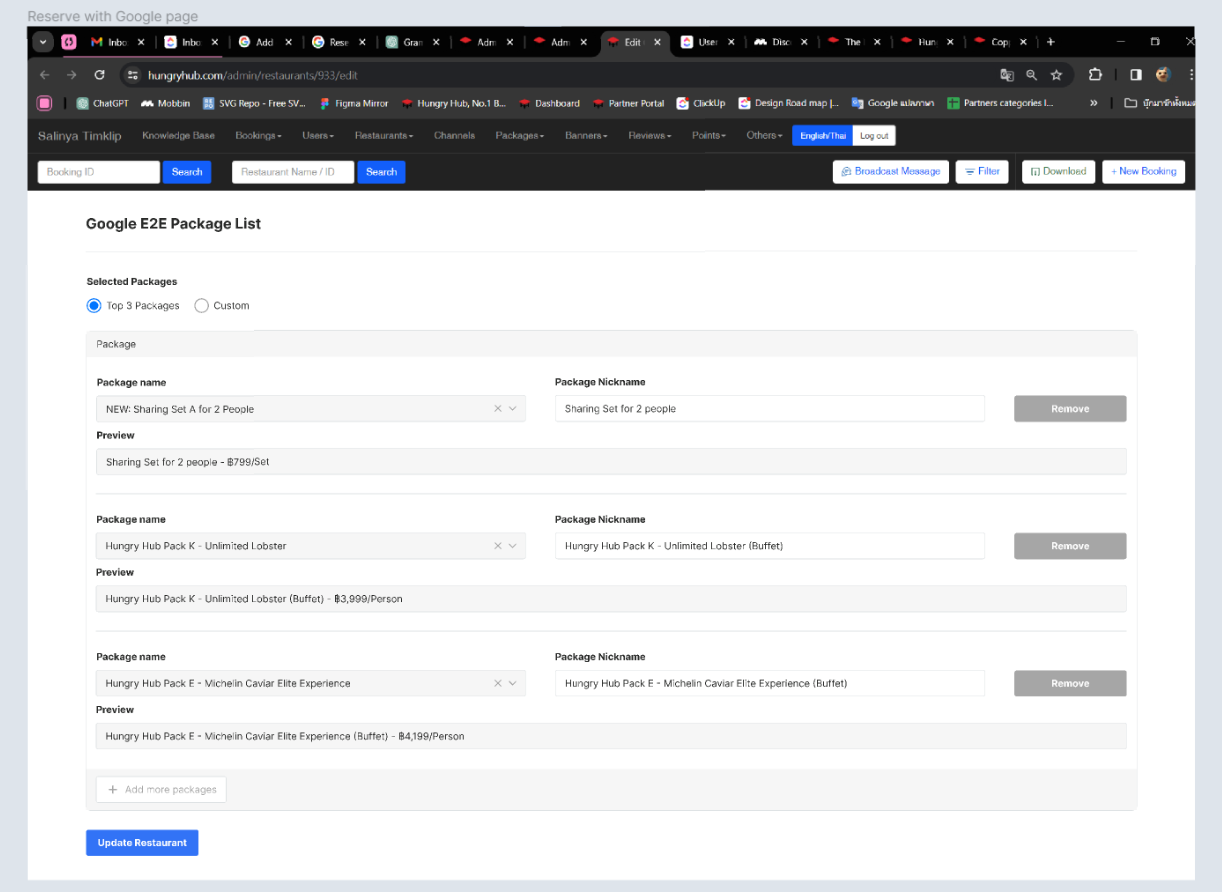 | Display the page containing the settings for Google E2E Package ListThere are 2 options (Radio Button) for displaying the packages on the Google E2E.Top 3 Packages (Default)CustomThere is Save/ Update button to update the changes |
Top 3 Packages
| User Story | Requirement |
|---|---|
As an admin, when I am in the Google E2E page. I let the option as default (Top 3 Packages)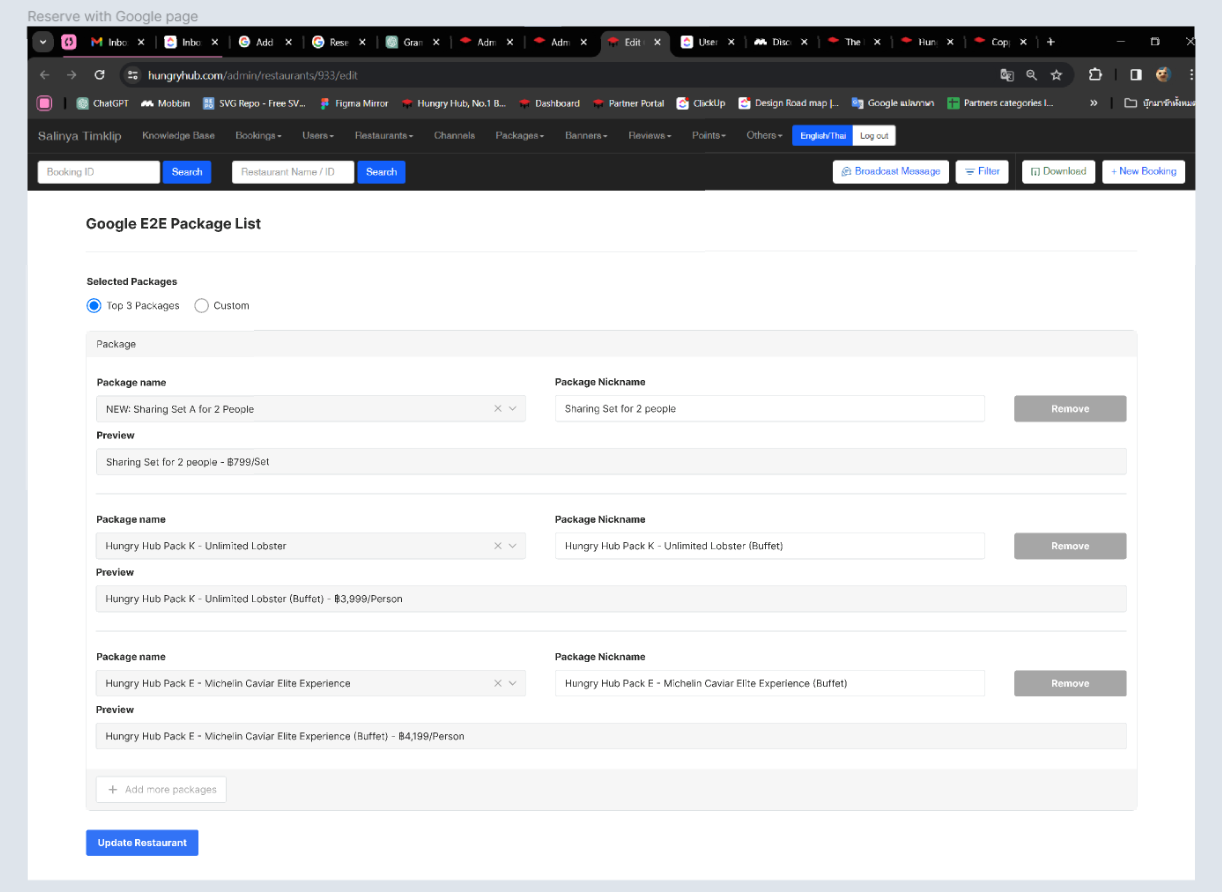 | Display top 3 packages automatically by system (AYCE/Party Pack) Sorting based on the highest sales by last 30 days / 1 month (can't be edited) There are some components Package Name formThis is the default name of the package and can't be edited Package Nickname formThis is the form for customizing the package name to be displayed on the Google E2EPreview formThis is the result preview after inputting the Package Name/Nickname Remove buttonThis is the form for removing packages that will be displayed on the Google E2E. for this option, it must be inactive.There is Add more packages button to add the package that want to be displayed on the Google E2E. for this condition, it must be inactive |
Custom Packages
| User Story | Requirement |
|---|---|
As an admin, when I am in the Google E2E page. I want to customize the package to be displayed by changing the option into Custom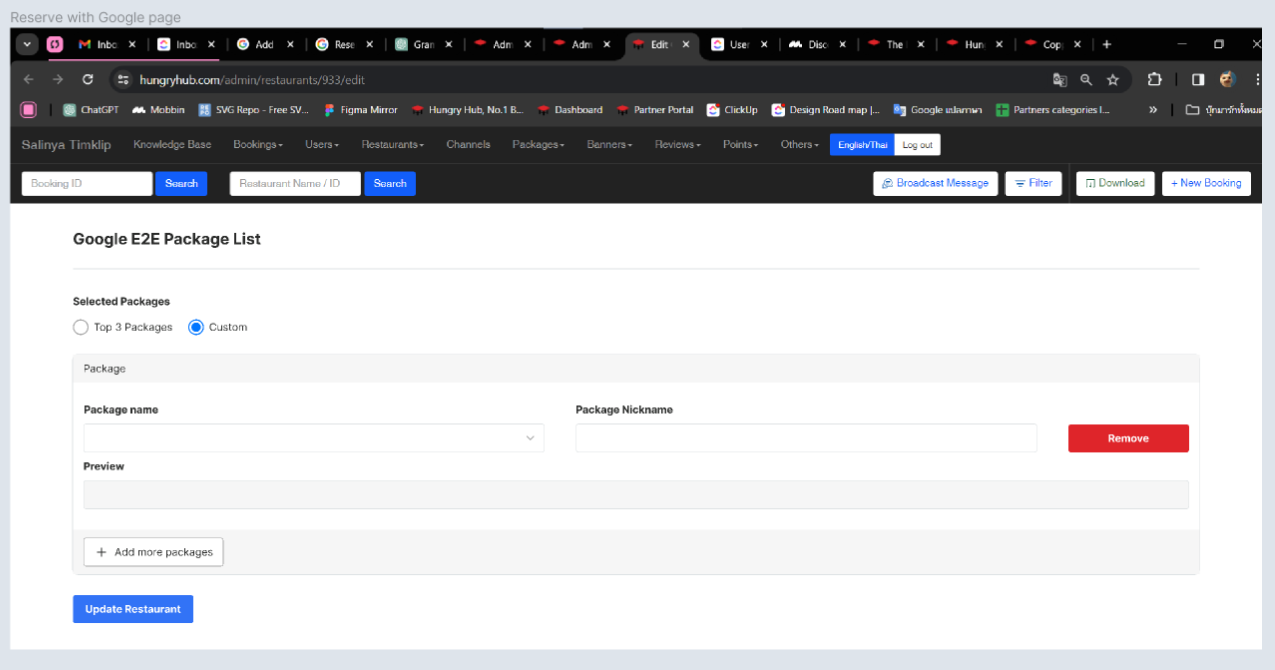 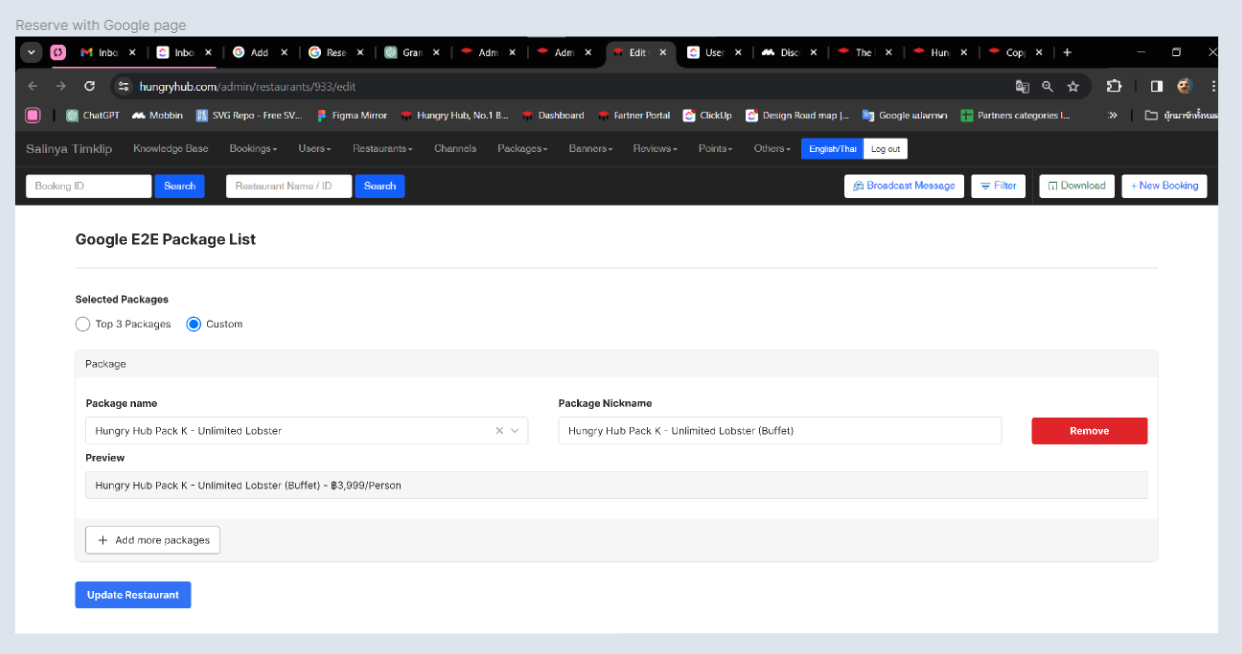 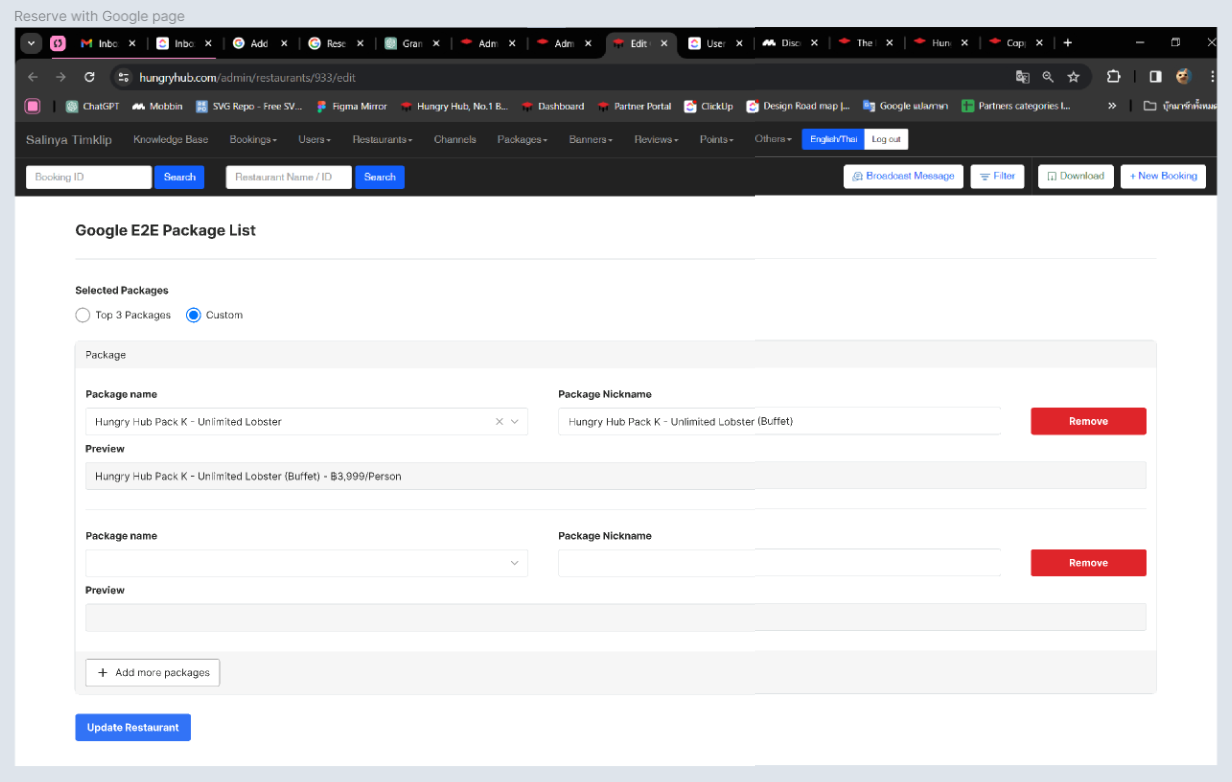 | By default, there is only 1 package and all of the forms are empty.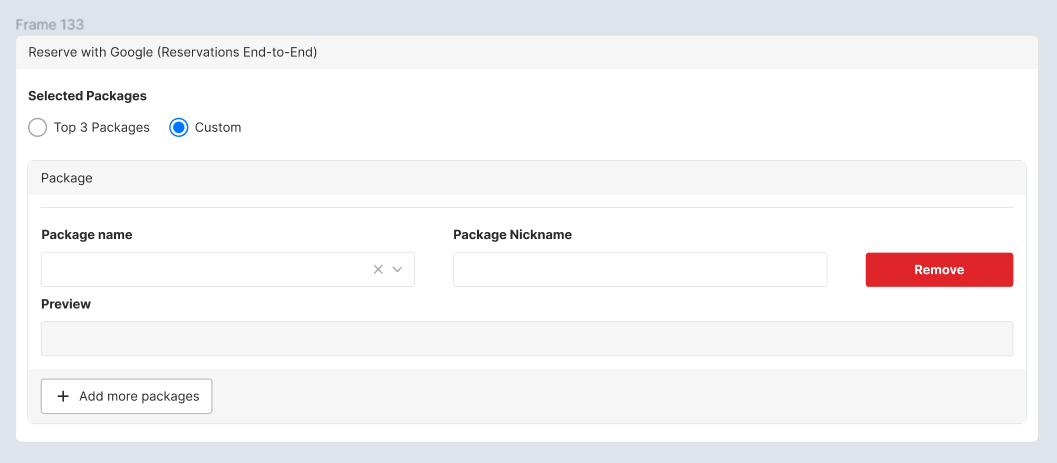 There are some components Package Name formThis is the default name of the package. Admin can select which package (AYCE/Party Pack with dropdown option) that want to be displayed on the Google E2E.Package Nickname formThis is the form for customizing the package name to be displayed on the Google E2EPreview formThis is the result preview after inputting the Package Name/Nickname Remove buttonThis is the form for removing packages that will be displayed on the Google E2E.There are more than 2 packages After clicking the remove button, package will be removed There is 1 package After clicking remove button, all of the filled form will be empty There is Add more packages button to add the package that want to be displayed on the Google E2E. |
Show Restaurant List that use Google E2E HH x Google E2E Restaurant List page
| User Story | Requirement |
|---|---|
As an admin, I want to choose which restaurants will be integrated with Google E2E. i can customize it on the HH x Google E2E Restaurant List pageFlow : Go to the Navbar Click Restaurant Dropdown Click HH x Google E2E Restaurant List itemRedirect to HH x Google E2E Restaurant List page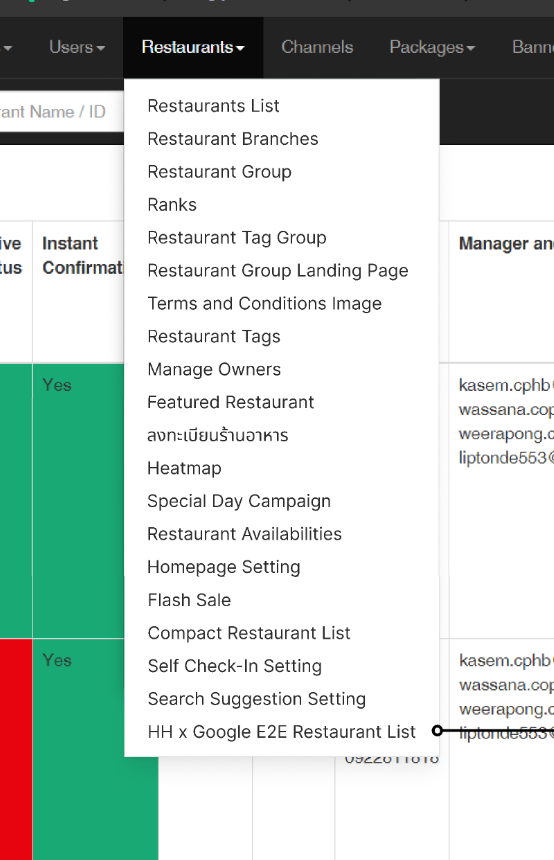 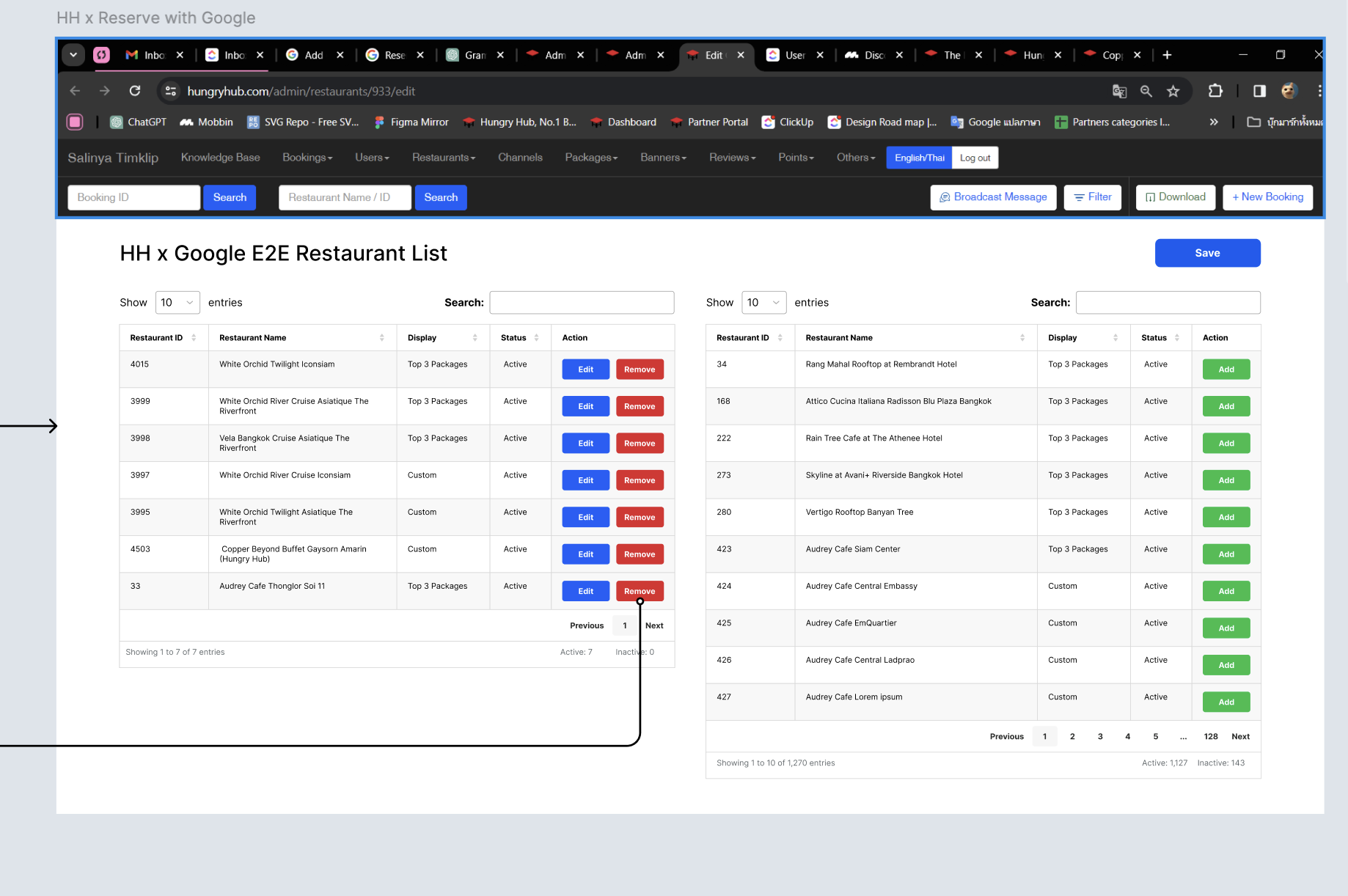 | There are 2 tablesIntegrated RestaurantsNot IntegratedIn each table there are several columns Restaurant IDRestaurant NameStatusShow restaurants that are currently active or inactive ActionThere are different cases, please kindly check the table below Provide Pagination Provide Search Feature Provide Save button to update changes |
| Integrated Restaurants | Not Integrated |
|---|---|
In the Action Column, There are 2 buttons Edit ButtonIt will redirect to HH x Google E2E Restaurant List PageRemove ButtonThe restaurant will be moved to Not yet Integrated table. it shows that restaurant is successfully not integrated to Google E2EStatus ButtonIt will show the status of restaurant ( active/inactive)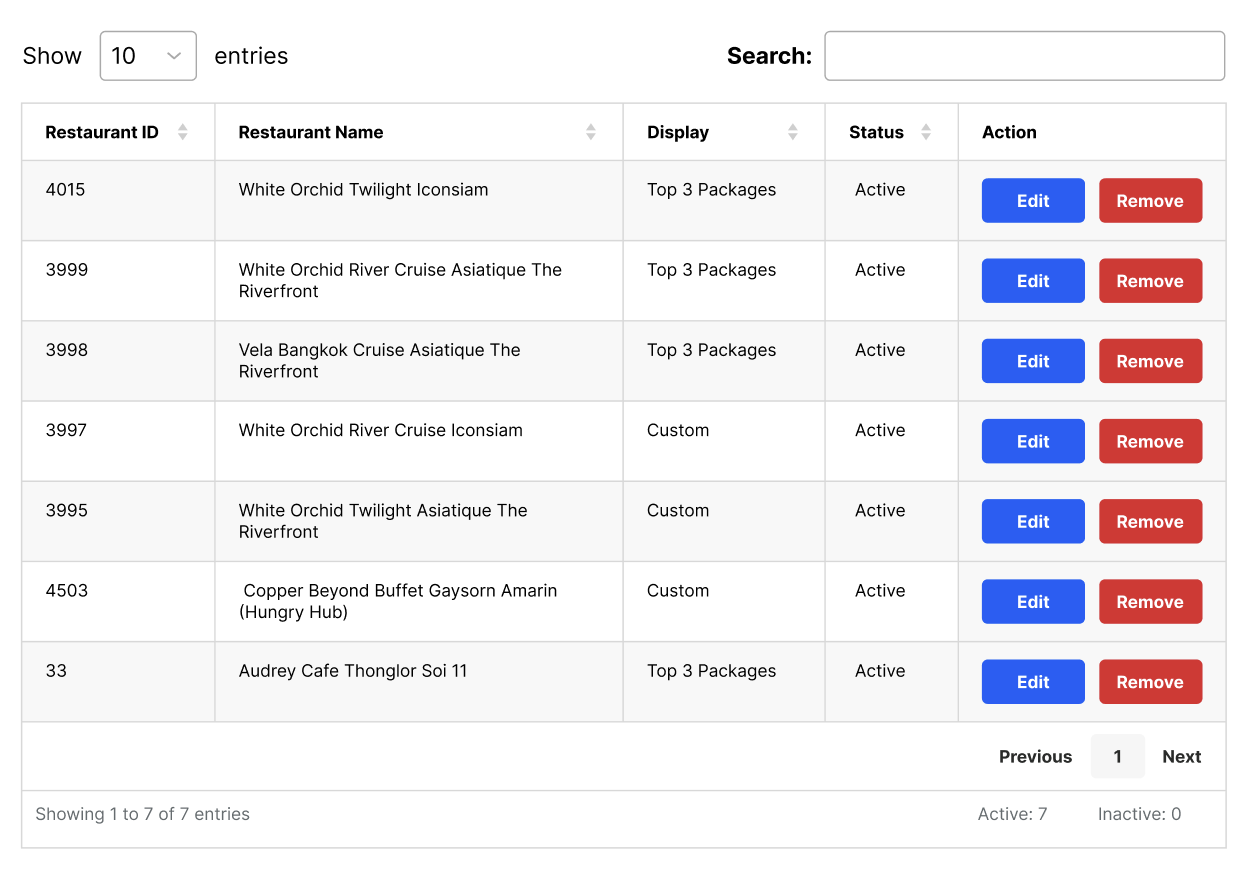 | In the Action Column, There are 2 buttons Add ButtonThe restaurant will be moved to Integrated Restaurants table. it shows that restaurant is successfully integrated to Google E2EStatus ButtonIt will show the status of restaurant ( active/inactive)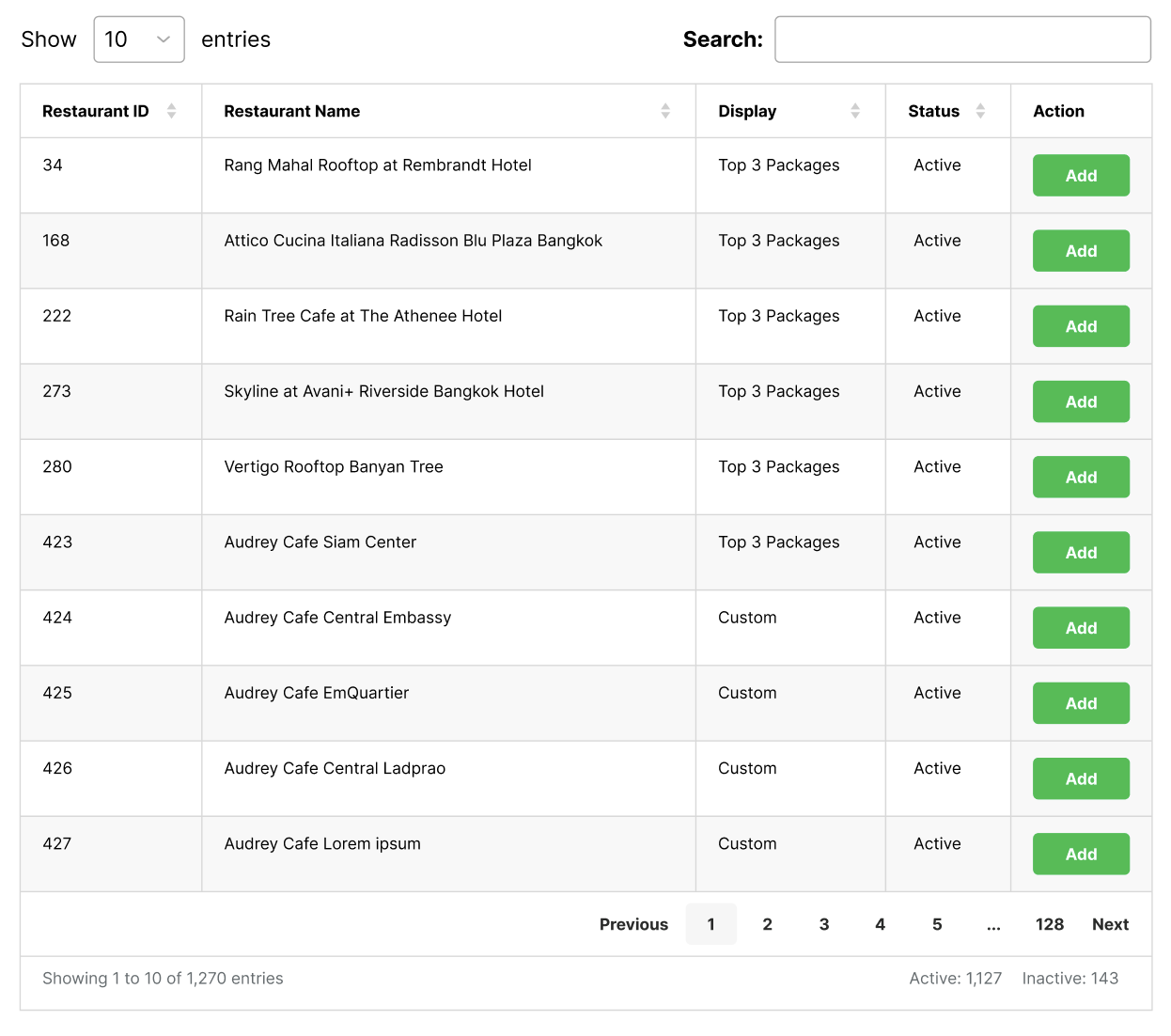 |
What if there is any expired package?
| User Story | Requirement |
|---|---|
| Every package has expired date. if the package is expired, user can't make a booking. as an admin, i want to adjust it. | Provide some conditionsTop 3 PackagesCustom |
| Top 3 Packages | Custom |
|---|---|
The expired package is in the 3rd order. (e.g. Package C). After the package is expired, the package will be replaced by the next package order. (4th order : Package D) 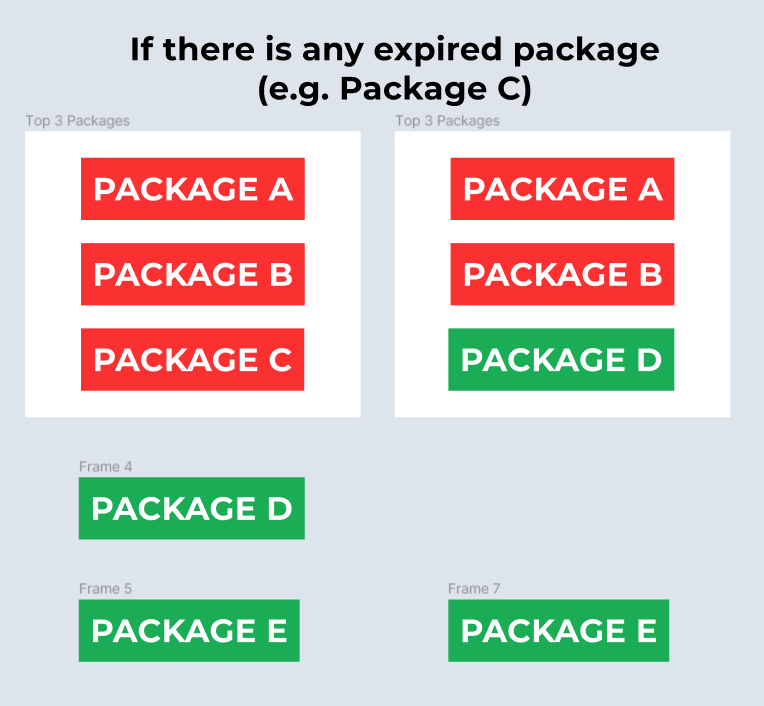 The expired package is in the 1st or 2nd order. (e.g. Package A). After the package is expired, the package will be replaced by the next package order. and the next 3rd package will be replaced by 4th package. 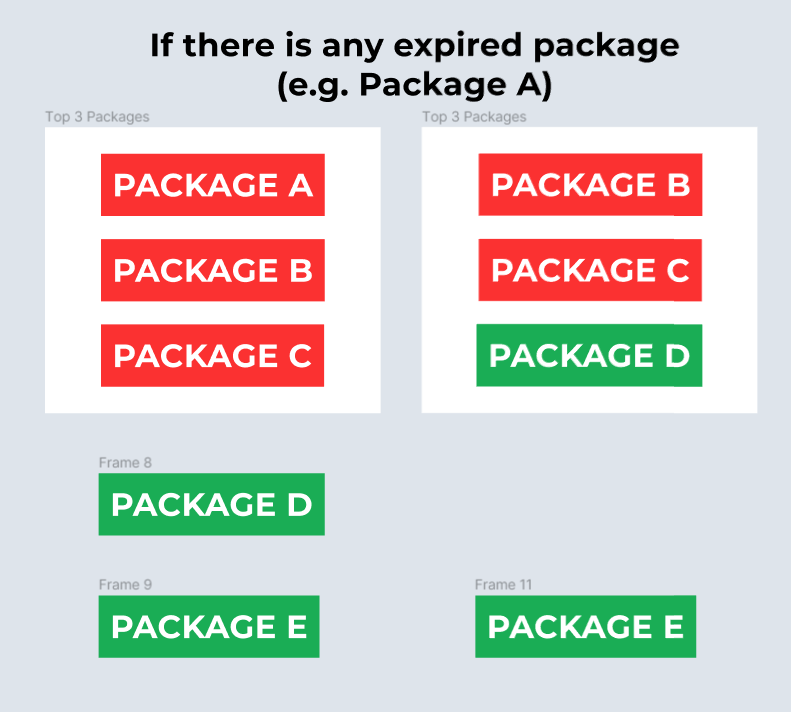 | There is any expired package (e.g. Package C) After the package is expired, the package will be removed. 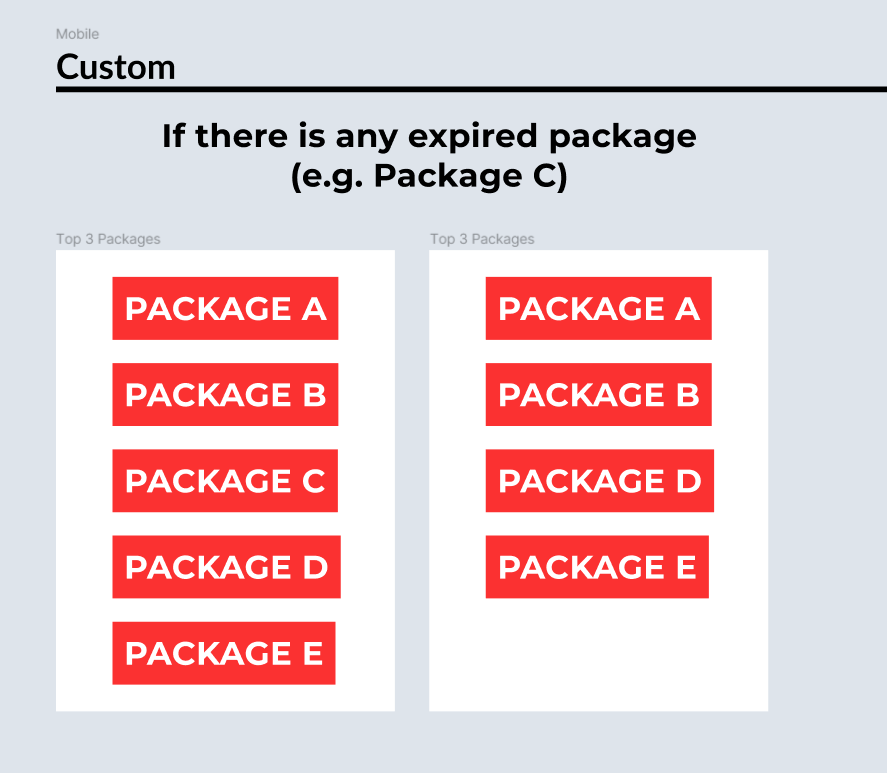 It would be better if the system could provide notification to the admin/owner if the package is expired (e.g. by email) |
❓ FAQ
| Question | Answer |
|---|---|
| when the nickname is empty, we should use English or Thai package's name? | for reaching universal user, prefer using english as priority. but can it be set based on the language being used when accessing Google? Google Setting : Thai ➝ Nickname : Thai Google Setting : English and all languages except Thai ➝ Nickname : English |
| Which restaurants can implement Google E2E? (For phase 1) | Restaurant that has prepayment method |
if restaurant hasPackage with paymentPackage without paymentwhat will happen? | We only can implement Package without payment for phase 1. but it has possibility for implementing Package with payment in the future. |
| How about client side? | Client Side : Private (https://app.clickup.com/9003122396/docs/8ca1fpw-7922/8ca1fpw-36936) |
| What if there are no packages in the top 3 packages? (no reservations in last 30 days) | Provide the random packages (between 1 - 3) |