Allow Minus on “Minutes in Advance Dine in Close” feature
🧾 History
| Date | Changes | Link | By |
|---|---|---|---|
| 24 April 2024 | List of Changes Allow users to book last-minute or even exceed the available schedule Allow admin to set number to minus that indicates users can book exceed the available schedule Convert minute to hour/day/week/month | This PRD | Umam |
📕 About
| Context | Currently, some restaurants are implementing the “Minutes in Advance Dine in Close” feature. This feature serves to set the latest time users can make a reservation. |
|---|---|
| Problem | In some cases, restaurants want to allow users to make reservations even if they exceed the available schedule. the use of positive and zero values in the time settings only allows reservations before the available schedule. the Minutes in Advance Dine in Close feature doesn’t have the ability to order exceed the available schedule. This poses a constraint as some users may wish to book last-minute slots or even exceed the available schedule.Example: Available Slot ➝ 7 PMMinutes in Advance Dine in Close ➝ 15 minutesResult : User can choose 7 PM slot when the current time is no later than 6.45 PMThe current time is 6.00 PM . So, user can choose 7 PM slot (Available)The current time is 6.50 PM . So, user can’t choose 7 PM slot (Not Available) |
| Solution | Enable Minutes in Advance Dine in Close to allow users to book even exceed the available schedule. This would involve permitting the use of negative numbers to indicate booking times exceeding the available schedule. |
| Name of Feature | Maximizing Minutes in Advance Dine in Close |
| Objective | Allow users to book last-minute or even exceed the available schedule Allow admin to set number to minus that indicates users can book exceed the available schedule |
| Gains | Users will feel more at ease knowing they can make reservations even exceed the available schedule, thereby improving the overall user experience Restaurants can enhance users satisfaction and build stronger relationships Restaurants will get the more chances to get more bookings |
| Pains | Restaurants may be concerned about losing control over their schedules if users are allowed to make reservations exceed the available schedule. This could potentially lead to issues in managing capacity or food preparation. Increase the complexity of order management for restaurants, necessitating adjustments in operational processes. |
| Figma Link | https://www.figma.com/design/YJToV06pIxxgTIMEU19YRc/Minutes-in-Advance-Dine-in-Close?node-id=0%3A1&t=bdYeneTUfVnkjlV9-1 |
| Available Platform | Web and App |
| Sprint | TBD |
| Related PRD | - |
| Out of Scope | - |
🎯 User Story & Requirement
Allow minus input on Minutes in Advance Dine in Close field
| User Story | Requirement |
|---|---|
As an admin, i want to set Minutes in Advance Dine in Close exceed the available scheduleHere is the flow Go to admin setting On the navbar, click restaurants and go to restaurant list Click action dropdown and choose edit Here is the example  | Allow minus input on Minutes in Advance Dine in Close fieldHere, the negative value indicates that users can make reservations exceed the available schedule. Example: Available Slot ➝ 7 PMMinutes in Advance Dine in Close ➝ -15 minutesResult: User can choose 7 PM slot when the current time is no later than 7.15 PMThe current time is 7.10 PM . So, user can choose 7 PM slot (Available)The current time is 7.20 PM . So, user can’t choose 7 PM slot (Not Available) |
Add Additional description on client view
| User Story | Requirement |
|---|---|
| As an User, i want to book the package that exceed the available schedule Here is the flow Go to restaurant page Make the booking until redirected to time availibility page | Provide additional information indicating when the user can select an available time slot Based on this following format Without minus ➝ This outlet requires you to book at least X in advanceWith minus ➝ This outlet allows you to book X past the start dining time. However, the starting dining time count will start based on selected timeX: variable for minute/hour/day/week/month in Advance Dine in CloseAdd the instruction in the blue block and Place it under the time slot section Convert minute into hour/day/week/month (also apply it for minus)If number > 60 minutes, convert it into hours (example : 1 hour, 1 hour 10 minutes)If number >1440 minutes, convert it into days (example : 1 day, 1 day 10 hours , 1 day 10 hours 50 minutes)If number >10080 minutes, convert it into weeks (example : 1 week, 2 weeks 2 days 10 hours 1 minute)If number >43800 minutes, convert it into months (example : 1 month, 2 months 2 weeks 10 days 1 minute)this also applies to multiples example : 120 minutes ➝ 2 hours 180 minutes ➝ 3 hours so on 1st Example (without minus) : Available Slot ➝ 7 PMMinutes in Advance Dine in Close ➝ 15 minutes (without minus)Result ➝ This outlet requires you to book at least 15 minutes in advance2nd Example (with minus) : Available Slot ➝ 7 PMMinutes in Advance Dine in Close ➝ -15 minutes (with minus)Result ➝ This outlet allows you to book 15 minutes past the start dining time. However the starting dining time count will start based on selected time |
| Without Minus | With minus |
|---|---|
Old Store page 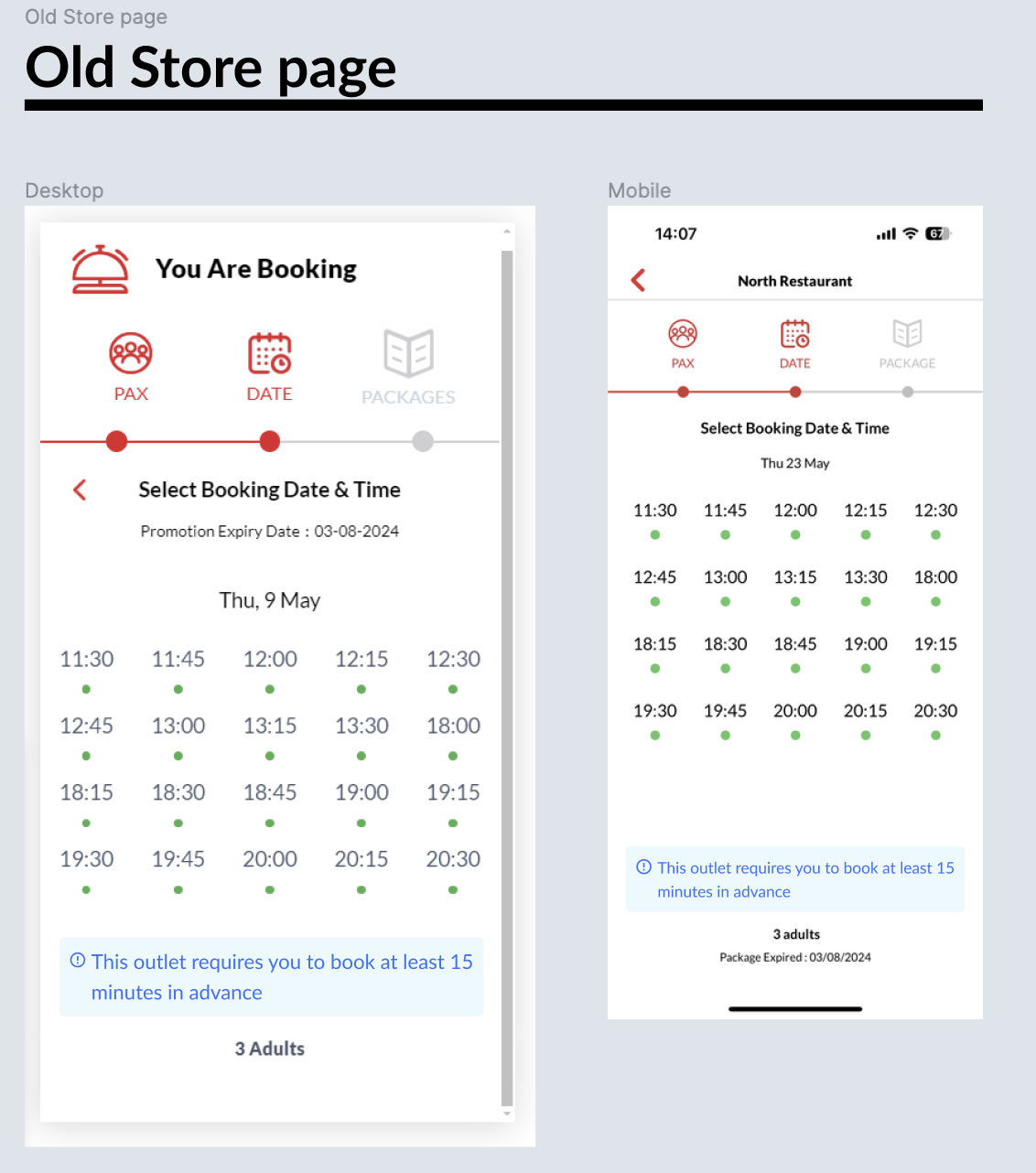 New Store Page 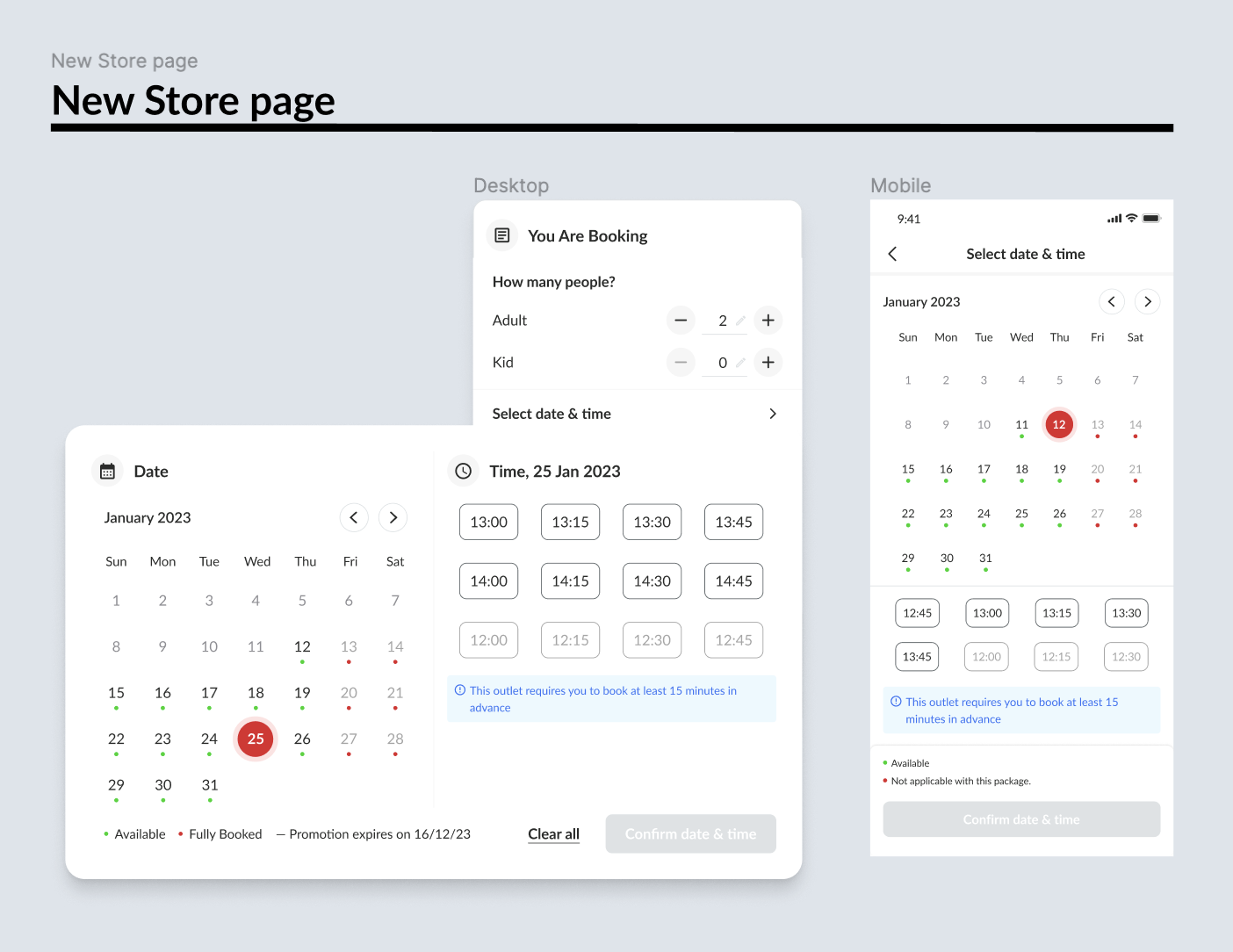 | Old Store page 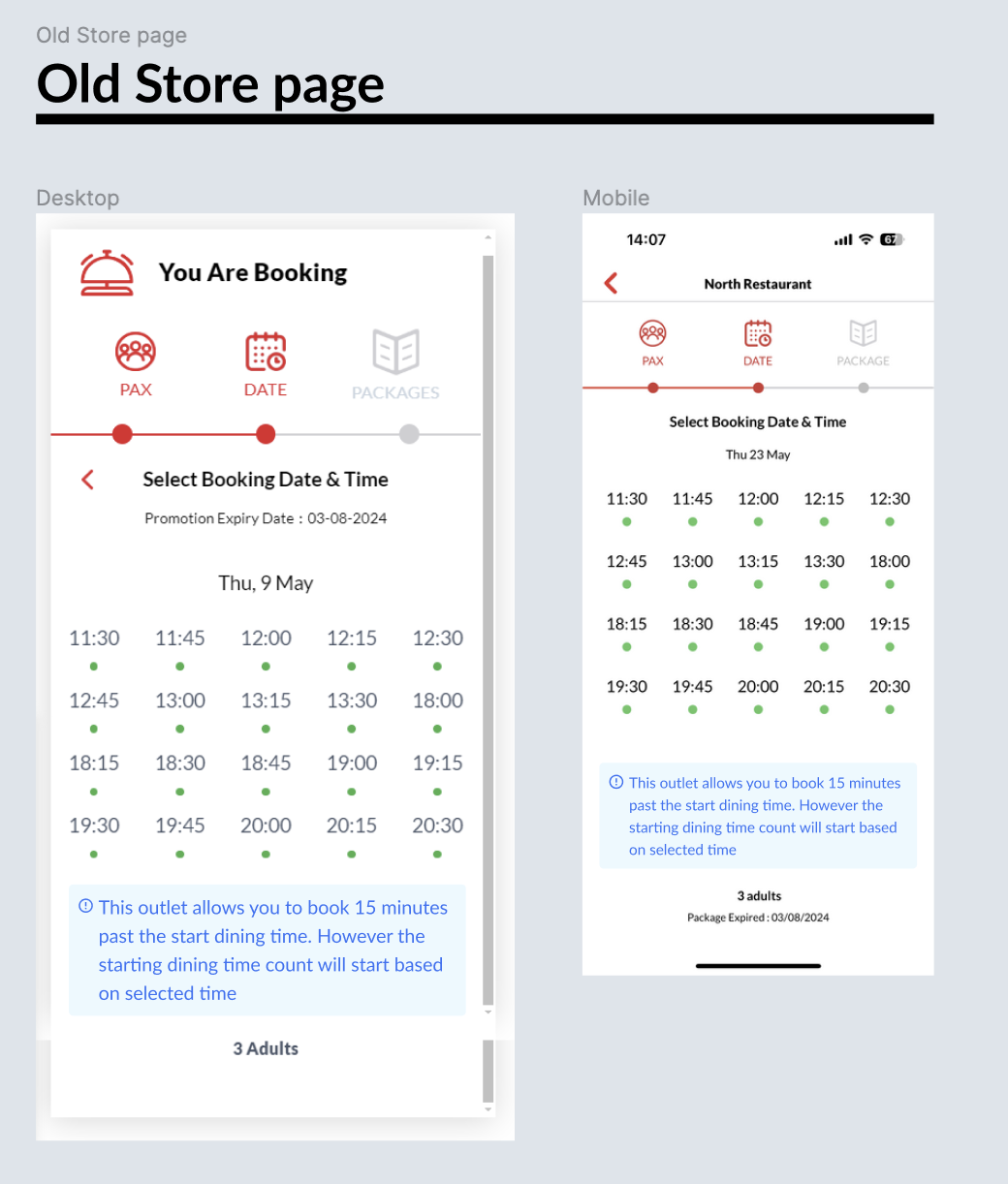 New Store Page 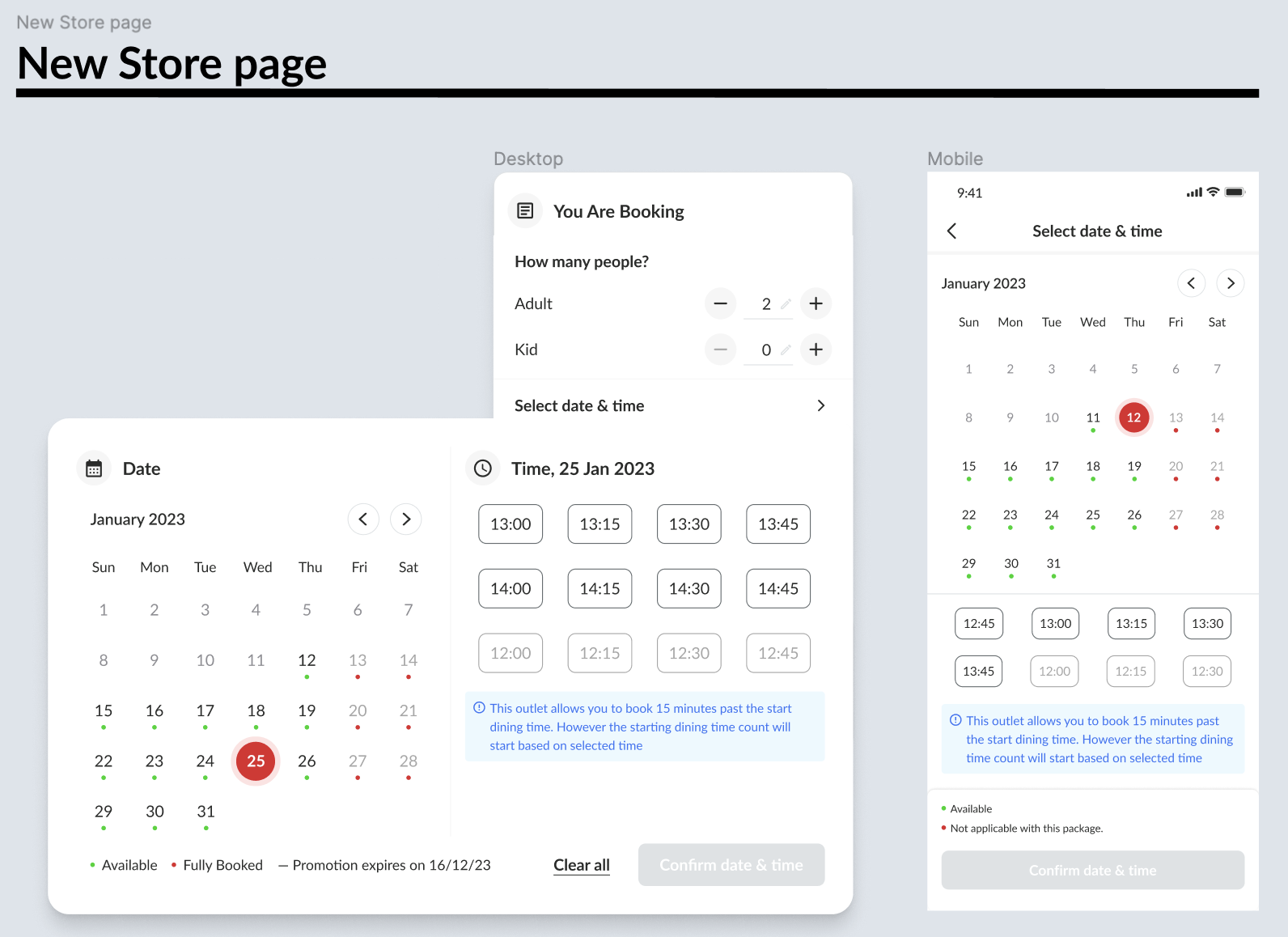 |
❓ FAQ
| Question | Answer |
|---|---|
What if a user input 0 ? | Do nothing, No instruction will appear |
| Mix and match? | For mix and match packages we will follow the largest min booking time of the packages Example : AYCE package A: -30 minutes AYCE package B: 20 minutes we will use the ayce package B with 20 minutes min booking time in advance |
| Choose package first? | The instruction will appear based on the package setting that has been selected |
| Choose date and time first? | If choose date and time first, follow the instruction based on the restaurant level. But, Once the package was selected, then follow the instruction based on the package level. |
| Add minus on package level? | Currently, can’t set the minus on the package level. but, the only way is setting on the restaurant level (choose follow restaurant level) |
| Level Prioritization | Admin level Restaurant level Package level |
| Example Scenario | Pls check here : https://docs.google.com/spreadsheets/d/1efVlDjkAiXVhCNt5Bm-bC_rPnRlXZxpWI81t4RR5XtA/edit?gid=0#gid=0 |