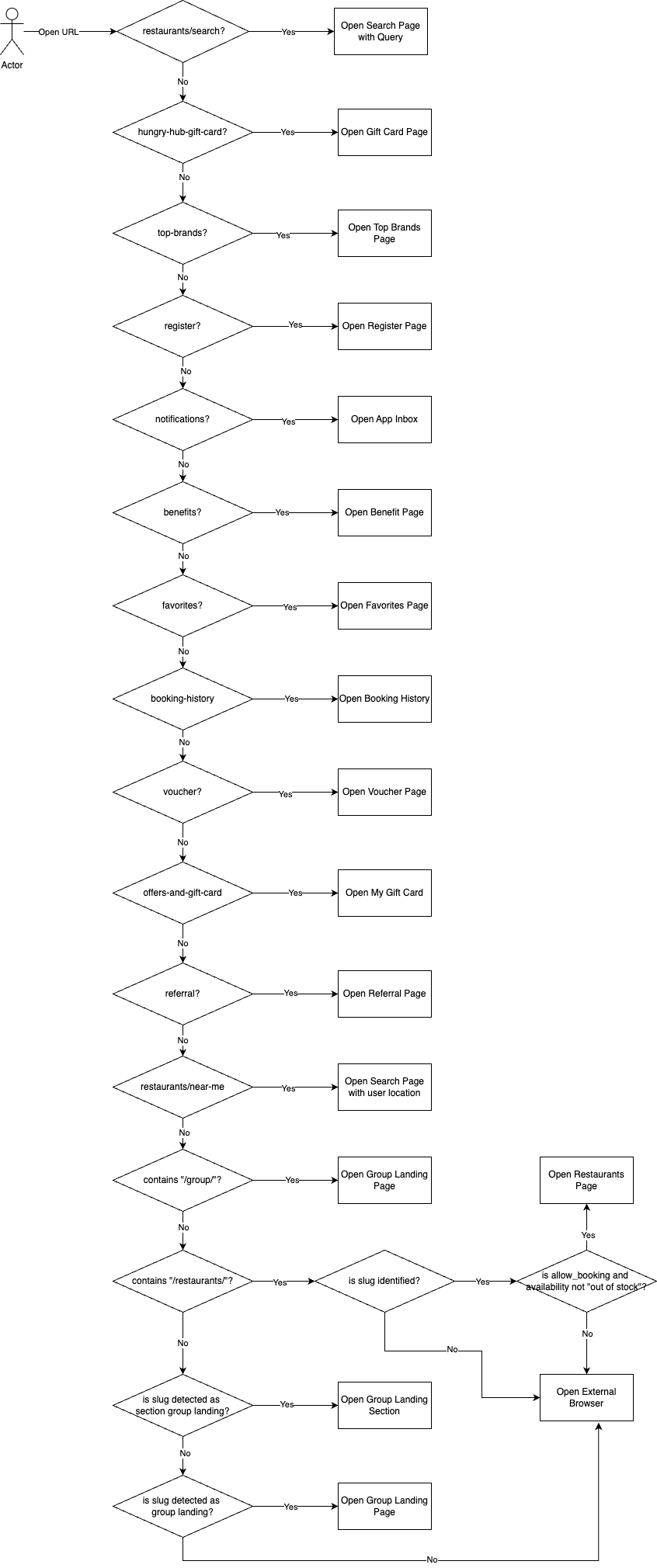
Deeplink On Mobile Apps
Possible Scheme:
- https://web.hungryhub.com/{path that we need to handle}
- hungryhub://{path that we need to handle}
Possible Host (HTTP):
There are 2 main functions that we implement in our app:
- Query Mapping
- Handle Navigation
Query Mapping
Currently, we handle queries mostly for referral transactions and search queries.
Referral Transaction
We have 4 channel referral transaction: blogger channel (our own referral), involve asia, access trade, and reserve with Google.
Blogger Channel
V1
There are 3 queries that we need take a look to handle this blogger channel: utm_source, utm_medium, and utm_version. booking channel is from utm_source
V2
If utm_version is exists and has value “v2” we store utm_medium as our channel. But if not we’ll use utm_source as our channel. For blogger channel we store it until 7 days and will reset if expired.
- we use that channel in doSetupData on hybrid checkout
PS: the upcoming project will store more data for UTM referral
Reserve With Google
We only need to handle rwg_token for query. We store that rwg_token to do conversion manually in our code after booking and we hardcoded channel with value “rwg” to track transaction in our admin dashboard.
Updated 10 Mar 2025
Involve Asia/Access Trade/Forit
For these two, we already implemented it. The different is Involve Asia we need to check query click_id and Access Trade we need to check partner. The basic logic is like this:
- if URL query has click_id (Involve Asia):
click_id = click_id value
adv_partner = involveasia
- if URL query has partner (Access Trade):
click_id = partner value
adv_partner = accesstrade
- if URL query has abm (Forit)
click_id = abm value
adv_partner = forit
- we use that click_id and adv_partner in doSetupData on hybrid checkout
Language
Actually, we have query locale, and also some old url have path /en/ or /th/ we need to ignore that language and use user preference or local language instead.
Handle Navigation
We have many navigation that we handle in our App.
Search Page
If the path contains “/restaurants/search” we’ll redirect it to the search page.
Search Query Mapping
These are query that we have right now:
- cuisine_id[]
- cuisine_name[]
- dining_style_id[]
- dining_style_name[]
- location_id[]
- location_name[]
- location_shopping_mall_id[]
- location_shopping_mall_name[]
- location_popular_zone_id[]
- location_popular_zone_name[]
- location_bts_route_id[]
- location_bts_route_name[]
- location_mrt_route_id[]
- location_mrt_route_name[]
- tag_id[]
- tag_name[]
- branch_id
- name_like
- city_id
- package_type[]
- distance
- price_type
- max
- min
- sort
- multiple_pricing
- offer_ticket
- hashtags
Restaurants
We have 2 type restaurant URL, single restaurants and group restaurants.
Single Restaurants
Example: https://web.hungryhub.com/restaurants/great-harbour-international-buffet
There’s URL that show specific single restaurant page. Currently, we use this format:
{base_url}/restaurants/{slug}
We read the slug data and hit API single restaurant by slug:
{{base_api }}/restaurants/{slug}/slug.json
In the response, we check if the restaurant exists, is_allow_booking is true and if availability is not “out of stock” we redirect to a single restaurant page. If criteria doesn’t match we redirect to open in browsers.
Some restaurants can only be booked on the website. That’s why we implement that logic.
Group Restaurants
There are 2 format URL that we have on Group Restaurants page:
- {base_url}/{slug} > https://web.hungryhub.com/era-izaan?locale=en
- {base_url}/restaurants/group/{slug} > https://web.hungryhub.com/restaurants/group/songkran-splash-deals?locale=en
There are also 2 types of group landing that we have:
Group Landing Section
Group Landing Section is a group landing that redirects from “see more” from the homepage section. For this group section, we check the slug from API: {{ base_api }}/homes/sections.json
Group Landing Restaurants
Group Landing Restaurants is a group landing that usually we can found on banner or any promotional event. For this one, we check the slug from API: {{ base_api }}/group_landing_pages.json
For the implementation, we currently store the group landing pages data in our local. We use that group landing data to check the slug is correct or not or check if branch_id have group landing page or not.
For deep link case, if slug not found in group landing pages data will redirect to open browsers.
Static Pages (Hardcoded URL)
Some pages use specific URLs that we hardcoded in our logic. The URL doesn’t need to be processed or request API before navigating.
Register Pages
https://web.hungryhub.com/register?locale=en We redirect users to the register page if they haven’t registered yet. But if users already sign in we redirect to their profile pages.
Profile Pages
There are some pages that we handle on profile page:
Profile Tab
https://web.hungryhub.com/profile/?locale=en We redirect users to the profile tab. If users already sign in will show their profile data. If not will show guest profile UI.
Referral (Update)
https://web.hungryhub.com/profile/referral?locale=en Old: We redirect users to the profile tab but show the referral pop-up dialog. New: Open a new referral page screen.
Booking History
https://web.hungryhub.com/profile/history?locale=en
We redirect users to the booking history page.
Note: need to check slug use history only or booking-history in all platforms.
Favorite Restaurants
https://web.hungryhub.com/profile/favourite?locale=en We redirect users to their favorite restaurant list page.
Vouchers
https://web.hungryhub.com/profile/voucher?locale=en We redirect users to their VIM page. That page shows their VIM that already bought or redeemed.
Offers and Gift Card
https://web.hungryhub.com/profile/offers-and-gift-card?locale=en We redirect users to their promo code and gift card page.
Benefits
https://web.hungryhub.com/profile/benefits?locale=en We redirect users to their user benefits page. That show their current loyalty level and all benefits.
Other:
We also have my address page but currently we hide it since we remove H@H packages. https://web.hungryhub.com/profile/address?locale=en
Hungry Hub Gift Card
https://web.hungryhub.com/hungry-hub-gift-card We redirect users to the buy gift card page.
Top Brands
https://web.hungryhub.com/top-brands?locale=en We redirect users to Our Partners page.
Notifications (App Inbox)
https://web.hungryhub.com/notifications We redirect users to App Inbox pages. This page only available in the app.
Special Case
Near me: https://web.hungryhub.com/restaurants/near-me We redirect users to search page with latitude and longitude applied.
Booking Confirmation
{base_url}/restaurants/{slug}/landing/{reservation_id or encrypted_id} https://web.hungryhub.com/restaurants/hungry-hub-training-test-16-49/landing/4013866?tracked=true We redirect users to booking confirmation pages. Need validation to read reservation_id or encrypted_id.
Expected Flow