All about system log
Description
- Every type of log have their on index(faraday, worker, sidekiq, ect)
- On 1 server we have several index as you can see on the image here:
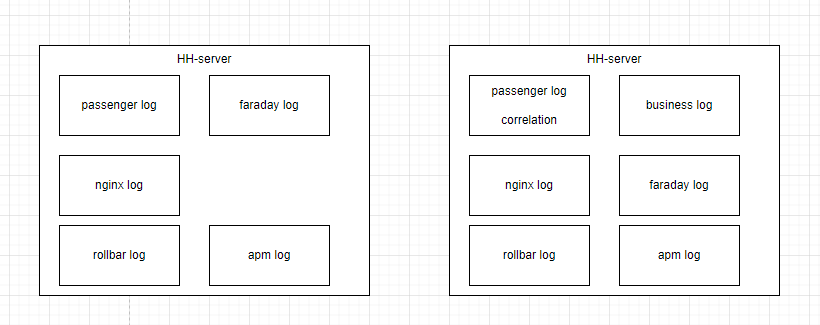
- All the log that we have in every server will be listed on logs.hungryhub.com
- If you want to know the data changes log, you can open the search index

Index Explanation
custom-log-index
This index is used to store BUSINESS logs from the application.
The logs are generated by hh-server to track business process that is happening, such as reservation validation result, creation progress, etc.
Staging index patterns:
- staging-hh-venus-custom-log-index*
- staging-hh-engineering-custom-log-index*
- staging-hh-ballbot-custom-log-index*
- prod-support-hh-server-custom-log-index*
Production index patterns:
- prod-hh-server-custom-log-index*
custom-technical-index
This index is used to store TECHNICAL logs from the application.
The logs are generated by hh-server to track technical process that is happening, such as cache checking, kafka event, sidekiq event, etc.
Staging index patterns:
- staging-hh-venus-custom-technical-index*
- staging-hh-engineering-custom-technical-index*
- staging-hh-ballbot-custom-technical-index*
- prod-support-hh-server-custom-technical-index*
Production index patterns:
- prod-hh-server-custom-technical-index*
faraday-index
This index is used to store Faraday logs from the application.
The logs are generated by Faraday to track HTTP request and response that is happening, such as request, response, error, etc.
Staging index patterns:
- staging-hh-venus-faraday-index*
- staging-hh-engineering-faraday-index*
- staging-hh-ballbot-faraday-index*
- prod-support-hh-server-faraday-index*
Production index patterns:
- prod-hh-server-faraday-index*
server-index
This index is used to store SERVER logs from the application.
The logs are generated by hh-server to track incoming request, such as request path, request method, request params, etc.
Staging index patterns:
- staging-hh-venus-server-index*
- staging-hh-engineering-server-index*
- staging-hh-ballbot-server-index*
- prod-support-hh-server-index*
Production index patterns:
- prod-hh-server-index*
elastic-apm-index
This index is used to store Elastic APM logs from the application.
The logs are generated by Ruby Elastic APM client app to when tracking and sending APM data to Elastic APM server.
The purpose is to let DevOps easily gather the logs when they need to debug the APM tracking issue.
Staging index patterns:
- staging-hh-venus-elastic-apm-index*
- staging-hh-engineering-elastic-apm-index*
- staging-hh-ballbot-elastic-apm-index*
- prod-support-hh-server-elastic-apm-index*
Production index patterns:
- prod-hh-server-elastic-apm-index*
nginx-error-log-index
This index is used to store Nginx error logs from the application.
The logs are generated by Nginx to track error that is happening, such as 404 error, 500 error, Passenger integration error etc.
We use Nginx as proxy server to handle incoming request and pass it to hh-server.
hh-server uses Passenger to run the Ruby application.
When hh-server server fail to run the application, usually Nginx will log the error.
Staging index patterns:
- staging-hh-venus-nginx-error-log-index*
- staging-hh-engineering-nginx-error-log-index*
- staging-hh-ballbot-nginx-error-log-index*
- prod-support-hh-server-nginx-error-log-index*
Production index patterns:
- prod-hh-server-nginx-error-log-index*
hh-search index
The logs are generated by hh-search to track user activities that is happening, such as user search pattern and to store the error from the GraphQL API.
Staging index patterns:
- hh-search-engineering-index*
Production index patterns:
- hh-search-production-index*
hh-search worker-index
This index is used to store TECHNICAL logs from the application.
The logs are generated by hh-search to track technical process that is happening, such as index/create/update/delete on opensearch, kafka event, bullmq, etc.
Staging index patterns:
- hh-search-engineering-worker-index*
Production index patterns:
- hh-search-production-worker-index*
Hungryhub log system account
Private (https://app.clickup.com/9003122396/docs/8ca1fpw-35956/8ca1fpw-41836)
How to read Log
- Open Logs.hungryhub.com
- Login
- Open Discover menu
- Pick you index:
- Check the search data history check hh-search-{server name}-index
- Check the api log on prod-hh-server-index or staging-hh-{server name}
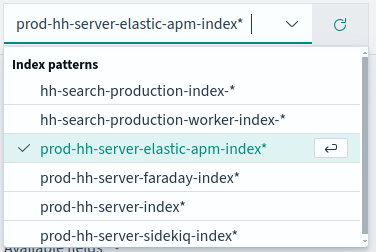
- And search your log
PRD / Task
Private (https://app.clickup.com/t/86cwq2hxv)
[
github.com
https://github.com/hungryhub-team/hh-server/pull/5953
](https://github.com/hungryhub-team/hh-server/pull/5953)
[
github.com
https://github.com/hungryhub-team/hh-server/pull/5953/commits
](https://github.com/hungryhub-team/hh-server/pull/5953/commits)