Voucher in Marketplace
Description / Background
Current packages on our platforms are linked to the allotments we receive from the partners. When the given allotment is full while rooms are still available at the hotels/restaurants, we lose the opportunity to sell more.
Glossary
https://app.clickup.com/9003122396/docs/8ca1fpw-35796/8ca1fpw-41516
Objectives
- One voucher number = one voucher
- Prepayment 100%
- Use pricing tier based on quantity per booking (e.g. Price per 10 vouchers)
- Voucher number format = VC-XXXXXX
- Voucher can’t be canceled or refund
- Voucher in marketplace is set up as a package via Package module on Admin dashboard
- This package type does not link to allotment
- Admin can set up the quantity of the voucher for each package
- Admin can set up the maximum vouchers allowed for each order
- Admin can set up the selling period (Start - End date)
- Admin can set up the validity period (Start - End date)
- Admin can set up the full and discounted price
- Admin can set up the voucher description (the same way we set up the menu)
- User can buy the vouchers through Hungry Hub during the selling period
- User can mix and match among Voucher package types per order
- User can pay using QR and CC
- User receives review link after redeem the voucher
- Dine-in = same as the existing time
- Xperience = 3 days after, one more time if not reviewed 30 days after
- Owner receives the e-voucher with the voucher number and order ID via email
- User must redeem the voucher within the validity period
- User can earn Hungry Points by buying the Vouchers
- Owner can see stats of sold/redeemed vouchers for each package (Quantity in orders and covers and revenue)
- Owner can access the Voucher Redemption page
- Owner redeems the voucher by inputting the voucher numbers from the e-voucher or scan the QR code
- Owner can keep track of redeemed vouchers as Voucher redemption list
- Owner can add Guest details during the voucher redemption if the voucher buyer and the person staying/dining in are different
- Admin can hide VIM by picking “Hide in Store Page” on VIM setting
- Singapore user now can book Voucher In Marketplace
Location
From Admin dashboard:
Packages menu ➝ Voucher in Marketplace
From Owner dashboard:
Voucher in Market Place menu ➝ Open Voucher in Market Place List to redeem the voucher(s)
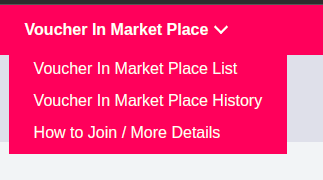
How to find Voucher in Marketplace Order(s)
From Admin Dashboard:
Booking menu ➝ Voucher Order List
Admin can download the VIM report there
From Owner Dashboard:
Voucher in Market Place menu ➝ Voucher in Market Place List If owner wants to check the voucher that has been redeemed open Voucher in Market Place menu ➝ Voucher in Market Place History
Owner can add guest detail on Voucher In Market Place History if needed
How to set VIM
- Go to Admin Dashboard
- Click Packages menu
- Click Voucher in Market Place sub menu
- Direct to Voucher in Market Place Overview
https://hungryhub.com/admin/ticket_groups?locale=en
- Find Add New button
- Click Add New button
- Direct to Create Voucher in Market Place page
https://hungryhub.com/admin/ticket_groups/new?locale=en
- Fill the fields (country, voucher name (TH and EN), cover image (for the voucher), custom labels, description (TH and EN))
- Select the restaurant(s) where we want to have the VIM
- Select the Package Type
- Choose the image file and set the Rank for TNC
- Set the Selling Period, Validity Period, Original Price (THB), Discount Price (THB), Voucher Quantity, Limit per Order, Payment Type, Commission, Accept Gift Card, Pre-Payment 100%, Allow Mix and Match Package
Make sure that end selling period and end validity period is not the same, validity period must be ended after selling period
- Fill commission
- Visibility: Select Show in Store page to have the VIM displayed on Store page / Restaurant Detail page
- Click Save button
- Check on the selected restaurant(s) to make sure the VIM set is displayed
VIM Customisation setting
 Admin can limit users buying by checking the “Limit Users”, the number that admin input here will be the maximum number of users buying.
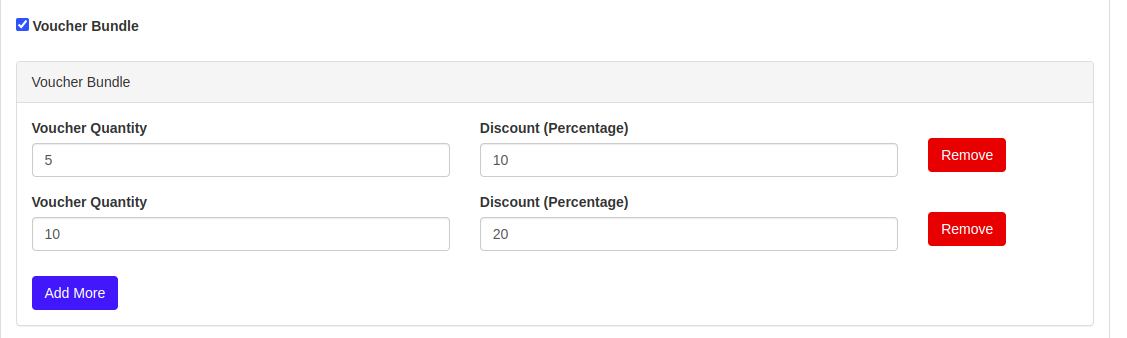
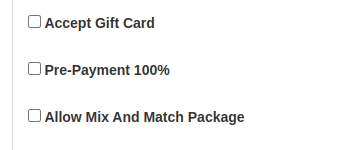
VIM behavior
- VIM with expired Selling Period would still be displayed on Restaurant Detail page
- Sold Out VIM would still be displayed on Restaurant Detail page
- VIM with today as the end of Selling Period would still be displayed on Restaurant Detail page
- VIM with expired Validity Period should not be displayed on Restaurant Detail page
- Quota Vouchers will return if VIM was canceled and VIM can be purchased again
- On the Quota and Quota witness admin pages, the quota amount will increase if VIM is canceled
Sequence Diagram / Flow
https://www.google.com/s2/favicons?domain_url=https%3A%2F%2Fapp.diagrams.net%2F%23G1HoljNWFbjmE0RaJn4JI20k3uDg0iEjCdhttps://app.diagrams.net/#G1HoljNWFbjmE0RaJn4JI20k3uDg0iEjCd
](https://app.diagrams.net/#G1HoljNWFbjmE0RaJn4JI20k3uDg0iEjCd)
ERD
UML
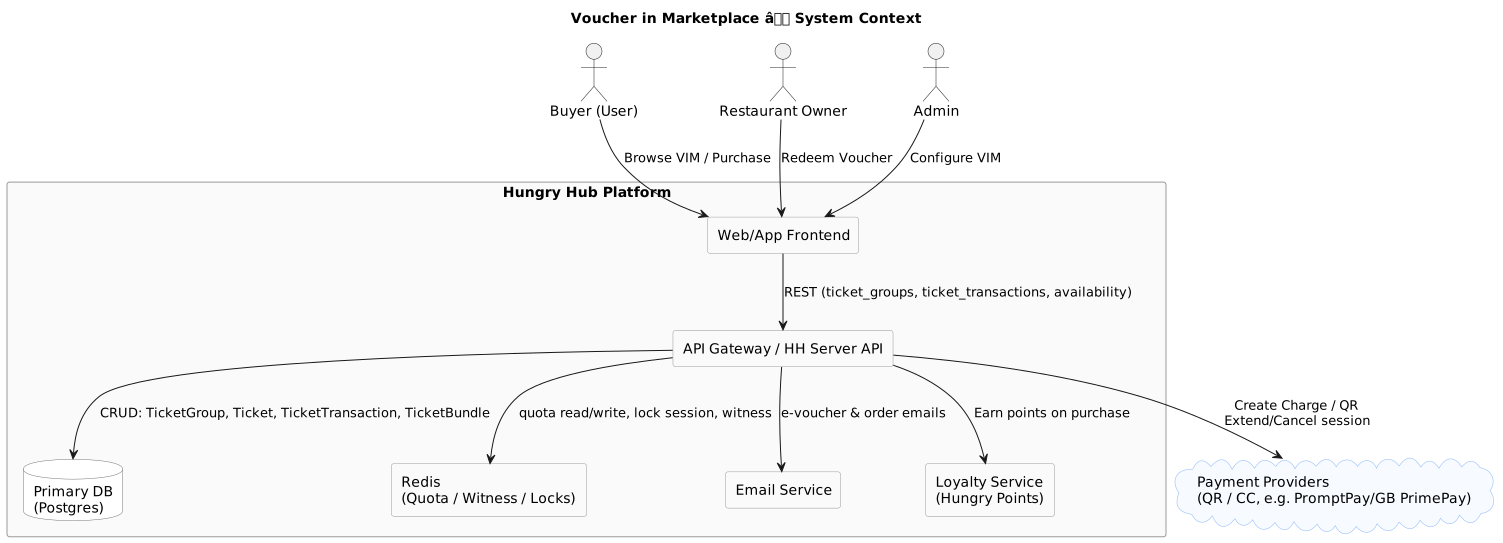


Backend Implementation
- Add new model ticket and ticket group (we call it ticket on database)
- implement earn point every voucher marketplace transaction
- voucher marketplace effect on loyalty program
- add send email confirmation, after buying the voucher
Frontend Implementation
Lock API
POST: {{ base_api }}/ticket_transactions/lock.json params:
{
	"restaurant_id": "997",
	"ticket_groups": [
		{
			"id": "5",
			"quantity": 1
		}
	],
	"access_token": "Pn1bJ0FbA989JU2JeUmQQj2wOfmTtrneoUg7SwebVb0"  (blank for guest)
}
Response:
{
	"data": {
		"transaction_id": 468,
		"expired_at": "2023-09-20T08:53:57Z"
	},
	"success": true,
	"message": "lock transaction success"
}
if failed
{
	"success": false,
	"message": "Sorry, the quantity is not sufficient.",
	"data": null
}
Cancel API:
PUT : {{ base_api }}/ticket_transactions/558/cancel.json
triggered when back from payment page and cancel QR payment
Create transaction API:
POST: {{ base_api }}/ticket_transactions**/submit.json** This is a new API different than previous one
{
	"restaurant_id": "997",
	"ticket_transaction_id": 558,
	"payment_type": "promptpay",
	"gb_primepay_card": {},
	"provider": "hungryhub",
	"channel": "web",
	"source": "website",
	"access_token": "Pn1bJ0FbA989JU2JeUmQQj2wOfmTtrneoUg7SwebVb0"
}
Design
[Email UI design (All) Created with Figma https://www.figma.com/file/Ob2Y8ifLbZUGxLy61epbIM/Email-UI-design-(All)?type=design&node-id=878-12&mode=design
](https://www.figma.com/file/Ob2Y8ifLbZUGxLy61epbIM/Email-UI-design-(All)?type=design&node-id=878-12&mode=design)
API Blueprint
Voucher in Marketplace table name is : Ticket Groups GET Ticket Groups URL: {{ base_api }}/ticket_groups.json Payload:
{ "restaurant_id" : 997 }
GET User Tickets URL: {{ base_api }}/users/tickets.json: Payload:
{ "access_token": "Oi_60629gs9fIwc-ZClNFdrx-y09-b2AgBazpsXe0vw", "section_type": "unredeemed/redeemed", "minor_version": "{{ minor_version }}" }
Improvement:
1. Create a secondary quota data using Redis
Createa a new Ruby class that responsible to track voucher quota, similar to InvWitness
example in Booking feature https://hungryhub.com/admin/restaurants/933/inventories?date=2023-09-15&locale=en
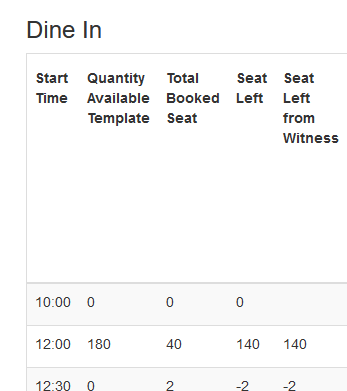 Update the redis data when TicketGroup has been created/updated/destroyed, when a new order created/updated/destroyed
2. Update Voucher List Page
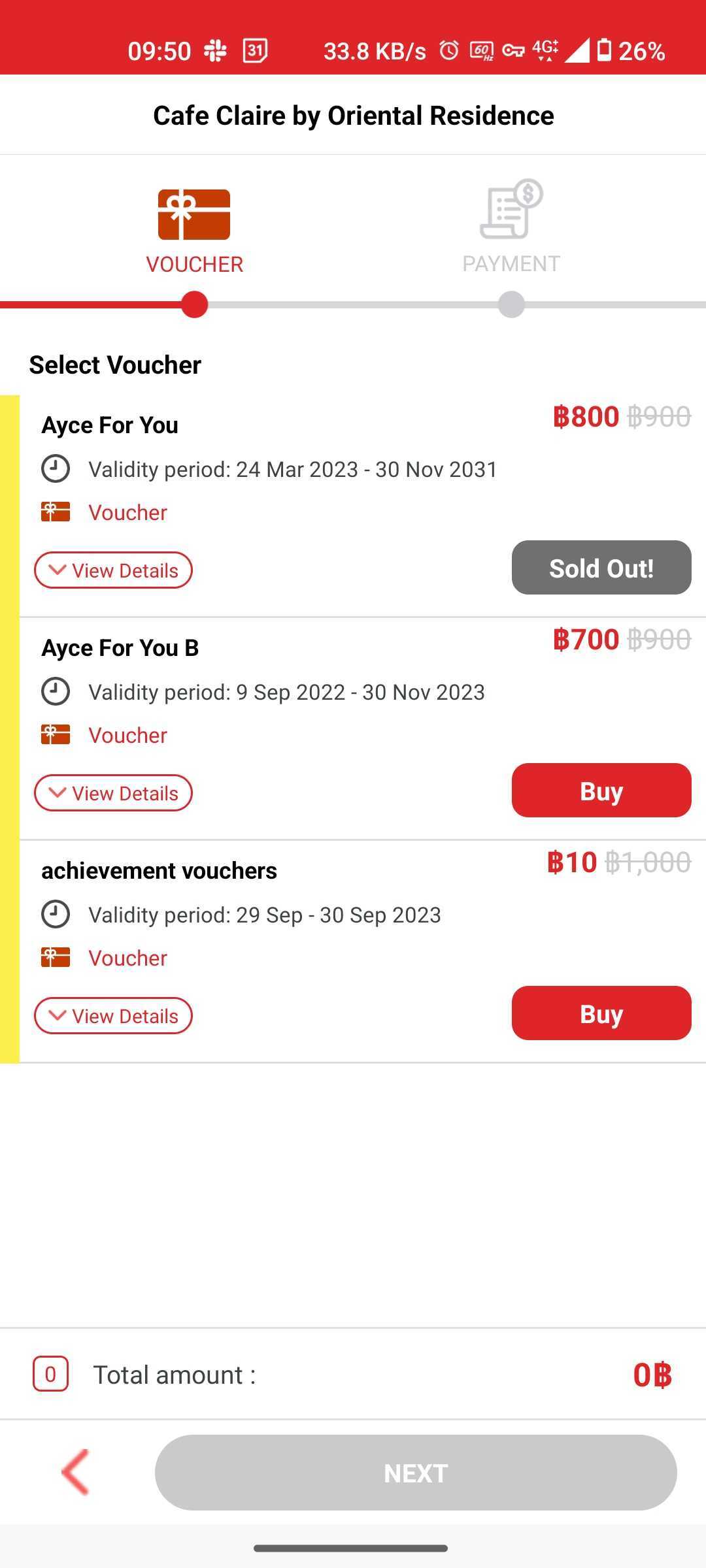
https://app.clickup.com/t/860rku97k we should check the voucher quota on this page, if the quota is empty, then say sold out
- make the BUY button to be disabled first
- get the availability API from backend
Read data from Redis, not DB
[
  { id: xx, quota: 10 }
]
GET {{ base_api }}/ticket_groups/availability.json?restaurant_id=997 Response:
{
	"data": [
		{
			"id": "5",
			"quota": "0"
		},
		{
			"id": "6",
			"quota": "100"
		},
		{
			"id": "7",
			"quota": "81"
		},
		{
			"id": "8",
			"quota": "10"
		}
	],
	"success": true
}
Compare available ticket with active ticket, if quota null make it sold out. Example result:
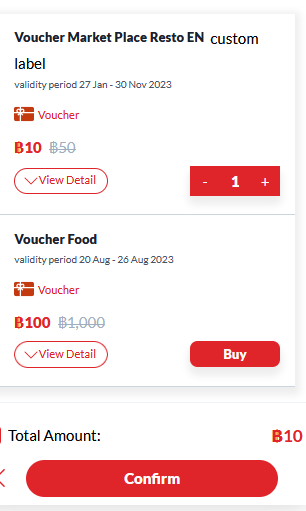
3.Update CONFIRM/NEXT button in Voucher List Page
https://app.clickup.com/t/860rku9fq once user click the confirm button, create a temporary order id to lock the order and reduce the quota.
update Redis first, then update the DB order active value should be false
system will cancel the order if it’s still pending for 10 minutes
quota = quota - selected quantity
active = false
 Lock API
POST: {{ base_api }}/ticket_transactions/lock.json
params:
Lock API
POST: {{ base_api }}/ticket_transactions/lock.json
params:
{
	"restaurant_id": "997",
	"ticket_groups": [
		{
			"id": "5",
			"quantity": 1
		}
	],
	"access_token": "Pn1bJ0FbA989JU2JeUmQQj2wOfmTtrneoUg7SwebVb0"  (blank for guest)
}
Response:
{
	"data": {
		"transaction_id": 468,
		"expired_at": "2023-09-20T08:53:57Z"
	},
	"success": true,
	"message": "lock transaction success"
}
transaction_id is used for create ticket transaction
4. Extend Ticket Lock Timer
https://app.clickup.com/t/860rtqwyk The expired_at is used for cooldown timer on payment page. When we click “I need more time” will hit this API: PUT: {{ base_api }}/ticket_transactions/946/extend_session.json
{
    "client_type": "web"
}
Response:
{
	"data": {
		"transaction_id": 716,
		"expired_at": "2023-09-26T03:05:40Z"
	},
	"success": true,
	"message": "Extend session transaction success"
}
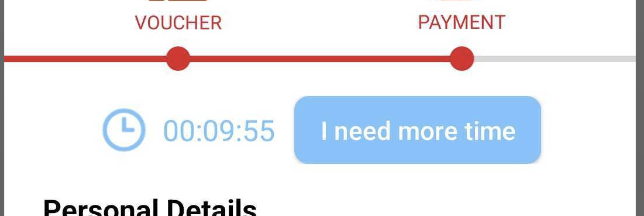
5. Cancel Ticket Lock and Transactions
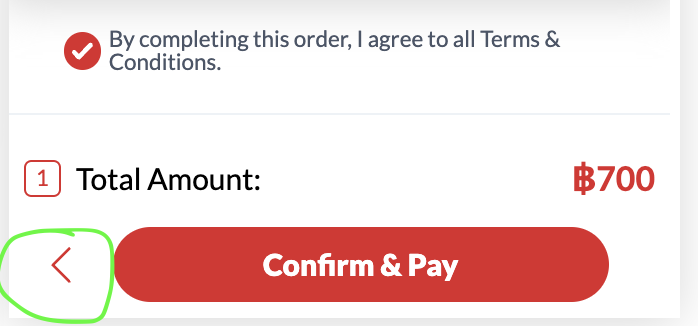
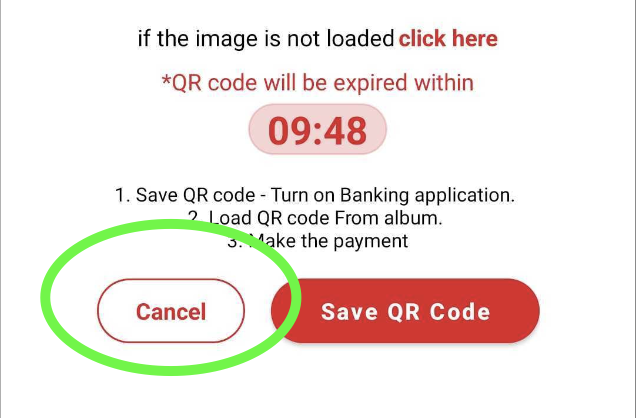
https://app.clickup.com/t/860rqct1t cancel the order ID once user click back button from payment page and also on QR Payment Cancel API: PUT : {{ base_api }}/ticket_transactions/558/cancel.json
{
    "client_type": "web"
}
6. Update Payload Payment Page
https://app.clickup.com/t/860rku9qw
change the active value to be true once the order has been paid
Before updating the active status to be true Check the availability again in Redis and Database if Redis says not available, then reject the order request
another step is checking on DB level DB says not available (quota already zero), then reject the order request
Create transaction API: POST: {{ base_api }}/ticket_transactions**/submit.json** This API is similar with our ticket_transactions API. But we replace ticket_group with ticket_transaction_id
{
	"restaurant_id": "997",
	"ticket_transaction_id": 558,
	"payment_type": "promptpay",
	"gb_primepay_card": {},
	"provider": "hungryhub",
	"channel": "web",
	"source": "website",
	"access_token": "Pn1bJ0FbA989JU2JeUmQQj2wOfmTtrneoUg7SwebVb0"
}
Response:
{
	"data": {
		"id": "506",
		"type": "ticket_transactions",
		"attributes": {
			"encrypted_id": "3Ed0Y",
			"phone": "66912392189",
			"status_as_symbol": "waiting_for_payment",
			"user_id": 188442,
			"qr_code_for_payment": "https://hh-engineering.my.id/uploads/externals/omise/source/qr_code/20042/qrcode-196-2023-09-19025811UTC20230919-614791-v415wp.png",
			"total_price": {
				"price": 1600,
				"currency": "THB",
				"format": "฿1,600"
			},
			"name": "Test First Time",
			"email": "firsttimer@gmail.com",
			"qrcode": "data:image/png;base64,iVBORw0KGgoAAAANSUhEUgAAAfQAAAH0AQAAAADjreInAAACFUlEQVR4nO3cQW7CMBBAURsq0R3cILkJ3Cz4ZnATuEHZFalt6rEdO05QWwks5Op7UTWBp9lZ4/EMi/6u9bZQ9y08Ho/H4/F4PB6Px+PxePwffa+z9TJ+sVHX/NPN4+Pj8fiqfSrrvtsnLf/s1VaqvPZxmT49FYqPx+Nr9ibPLrTe27/n8CIkJLuC8fF4/P/wdrtQqusPz4qPx+Pr9e78IglH+5z4eDy+Lt/5prbhUds95KCa8EL76sehYHw8Hl+rT/crr8qdXyT/6Pqjq398pk/bQvHxeHylXueN9R/ywtc/JP9YTdruHx8fj8dX7o3eqfO8/8MnJGp6IfP4+Hg8vlbvd4cm5B9udaHdQ/rHwlePui0UH4/H1+397nC1+YdbkpA06bjiCyKcX/B4/NRLu6msi14P+cd4uQON3L9wfsHj8XPfud2h6S82/4j1U9kuVr6g6htCtuQfeDz+hvfjLrJduP5T465r13ZDWfVfwzdOBePj8fgK/Wz+1uUfKs7PxYZ2o9sS8fF4fNU+n7+N8y9yobseGkIM83N4PP6mn8zf+tWM8w9JSI7UT/F4/I8+Szek/2PZu5Z2Q/0Uj8f/4mO5Q+smNZSZOBBTOj4ej6/Lj+dvw++P+fPL1Te0p4GYMvHxeHytfjbukgZisvop/WN4PD7zs/lbt7p4IbOU/g//+x/kH3g8Ho/H4/F4PB6Px+Px9fhv/qBlquKAqw4AAAAASUVORK5CYII=",
			"qr_code_for_payment_expired_at": "2023-09-19T03:00:17Z",
			"hungry_points": 64,
			"payment_type": null,
			"charge_price": {
				"price": 1600,
				"currency": "THB",
				"format": "฿1,600"
			}
		},
		"relationships": {
			"tickets": {
				"data": [
					{
						"id": "826",
						"type": "tickets"
					},
					{
						"id": "827",
						"type": "tickets"
					}
				]
			},
			"ticket_bundles": {
				"data": [
					{
						"id": "575",
						"type": "ticket_bundles"
					}
				]
			}
		}
	},
	"included": [
		{
			"id": "826",
			"type": "tickets",
			"attributes": {
				"encrypted_id": "Ooyk3",
				"redeemed_at": null,
				"ticket_group_id": 5,
				"ticket_code": "VC-D08C4EBB70",
				"valid_start_date": "2023-03-24",
				"valid_end_date": "2031-11-30",
				"active": false,
				"name": "Ayce For You",
				"amount": {
					"format": "฿800",
					"amount": 800.0,
					"currency": "THB"
				},
				"qrcode": "data:image/png;base64,iVBORw0KGgoAAAANSUhEUgAAAfQAAAH0AQAAAADjreInAAACoklEQVR4nO3cXW7iMBDAcQ+pRN/YG8BN4GaEmzU3KTegb4201JuZsROj9mE3HyjS/v2AkpCf/GSNPR5nEye12yZMa3g8Ho/H4/F4PB6Px/9P/i5F04et/Op+G6lDiN2j1/BRvvE6d/94PH6K3/ZJsaDDeRdv4Son/6+Kn93vPr/we4n+8Xj8FO8RttbLKurNwR5L1Q/YJkfnRfrH4/EzeQ3H7+EYa50/vzy/fzweP9VrwH2cMD+3fzwe/5d+Z4vbWi89nXX05fAQf+3B11L94/H4sb7tk8t2u4234Pnnbv3bWsL5ml94+clP7R+Px4/1VVmV6RF2161/Q7hIvNuA3ZVvfM7dPx6Pn+4bj7DbboRqBvrs20na9PakF5H4i8ev11vCqpV9ir9S9QFXR3eQNJ1erH88Hv+v3guutMnG6jeucozd7Dla/ZXIPmW3WP/i8Wv0H3KwDd9u/av1Gx5/uyblgnfB/vF4/FjvBRvaUoWzr38tHe3hWHwz+CuVU87cPx6PH+t1w9fnz+ch/xzjm98O9c/1Qv3j8fjxXnNUfmDBElZacOUJ54sUCWfyV3j8Wr2uf7VgwzZ8tX5jb/HX0lkanf04EucX8Pi1eR+hnmMuRqid/5WH+udUzjFz/3g8frz3+qt3u+73fxs55wWvnw7WcLxM/3g8frz/9v2NbbxKMZ322bW24jjwjP3j8fgp/uH7G7mcQ7eD04DN5dDUT+Lxa/TF9zfycL7k+Ounk07D7tIC/ePx+Fl8ZecXDsECrqT4m04HC/NnPH7lvi03jIaCK5s/b6m/wuPX5ovvb3jrC67u6fz+yZ/fqd/A49flv31/I8YmL3jzdLrR40jMn/H4lfkfvr8RrP4qtZydrv1l5s94PB6Px+PxeDwej8c/0f8BDE2pqsM5M1kAAAAASUVORK5CYII="
			}
		},
		{
			"id": "827",
			"type": "tickets",
			"attributes": {
				"encrypted_id": "ON92R",
				"redeemed_at": null,
				"ticket_group_id": 5,
				"ticket_code": "VC-2FFE0C72BC",
				"valid_start_date": "2023-03-24",
				"valid_end_date": "2031-11-30",
				"active": false,
				"name": "Ayce For You",
				"amount": {
					"format": "฿800",
					"amount": 800.0,
					"currency": "THB"
				},
				"qrcode": "data:image/png;base64,iVBORw0KGgoAAAANSUhEUgAAAfQAAAH0AQAAAADjreInAAAClklEQVR4nO3cS3LiMBCAYQmocnZwA3ITcjPwzeAm8Q3CLq4aouluWY41zCzwI9FUfi0SHPxVZ6NqPVpahUntbeWmNTwej8fj8Xg8Ho/H43+Sv/lBW8njk7v+41Hb09zx8Xj8FF/1i2LysA5Xv3P7cHbH+PguP/fphV9LxMfj8VN8zLAn/XjzW+mnF/+Sv32J6Xih+Hg8fhavCffqD5J/vyc+Ho8f73U6vJPfh3D6lvh4PP5Bv7XJ7Uk/av7d2vi59uHmN90bB33hY6n4eDx+rG/7xWUX57+NjJ+l9wa/Dq0tODfphc3f/NT4eDx+rF8PqzI1w7Z+L/n3KOlY8m9l6XjQ3ueOj8fj5/C1rjCnDaPan5zkX90wuvpnd9HHuB28WHw8Hv+oT/UbL+74OcNtLP9mTQbUH13vnjU+Ho8f79P4+Rzzr85/3+yLbP1KG/VXeHxpPm0YuZh/0/j5rH/x/frVUauzPPNfPL48H2e4XYVV2w+nXSqn1Gbj54Xi4/H4sb6yAbMWbGQ9tI7dWb/tlrPYP8Lji/S6wxtCVuEs+TdYKt6H1/veXdj/j8f/ZB8nvNJDs/UrPXCk+bdJw+nF4uPx+Klekm0lE149Lqi9V/LvxqbDcf/XOfZ/8fiyfCx47kbIIbSD/Gv1G1W3u7RUfDweP97/cf/G54Kzc93+r65OW2P/CI8vzmf3b9z6DV8rmNSm2Vkb5/fx+BL94P6NdH7f5r9exs9pO1haoP4Kj/8PfGMdtivH2qb5r+f+Kzy+cJ8tWMXjwM/uEOx08FfEx+PxD/nB/RtaP7mz+a902GDnf1N1B+eP8PjyfHb/Rmp3B35rz/wXjy/N392/EQueBxdupPs32D/C4/F4PB6Px+PxeDz+q/1vxtqqqhmZlogAAAAASUVORK5CYII="
			}
		},
		{
			"id": "575",
			"type": "ticket_bundles",
			"attributes": {
				"ticket_group_bundle": null,
				"quantity": 2,
				"discount_percent": null,
				"name": "Ayce For You",
				"description": "I have to be in a room by your house in a room with the new code for your phone was on your desk at work but you need a new job and you need a job at a job and a job at work at a job and I will call the doctor and tell them they will not have the right ",
				"price_per_ticket": {
					"price": 800,
					"currency": "THB",
					"format": "฿800"
				},
				"total_price": {
					"price": 1600,
					"currency": "THB",
					"format": "฿1,600"
				}
			}
		}
	],
	"success": true,
	"message": "Purchase vouchers success"
}
Locking System
to prevent oversold issue, we need to implement a locking system for VIM
implementation details: https://app.clickup.com/t/860rjen10 FE: BE: https://app.clickup.com/t/860rjenbv
there are few pending items that we will continue on the next phase:
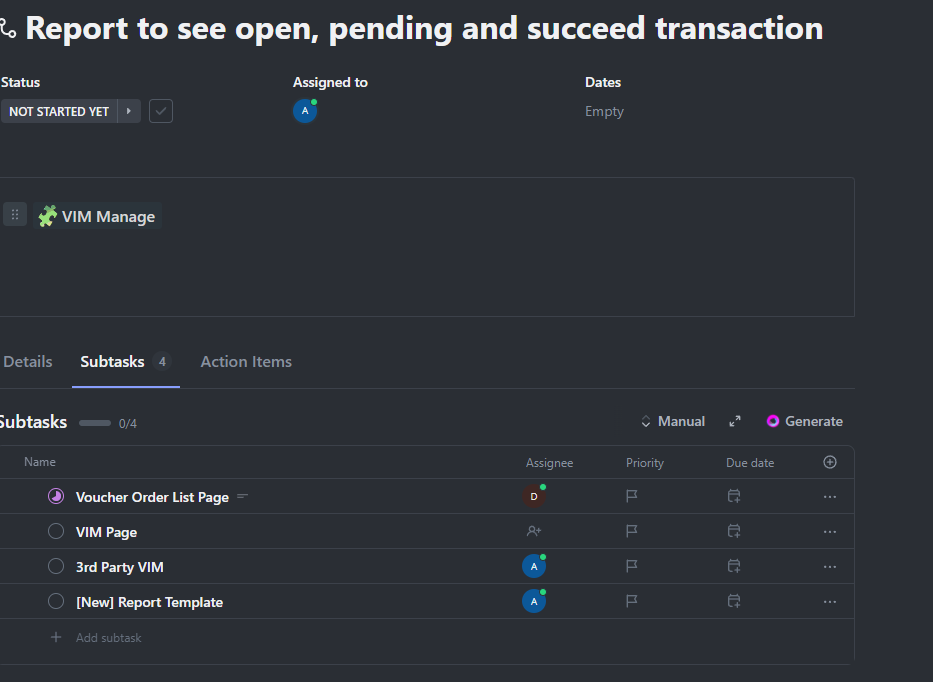 https://github.com/hungryhub-team/hh-server/pull/4995
Quota Witness ada kaitan dg locking system, hrus sama dg quota biasa, quota witness dari redis, validasi quota di level quota witness dlu biar cepet
Hide store page = VIM is invisible
ketika bikin suatu ticket group sistem bikin list ticket pool, klo quantitynya 1-10, maka bikin pool dengan 10 member misal 105-ticket-1 105-ticket-2 105-ticket-3 sampe 105-ticket-10ketika ngedit ticket group quota, maka sistem akan generate lagi misalnya di edit jd 5 maka available ticket pool nya adalah 105-ticket-1pool pertama, kedua, dan ketiga itu gak ada hubungannya jika ada pool baru, maka pool lama akan di hapus member dari masing2 pool itu gak ada hubungannyaitu cuma ideku biar gak ada kasus oversold aja kasus oversold bisa di identifikasi klo ada member yg duplicate dalam pool yg samamungkin di rename aja nama member poolnya, biar gak bikin bingungmisalnya“{ticket-groupid}-{pool timestamp}-{member number}“