Search PDT on Store Page
Document Feature
Title
Search people/date/time on store page
Description / Background
In order to increase the revenue, the booking process always has to be quick and simple as possible. However, hotjar monitoring indicates that there is struggling in that process. The customers can’t go through packages in store, because the packages’ information is displayed most likely the same, they can’t decide which package they have to book, or which package is available when they need to dine. This leads to unavoidable situations where customers discover that the selected package is not available for their requirements (PAX, date, time), causing drop-off in the booking process. In addition, we have filters for people/ date/ time form search pages (implementing in sprint 16, this information should be pre-filled when the customers arrive at the store page rather than input it again.
Objectives
- user can see filter by people, date and time on top section of the screen on store(restaurant) page
- user can see the default setting (adult 2, kids 0, and the apply button is gray)
- user can change the data on the filter and the apply button will active
- user can see the package list that available
- user can see the
other packagesection which means the package that is not suitable for your filter result - user will get the recommendation restaurant at the bottom of the page
- If the user selected an available package form filter, selected options from the filter will be pre-fill in the booking process, and skip the customers directly to the checkout page.
Scope
- All platforms
Sequence Diagram / Flow
ERD
DB Schema / Database Migration
| Column Name | Data Type | Description |
|---|---|---|
API Blueprint
| Method | Path | URL | Description | Payload |
|---|---|---|---|---|
New Query
Notes, Constraint & Assumptions
If the customers make any changes from default state, This feature will be in active state. (DS Link)
- Number of adults and kids;
- Big Group; Toggle option
- When press toggle, adults value will automatically increase to “xx” (maximum of store)
- Decreasing the value to “xx-1” by pressing “-” from adult will make this toggle turn off.
- Customers can turn this toggle via two interactions
- Press the toggle again.
- Press “+” until the adult value reaches “xx” (maximum of store).
- After turn toggle off, adults value will go back to “2”
- Press “+” and “-” to increase or decrease the number of people, change 1 for each press.
- The “-” button will be grayed out if amount is “0”
- The “+” button will never be grayed out, but if the adult value is “xx” (maximum of store) a big group toggle will be turned on.
- If users need to book a big group, it will redirect to the booking request page.
- Select date; have two interact options
- Can select only one day*
- Fast select will show this following;
- Today and followed by +1 day slot with a total of 7 days.
- Check the allotment, if there are no packages available on that day, hide it and show the next day.
- Overlay selectWill appear from bottom of the screen.
- Display dynamic days in advance, based on the available allotments of that particular store. Past and closing day in that month will be grayed out, unable to interact.
- Today and followed by +1 day slot with a total of 7 days.
- Select time; also have two interactive options.
- Fast select will show this following;
- Can select only one time*
-
* **Fast select;**The next xx minutes (min 15) time slot and followed by +xx minutes slot with a total of 3 hours.- **Overlay select, behave most likely to ‘select date overlay’;**Display store’s first until last bookable time, each will be 15 minutes apart.
- In the store page, the minutes number is dynamic. Some may require 30 min or 1 hour in advance.
-
- Can select only one day*
- Big Group; Toggle option
- For available date and time, allotment will be checked and displayed in two colours.*
- Green(00D315) - Available, can be selected
- Red(DF252A) - Fully booked, currently can’t select
- Apply button = default in gray
- After selecting the two options above, the button will turn red and clickable.
- Apply button = default in gray
TODO / Task List / Action Items
References
https://www.figma.com/file/T9kSuAj3GZW7khySGNq84m/Store-Page-Update?node-id=0-1&t=266LiSmktWGnP6n3-0
https://docs.google.com/document/d/1d28eRpeAVixaAFavv0U2ALXLo7VQTsQsoCGWyRkbbhc/edit
search pdt inventory flow between hh-server and hh-search
https://drive.google.com/file/d/1HJ8kZQWAVbN4VK1FRrtetAaojELFPYCq/view
Change History
| NO | Date Time | What Chaged | Description |
|---|---|---|---|
FE Integration
In our search page with PDT, we have event onPdtSelected from hybrid with response like this:
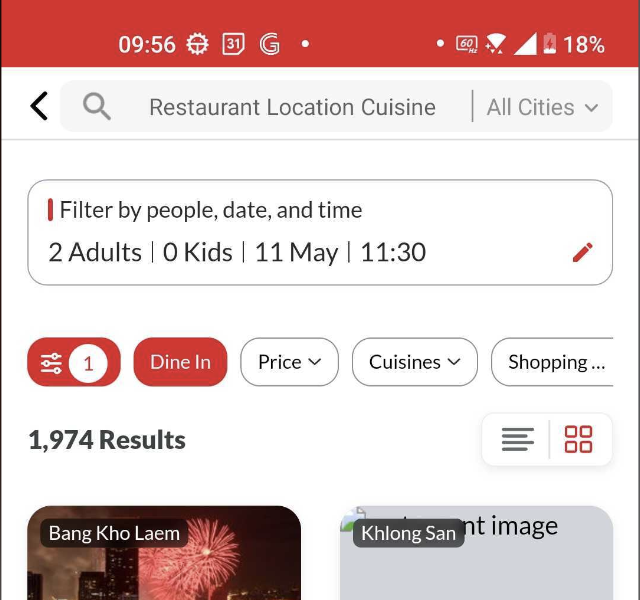
{
	"people": {
		"adults": 2,
		"kids": 0
	},
	"date": "2023-05-11",
	"time": "11:30"
}
When we open the restaurant detail we’ll send the PDT payload from search page to store page hybrid like this: Event Name: onSearchPDT Payload:
{
	"people": {
		"adults": 2,
		"kids": 0
	},
	"date": "2023-05-11",
	"time": "11:30"
}
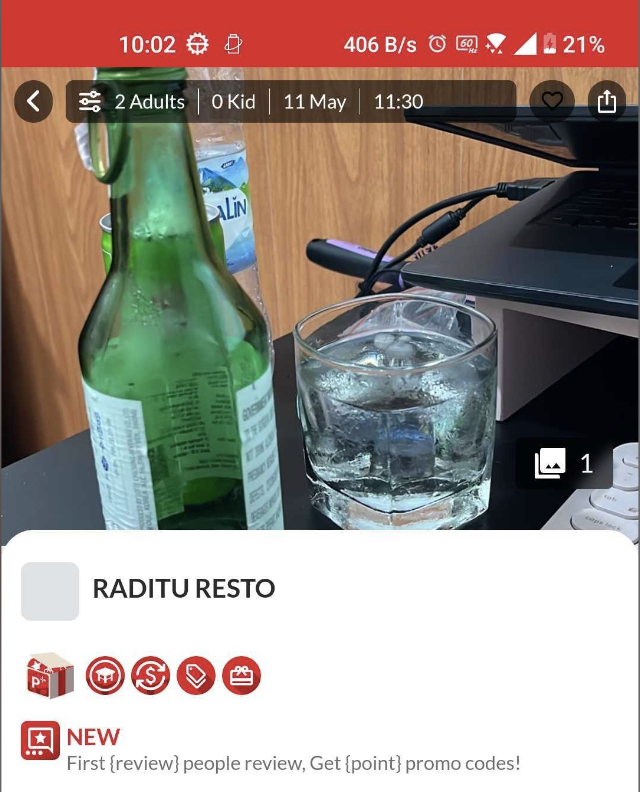
After that, store page will apply that PDT filter to show available package on that people, date and time like this:
API:
https://hh-engineering.my.id/api/v5/restaurants/search.json
1a. Filter by People
New Params:
"people": {
  "adults": 2,
  "kids": 1
}

// Query params
?people[adults]=2&people[kids]=1
1b. Filter by Date
New Params:
"date": "2023-03-11"

// Query params
?date=2023-03-11

// Format date YYYY-MM-DD
1c. Filter by Time
New Params:
"time": "11:00"

// Query params
?time=11:00
2. Location
API:
https://hh-engineering.my.id/api/v5/locations.json
Need new param to filter locations by Category eg. Shopping Mall, Popular Zone, etc.
"categories": ["Shopping Mall", "Popular Zone"]

// Query params
?categories=Shopping Mall,Popular Zone
Payload Adjustment For Turn-On Location
In the new design we have filter by distance in hybrid, but before we can use that we need to send latitude and longitude data. On that pop up if we click will trigger this event: Web Event: onRequestAccessLocation Client needs to handle permission and get user latitude and longitude and pass it to hybrid web. After get latitude and longitude can do event: App Event: doSearch With current payload but we add this:
{
......
"location":{"long":112.64571,"lat":-7.923749}
}
This is similar payload that we send on free delivery features on homepage but without distance. If with distance will apply sort but if no we just like send latitude and longitude to hybrid. If we already have latitude and longitude in the beginning, always put this location payload to initial doSearch.