Rewards
Description / Background
We require an incentive that delivers an advantage to our users, with the aim of increasing our “member” count. We will establish a reward scheme that provides “member” rewards for each purchase made. Rewards will also be granted when users register, share our app using a referral code, and review their booking.
Glossary
- VIM (Voucher in Marketplace): A pre-purchased voucher package that users can buy and redeem at restaurants.
- Loyalty Level: A tier system that determines the reward points multiplier for a member based on their booking history.
Objectives
- The reward is given to members only
- The default point value is 1 baht per point
- Members get rewards by booking
- Members get rewarded by reviewing a booking, with or without a picture
- Members get rewards when they invite others to register(using a referral code)
- Members get rewards as points or as vouchers
- Members get rewards by buying VIM
- Members can see their point history
- Members can see their voucher rewards
- Members can use their reward points as a discount when booking
- Members can use their voucher reward as a discount when booking
- Admin can give point manually if the system won’t give member point as a rewards
- Admin can change the default point value by adding campaign on Adaptive point ratio
- Admin can limit user point usage on a specific date range
- Reward points are given based on user loyalty level
- Admin can change the reward value on Admin Dashboard ➝ Others ➝ Loyalty Level
How to find ..
You can find the reward on Client Side and Admin Side. on Client side: Member can check their rewards point on their profile, under member username.
on Admin:
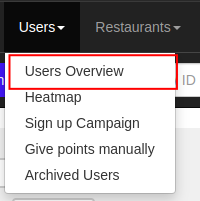
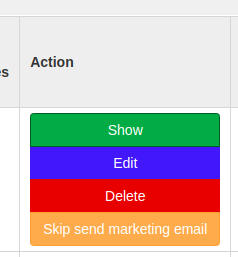
- Admin can check user point by checking their user details from Users ➝ Users Overview ➝ Pick user ID and pick action show
- Admin can add points manually from menu Users ➝ Give Points Manually
- Admin can add campaign to set points value on specific restaurant/group/hashtag from menu Points ➝ Adaptive Point Ratio
- Admin can limit user point usage on a specific date range from menu Points ➝ Limit Point Usage Adjustment
how to check if the rewards that user get is the correct amount?
- Open Admin ➝ Users ➝ User Overview and pick the user
- Check the user details ( Click action Show )
- Check the user loyalty level and the history of it (check the note on point history)
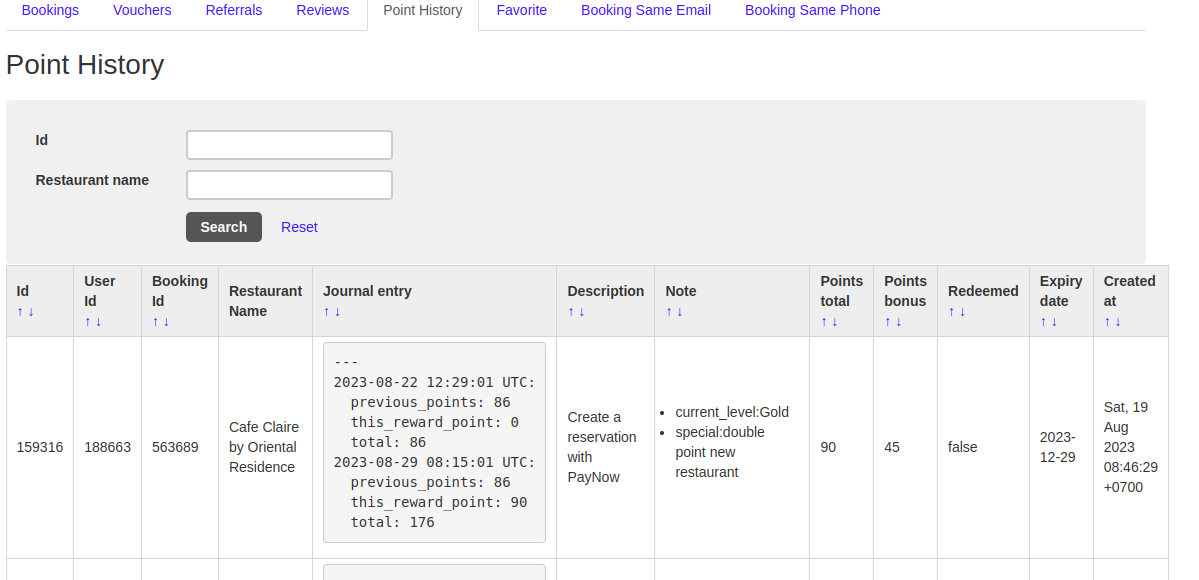
- Check the user’s current loyalty level and expiry date. Subtract 4 months from the expiry date to determine the effective period, comparing with registration date or investigation date.
- Check user point base on loyalty level is it the same (on point history tab)
- Check if the total point is correct from all of user transaction
Check the point that user get after their booking is that the correct number for how much they should receive the point. (on point history tab)
If you want to know how much they pay for the booking, open the bookings tab and search their booking ID.