HungryHub Restaurant Registration System
Description / Background
The HungryHub Restaurant Registration System is a comprehensive platform for onboarding new restaurant partners. It streamlines the process of bringing new restaurants onto the HungryHub platform by providing a user-friendly registration form for partners and an internal operations portal for staff to review, enrich, and submit applications to the HungryHub production system.
The system consists of two main portals that work together to ensure efficient and accurate restaurant onboarding:
- Partner Onboarding Portal - Public-facing form for restaurant partners to register
- Operations Team Portal - Internal admin tool for reviewing and submitting restaurant applications
This system supports multi-country operations (Thailand, Singapore, Malaysia) with country-specific fields and localization.
Objectives
- Simplify the restaurant partner onboarding process
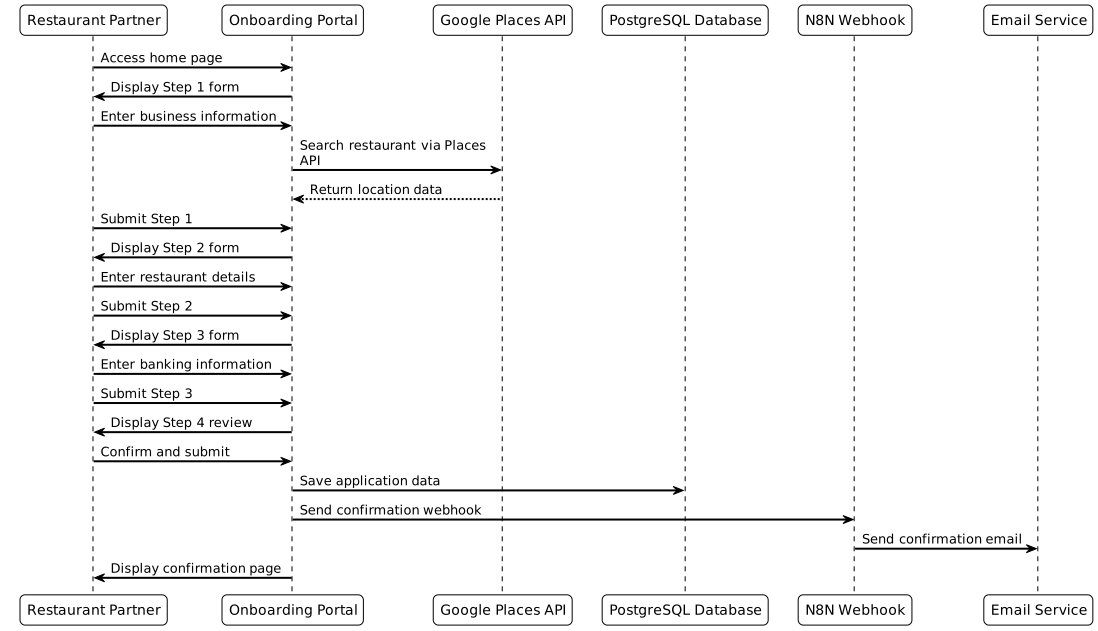
- Provide a structured 4-step registration flow for restaurant partners
- Enable operations staff to review and enrich restaurant data before submission
- Integrate with Google Places API for accurate location data
- Support multiple countries with localized fields and options
- Automate data submission to HungryHub production system via N8N workflows
- Maintain data consistency through database-driven tags and dropdowns
- Send automated confirmation emails to partners upon registration
Scope
Partner Onboarding Portal Features
- Multi-language support (Thai/English toggle)
- Google Places integration for address autocomplete
- Country-specific fields (Thailand, Singapore, Malaysia)
- 4-step registration process:
- Business Information
- Restaurant Details
- Banking Information
- Review & Submit
- Real-time form validation
- Confirmation page with next steps
Operations Team Portal Features
- Application list view with status tracking
- Detailed restaurant data entry with additional fields
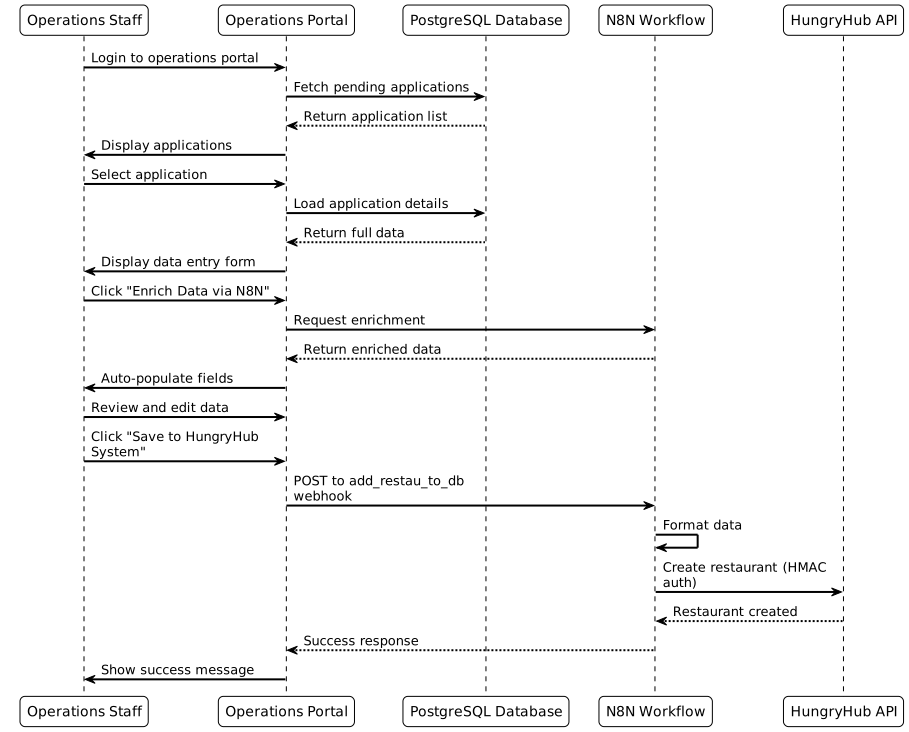
- Data enrichment via N8N integration
- Submit to HungryHub API with HMAC authentication
- Advanced scheduling with inventory groups
- SEO metadata management in multiple languages
Admin Manager Features
- Form section management
- Question configuration
- Tag management for dropdowns
Location
Base URL: (https://onboarding.hungryhub.com)
- Partner Onboarding Portal:
/(Home page) - Operations Team Portal:
/operations-team - Admin Manager:
/admin_manager - Login Page:
/login
How to find Restaurant Applications
As Operations Staff:
- Navigate to
/operations-team - Login with credentials (default:
admin@hungryhub.com/Admin@123) - View all pending restaurant applications in the list
- See submission date, restaurant name, country, and status
- Click on any application to load detailed information
As Restaurant Partner:
- Navigate to the home page
/ - Complete the 4-step registration form
- Submit application
- Receive confirmation email with application details
How to Register a New Restaurant
Step 1: Business Information
- Select country (Thailand, Singapore, or Malaysia)
- Enter booking alert email and SMS number
- Provide primary contact person details:
- Name
- Phone number
- Search restaurant via Google Places
- Enter basic restaurant information:
- Restaurant name (English/Thai)
- Phone number
- Full address
- Latitude/Longitude (auto-filled from Google Places)
Step 2: Restaurant Details
- Set operating hours schedule:
- Select days of the week
- Add multiple time slots per day
- Select cuisine types (multi-select)
- Select dining styles (multi-select)
- Select facilities (multi-select)
- Choose location tags and popular zones
- Select city, MRT station, and nearby malls
- Enter restaurant descriptions:
- English description
- Thai description
- Add SEO metadata:
- Meta title
- Meta description
- Meta keywords
Step 3: Banking Information
- Enter bank details for payments:
- Bank name
- Account number
- Account holder name
- Provide company registration information:
- Company name
- Tax ID
- Registration number
- Add accounting team contact details:
- Name
- Phone number
Step 4: Review & Submit
- Review all entered information
- Edit any section if needed
- Submit application
- View confirmation page with next steps
- Receive confirmation email
Sequence Diagram / Flow
Partner Registration Flow
Operations Team Flow
ERD
Main Tables
| Table | Column | Type | Description |
|---|---|---|---|
| restaurants_applications | id | SERIAL | Primary Key |
| restaurants_applications | submission_date | TIMESTAMP | |
| restaurants_applications | country | VARCHAR(2) | |
| restaurants_applications | status | VARCHAR(50) | |
| restaurants_applications | restaurant_name_en | VARCHAR(255) | |
| restaurants_applications | restaurant_name_th | VARCHAR(255) | |
| restaurants_applications | contact_name | VARCHAR(255) | |
| restaurants_applications | contact_email | VARCHAR(255) | |
| restaurants_applications | contact_phone | VARCHAR(50) | |
| restaurants_applications | booking_alert_email | VARCHAR(255) | |
| restaurants_applications | booking_alert_sms | VARCHAR(50) | |
| restaurants_applications | address | TEXT | |
| restaurants_applications | latitude | DECIMAL(10, 8) | |
| restaurants_applications | longitude | DECIMAL(11, 8) | |
| restaurants_applications | google_place_id | VARCHAR(255) | |
| restaurants_applications | operating_hours | JSONB | |
| restaurants_applications | cuisines | TEXT[] | |
| restaurants_applications | dining_styles | TEXT[] | |
| restaurants_applications | facilities | TEXT[] | |
| restaurants_applications | location_tags | TEXT[] | |
| restaurants_applications | popular_zones | TEXT[] | |
| restaurants_applications | city_id | INTEGER | |
| restaurants_applications | mrt_station_id | INTEGER | |
| restaurants_applications | mall_id | INTEGER | |
| restaurants_applications | description_en | TEXT | |
| restaurants_applications | description_th | TEXT | |
| restaurants_applications | meta_title | VARCHAR(255) | |
| restaurants_applications | meta_description | TEXT | |
| restaurants_applications | meta_keywords | TEXT | |
| restaurants_applications | bank_name | VARCHAR(255) | |
| restaurants_applications | account_number | VARCHAR(100) | |
| restaurants_applications | account_holder_name | VARCHAR(255) | |
| restaurants_applications | company_name | VARCHAR(255) | |
| restaurants_applications | tax_id | VARCHAR(100) | |
| restaurants_applications | registration_number | VARCHAR(100) | |
| restaurants_applications | accounting_contact_name | VARCHAR(255) | |
| restaurants_applications | accounting_contact_email | VARCHAR(255) | |
| restaurants_applications | accounting_contact_phone | VARCHAR(50) | |
| restaurants_applications | created_at | TIMESTAMP | |
| restaurants_applications | updated_at | TIMESTAMP | |
| users | id | SERIAL | Primary Key |
| users | VARCHAR(255) | ||
| users | password_hash | VARCHAR(255) | |
| users | role | VARCHAR(50) | |
| users | failed_login_attempts | INTEGER | |
| users | lockout_until | TIMESTAMP | |
| users | created_at | TIMESTAMP | |
| users | updated_at | TIMESTAMP | |
| form_sections | id | Primary Key | |
| form_sections | name | ||
| form_sections | display_order | ||
| form_sections | active | ||
| form_questions | id | Primary Key | |
| form_questions | section_id | Foreign Key | |
| form_questions | question_text | ||
| form_questions | field_type | ||
| form_questions | required | ||
| form_questions | display_order | ||
| database_tags | id | SERIAL | Primary Key |
| database_tags | tag_type | VARCHAR(50) | |
| database_tags | name_en | VARCHAR(255) | |
| database_tags | name_th | VARCHAR(255) | |
| database_tags | country_code | VARCHAR(2) | |
| database_tags | active | BOOLEAN | |
| database_tags | display_order | INTEGER |
Frontend Implementation
Technology Stack
- Framework: React 18 with TypeScript
- Build Tool: Vite
- Styling: Tailwind CSS + Shadcn/UI components
- Routing: Wouter
- Data Fetching: TanStack Query
- Form Management: React Hook Form
- State Management: React Context API
Key Components
Partner Portal Components:
OnboardingForm.tsx- Main registration form wrapperStep1BusinessInfo.tsx- Business information stepStep2RestaurantDetails.tsx- Restaurant details stepStep3BankingInfo.tsx- Banking information stepStep4Review.tsx- Review and submit stepGooglePlacesAutocomplete.tsx- Google Places integrationOperatingHoursScheduler.tsx- Schedule managementCountrySelector.tsx- Country selection with flagsLanguageToggle.tsx- Thai/English language switcher
Operations Portal Components:
ApplicationList.tsx- List of pending applicationsApplicationDetail.tsx- Detailed application viewRestaurantDataForm.tsx- Comprehensive data entry formEnrichDataButton.tsx- Data enrichment triggerSubmitToAPI.tsx- HungryHub API submissionInventoryGroupManager.tsx- Advanced scheduling
Admin Manager Components:
FormSectionManager.tsx- Section CRUD operationsQuestionManager.tsx- Question configurationTagManager.tsx- Tag management interface
Country-Specific Behavior
Thailand:
- Shows BTS stations dropdown
- Displays Thai language fields
- Thai popular zones and cities
- Thai MRT stations
Singapore:
- Hides Thai-specific fields
- Shows Singapore MRT stations
- Singapore popular zones and cities
- SGD currency
Malaysia:
- Hides Thai-specific fields
- Shows Malaysian cities and MRT stations
- Malaysian popular zones
- MYR currency
Validation Rules
- Email format validation
- Phone number format (country-specific)
- Required field validation
- Address validation via Google Places
- Operating hours validation (no overlapping slots)
- Bank account number format
- Tax ID format (country-specific)
Backend Implementation
Core Features
- Added Admin HMAC authentication middleware for secure API access
- Implemented
Api::Admin::BaseControllerwith error handling and authentication - Created
POST /api/admin/restaurantsendpoint for restaurant onboarding - Built
RestaurantService::CreateFromApiservice for creating restaurants with nested data (owner, tags, locations) - Implemented
RestaurantService::TagAssignmentfor robust tag assignment with search index updates - Auto-confirm owner email on API onboarding by setting
confirmed_at: Time.currentin owner creation - Added request body read and rewind functionality in
EncryptableHelperfor HMAC signature verification - Removed obsolete documentation files (RESTAURANT_ONBOARDING_API.md, RESTAURANT_ONBOARDING_VALIDATION_RULES.md)
Technology Stack
- Framework: Ruby on Rails (HH-Server), Express.js with TypeScript (Onboarding Portal)
- Database: PostgreSQL (Neon)
- ORM: Drizzle ORM (Portal), Active Record (Rails)
- Authentication: Session-based with bcrypt (Portal), HMAC authentication (Admin API)
- Security: HMAC authentication for HungryHub API calls
PRD & Task
- GitHub Repository: hungryhub-onboarding-system
- N8N Workflows:
- Confirmation Email Workflow
- Data Enrichment Workflow
- Restaurant Creation Workflow
Design
Partner Portal Design
- Clean, modern interface with step indicators
- Progress bar showing completion percentage
- Responsive design for mobile and desktop
- Country flag icons for country selection
- Thai/English language toggle in header
- Google Maps integration for visual confirmation
- Multi-select dropdowns with search functionality
- Time picker for operating hours
- Drag-and-drop for image uploads (future enhancement)
Operations Portal Design
- Dashboard-style layout
- Sidebar navigation
- Data table with sorting and filtering
- Tabbed interface for different data sections
- Inline editing capabilities
- Action buttons (Enrich Data, Save to HungryHub)
- Status badges for application states
- Toast notifications for actions
Admin Manager Design
- CRUD interface for all manageable entities
- Drag-and-drop for reordering
- Inline editing
- Bulk actions support
- Import/export functionality
API Blueprint
Partner Portal APIs
| Method | Path | URL | Description | Payload |
|---|---|---|---|---|
| POST | /api/onboarding/submit | {{base_url}} | Submit restaurant application | { businessInfo, restaurantDetails, bankingInfo } |
| GET | /api/tags/:tagType | {{base_url}} | Get tags by type | Query: type=cuisine|dining_style|facility|etc |
| GET | /api/tags/country/:countryCode | {{base_url}} | Get country-specific tags | Path: countryCode=TH|SG|MY |
Operations Portal APIs
| Method | Path | URL | Description | Payload |
|---|---|---|---|---|
| GET | /api/applications | {{base_url}} | List all applications | Query: status, country, page, limit |
| GET | /api/applications/:id | {{base_url}} | Get application details | Path: id |
| POST | /api/applications/:id/enrich | {{base_url}} | Trigger N8N enrichment | { applicationId } |
| POST | /api/applications/:id/submit | {{base_url}} | Submit to HungryHub API | { restaurantData, googleReserveData, seoData } |
| PUT | /api/applications/:id | {{base_url}} | Update application | { ...updatedFields } |
Authentication APIs
| Method | Path | URL | Description | Payload |
|---|---|---|---|---|
| POST | /api/auth/login | {{base_url}} | User login | { email, password } |
| POST | /api/auth/logout | {{base_url}} | User logout | None |
| GET | /api/auth/check | {{base_url}} | Check authentication | None |
Webhook Integration
Partner Portal Webhook
- URL:
https://n8n.hungryhub.com/webhook/confirmation_email - Method: POST
- Purpose: Sends confirmation email to partner after submission
- Trigger: When partner submits application via onboarding form
- Payload:
{
  "restaurantName": "string",
  "contactName": "string",
  "contactEmail": "string",
  "applicationId": "string",
  "submissionDate": "ISO 8601 date"
}
Operations Team Webhook
- URL:
https://n8n.hungryhub.com/webhook/add_restau_to_db - Method: POST
- Purpose: Formats data and creates restaurant in HungryHub system
- Trigger: When operations staff clicks “Save to HungryHub System”
- Authentication: HMAC signature in headers
- Headers:
{
  "X-App-Id": "HungryHub App ID",
  "X-Timestamp": "Unix timestamp",
  "X-Signature": "HMAC SHA-256 signature"
}
- Payload: Complete restaurant data in HungryHub API format
DB Schema / Database Migration
Database Tags
The system uses database-driven tags for all dropdown options:
| Tag Type | Count | Description |
|---|---|---|
| Cuisine | 40 | Restaurant cuisine types (Italian, Japanese, Thai, etc.) |
| Dining Style | 31 | Restaurant styles (Casual, Fine Dining, Rooftop, etc.) |
| Facility | 29 | Amenities (Parking, WiFi, Pet Friendly, Wheelchair Access, etc.) |
| Location Tag | 188 | Geographic areas and neighborhoods |
| Popular Zone | 128+ | Popular areas by country |
| City | 84+ | Cities across Thailand, Singapore, Malaysia |
| MRT Station | 172+ | Train stations across all countries |
| Mall | 194+ | Shopping malls for proximity tagging |
| BTS Station | 62 | Bangkok Skytrain stations (Thailand only) |
Migration Scripts
Initial Schema:
CREATE TABLE restaurants_applications (
  id SERIAL PRIMARY KEY,
  submission_date TIMESTAMP DEFAULT NOW(),
  country VARCHAR(2) NOT NULL,
  status VARCHAR(50) DEFAULT 'pending',
  restaurant_name_en VARCHAR(255) NOT NULL,
  restaurant_name_th VARCHAR(255),
  contact_name VARCHAR(255) NOT NULL,
  contact_email VARCHAR(255) NOT NULL,
  contact_phone VARCHAR(50) NOT NULL,
  booking_alert_email VARCHAR(255),
  booking_alert_sms VARCHAR(50),
  address TEXT NOT NULL,
  latitude DECIMAL(10, 8),
  longitude DECIMAL(11, 8),
  google_place_id VARCHAR(255),
  operating_hours JSONB,
  cuisines TEXT[],
  dining_styles TEXT[],
  facilities TEXT[],
  location_tags TEXT[],
  popular_zones TEXT[],
  city_id INTEGER,
  mrt_station_id INTEGER,
  mall_id INTEGER,
  description_en TEXT,
  description_th TEXT,
  meta_title VARCHAR(255),
  meta_description TEXT,
  meta_keywords TEXT,
  bank_name VARCHAR(255),
  account_number VARCHAR(100),
  account_holder_name VARCHAR(255),
  company_name VARCHAR(255),
  tax_id VARCHAR(100),
  registration_number VARCHAR(100),
  accounting_contact_name VARCHAR(255),
  accounting_contact_email VARCHAR(255),
  accounting_contact_phone VARCHAR(50),
  created_at TIMESTAMP DEFAULT NOW(),
  updated_at TIMESTAMP DEFAULT NOW()
);

CREATE TABLE users (
  id SERIAL PRIMARY KEY,
  email VARCHAR(255) UNIQUE NOT NULL,
  password_hash VARCHAR(255) NOT NULL,
  role VARCHAR(50) DEFAULT 'operations',
  failed_login_attempts INTEGER DEFAULT 0,
  lockout_until TIMESTAMP,
  created_at TIMESTAMP DEFAULT NOW(),
  updated_at TIMESTAMP DEFAULT NOW()
);

CREATE TABLE database_tags (
  id SERIAL PRIMARY KEY,
  tag_type VARCHAR(50) NOT NULL,
  name_en VARCHAR(255) NOT NULL,
  name_th VARCHAR(255),
  country_code VARCHAR(2),
  active BOOLEAN DEFAULT true,
  display_order INTEGER DEFAULT 0,
  created_at TIMESTAMP DEFAULT NOW(),
  updated_at TIMESTAMP DEFAULT NOW()
);

CREATE INDEX idx_applications_status ON restaurants_applications(status);
CREATE INDEX idx_applications_country ON restaurants_applications(country);
CREATE INDEX idx_applications_submission_date ON restaurants_applications(submission_date);
CREATE INDEX idx_tags_type ON database_tags(tag_type);
CREATE INDEX idx_tags_country ON database_tags(country_code);
Environment Variables
Required Secrets
| Variable | Description | Example |
|---|---|---|
DATABASE_URL | PostgreSQL connection string | postgresql://user:pass@host:5432/dbname |
VITE_GOOGLE_MAPS_API_KEY | Google Maps API key | AIza... |
HUNGRYHUB_APP_ID | HungryHub API app ID | hh_app_123 |
HUNGRYHUB_APP_SECRET | HungryHub API secret | secret_key_xyz |
HUNGRYHUB_API_URL | HungryHub API base URL | https://api.hungryhub.com |
SESSION_SECRET | Express session secret | random_secret_string |
N8N_WEBHOOK_URL | N8N webhook base URL | https://n8n.hungryhub.com/webhook |
User Roles
| Role | Access | Capabilities |
|---|---|---|
| Partner | Public | Submit restaurant application, receive confirmation |
| Operations Staff | Login required | Review, edit, enrich, and submit applications to HungryHub |
| Admin | Login required | Manage form fields, tags, and system configuration |