QR Code for Menu
Description / Background
In the current system, accessing the menu list requires users to navigate through multiple steps to reach the store page, making it a time-consuming process, especially when onsite. This lengthy process can disrupt the user experience, particularly for users who need quick and convenient access to the menu.
To address this issue, implementing a QR code shortcut can significantly streamline access. By scanning a QR code, users can be taken directly to the menu list, bypassing the need to go through the store page. This solution not only enhances convenience but also improves the overall user experience by allowing seamless and immediate access to the menu while onsite.
Glossary
https://app.clickup.com/9003122396/docs/8ca1fpw-35796/8ca1fpw-41516
Objectives
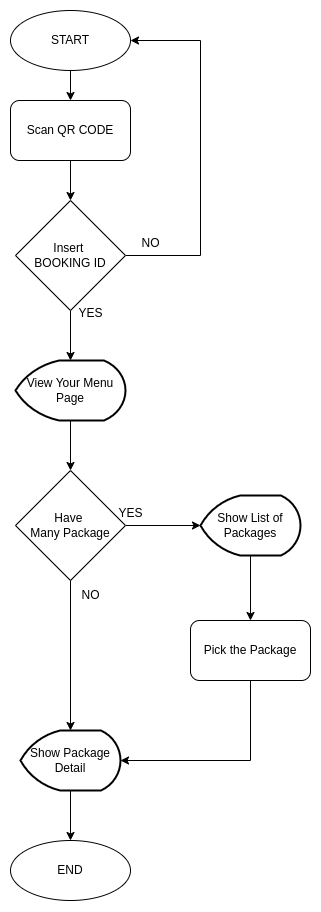
- Users can scan and see HH menu from restaurant QR code by inserting their booking ID
- Users can only insert a valid booking ID (upcoming booking or booking where the dining time has not exceeded 24 hours)
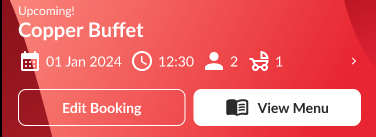
- Users can see the View Menu button on Profile ➝ Booking & Voucher Page next to Edit Booking button (upcoming booking only)
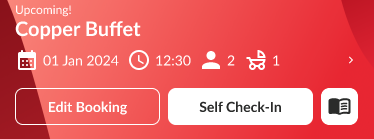
- Users can see the View Menu icon button on Profile ➝ Booking & Voucher Page next to Self Check-in button (upcoming booking only)
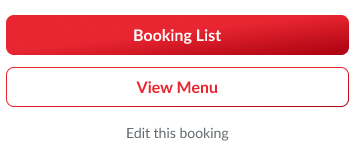
- Users can see the View Menu button on Booking Detail (Profile ➝ Booking & Voucher Page ➝ Pick the Upcoming Booking) under the Booking List button
- Users can redirect to View Your Menu page
- Users can see the list of packages (if package more than 1) on the View Your Menu page.
- Users can pick the package (if package more than 1)
- Users can see the package detail and the package menu on View Your Menu page
Scope
Mobile web view
Sequence Diagram / Flow
Scan from Restaurant QR Code:
Open Menu from Profile :
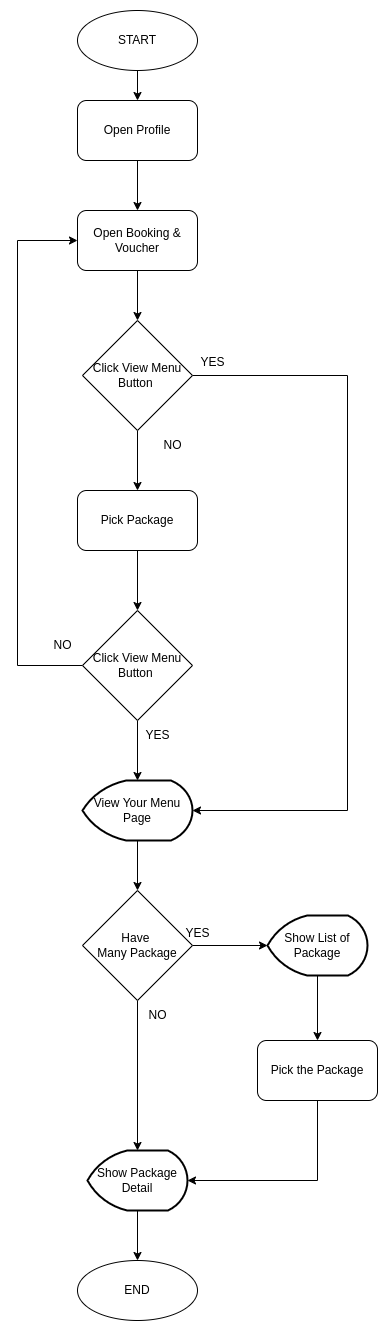
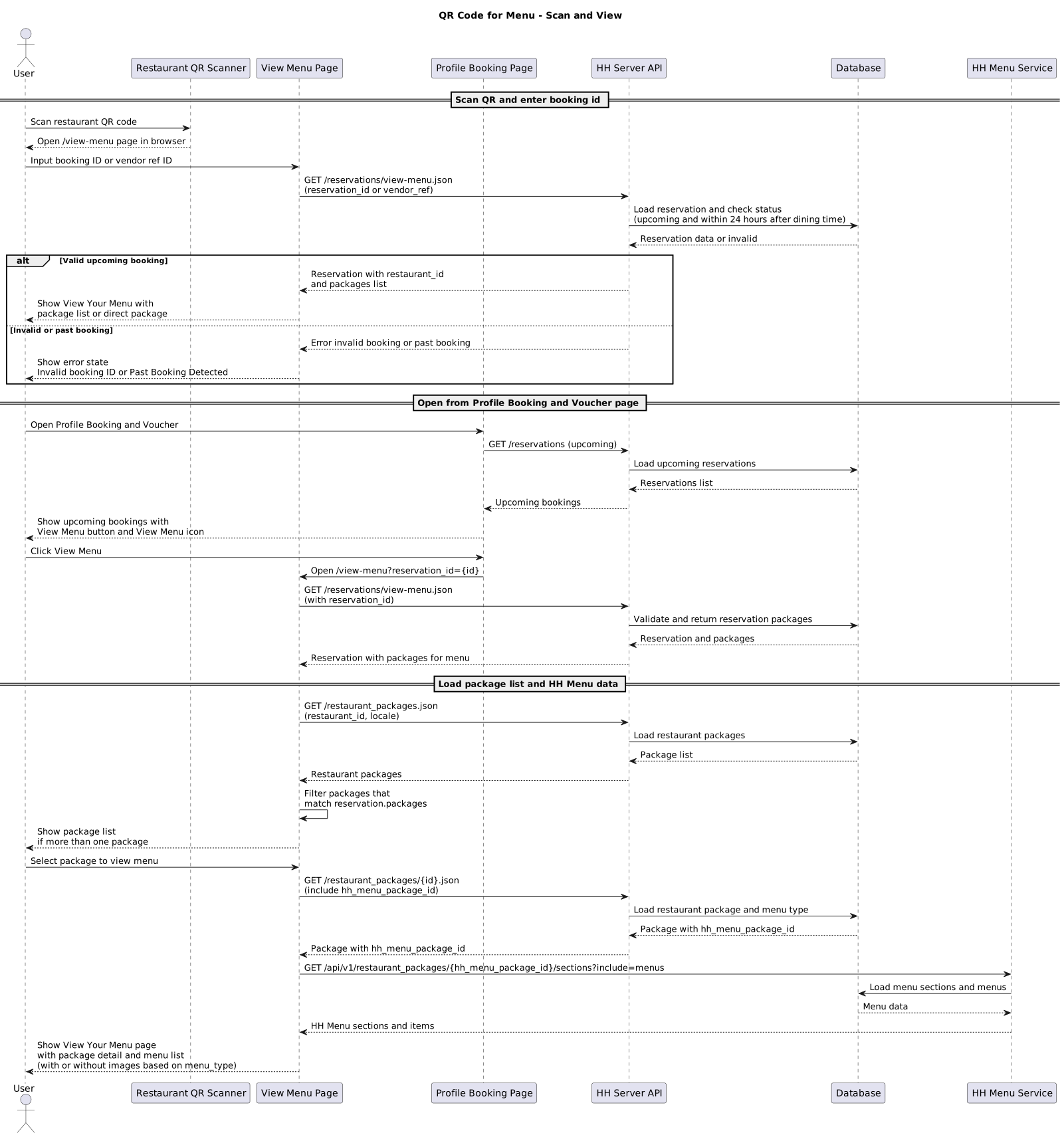
ERD
N/A
UML
N/A
Backend Implementation
- Add new endpoint to get package data based on reservation id or vendor reservation id
- Add validation to check if the booking is an upcoming booking (return error if old booking or invalid booking)
- Move “package” method on
app/serializers/api/v5/reservation_serializer.rbto
app/serializers/api/v5/reservations/common_fields_serializer.rb
- Add
app/serializers/api/v5/reservations/packages_serializer.rbto show package list and the package detail
Frontend Implementation
- Add
hh_menu_package_idon API Get Restaurant Package
Current flow we open this URL: https://menu.hungryhub.com/api/v1/restaurant_packages/link_package_menu?package_id=4783&package_type=HhPackage::Package::PartyPack&locale=th\n%20%20%20%20%20%20&restaurant_package_server_id=24172&restaurant_id=3371
And then return this URL:
Actually, we only need to get hh menu v2 data to get that package menu:
https://menu.hungryhub.com/api/v1/restaurant_packages/270/sections?include=menus
The problem we don’t know that 270 (hh menu package id) until open the redirection menu. So, we need to return hh_menu_package_id on restaurant-packages serializer. And client only need to get menu.hungryhub.com API.
- Add Looking for menu page
For the view menu main page can use this URL:
https://web.hungryhub.com/en/view-menu
On this page, user can insert their booking ID/vendor ref ID to see their reservation menu. Use API get reservation package.
- Add View menu button
when it clicked, it will open view menu URL with query reservation_id
- Add Restaurant Header
From response reservations/packages API we’ll get image_cover_url data. Use image_cover_url for background collapsing toolbar. And when scroll up will show restaurant name.
- Add Package List page (For Multiple Package)
This page is showing up if only have more than one packages in reservation response. To handle this UI use restaurant package API:
https://hungryhub.com/api/v5/restaurant_packages.json?restaurant_id=3371&locale=en
We set it up like in current store page. But after get data package. Filter to show package that available in reservation.packages.
Example logic:
const itemList = [
  { id: "1", name: "pack A", type: "ayce" },
  { id: "2", name: "Pack B", type: "pp" },
  { id: "3", name: "Pack C", type: "ayce" }
];

const showList = ["1", "3"];

const filteredList = itemList.filter(item => showList.includes(item.id));

console.log(filteredList);
- Add HH Menu with images
To get menu data, we need to hit API restaurant package:
https://hungryhub.com/api/v5/restaurant_packages/41220.json?locale=en
And then we’ll get the hh_menu_package_id, from that id we will hit another API to retrieve hh-menu data.
But since BE not returned the id yet. We can try mapping with this menu API:
https://menu.hungryhub.com/api/v1/restaurant_packages/7090/sections?include=menus
- Add HH Menu without images
Same like above but without images.
- Add HH Menu + Image or imenupro
Additional case, for this HH Menu + image/imenupro. We need to check menu_type if the value menu_v2_and_img or menu_v2_and_imenupro we need to add 1 more tab to load menu_link on that first tab.
PRD & Task
https://app.clickup.com/9003122396/docs/8ca1fpw-7922/8ca1fpw-42436
https://app.clickup.com/t/86cwp310q https://app.clickup.com/9003122396/docs/8ca1fpw-37016/8ca1fpw-46076
Design
API Blueprint
| Method | Path | URL | Description | Payload |
|---|---|---|---|---|
| GET | /reservations/packages.json | https://www.hungryhub.com/api/v5 | Get package list and package detail | Use body json or query params You can insert reservation id or vendor reservation id { “reservation_id”: 123455 } |
New Query
-
DB Schema / Database Migration
-
Improvement:
| NO | Date Time | What Changed | Description |
|---|---|---|---|
Notes
Task: https://app.clickup.com/t/86cwp310q
Backend Update
API Get Reservation Package
To provide user reservation package data, we need to provide API to get reservation data by ID.
- It should support reservation ID and also vendor ref ID.
- Only valid for upcoming booking (not passed 24 hrs after dining time and pending arrival or arrived. must have these 2 conditions.
- If not valid or incorrect, display error state under the form
Invalid booking IDorPast Booking DetectedMethod: GET Endpoint: https://hungryhub.com/api/v5/reservations/{id}/view-menu.json (feel free if you have better suggestion) Respose:
{
	"data": {
		"id": "5747958",
		"type": "reservations",
		"attributes": {
			"restaurant_id": 4039,
			"date": "2024-08-14",
			"name": "Ghoo",
			"special_request": ""
.....
To make it easier we can use the same reservation serializer. But what we actually need is only restaurant_id and package data.
Add hh_menu_package_id on API Get Restaurant Package
Current flow we open this URL: https://menu.hungryhub.com/api/v1/restaurant_packages/link_package_menu?package_id=4783&package_type=HhPackage::Package::PartyPack&locale=th\n%20%20%20%20%20%20&restaurant_package_server_id=24172&restaurant_id=3371 And then return this URL: https://hh-menu.hungryhub.com/layout?token=OJcwJyBAmEk_aSSTLjmqL71PFemFHG7JODci4uOPywM&price=true&restaurant_package_id=270&layout_id=1&recommended=&lang=thai&restaurant_package_server_id=24172&restaurant_id=3371
Actually, we only need to get hh menu v2 data to get that package menu: https://menu.hungryhub.com/api/v1/restaurant_packages/270/sections?include=menus
The problem we don’t know that 270 (hh menu package id) until open the redirection menu. So, we need to return hh_menu_package_id on restaurant-packages serializer. And client only need to get menu.hungryhub.com API.
Looking for menu page
 For the view menu main page can use this URL:
https://web.hungryhub.com/en/view-menu
On this page, user can search their booking ID/vendor ref ID to see their reservation menu. We can use API get reservation package but if it is not ready yet, we can hardcoded the data for now.
For the view menu main page can use this URL:
https://web.hungryhub.com/en/view-menu
On this page, user can search their booking ID/vendor ref ID to see their reservation menu. We can use API get reservation package but if it is not ready yet, we can hardcoded the data for now.
Add View Menu Button

This is just simple button when we click it will open view menu URL with query reservation_id: https://web.hungryhub.com/en/view-menu?reservation_id=XXXXXX
Update For Hybrid: Since the behavior become bad when back from view menu, we need to add an event instead navigate it. Event: onLinkClicked Payload:
{
     "target_url": "https://web.hungryhub.com/en/view-menu?reservation_id=XXXXXX"
}
Restaurant Header
 From response view-menu API we’ll get restaurant_id data. And we’ll use that for handle header restaurants.
API: https://hungryhub.com/api/v5/restaurants.json?restaurant_id=1039&locale=en
We can use
From response view-menu API we’ll get restaurant_id data. And we’ll use that for handle header restaurants.
API: https://hungryhub.com/api/v5/restaurants.json?restaurant_id=1039&locale=en
We can use image_cover_url for background collapsing toolbar. And when scroll up will show restaurant name.
Package List (For Multiple Package)
 This page is showing up if only have more than one packages in reservation response. To handle this UI we can use restaurant package API:
https://hungryhub.com/api/v5/restaurant_packages.json?restaurant_id=3371&locale=en
We set it up like in our current store page. But after get data package. We need to filter to show package that available in reservation.packages.
Example logic:
This page is showing up if only have more than one packages in reservation response. To handle this UI we can use restaurant package API:
https://hungryhub.com/api/v5/restaurant_packages.json?restaurant_id=3371&locale=en
We set it up like in our current store page. But after get data package. We need to filter to show package that available in reservation.packages.
Example logic:
const itemList = [
  { id: "1", name: "pack A", type: "ayce" },
  { id: "2", name: "Pack B", type: "pp" },
  { id: "3", name: "Pack C", type: "ayce" }
];

const showList = ["1", "3"];

const filteredList = itemList.filter(item => showList.includes(item.id));

console.log(filteredList);
HH Menu with images
 To get menu data, we need to hit API restaurant package:
https://hungryhub.com/api/v5/restaurant_packages/41220.json?locale=en
And then we’ll get the hh_menu_package_id, from that id we will hit another API to retrieve hh-menu data.
But since BE not returned the id yet. We can try mapping with this menu API:
https://menu.hungryhub.com/api/v1/restaurant_packages/7090/sections?include=menus
To get menu data, we need to hit API restaurant package:
https://hungryhub.com/api/v5/restaurant_packages/41220.json?locale=en
And then we’ll get the hh_menu_package_id, from that id we will hit another API to retrieve hh-menu data.
But since BE not returned the id yet. We can try mapping with this menu API:
https://menu.hungryhub.com/api/v1/restaurant_packages/7090/sections?include=menus
HH Menu without images
 Same like above but without images.
But since BE not returned the id yet. We can try mapping with this menu API:
https://menu.hungryhub.com/api/v1/restaurant_packages/270/sections?include=menus
Same like above but without images.
But since BE not returned the id yet. We can try mapping with this menu API:
https://menu.hungryhub.com/api/v1/restaurant_packages/270/sections?include=menus
HH Menu + Image or imenupro
 Additional case, for this HH Menu + image/imenupro. We need to check
 menu_type if the value menu_v2_and_img or menu_v2_and_imenupro we need to add 1 more tab to load menu_link on that first tab.
Image Menu
 Can try mapping with any random non menu_v2 menu package:
https://hungryhub.com/api/v5/restaurant_packages/30474.json?client_type=web&locale=en
Can try mapping with any random non menu_v2 menu package:
https://hungryhub.com/api/v5/restaurant_packages/30474.json?client_type=web&locale=en