Paynow
Document Feature
Title
Pay Now
Description / Background
There has been an increase in recent requests from Customers to prepay for the bookings and currently the OPS team is handling this manually which causes unnecessary extra tasks and a risk for human error. Also based on the recent force for full prepayment upon using discount codes and points, the high number of users willing to pay in advance has proved the prepayment trend.
Objectives
- Users (members and guests) can use it
- Users can pick the Pay Now option when creating a booking (available for all payment methods)
- Users can see the Pay Now option when the payment type is Pay Now or prepayment (but users cannot click the Pay Now option as it will be disabled)
- Users can get points after 24 hours from booking time (members only)
- Admins can see which users use Pay Now (booking report and Clevertap)
- Admins can turn on/off the Pay Now feature at the package level
- Although ‘Earn Points’ is not checked by admin, if users use PayNow, users will get the points.
Scope
- All platforms
Sequence Diagram / Flow
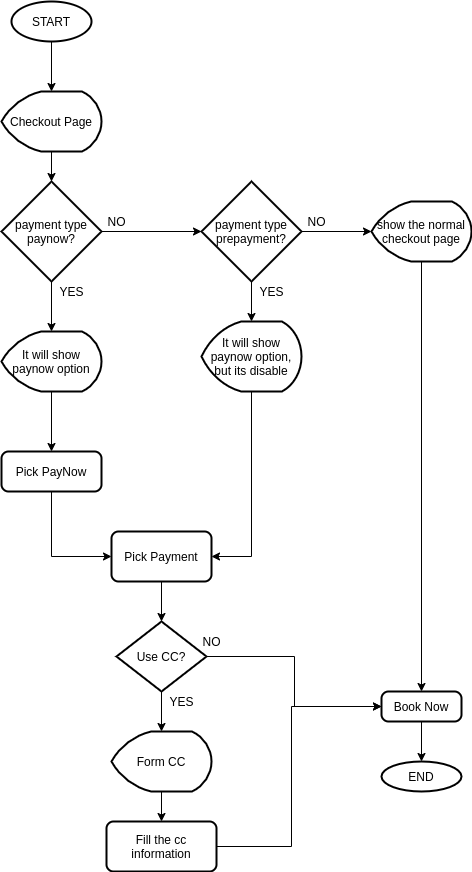
Paynow flow checkout page (1).drawio
ERD
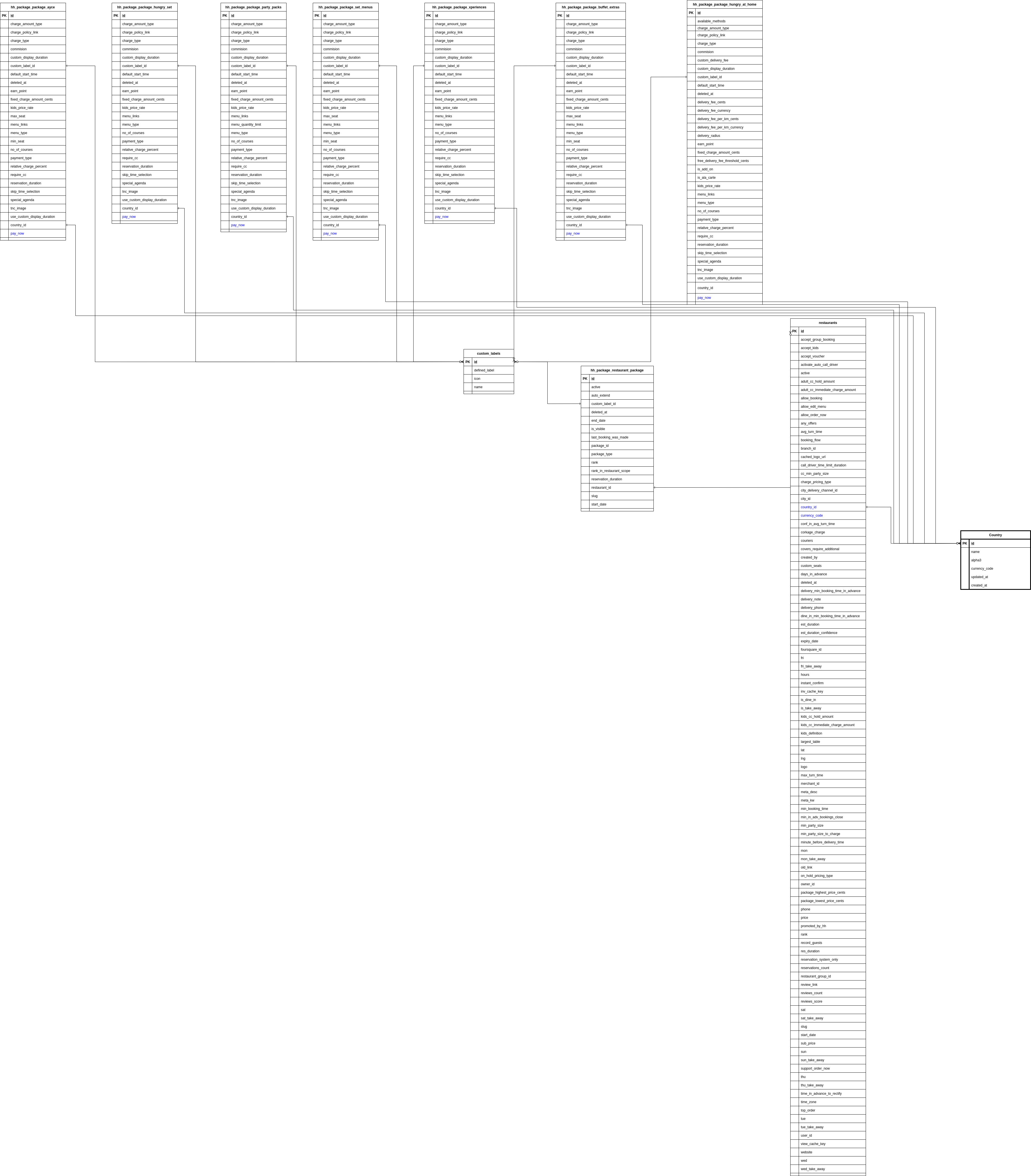
DB Schema / Database Migration
| Column Name | Data Type | Description |
|---|---|---|
| pay_now | boolean | Add pay_now column on all package type table |
API Blueprint
| Method | Path | URL | Description | Payload |
|---|---|---|---|---|
| POST | {{ base_api }}/reservations.json | add pay_now true or false on reservation object | ||
| “reservation”: { | ||||
| “restaurant_id”: 837, | ||||
| “date”: “2020-10-01”, | ||||
| “start_time”: “17:00”, | ||||
| “adult”: 1, | ||||
| “kids”: 0, | ||||
| “special_request”: “adasd jasd adj”, | ||||
| “voucher_code”: “HADIAH”, | ||||
| “service_type”: “delivery”, | ||||
| “distance_to_restaurant”: 13.4, | ||||
| “pay_now”: false | ||||
| } |
New Query
💡 change package attr to be optional belongs_to :package_attr, class_name: ‘HhPackage::PackageAttr’, foreign_key: ‘hh_package_package_attr_id’, optional: true
1. Only pay on-site
- require_cc: false
- pay_now: false
- is_temporary: false 2. Require pre-payment
- require_cc: true
- pay_now: false
- is_temporary: true 3. Option to Pay-Now
- require_cc: false
- pay_now: true
- is_temporary: true Booking report : a.Requires pre-payment column
- Yes (if that package setting is “Requires pre-payment”)
- No (if that package setting is **not “**Requires pre-payment”) b.PayNow column
- Yes (if user chose to pay now for that booking)
- No (if user didn’t choose to pay now or if the setting is “Requires pre-payment” or “Pay on-site”)
Notes, Constraints & Assumptions
- Requires pre-payment = setting by package
- Option to PayNow = for packages not forced for payment via setting so we offer the payment by user’s choice. PayNow always requires a prepayment (i.e. 100% of the total booking price)
- Pay on-site = No PayNow option shows up on client side
- For tracking purposes, add 2 new columns in the booking report list. So we know % of users using this feature after a month of release
- Requires pre-payment column
- Yes (if that package setting is “Requires pre-payment”)
- No (if that package setting is **not “**Requires pre-payment”)
- PayNow column
- Yes (if user chose to pay now for that booking)
- No (if user didn’t choose to pay now or if the setting is “Requires pre-payment” or “Pay on-site”)
TODO / Task List / Action Items
https://3.basecamp.com/5190892/buckets/30696659/todosets/5662070561
References
https://www.figma.com/file/iZf1pRlP4ptnLQP9tURtsI/Pay-now-update?node-id=0%3A1&t=gjUpZPIbTCKCXAqu-0
Change History
| NO | Date Time | What Changed | Description |
|---|---|---|---|
| 1 | 20 Jan 2023 | - | Initial Document |
| 2 | 23 Jan 2023 | Update ERD and query | |
| 3 | 24 Jan 2023 | Update API blueprint | |
| 4 | 25 Jan 2023 | Update payment now flow on checkout page |