Multi Currency
Description / Background
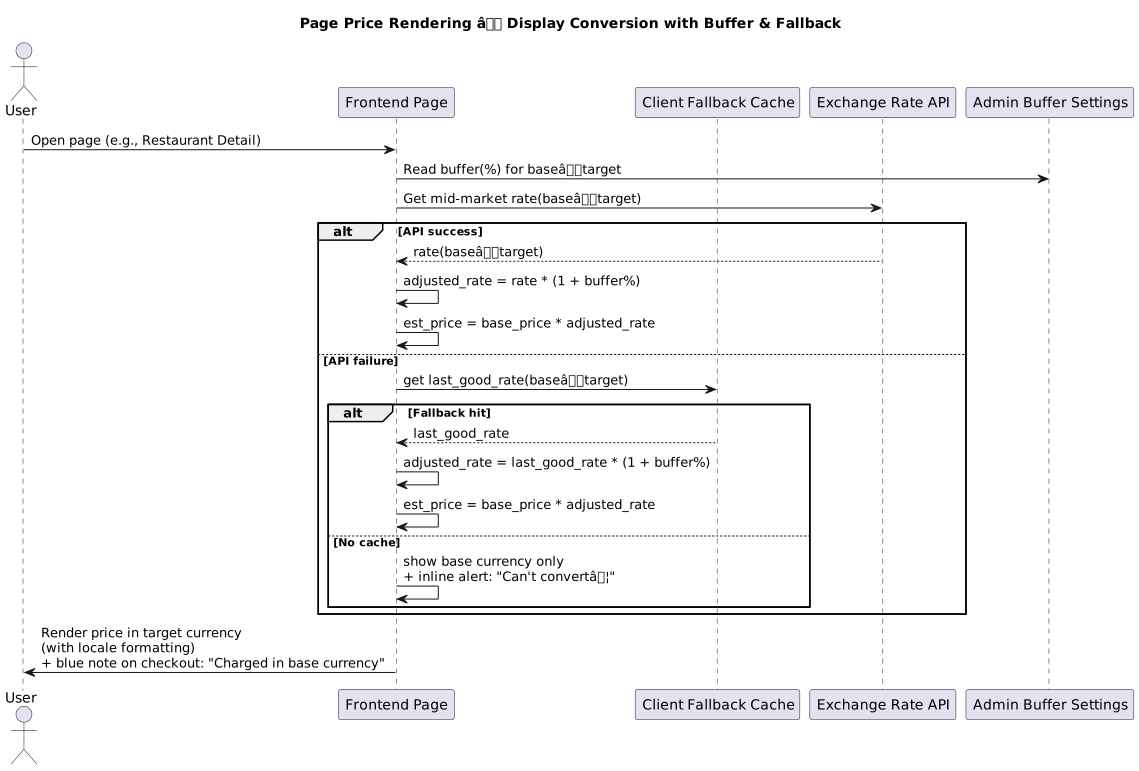
Multi-Currency introduces the ability for users to view estimated prices in their preferred or local currency across Hungry Hub’s website and app. Prices are converted in real time using exchange rate APIs, allowing users to better understand the cost of restaurant packages in familiar monetary terms.
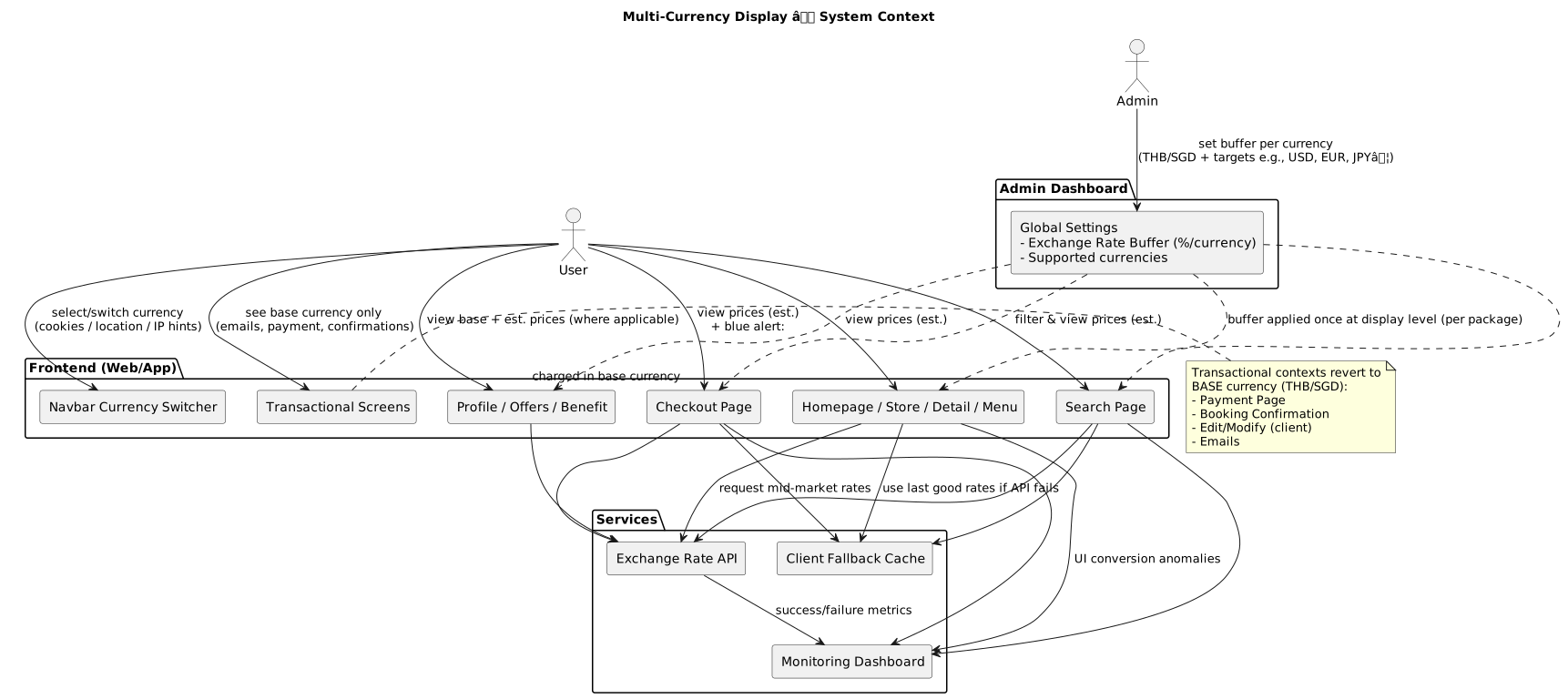
The actual billing remains in the restaurant’s base currency (THB or SGD) — ensuring no impact on backend calculations or payment processing. The feature supports multiple target currencies (USD, EUR, GBP, JPY, etc.) and provides clear indicators that displayed prices are estimates.
This enhancement improves international accessibility, transparency, and trust while laying the groundwork for Phase 2: Real Multi-Currency Payments.
Objectives
- User can see the package price from their selected currency
- Support for THB and SGD as base currencies
- Support target currency (Order by alphabetical sort)
- 🇦🇺 AUD (Australian Dollar)
- 🇨🇳 CNY (Chinese Yuan)
- 🇪🇺 EUR (Euro)
- 🇬🇧 GBP (British Pound Sterling)
- 🇭🇰 HKD (Hong Kong Dollar)
- 🇮🇩 IDR (Indonesian Rupiah)
- 🇯🇵 JPY (Japanese Yen)
- 🇰🇷 KRW (South Korean Won)
- 🇲🇾 MYR (Malaysian Ringgit)
- 🇷🇺 RUB (Russian Ruble)
- 🇸🇬 SGD (Singapore Dollar)
- 🇹🇭 THB (Thai Baht)
- 🇺🇸 USD (US Dollar)
- 🇻🇳 VND (Vietnamese Dong)
- User can see estimated prices in their local or preferred currency (e.g., USD, EUR, JPY) when browsing restaurant packages.
- User can switch between available currencies through a Currency Switcher on the navbar or within their profile settings.
- User can receive up to three suggested currencies based on personalization:
- Their previously selected or detected currency (cookies/location/IP).
- USD as a default fallback.
- The city currency of the restaurant being viewed (THB/SGD).
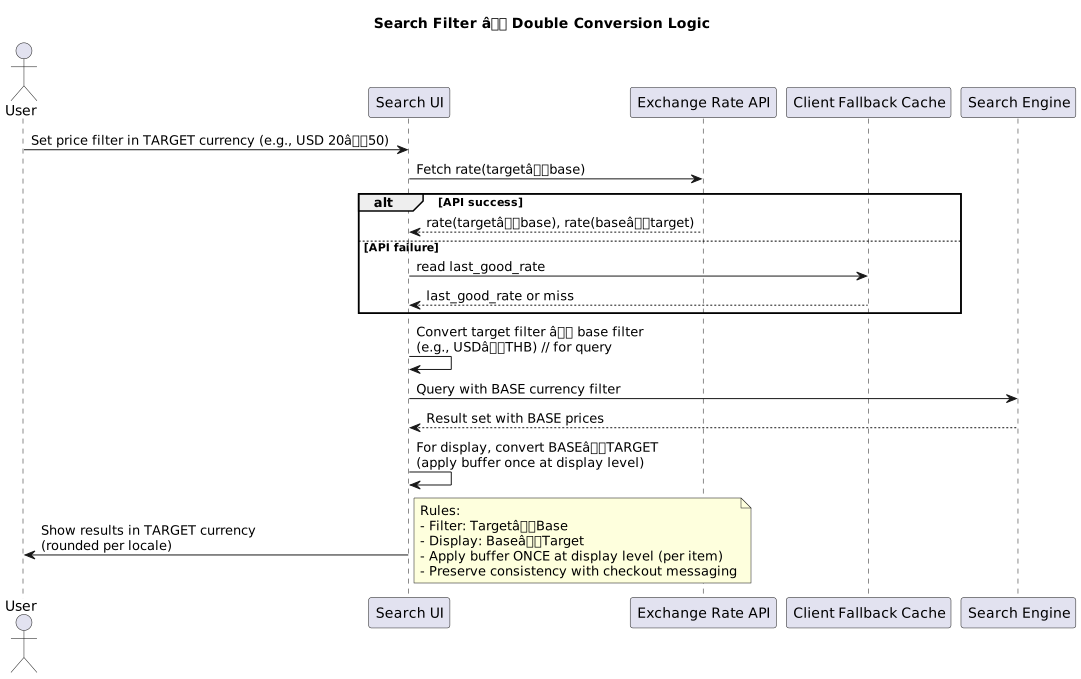
- User can filter restaurants by price in their selected currency, with automatic conversion handled on both filter and result display.
- User can view checkout prices in their chosen currency, with an on-screen alert explaining that billing will occur in the restaurant’s local currency.
- User can see consistent currency conversion across homepage, search results, package details, and offers pages.
- User can still receive receipts, confirmation emails, and booking edits in the restaurant’s base currency, ensuring clarity in payments.
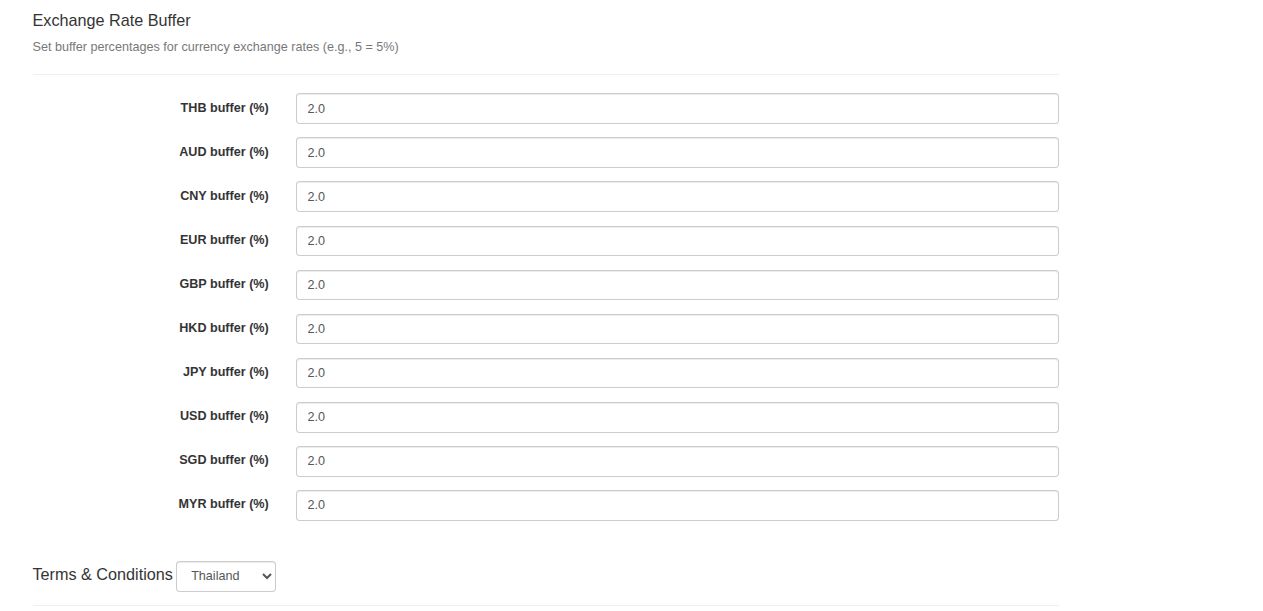
- Admin can manage a global configuration section called “Exchange Rate Buffer” within the Admin Dashboard, ensuring consistent control of conversion parameters across all supported currencies.
- Admin can set a configurable buffer percentage (
{currency} buffer (%)) for each currency — both base (THB, SGD) and target (USD, EUR, GBP, etc.) — in the Admin Dashboard. (This buffer defines a tolerance margin applied to exchange rates to account for market fluctuations and risk management). - Admin can extend buffer settings to newly supported currencies like MYR (Malaysian Ringgit) to align with country expansion initiatives.
- Admin can track and monitor exchange rate anomalies via a monitoring dashboard used by product analysts. This helps detect sudden rate discrepancies or API failures in near real-time.
- Admin can ensure that buffers are applied only once — at the display level per package — and not to backend or total calculations, preventing inconsistency between shown and charged prices.
- Admin can enforce proper formatting standards for currencies (symbol position, comma vs. dot separators, and locale conventions) to maintain international accuracy and readability.
- Admin can monitor key performance indicators such as exchange rate fetch success rate, restaurant card click-through rates, and conversion rate changes for non-base currencies.
Scope
homepage language setting, all displayed currency, including dynamic pricing, original price, kid price etc
How to set exchange rate buffer
-
Log in to the Admin Dashboard.
-
Navigate to Settings
-
Locate the new section titled “Exchange Rate Buffer.”
This section controls how the system adjusts live exchange-rate conversions shown on the frontend.
Example:
- Base currency = THB, Target = USD
- Base rate: 1 THB = 0.031 USD
- Buffer = 2 % (0.02)
- Adjusted rate = 0.031 × 1.02 = 0.03162 USD/THB
- A 12.000 THB package → 12.000 × 0.03162 = 379.44 USD displayed to users
Sequence Diagram / Flow
ERD
Backend Implementation
- API Configuration (
pages_controller.rb): Addsexchange_rate_bufferskey toapp_configendpoint, returns hash with buffer percentages for 9 currencies (AUD, CNY, EUR, GBP, HKD, JPY, USD, SGD, MYR), each buffer value converted to float for precise calculations - Database Model (
admin_setting.rb): Defines 9 new float fields for exchange rate buffers (one per currency), all fields default to0.0(0% buffer), documented as percentage values in comments - Admin UI (
index.html.erb): Excludes buffer fields from generic settings listing to reduce clutter, creates dedicated “Exchange Rate Buffer” section in admin dashboard, provides numeric input fields with step=“0.01” precision, displays user-friendly labels (e.g., “AUD buffer (%)”), includes help text: “Set buffer percentages for currency exchange rates (e.g., 5 = 5%)” - Internationalization (
admin_setting.en.yml): Adds English descriptions for all 9 buffer settings, format: “Exchange rate buffer percentage for [Currency Name] ([CODE]). Example - 5 means 5%” - Extended currency support: Adds buffer fields for 4 additional currencies: RUB (Russian Ruble), KRW (Korean Won), IDR (Indonesian Rupiah), VND (Vietnamese Dong), increasing total supported currencies from 9 to 13
- Model Updates (
admin_setting.rb): Addsexchange_rate_buffer_rub,exchange_rate_buffer_krw,exchange_rate_buffer_idr,exchange_rate_buffer_vndfields, all float type with default 0.0 - Admin UI Updates (
index.html.erb): Extends excluded settings list with 4 new buffer fields, updates currency iteration loop to include: rub, krw, idr, vnd, maintains consistent UI pattern - Localization (
admin_setting.en.yml): Adds descriptions for 4 new buffer fields following same format as existing descriptions Link Link
Hybrid Implementation
- A new utility (
generateEstimatedPrice) is called in many locations to display prices in the user’s selected currency, based on exchange rates, alongside original restaurant prices. - All price rendering logic (menus, packages, add-ons, search results, booking summaries, vouchers, etc.) now optionally shows the estimated price in the user’s preferred currency.
- When the restaurant’s currency differs from the user’s selection, both are shown (e.g., “SGD 20” and “THB 520”).
- The language picker is expanded to allow users to select both language and currency.
- New components (
CurrencyOptionView,CurrencyOption,LanguageDropdown) provide currency selection and explanations of how estimated pricing works. - Currency selection is stored in cookies and persists across sessions/pages.
- All components showing prices (e.g., booking summary, payment, confirmation, add-on detail, point redemption, package comparisons, QR menu) can now show estimated prices and/or currency labels.
- Conditional logic displays estimated price when base and selected currencies differ.
- New
RestaurantCurrencyLabel.vuedisplays the original restaurant price and currency when different from the user’s selection. - Search results and restaurant cards show both original and estimated prices.
- Search filters use selected currency for price ranges and display.
- Language settings now include currency selection.
- Currency is displayed in profile and can be changed in settings.
- Exchange rates are fetched and stored in a global config for client-side use.
- Dropdowns, tabs, and explanations are added to make currency selection clear and easy.
- Explanatory text is shown to inform users that payment is made in the restaurant’s currency, but estimates are shown in their preferred currency.
- Price props are refactored to handle both original and estimated prices.
- Code is updated everywhere prices are displayed or inputted to support dynamic currency.
- Helper functions ensure correct codes for currencies and languages when switching.
https://github.com/hungryhub-team/hh-pegasus/pull/1892
Mobile Implementation
Android:
- Currency Rate Loading & Persistence: Modified
DashboardActivity.javato load THB and SGD currency rates from API and persist them in SharedPreferences usingTHB_CURRENCY_RATESandSGD_CURRENCY_RATESconstants - Currency Conversion Utility: Updated
Utils.javawithgetConvertedAndFormattedCurrency()method to convert prices between currencies using stored exchange rates and apply buffer rates fromExchangeRateBuffersconfig - Exchange Rate Buffer Model: Added
ExchangeRateBuffers.ktdata class with fields for 9 currencies (AUD, CNY, EUR, GBP, HKD, JPY, USD, SGD, MYR) to support dynamic rate adjustments - Cart Price Parsing: Enhanced
CartItemAdapter.ktto detect THB (฿) and SGD (S$) currency symbols and convert cart item prices to user’s selected currency - Multi-Currency Formatting: Implemented currency-specific formatting in
Utils.javasupporting symbols and decimal rules for 9 currencies (THB displays as ฿, SGD as S$, etc.) - Config Integration: Modified app to fetch and parse
exchange_rate_buffersfrom/api/v5/pages/app_configendpoint inAppConfigmodel - MYR Rate Management: Added MYR currency rate loading in
DashboardActivity.javaand createdMYR_CURRENCY_RATESpreference constant inConstants.java - MYR Conversion Support: Extended
Utils.javato map MYR currency in conversion logic and retrieve MYR rates from SharedPreferences - RM Symbol Detection: Updated
CartItemAdapter.ktto detect RM currency symbol and convert Malaysian Ringgit prices to user’s selected currency - Extended Buffer Model: Added 4 additional currency fields (RUB, KRW, IDR, VND) to
ExchangeRateBuffers.ktdata class - Additional Currency Formatting: Extended
Utils.javawith currency symbols and formatting rules for RUB (₽), KRW (₩), IDR (Rp), VND (₫) - Currency API URL Configuration: Updated
app/build.gradleto configureCURRENCY_BASE_URLfor debug and release environments - Checkout Cart Cleanup: Modified
CheckoutFragment.ktto delete cart items after successful reservation usingCartViewModel - Profile Settings Integration: Updated
MyProfileFragment.ktto handle currency change events from WebView, trigger home navigation and activity recreation - UI Layout Refactoring: Converted
activity_dashboard.xmllayout from FrameLayout to ConstraintLayout for better bottom navigation positioning - Code Cleanup: Removed 59 lines of unused tooltip helper methods from
Utils.java - Currency Preference Storage: Added
CURRENT_CURRENCYconstant toConstants.javafor persisting user’s selected currency across app sessions - Currency Change Handler: Implemented
onChangeCurrencyWebView handler inMyProfileFragment.ktto capture currency selection from hybrid web views and save to SharedPreferences - Hybrid URL Currency Propagation: Modified
HybridUrlManager.ktto append¤cy=query parameter to all Pegasus hybrid URLs based on saved preference - Currency Response Model: Created
CurrencyResponse.ktdata class to parse currency change events from WebView - Activity Refresh on Currency Change: Added activity recreation logic in
MyProfileFragment.ktto reload app with new currency selection
PR #2040 - Multi-Currency WebView Integration PR #2080 - MYR Currency Support PR #2065 - Multi-Currency Foundation
iOS:
- Multi-Currency Cart Support: Implemented complete RxSwift-based reactive currency conversion in
CartCell.swiftwith exchange rate API integration, buffer application fromConfigData, and currency-specific rounding logic - Exchange Rate API Service: Created
GetLatestConversionsUseCaseinPostGoogleConversionUseCase.swiftwithCurrencyandRatemodels for fetching exchange rates from environment-aware URLs (production: rates.hungryhub.com, debug: rates.hh-engineering.my.id) - Currency Symbol Mapping: Added
getCurrency()andgetCurrencySymbol()helper methods inString+SubScript.swiftsupporting 13 currencies (THB ฿, SGD S$, MYR RM, USD $, AUD A$, GBP £, EUR €, CNY ¥, JPY ¥, HKD HK$, RUB ₽, KRW ₩, IDR Rp, VND ₫) - Currency Code Detection: Implemented RM symbol to MYR currency code mapping in
String+SubScript.swiftgetCurrency() method for Malaysian Ringgit base currency support - Locale-Based Formatting: Extended
NumberHelper.swiftcurrency() method with locale parameter for localization and standardized currency separators (comma for grouping, dot for decimal) - Exchange Rate Buffer Configuration: Added
exchangeRateBuffersproperty toConfigData.swiftparsing [String: Double] from app_config API’s exchange_rate_buffers field - Package Price Formatting: Updated
CartViewModel.swiftto include currency symbol extraction in package price formatting logic - Currency-Specific Display Rules: Added VND-specific vi_VN locale handling in
CartCell.swiftwith rounding, and RUB following USD/SGD pattern - Decimal Separator Standardization: Modified
PriceHelper.swiftto force currencyDecimalSeparator to “.” for consistency across currencies - UserDefaults Currency Storage: Added
currencycase toDefaults.swiftenum for persistent currency preference storage - Currency Change WebView Handler: Implemented
onChangeCurrencyWebView bridge handler inProfileVC.swiftto capture currency selection from web views - Currency Change ViewModel Logic: Added
didChangeCurrencyRxSwift PublishRelay inProfileViewModel.swiftto save currency preference and trigger app-wide refresh via tabbarController() - WebView Currency Parameter: Modified
WebViewEndpoint.swiftto conditionally append currency query parameter to all WebView requests when currency preference is not empty, defaulting to omission if empty - Voucher Amount Cell Currency Support: Updated
AmountSelectedCell.swiftsetupPackageData() and setupVoucherPackage() methods to accept currency parameter and replace currencyDisplay() with thousandSeparator().addCurrency() - Total Charge Currency Display: Modified
TotalVoucherSelectedCell.swiftsetTotal() and setTotalVoucherPackage() methods to accept and apply currency parameter in price calculations - Payment Summary Currency Propagation: Updated
ChargeSummaryVoucher.swiftto accept and pass currency property to amount cells and total cells for consistent multi-currency display - Payment Method Currency Context: Modified
PaymentMethodController.swiftto pass currency parameter (“THB”) to calculatePricePackageVoucher() for payment charge calculation - Voucher Landing Page Currency Injection: Updated
VoucherLandingPage.swiftto extract currency from voucherPackageData and inject into ChargeSummaryVoucher for voucher package flows - Voucher Flow Currency Mapping: Added currency field mapping in
VoucherFlowMapper.swiftfor bothVoucherFlowAttributesandVoucherPackageFlowAttributesclasses - QR Payment Currency Display: Modified
VoucherQRPayment.swiftto replace currencyDisplay() with thousandSeparator().addCurrency() for both voucher and voucher package flows - Register Layout Multi-Line Support: Fixed
RegisterVC.xiblabels to support numberOfLines=“0” for multi-line text wrapping - Code Formatting Cleanup: Improved Swift code formatting in
AmountSelectedCell.swift,TotalVoucherSelectedCell.swift,VoucherChargedSummary.swift, andRestaurantDetailViewModel.swiftwith proper spacing and line breaks - Logout Currency Reset: Added
Defaults.currency.remove()to logout flow inProfileViewModel.swiftto clear currency preference on user logout - Conditional Currency Parameter: Modified
WebViewEndpoint.swiftto only append currency parameter when Defaults.currency is not empty, preventing empty string propagation
PR #2220 - Multi-Currency Cart Page PR #2226 - MYR Base Currency PR #2227 - Russian, Korean, Indonesian, Vietnamese Currencies PR #2210 - Multi-Currency Foundation PR #2211 - Currency in Voucher & QR Payment PR #2215 - Default Currency Parameter Removal
PRD & Task
PRD:
https://app.clickup.com/9003122396/v/dc/8ca1fpw-7922/8ca1fpw-52476
https://app.clickup.com/9003122396/v/dc/8ca1fpw-7922
https://app.clickup.com/9003122396/v/dc/8ca1fpw-7922/8ca1fpw-46316
https://app.clickup.com/9003122396/v/dc/8ca1fpw-7922/8ca1fpw-46336
https://app.clickup.com/9003122396/v/dc/8ca1fpw-7922/8ca1fpw-54256
TASK: https://app.clickup.com/t/86cyg53nr
https://app.clickup.com/t/86d0mjw50 https://app.clickup.com/t/86d0m29t8
https://app.clickup.com/t/86d0pja2j
Design
https://www.figma.com/design/PvOG3Actzf6wjG0cyglyVC/Multi-Currency?node-id=0-1&t=3WTr983lWPRX51ed-1
API Blueprint
| Method | Path | URL | Description | Payload |
|---|---|---|---|---|
| GET | /api/v5/pages/app_config | Base API URL | Returns app configuration including exchange_rate_buffers hash with buffer percentages for all supported currencies (AUD, CNY, EUR, GBP, HKD, JPY, USD, SGD, MYR, RUB, KRW, IDR, VND) | N/A |
New Query
DB Schema / Database Migration
- Add new setting Exchange Rate Buffer for each currency (AUD, CNY, EUR, GBP, HKD, JPY, USD, SGD, MYR, RUB, KRW, IDR, VND) as float fields with default 0.0 in
admin_settings.
Improvement:
| Feature Name | Date | What Changed | Description |
|---|---|---|---|