Mix and Match AYCE Package
Description / Background
Mix and Match Package was a feature that allowed users to book more than 1 package of the same category. This feature was previously only available on the Party Pack package.
In order to enhance customer satisfaction and flexibility, the Mix and Match feature will be applied to AYCE package. This will enable users to purchase more than one type of AYCE package. The feature will be launched initially at Copper Buffet restaurants.
Glossary
https://app.clickup.com/9003122396/docs/8ca1fpw-35796/8ca1fpw-41516
Scope
This mix and match feature is only available on the new store page. For the old store page there is no mix and match feature.
Objectives
- User can book more than 1 type of AYCE package
- User can book both for adult and kids
- When users book adult and kids, the kids price that the system used was the most expensive between the AYCE package that users choose.
- User can see special menu for both package on checkout page (if any)
- User can see the both package name and special menu on booking confirmation page
- The system will pick the first picked package payment method (prepaid 100% or pay at restaurant or deposit).
Example:
User book Normal Party Pack package use prepaid and Party Pack A use pay on site
The system should use the Normal Party Pack payment Method (prepaid)
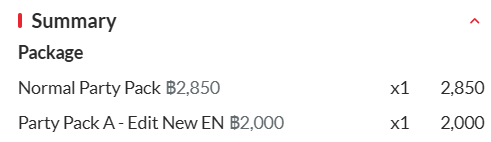
- The system will calculate the total of the prepaid amount, even if the packages have a different percentage of the prepaid amount.
Example:
Package A 100% prepaid, package price ฿1000
Package B 50% prepaid, package price ฿1200
The total prepaid amount should be ฿1000 + ฿600 = ฿1600
- The system will change the payment method of the package from Pay on Site to Prepaid if the other payment method of the package is Prepaid less than 100%.
Example:
Package A ➝ Prepayment 80% (less than 100%)
Package B ➝ Payonsite
Package A is still prepaid 80% (not change). Package B will be 100% prepaid (not payonsite anymore)
- The system will calculate the
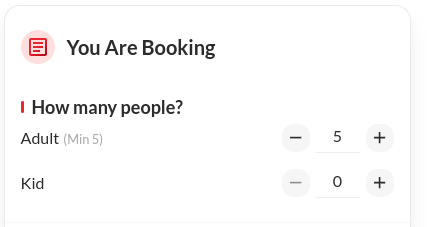
min seatby combining themin_seatfrom both package
Example:
Package A min_seat = 3 people, Package B min_seat = 2 people
It should written Adult (Min 5), and selected 5 adult.
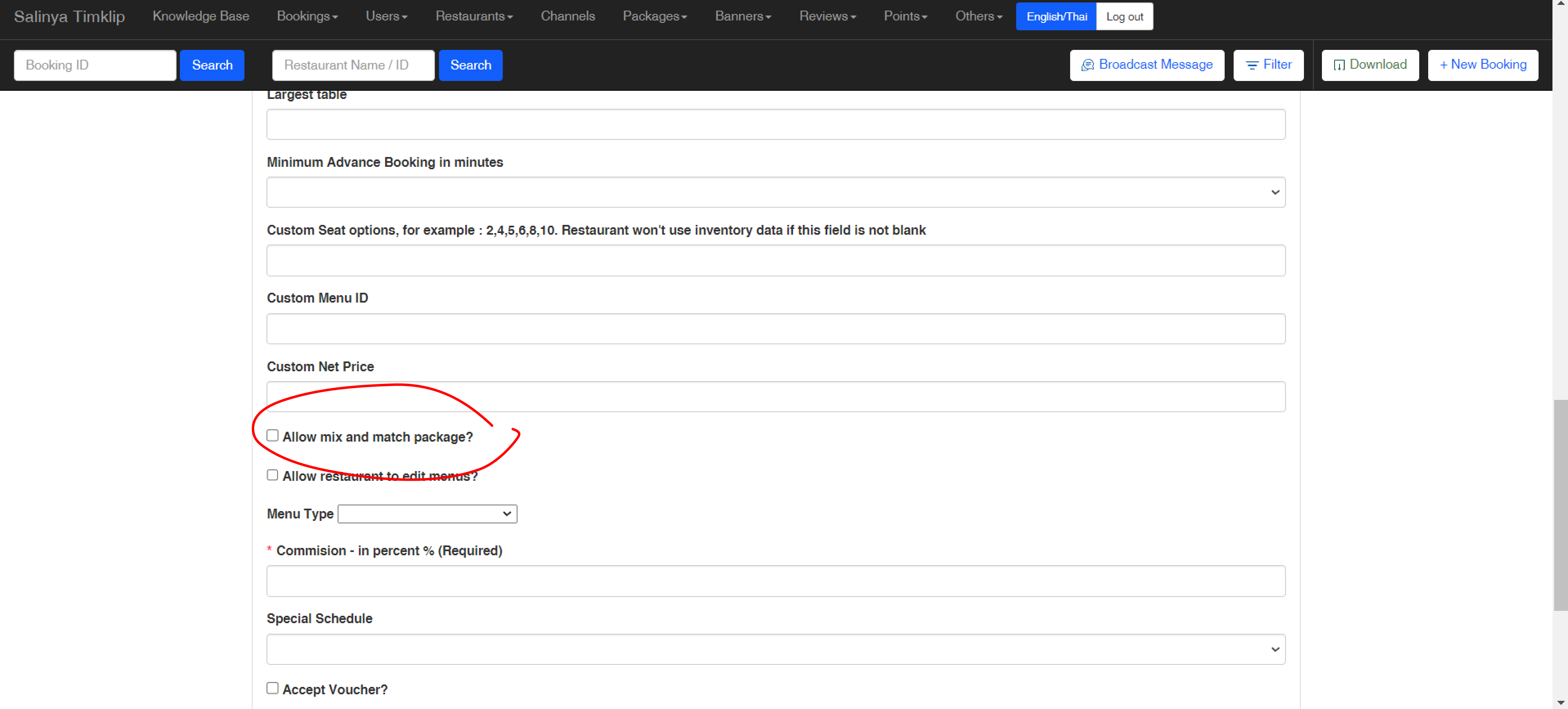
- Admin can allow mix and match package on their restaurant settings
- The system will use the highest kids price, if user add kids on their booking
- The system will use the adult price if both package don’t have kids price and user add kids on their booking
How to set mix and match package
- Open Admin Dashboard
- Open Restaurant ➝ Restaurant List
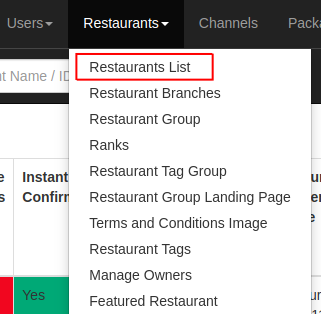
- Pick Restaurant ➝ Click Packages
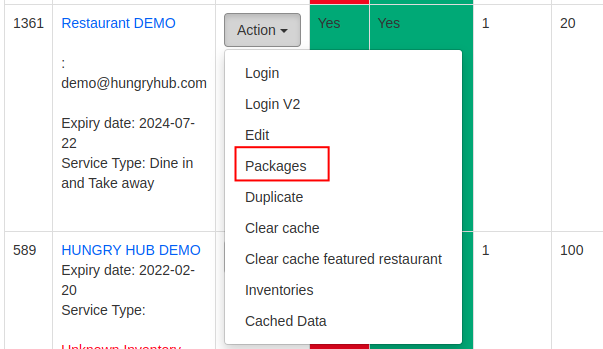
- Pick the package ➝ Click Edit button

- Find Allow mix and match package checkbox

- Click the checkbox and save
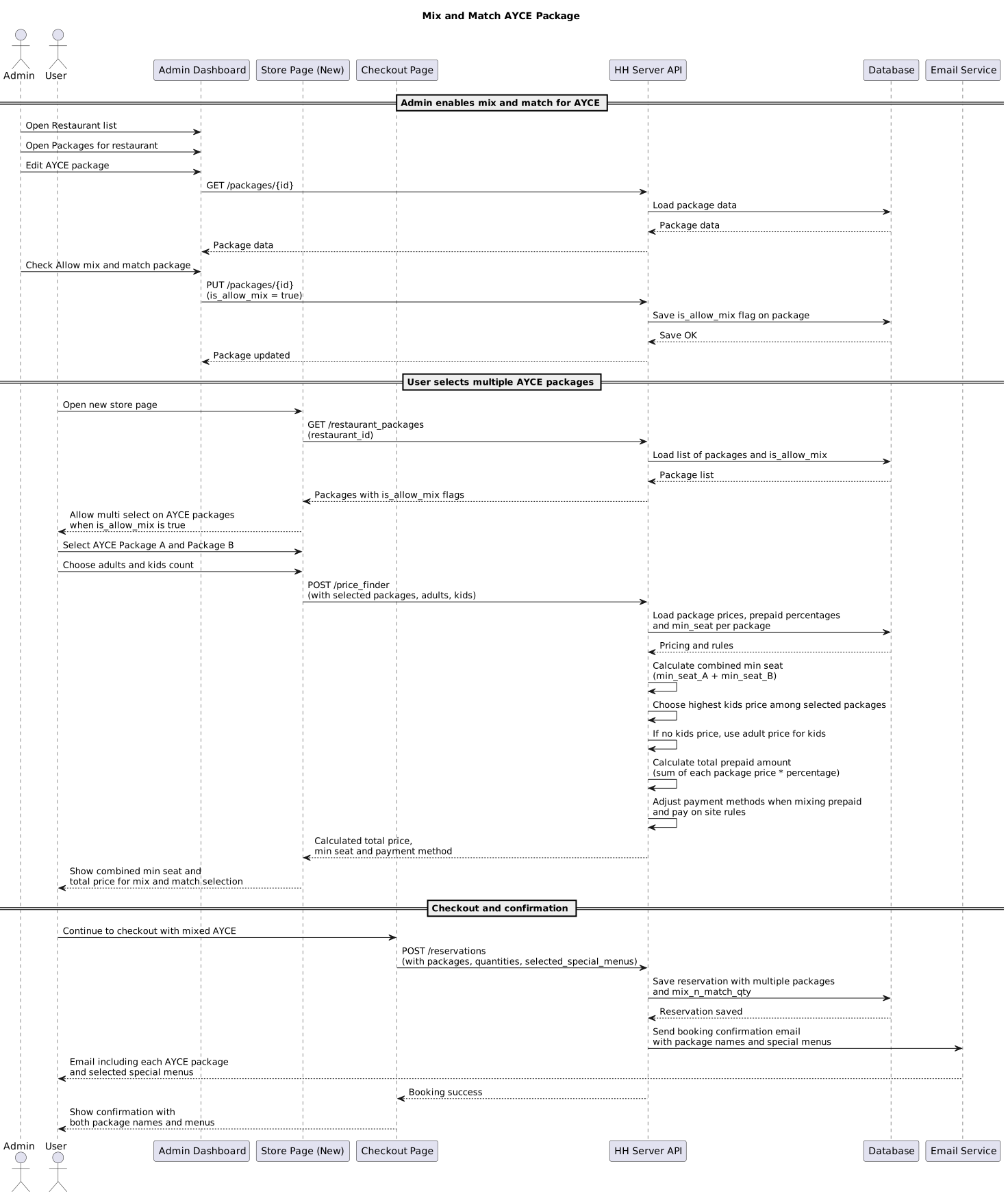
Sequence Diagram / Flow
ERD
-
Backend Implementation
- Add checkbox on package setting to turn on and off the feature from the package

- Add
is_allow_mixparams to API (restaurant package)"is_allow_mix": true - Update
selected_special_menusdata on reservation response for booking confirmation."packages": [ { "name": "Standard Menu (Monday - Thursday)", "quantity": 1, "id": 146, .... "selected_special_menus": [ { "id": 3292, "name": "Bakso Urat", "quantity": 1 }, { "id": 3292, "name": "Bakso Telur", "quantity": 1 } ] } - Change the AYCE package information on booking confirmation mail.
- Change the AYCE package party size information to use package quantity on ayce user mailer template
- Add logic to check how many package when counting the final reservation price
- Add
mix_n_match_qtyto hh_package model concern to calculate the quantity of the mix and match package - Add
allow_mix_ayce?to hh_package model concern to check if the package used mix and match - Add validation
reduced_with_promo?on reservation model, to check if the restaurant package was using come more payless - Add condition when the package was mix and match, and the pricing was dynamic and if they were come more payless package on
price_finderlib - Add come more payless section on booking confirmation email
- Add allow mix and match attribute on partner API
https://github.com/hungryhub-team/hh-server/pull/5481/files
https://github.com/hungryhub-team/hh-server/pull/5615
https://github.com/hungryhub-team/hh-server/pull/5994
https://github.com/hungryhub-team/hh-server/pull/5589
https://github.com/hungryhub-team/hh-nuxt/pull/1029
https://github.com/hungryhub-team/hh-server/pull/5606
https://github.com/hungryhub-team/hh-server/pull/5995
Frontend Implementation
- Add Select Multiple Ayce on Booking Process
If the ayce package
is_allow_mixvalue is true, make package selection multiple. The logic will be similar like party pack or experience package. Please make sure the quantity not hard-coded as 1 item. - Adjust Special Menu Section on Checkout UserAdjust the data if package have special menu will show selected special menu on checkout page. There’s no payload changes on doSetupData since it already have special menu on each package data.
- Adjust Special Menu Selection Page Right now we can select multiple selection menu on each package.
- Update Payload on Checkout Flow
Change the special menu param location from this:
to this:{ "minor_version": "3", "access_token": "{access_token}", "provider": "hungryhub", "source": "hh_android", "reservation": { // .... "selected_special_menus": [ { "id": 3292, "quantity": 1 }, { "id": 3292, "quantity": 1 } ] // .... }"packages": [ { "id": "1459", "quantity": 1, "menu_sections": [], "selected_special_menus": [ { "id": 3292, "name": "Bakso Urat", "quantity": 1 } ] }, { "id": "1459", "quantity": 1, "menu_sections": [], "selected_special_menus": [ { "id": 3292, "name": "Bakso Telur", "quantity": 1 } ] } ], - Adjust Selected Special Menu on Booking Confirmation Update UI selected special menu on booking confirmation.
https://github.com/hungryhub-team/hh-nuxt/pull/1029
partner portal:
https://github.com/hungryhub-team/book-bite/pull/634/files
Design
https://www.figma.com/file/MCt5YX8oPWdZLdun8QGv9o/Mix-n’-Match-(All-You-Can-Eat)?type=design&node-id=0-1&mode=design&t=stFklOaLTalaC60I-0 https://www.figma.com/design/MCt5YX8oPWdZLdun8QGv9o/Mix-n’-Match-(All-You-Can-Eat)?node-id=0-1&t=yB4EUqm0QBXJNnRq-0 https://www.figma.com/design/ymdLN2ZKzfI0oyX4kps2GQ/Partner-Portal-Desktop?node-id=14031-30498&t=fOeF2lSxvq20Fjn0-1
PRD & Task
https://app.clickup.com/9003122396/docs/8ca1fpw-7922/8ca1fpw-35496 https://app.clickup.com/9003122396/docs/8ca1fpw-7922/8ca1fpw-38776 Mix and match phase 3 didn’t have PRD
Done: https://app.clickup.com/t/86cutwbnc https://app.clickup.com/t/86cuzmkg9 Inprogress: https://app.clickup.com/t/86cvg1bq1 https://app.clickup.com/t/86cvg1bq1
API Blueprint
| Method | Path | URL | Description | Response |
|---|---|---|---|---|
| all | all restaurant package | add allow mix params | https://app.clickup.com/9003122396/v/dc/8ca1fpw-32076 |
New Query / Logic
There are 2 packages, All of them don’t have kids price
Package A ➝ adult 2000
Package B ➝ adult 1500

2 adults, 2 kids

Use highest price
Package A = 1 adult + 2 kids = 2000 + (2*2000) = 6000
Package B = 1 adult = 1500
total 7500
There are 2 packages, Only one package has kids price
Package A ➝ adult 2000
Package B ➝ adult 1500, kids 500 , 400 , 300

2 adults, 2 kids

Use highest kids price
Package A = 1 adult = 2000
Package B = 1 adult + 2 kids = 1500 + (2*500) = 2500
total 4500
There are 2 packages, All of the packages have kids price
Package A ➝ adult 2000, kids 1000
Package B ➝ adult 1500, kids 500, 400, 300

Use highest kids price
Package A = 1 adult + 2 kids = 2000 + (2*1000) = 4000
Package B = 1 adult = 1500
total 5500
There are 5 packages, Only 2 packages has kids price
Package A ➝ adult 2000, kids 1000
Package B ➝ adult 1500, kids 500 , 400 , 300
Package C ➝ adult 2100
Package D ➝ adult 1000
Package E ➝ adult 2500

Use highest kids price
Package A = 1 adult + 2 kids = 2000 + (2*1000) = 4000
Package B = 1 adult = 1500
Package C = 1 adult = 2100
Package D = 1 adult = 1000
Package E = 1 adult = 2500
Total 11.100
DB Schema / Database Migration
- Add reference on reservation special menus to restaurant package
- Set default allow mix and match ayce to false
- Run data migration to update all AYCE package
allow_mixto false
Improvement:
| NO | Date Time | What Changed | Description |
|---|---|---|---|
Response get restaurant package
{
	"data": {
		"id": "4095",
		"type": "restaurant-packages",
		"attributes": {
			"menu_link": "https://hh-engineering.my.id/en/restaurant_packages/4095/menu.html?updated_at=hh_package%2Frestaurant_packages%2F4095-20241023190046000000",
			"menus": {
				"type": "image",
				"data": {
					"img": []
				}
			},
			"slug": "1569-AY-6199818",
			"rank": null,
			"rank_in_restaurant_scope": 0,
			"start_date": "2022-12-01",
			"end_date": "2024-11-17",
			"require_cc": true,
			"charge_type": "on_charge",
			"skip_time_selection": null,
			"featured": null,
			"package_cover_url": "",
			"hh_menu_v2_html_preview_link": "",
			"hh_menu_package_id": "",
			"dynamic_pricing": {
				"mode": "per_pack",
				"type": "by_day",
				"rules": [
					{
						"title": "vrfer",
						"price": "฿45,550",
						"min_seat": "",
						"max_seat": "",
						"category_name": "custom_day",
						"days": [
							"Sunday"],
						"duration": 120,
						"kids_price": "",
						"start_date": null,
						"end_date": null,
						"dynamic_pricing_type": "by_day",
						"price_cents": 4555000,
						"kids_price_cents": 0,
						"price_currency": "THB",
						"id": 3101,
						"per_pack": 5
					}
				],
				"kids_price_policy": "<div>rgwrw</div>",
				"come_more_pay_less_rules": {}
			},
			"rules": [
				{
					"price_description": "45550.00 per 5 adults",
					"price": "฿45,550",
					"min_seat": 0,
					"max_seat": 0,
					"per_pack": 5,
					"duration": 120,
					"kids_price_rate": 0,
					"id": 3101
				}
			],
			"available_methods": "",
			"pay_now": false,
			"custom_net_price": "",
			"menu_display_type": "courses",
			"no_of_courses": null,
			"default_start_time": "",
			"max_package_quantity": 1000000,
			"charge_policy": "",
			"charge_policy_link": "",
			"menu_quantity_limit": 100000,
			"original_price": {
				"price": 208,
				"currency": "THB",
				"format": "฿208"
			},
			"hide_menu_price": false,
			"is_add_on": false,
			"earn_point": true,
			"custom_label": {
				"name": "",
				"icon_url": "",
				"description": "",
				"type": ""
			},
			"custom_labels": [],
			"menu_sections": [],
			"for_dine_in": true,
			"has_custom_delivery_fee": false,
			"take_away_property": {
				"delivery_fee_in_baht": 0,
				"delivery_fee_currency": "THB",
				"delivery_fee_per_km_in_baht": 10,
				"free_delivery_fee_threshold_in_baht": 0,
				"delivery_radius": 5
			},
			"accepted_cards": [
				"debit",
				"credit"
			],
			"menu_type": "img",
			"name": "Premium AYCE Lunch SGD",
			"description": "Premium AYCE Lunch",
			"last_booking_was_made": null,
			"type_code": "ayce",
			"type_name": "All You Can Eat",
			"package_info": {
				"min_pax": 1,
				"max_pax": 1000000,
				"time_limit": "2 hours",
				"tnc_link": "https://hh-engineering.my.id/uploads/restaurants/tc/image/34/tc.png",
				"per_pack": 5,
				"kids_price_rate": 0
			},
			"image_cover_url": {},
			"restaurant_cuisine": "Noodle",
			"restaurant_location": null,
			"restaurant_name": "Cafe Claire Internal EN asdasdasd",
			"is_visible_for_staff": false,
			"opening_hours": [],
			"is_accept_many_quantity": true,
			"comemore_payless": false,
			"pricing_groups": {},
			"enable_special_menu": false,
			"special_menu_limit": 0,
			"special_menus": [],
			"pricing_type_sym": "per_pack",
			"pricing_type": "NET price per pack",
			"time_slots": {},
			"pricing_mode": "multiple",
			"is_accept_voucher": true,
			"largest_table": 16,
			"custom_seats": [],
			"accept_we_travel_together": false,
			"is_allow_mix": false,
			"restaurant_package_voucher_detail": "",
			"restaurant_package_voucher_tnc": "",
			"payment_types": [
				"promptpay",
				"credit_card"
			],
			"kids_price_v2": [],
			"use_kids_price": false,
			"package_group": {},
			"minutes_in_advance": 60
		},
		"relationships": {
			"restaurant": {
				"data": {
					"id": "837",
					"type": "restaurants"
				}
			}
		}
	},
	"success": true,
	"message": null
}