Edit Booking App
Description / Background
Booking typically requires customers to provide a lot of mandatory information, which often leads to user errors. On average, we receive about 100 inquiries from customers requesting help from customer support (CS) to edit their bookings. Common issues include customers attempting to book on fully booked days and being unaware of how to edit their bookings on the platform. This indicates that the current booking editing feature does not meet customer needs, preventing them from completing edits independently.
Glossary
Editing package mechanism
- In case No.1, if the user wants to change their package from All You Can Eat (for 2 PAX) to Party Pack (for 1-3 PAX), the system will change PAX to the minimum of their package automatically.
- In case No.2, if the original booking’s user with PAX does not exceed the minimum of the new package that the user wants to change, the system will stay the same number of original booking.
- In case No.3, If the number of people is already in the minimum of the package, the decrease button will be hidden or cannot press it. Users will not be able to reduce the number of packages less than that.
- In case No.4, If the user wants to increase the number of packages, the decrease button will be back from hiding.
Objectives
- If customers have made any type of prepayment, including deposits, they cannot change the package type. However, users can still modify the package, date, time, number of people (PAX), special requests, and occasion
- if the customer wants to change the booking package that has already been pre-paid. Customers can only change if this package is more expensive than the original package. The customer has the right to modify the package within 15 minutes after booking.
- if customers pay on site, they can edit the Package's Type, Package, Date, Time, PAX, Special request and occasion.
Location
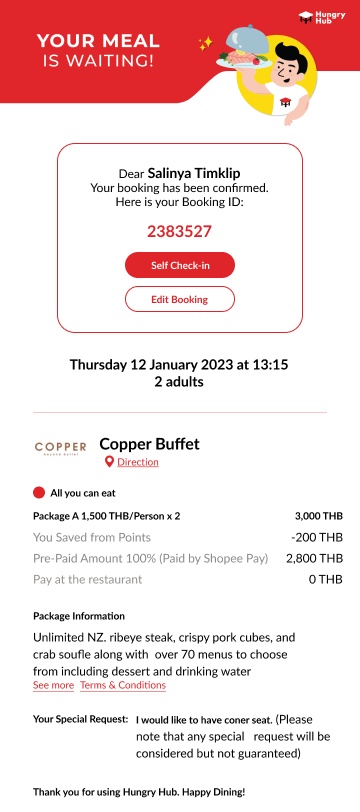
Click Edit booking button from this page:
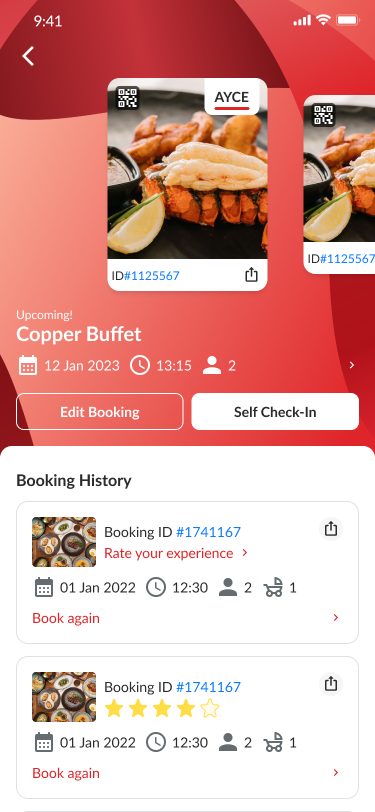
.png)
Sequence Diagram / Flow
Booking modification with package
The following diagram illustrates the process when a user increases the total number of adults, changes the date or start time, or changes the package to a different one.
sequenceDiagram
	  actor User
    participant HH System
    actor HH Admin
		actor Restaurant Staff

    User->>+ HH System: Can I change the adult, date, start time, or package
    HH System->>HH System: Checking available seat
    alt inventory is available
				HH System->>HH System: Create a duplicate of the old booking, but have a new adult data
        HH System->>User: Send new Booking ID and send notification
				par send notification
					HH System->>HH Admin: Send notification
					HH System->>Restaurant Staff: Send notification
				end
    else inventory is not available
        HH System->>-User: Say that the inventory is not available
    end
Following is a diagram when user decrease the adult or kids
sequenceDiagram
	  actor User
    participant HH System
    actor HH Admin
		actor Restaurant Staff

    User->>+ HH System: Can I decrease the total adult or kids?
    HH System->>HH System: Create a duplicate of the old booking, but have a new adult data
		par Send notification
			HH System->>HH Admin: Send notification
			HH System->>Restaurant Staff: Send notification
		end
    HH System->>-User: Send new Booking ID and send notification
Booking modification without package
the logic is similar, the difference is, HH System doesn’t check package agenda availability
ERD
Backend Implementation
[
github.com
https://github.com/hungryhub-team/hh-server/pull/5267/files
](https://github.com/hungryhub-team/hh-server/pull/5267/files)
- Create new End point to modify booking by guest or by member
- Add new Column modify_with_prepaid to Reservations model
- Add new worker to check if this is modified booking and has remain charge(payment failed) then we need to activate the old reservation
( app/workers/workers/reservations/cancel_later_worker.rb app/services/reservation_service/cancel_modify.rb )
- Refactor these class:
- app/my_lib/receptionist/credit_card_checker.rb
- app/services/create_promptpay_service.rb
- Add new lib to save the logic of modify booking by user app/my_lib/agents/modify_booking_for_user.rb
Code
Old code for edit booking on app/my_lib/agents/modify_booking_for_user.rb
Code for handling booking with package modification app/my_lib/package_booking/users/update.rb.
Check lib/reservations/check_seat_increased.rb or *_decreased.rb to understand the inventory for edit booking.
Frontend Implementation
Hybrid
On the beginning after onMounted we'll send reservation_id, encrypted_id, and access_token like booking confirmation page. App Event: doSetupData Member:
{
	"access_token": "q4lJKX6o7hbTkpBVjtNg9JApnBz8YaVWI2cyscvMYKc",
	"reservation_id": "123456789"
}
Guest:
{
	"encrypted_id": "gbqRB"
}
Web Event: onBackClicked
Trigger when click back button or cancel in Toolbar

Reservation Data
After get reservation id or encrypted_id can use this API to load content: Member: {{ base_api }}/reservations/{reservation_id}.json Payload:
{
	"access_token": "access_token",
	"provider": "hungryhub"
}
Guest: {{ base_api }}/reservations/{encrypted_id}/detail.json
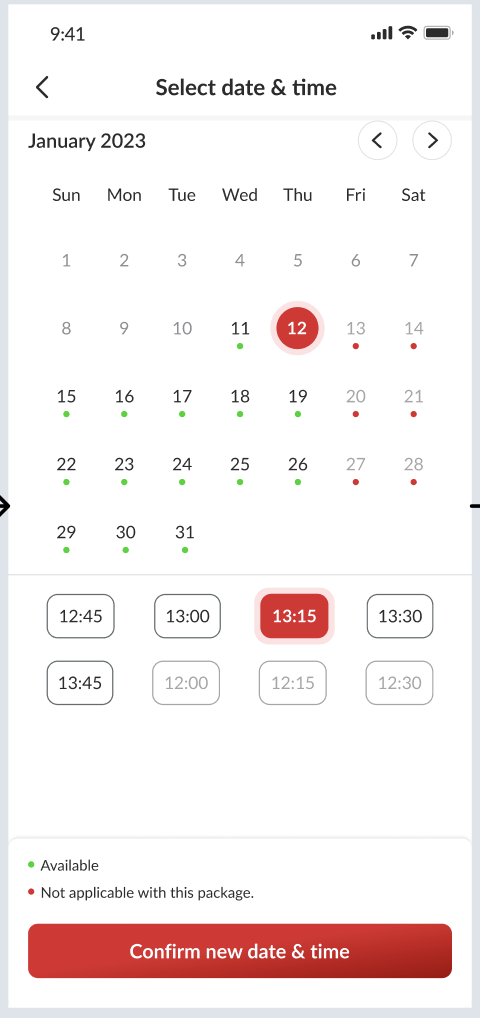
Available Date
To get the available date we can use this API: {{ base_api }}/restaurants/{restaurant_id}/available_dates_based_on_packages.json Payload:
{
	"adult": 2, // from selected adult
	"end_date": "2023-12-30",
	"for_delivery": false,
	"is_dine_in": true,
	"kids": 1,
	"minor_version": "4", // to get availability value
	"restaurant_package_ids": [1459], // from selected package
	"start_date": "2023-12-20"
}
Available Time
To get available time we can use this API: {{ base_api }}/restaurants/{restaurant_id}/available_start_times_based_on_packages.json Payload:
{
	"minor_version": "4",
	"date": "2023-12-07", // from selected date
	"adult": 1,
	"kids": 0,
	"minor_version": 4,
	"restaurant_package_ids": [2850],
	"is_order_now": false
}
Occasion Data
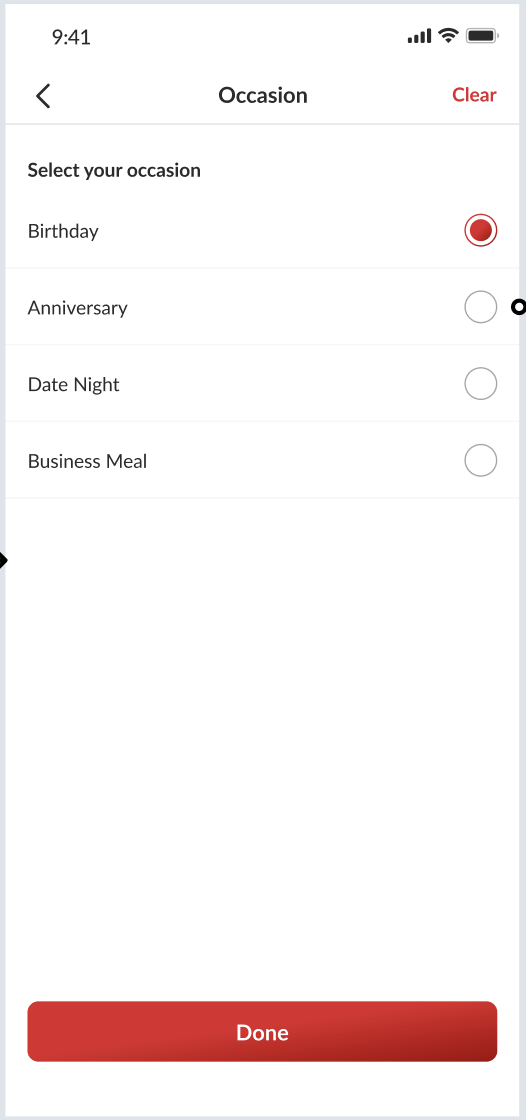
For occasion data we can use this API:
{{ base_api }}/dining_occasions.json
Save Modified Booking
API: {{ base_api }}/reservations/modify.json Method: PUT Payload:
{
	"encrypted_id": "a18nda", // for guest
	"access_token": "pum1NC8yulCuDFt5bipmx8vrbuxE5mfSULvuQWX2j", // for member
	"source": "website",
	"provider": "hungryhub",
	"reservation_id": "564726",
	"reservation": {
		"adult": 2,
		"kids": 0,
		"restaurant_id": "1124",
		"date": "2023-12-31",
		"start_time": "18:00",
	    "special_request": "smoking room",
	    "dining_occasion_id": "12"
	},
	"packages": [
		{
			"id": "1459",
			"quantity": 1
		}
	]
}
Validate the available date and time for that package if not available don't make it successful
After successful update trigger this event: Event Name: onModifySuccess
{
	"payment_type": "promptpay/credit_card", // leaves empty if no prepayment
	"encrypted_id": "q4lJK",
	"reservation_id": "123456789"
}
Affected Features
For booking confirmation we have this event to modify booking: Event Name: onModifyBookingClicked Payload:
{
	"modify_url": "https://hungryhub.com/reservations/my-reservation/GY0j6.html"
}
We need to update payload like this:
{
	"modify_url": "https://hungryhub.com/reservations/my-reservation/GY0j6.html",
	"encrypted_id": "q4lJK",
	"reservation_id": "123456789"
}
We keep the modify_url to make it still work in our existing confirmation booking
PRD & Task
Private (https://app.clickup.com/t/860qy1hah)
[
docs.google.com
https://docs.google.com/document/d/1z85hZQnD3KUbNqLKAZmz_l3XZuFSoLgbMn5L5pHxS8c/edit
](https://docs.google.com/document/d/1z85hZQnD3KUbNqLKAZmz_l3XZuFSoLgbMn5L5pHxS8c/edit)
Private (https://app.clickup.com/t/86cwdn90v) Private (https://app.clickup.com/t/86cwdn90v)
Design
API Blueprint
API: {{ base_api }}/reservations/modify.json Method: PUT Payload:
{
	"encrypted_id": "a18nda", // for guest
	"access_token": "pum1NC8yulCuDFt5bipmx8vrbuxE5mfSULvuQWX2j", // for member
	"source": "website",
	"provider": "hungryhub",
	"reservation_id": "564726",
	"reservation": {
		"adult": 2,
		"kids": 0,
		"restaurant_id": "1124",
		"date": "2023-12-31",
		"start_time": "18:00",
  	    "special_request": "smoking room",
  	    "dining_occasion_id": "12"
	},
	"packages": [
		{
			"id": "1459",
			"quantity": 1
		}
	]
}
Validate the available date and time for that package if not available don't make it successful