Dynamic Pricing
Description / Background
Restaurant wants to set multiple pricing for each day, they want to have weekday prices, weekend prices and holiday prices. They want to fully customize the price for each day.
Glossary
Private (https://app.clickup.com/9003122396/docs/8ca1fpw-35796/8ca1fpw-41516)
Objectives
- User can find dynamic pricing on store page
- User can see pricing option on package details
- User can see detail pricing for Public Holiday / special day
- User can scroll detail pricing for public holiday / special day if its more than 3 days
- User can see minimum 2 types of pricing options
- User can only see current and future pricing option
- User can see the detail pricing by hovering
- User can see the pricing name (custom from inputing on admin dashboard)
- User can see separate holiday price
If the package have 3 holiday, valentine, new year, and christmas. It will show as 3 different section card on user side.
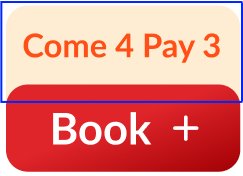
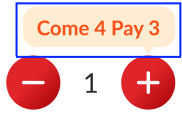
- User can see the promotion badge on top of Book + button on store page

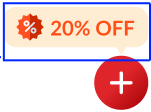
- User can see the promotion badge on the restaurant card on homepage
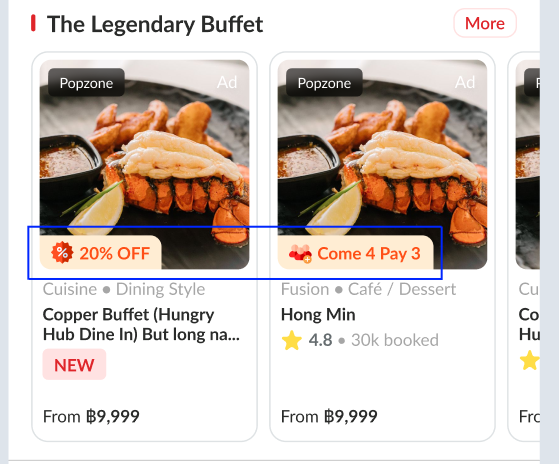
- User can see the promotion badge on the restaurant card on search page
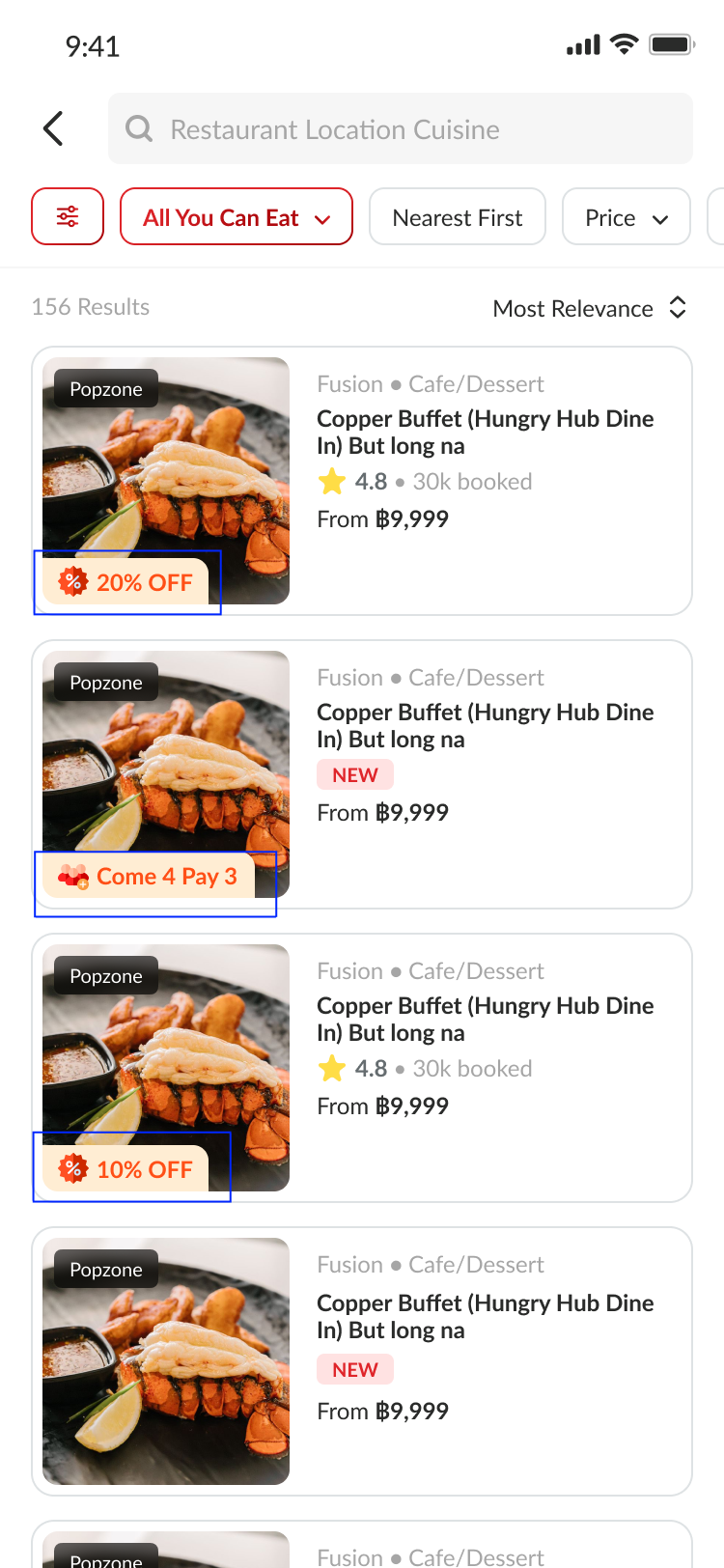
- User can see the promotion badge on the restaurant card on group landing page
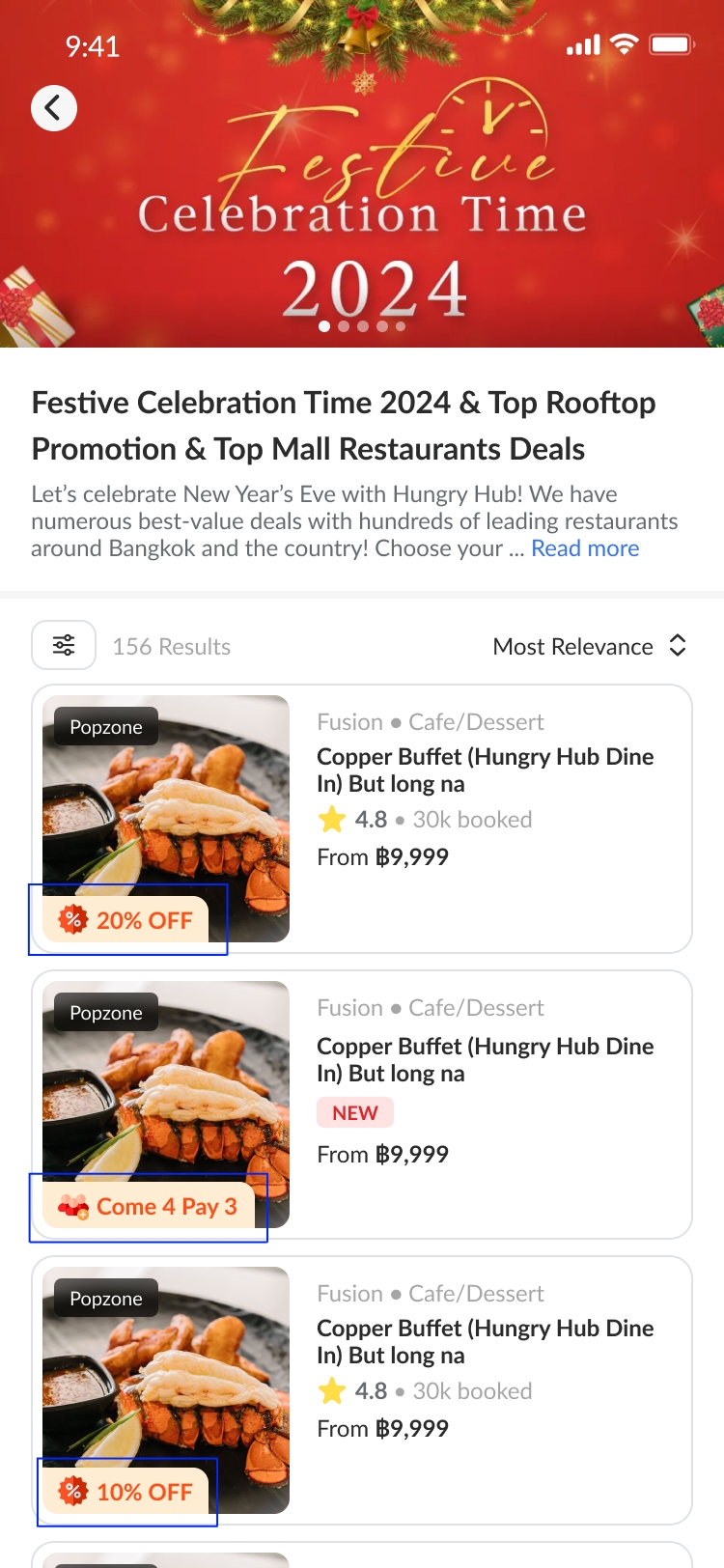
- User can see the promotion badge (%) on the pricing on package detail page
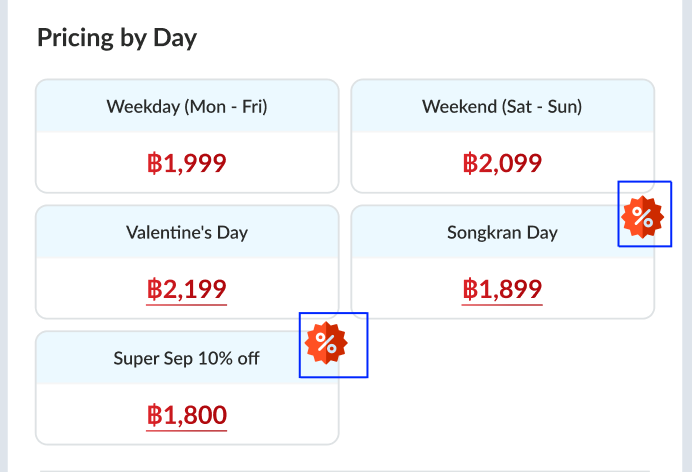
- There are 5 category of pricing option :
- Weekday (Mon - Fri)
- Weekend (Sat - Sun)
- Everyday
- Custom
- Holidays / Special Day
- Admin can add pricing option on each package
- Admin can add multiple pricing option
- Admin can see 3 pricing type:
- Normal price (only have 1 price)
- price by party size (have multiple price based on party size)
- price by day (custom price for each day)
- Admin can see 4 default custom day option:
- Weekday (Mon - Fri)
- Weekend (Sat - Sun)
- Everyday
- Custom (Admin can pick which day)
- There are 2 section of Price by day:
- Custom Day (required)
- Holidays / SpecialDay
- Admin can add title on custom day
- Admin can see the public holiday / special day section
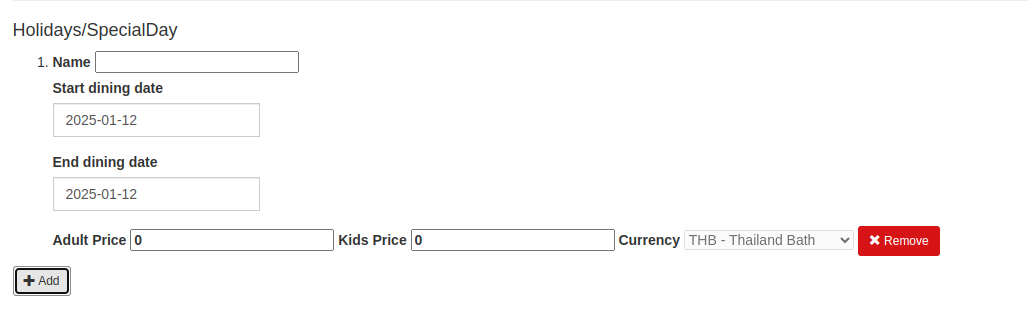
- Admin can setting specific start and end dining date on public holidays/special day section
- Admin can add the holiday title (TH, CN and EN) on public holidays/special day section
- Admin can set name for Price by day
- Admin and Owner will be able to see the price per person after selecting the date, time and number of people when creating the booking.
- Admin and Owner will be able to see the price per person after selecting the date, time and number of people when editing the booking.
- Admin can set the promotion badge on edit package:
- for dynamic pricing promotion
- Open Edit Package
- Go to price section
- Pick price type Price by Day
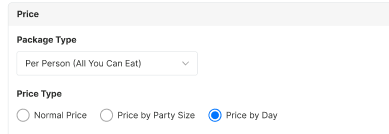
- Go to Public Holidays /Special Days section

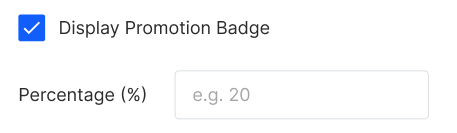
- Checked the Display Promotion Badge
- Insert the percentage number
- for come more pay less promotion
- Open Edit Package
- Go to promotion section
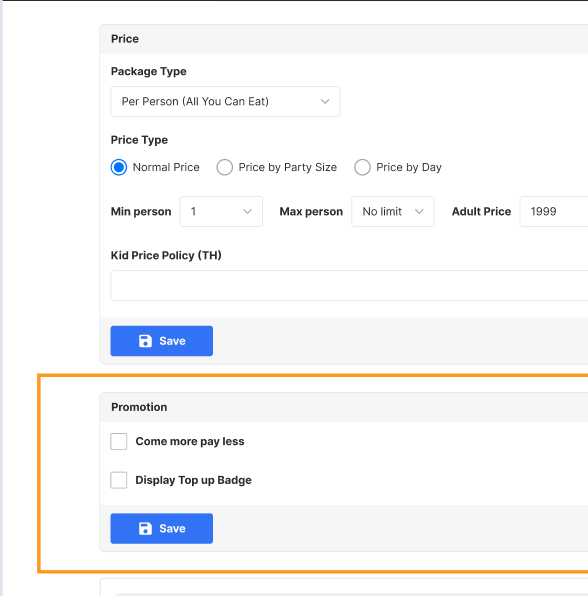
- Checked the Come more pay less
- for top up badge
- Open Edit Package
- Go to promotion section
- Checked the Display Top Up Badge
- for dynamic pricing promotion
- The system will show the highest promotion percentage
- The Top Up Badge can be used for :
- Normal Price
- Price by Party Size
- Price by Day
- Price by Day → Public holidays / Special days
- If there are Top up, special day and come more pay less , should use one of the highest percentage between them
- The Come more pay less can be used for:
- Normal Price
- Price by Party Size
- Price by Day → Public holidays / Special days
- If there are discount promotion and come more pay less , should use one of the highest percentage between them
- The System will transform the come more pay less into percentage to choose which bagde will shows:
100% - ((Group size to pay / group size) *100%)
Come 4 pay 3 → 25% off
Come 5 pay 4 → 20% off
Scope
Old Store Page, New Store Page, Admin For All platform
Location
Detail Package
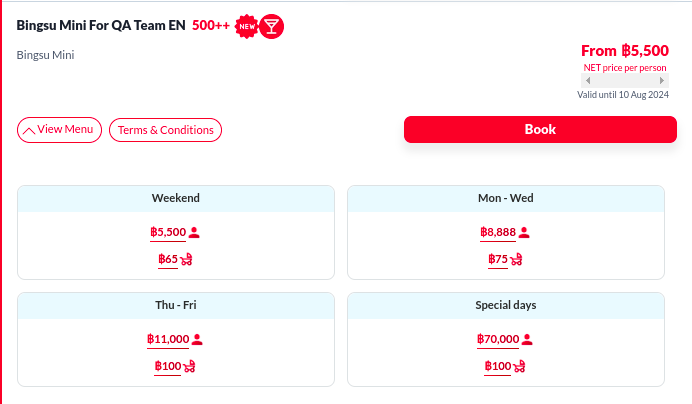
How to find Dynamic Pricing
- Open Store Page
- Pick the package that you want to book
- Click "View Menu" button
- You can find the Dynamic pricing there
How to set Dynamic Pricing
Private (https://app.clickup.com/9003122396/docs/8ca1fpw-34056/8ca1fpw-39296)
From Restaurant Page
- Open https://hungryhub.com/admin/restaurants?locale=en
- Pick restaurant
- Click Action ➝ Packages
- Pick the package ➝ click edit
- Change the pricing option and set the pricing
- Save
From Package Page
- Open https://hungryhub.com/admin?locale=en
- Open menu Packages
- Pick the package types (AYCE, PP, XP)
- Pick the package ➝ click edit
- Change the pricing option and set the pricing
- Save
For Vendor
- Open https://hungryhub.com/admin?locale=en
- Open menu Channel
- Pick vendor channel ➝ click Edit
- Check Support dynamic pricing to enable dynamic pricing in the channel

- Click Update Channel
- Now you can find the dynamic pricing response on the API
Sequence Diagram / Flow
-
ERD
-
PRD
Private (https://app.clickup.com/9003122396/docs/8ca1fpw-7922/8ca1fpw-36596) Private (https://app.clickup.com/9003122396/docs/8ca1fpw-7922/8ca1fpw-36576) Private (https://app.clickup.com/9003122396/docs/8ca1fpw-11562/8ca1fpw-36616)
Private (https://app.clickup.com/t/86cuyeq08) Private (https://app.clickup.com/t/86cvmtnec) Private (https://app.clickup.com/t/86cw7tme2) Private (https://app.clickup.com/t/86cwm3wkw) Private (https://app.clickup.com/t/86cwavp3m) Private (https://app.clickup.com/t/86cx3baf1)
Backend Implementation
- Remove
app/concepts/booking_cpt/cell/landing_page.rb - Remove
include PackagePricingValidationConcern - Add pricing validation on
app/controllers/admin/packages/base_controller.rb - Add model concern
DynamicPricingsForPackage - Change code
[package.pricing].flatten.compacttopackage.dynamic_pricings - Replace
.pricing_typeto.dynamic_price_pricing_model - replace
.pricing_modelto.dynamic_price_dynamic_pricing_type - create api to send dynamic pricing to partner portal
- call the api when owner picking the package name on create booking or edit booking, based on the date, time, adult and kids they picked. It will show the price on the package list before the package name

- Added and modified several sections to support displaying and interacting with promotion badges.
- Introduced
promotionBadgeDisplayandpromotionBadgePercentagefields within form components and their related logic. - Added validation and error handling for the new fields.
- Added a method to fetch the highest promotion badge from a list of restaurants.
- Included
promotion_badge_textin the list of keys for dynamic pricing JSON representation. - Added
promotion_badge_textto the pricing JSON representation. - Added methods to handle promotion badge logic, including determining the type and text of the promotion.
- Added private methods for formatting and updating related fields.
- Added a new field,
promotion_badge_percentage. - Added a new field,
promotion_badge_percentage. - Added attributes to serialize promotion badge information.
- Included promotion badge in the restaurant payload.
- Added a new worker to handle expired promotion badge dynamic prices.
- A new worker to process expired promotion badges.
- Added methods to determine the highest promotion badge for a restaurant.
- Added methods to calculate and format promotion badge percentages and texts.
github.com https://github.com/hungryhub-team/hh-server/pull/5548/files
github.com https://github.com/hungryhub-team/book-bite/pull/647/files
github.com https://github.com/hungryhub-team/hh-server/pull/6420
Frontend Implementation
- Use
min_seatandmax_seatfrom package level if the pricing setting was by_day - If type
normalno need to show multiple pricing. - package title will generated by min_seat and max_seat. If min_seat and max_seat numbering will be show like this: "{min_seat} - {max_seat} People" but if max_seat value
Infinitywill be "{min_seat} and more"
	"min_seat": "1",
    "max_seat": "Infinity",
- Added a new field
promotionBadgeto the GraphQL queries, which includespromotionTypeandpromotionText. - New icon files added.
- Introduced a new Vue component
PromotionBadgefor displaying promotional badges. - Integrated the new
PromotionBadgecomponent into various restaurant and favorite card components. - Adjusted layout and styles to accommodate the new
PromotionBadge. - Added support for
promotionBadgein package-related components. - Enhanced dynamic pricing and package card components to display promotional information.
- Updated restaurant models and mappers to include
promotionBadgedata. - Updated relevant store and type definitions to include
promotionBadge. - Integrated
PromotionBadgeinto various partial and section components.
github.com https://github.com/hungryhub-team/hh-pegasus/pull/478/files
github.com https://github.com/hungryhub-team/hh-pegasus/pull/552
github.com https://github.com/hungryhub-team/hh-pegasus/pull/1530
Design
Dynamic Pricing Created with Figma
Show exact price on package name Created with Figma
API Blueprint
Top-Level Attributes
mode: A string indicate pricing model. Possible value areper_pack,per_person,per_set.type: A string indicating the pricing type. Possible values are"normal","by_party_size", and"by_day".rules: An array of objects, each representing a specific pricing rule according to thetype.kids_price_policy: A string describing the pricing policy for children.come_more_pay_less_rules: A string describing the come more payless policy.
Attributes within rules
title: A string describing the dynamic pricing titlepricemin_seatmax_seatcategory_name: A string describing the dynamic pricing category name (custom_day or not)days: An array of objects, each representing a specific days of the priceduration: not usedkids_pricestart_dateend_datedynamic_pricing_type: A string describing the dynamic pricing pricing type (normal, by_party_size, by_day)price_cents: A string indicating the price of the product in cents.kids_price_cents: A string indicating the kids price of the product in centsprice_currency: The currency of the pricingid: Dynamic pricing rules id
Common Attributes for All Types
title: A string describing the rule. This is only populated if thetypeis"by_day".price: A string indicating the price of the product. The currency symbol is included.kids_price: A string indicating the price for children. The currency symbol is included.start_date: A string ornilvalue representing the start date for the pricing rule, formatted as"YYYY-MM-DD". This is only populated if thetypeis"by_day"and there is a specific date range for the rule.end_date: A string ornilvalue representing the end date for the pricing rule, formatted as"YYYY-MM-DD". This is only populated if thetypeis"by_day"and there is a specific date range for the rule.
Attributes for "normal" and "by_party_size" Types
min_seat: A string indicating the minimum number of seats required to qualify for the price. For"normal"type, this is typically the string"2", and for"by_party_size"type, it varies based on the tier.max_seat: A string indicating the maximum number of seats that qualify for the price. This can be a number or the string"Infinity".
Attributes for "by_day" Type
category_name: A string indicating the category of the day, such as"weekday","weekend", or"holiday".days: An array of integers representing the days of the week to which the pricing rule applies. Sunday is represented by0, Monday by1, and so on up to Saturday represented by6.
Notes
- The
title,min_seat,max_seat, andcategory_nameattributes are only relevant for the"by_day"pricing type and will be empty strings for other types. - The
daysattribute is an empty array for the"normal"and"by_party_size"pricing types, as these do not depend on specific days of the week. - The
start_dateandend_dateattributes are used to define specific date ranges for special pricing rules and arenilwhen not applicable. - The
kids_price_policyprovides a human-readable description of the pricing rules for children, which may vary depending on the pricing type and rules defined.
| Method | Path | URL | Description | Response | Payload |
|---|---|---|---|---|---|
| all | all package api | Add dynamic_pricing response normal per_person | { "dynamic_pricing": { "mode": "per_person", "type": "normal", "rules": [ { "title": "normal", "price": "฿1,190", "min_seat": "1", "max_seat": "Infinity", "category_name": "", "days": [], "duration": 120, "kids_price": "฿590", "start_date": "", "end_date": "", "dynamic_pricing_type": "normal", "price_cents": 2000000, "kids_price_cents": 0, "price_currency": "THB", "id": 2447 } ], "kids_price_policy": "", "come_more_pay_less_rules": {} } } | ||
| all | all package api | Add dynamic_pricing response per_person and per_party_size | { "dynamic_pricing": { "mode": "per_person", "type": "by_party_size", "rules": [ { "title": "null", "price": "฿1,190", "min_seat": "1", "max_seat": "5", "category_name": "", "days": [], "duration": 120, "kids_price": "฿590", "start_date": "", "end_date": "", "dynamic_pricing_type": "by_party_size", "price_cents": 2000000, "kids_price_cents": 0, "price_currency": "THB", "id": 2447 } ], "kids_price_policy": "", "come_more_pay_less_rules": {} } } | ||
| all | all package api | Add dynamic_pricing response per_person and per_day | { "dynamic_pricing": { "mode": "per_person", "type": "by_day", "rules": [ { "title": "normal", "price": "฿1,190", "min_seat": "1", "max_seat": "13", "category_name": "", "days": [ "Sunday", "Saturday" ], "duration": 120, "kids_price": "฿590", "start_date": "", "end_date": "", "dynamic_pricing_type": "custom_day", "price_cents": 2000000, "kids_price_cents": 0, "price_currency": "THB", "id": 2447 } ], "kids_price_policy": "", "come_more_pay_less_rules": {} } } | ||
| all | all package api | add dynamic pricing response per_day with holiday | { "dynamic_pricing": { "mode": "per_person", "type": "by_day", "rules": [ { "title": "eee", "price": "฿1,190", "min_seat": "1", "max_seat": "23", "category_name": "custom_day", "days": [ "Sunday", "Saturday" ], "duration": 120, "kids_price": "฿590", "start_date": "", "end_date": "", "dynamic_pricing_type": "by_day", "price_cents": 2000000, "kids_price_cents": 0, "price_currency": "THB", "id": 2447 }, { "title": "fefee", "price": "฿1,190", "min_seat": "1", "max_seat": "23", "category_name": "holiday", "days": [], "duration": 120, "kids_price": "฿590", "start_date": "2024-10-18", "end_date": "2024-10-18", "dynamic_pricing_type": "by_day", "price_cents": 2000000, "kids_price_cents": 0, "price_currency": "THB", "id": 2447 } ], "kids_price_policy": "", "come_more_pay_less_rules": {} } } | ||
| all | all package api | Add dynamic_pricing response normal per_pack | { "dynamic_pricing": { "mode": "per_pack", "type": "normal", "rules": [ { "title": "normal", "price": "฿1,190", "min_seat": "1", "max_seat": "Infinity", "category_name": "", "days": [], "duration": 120, "kids_price": "฿590", "start_date": "", "end_date": "", "dynamic_pricing_type": "normal", "price_cents": 2000000, "kids_price_cents": 0, "price_currency": "THB", "id": 2447 } ], "kids_price_policy": "", "come_more_pay_less_rules": {} } } | ||
| all | all package api | add dynamic pricing response per_pack per_day with holiday | { "dynamic_pricing": { "mode": "per_pack", "type": "by_day", "rules": [ { "title": "eee", "price": "฿1,190", "min_seat": "1", "max_seat": "23", "category_name": "custom_day", "days": [ "Sunday", "Saturday" ], "duration": 120, "kids_price": "฿590", "start_date": "", "end_date": "", "dynamic_pricing_type": "by_day", "price_cents": 2000000, "kids_price_cents": 0, "price_currency": "THB", "id": 2447 }, { "title": "fefee", "price": "฿1,190", "min_seat": "1", "max_seat": "23", "category_name": "holiday", "days": [], "duration": 120, "kids_price": "฿590", "start_date": "2024-10-18", "end_date": "2024-10-18", "dynamic_pricing_type": "by_day", "price_cents": 2000000, "kids_price_cents": 0, "price_currency": "THB", "id": 2447 } ], "kids_price_policy": "", "come_more_pay_less_rules": {} } } | ||
| POST | /restaurant_packages/dynamic_pricing_list | Get package with dynamic pricing. Hit this API when admin and owner picking the package name, based on the date, time, adult and kids they picked | { "success":true, "message":"", "data":[ { "id":37640, "name":"International Buffet + Free Flow Alcoholic Drinks (Test)", "total_price":100, "total_adult_price":100, "quantity":1, "adult":"1", "price":100, "package_type":"ayce", "price_type":"per_person", "base_price":100, "allow_mix":true } ]} | { "adult": "1", "kids": "3", "quantity": 1, "reservation_date": "16-01-2025", "mix_and_match": true, "package_type": "ayce" } |
New Query
- Change column
pricing_modelonhh_package_package_attrstable default toper_person - Change column
dynamic_pricing_typeonhh_package_package_attrstable tonormal - Ignore column
kids_price_rateon all package table
DB Schema / Database Migration
- Add column
dynamic_pricing_typeandpricing_modeltohh_package_package_attrstable - Add column
title,by_day_category,start_date,end_date,selected_days,dynamic_pricing_type,pricing_modeltohh_package_pricingstable -
- Add column
start_date,end_datetohh_package_pricing_groups
- Add column
- Add translation for
kids_policyonHhPackage::PackageAttradd_monetize - Add
monetizetokids_priceonhh_package_pricingsand when column currency is not exist onhh_package_pricingstable usingcurrency: { present: false } - add
promotion_badge_percentagetohh_package_package_attrstable, column type decimal - add
promotion_badge_percentagetohh_package_pricingstable, column type decimal
Improvement:
| Feature Name | Date | What Changed | Description |
|---|---|---|---|
| Show exact price for dynamic pricing and come more pay less | Nov 2024 | Change price on create and edit booking | Change price on admin and partner portal |
| Public holiday adjustment | Dec 2024 | Add adjustment on holiday setting at edit package | |
| promotion badge | march 2025 | Add promotion badge |
New updates, pls review
Overview
The dynamic pricing API provides various pricing configurations based on two modes and multiple types. The modes are per_person and per_pack, and the types within the per_person mode is normal, by_party_size, and by_day.
Modes
Per Person Mode
In this mode, the price is calculated based on the number of individuals. It supports three types of pricing: normal, by_party_size, and by_day.
Per Pack Mode
In this mode, the price is calculated based on the number of packs. A pack is usually for 4 persons, but this can vary. If the number of persons exceeds the pack size, the price is calculated based on the number of packs required or the user can choose more than the required number of packs.
Types
Normal Mode
This type indicates a fixed price per person or pack.
By Party Size
This type offers discounts for larger party sizes, with different pricing tiers based on the number of persons.
By Day
This type provides different prices for different days, which can include weekdays, weekends, and special days.
API Response Structure
The API response is a JSON object with two main keys: per_person and per_pack, each containing samples of pricing configurations.
Common Attributes for All Modes and Types
mode: Indicates the pricing mode (per_personorper_pack).type: Indicates the pricing type (normal,by_party_size, orby_day).rules: An array of rule objects that define the pricing details.kids_price_policy: A description of the pricing policy for children.
Rule Object Attributes
For normal and by_party_size Types
price: The price for the product (required).min_seat: The minimum number of seats required to qualify for the price (required forby_party_sizeandnormal).max_seat: The maximum number of seats that qualify for the price. UseInfinityto represent 'No limit' (required forby_party_sizeandnormal).kids_price: The price for children (required).
For by_day Type
title: A description of the rule, such as "Weekday" or "Valentine's Day" (required).category_name: The category of the day, such as "weekday", "weekend", or "special_days" (required).days: An array of integers representing the days of the week to which the pricing rule applies. Sunday is represented by0, Monday by1, and so on up to Saturday represented by6(required forcustomcategory, ignored otherwise).start_date: The start date for the pricing rule, formatted as "YYYY-MM-DD" (optional, required forspecial_days).end_date: The end date for the pricing rule, formatted as "YYYY-MM-DD" (optional, required forspecial_days).
Per Pack Specific Attributes
per_pack: The number of persons included in a pack (required forper_packmode, ignored forper_personmode).
example of mode per person and type normal
https://hh-engineering.my.id/api/v5/restaurant_packages.json?client_type=web&corporate_event_id=&include_restaurant=false&locale=en&restaurant_id=837&pricing_type=per_person&sample=sample_1&__cache=false
example of mode per person and type is by day
https://hh-engineering.my.id/api/v5/restaurant_packages.json?client_type=web&corporate_event_id=&include_restaurant=false&locale=en&restaurant_id=837&pricing_type=per_person&sample=sample_2&__cache=false

https://hh-engineering.my.id/api/v5/restaurant_packages.json?client_type=web&corporate_event_id=&include_restaurant=false&locale=en&restaurant_id=837&pricing_type=per_person&sample=sample_3&__cache=false
example of mode per person and type is by party size
https://hh-engineering.my.id/api/v5/restaurant_packages.json?client_type=web&corporate_event_id=&include_restaurant=false&locale=en&restaurant_id=837&pricing_type=per_person&sample=sample_4&__cache=false
you can change the sample=sample_x until sample_7
example of mode per pack:
https://hh-engineering.my.id/api/v5/restaurant_packages.json?client_type=web&corporate_event_id=&include_restaurant=false&locale=en&restaurant_id=837&pricing_type=per_pack&sample=sample_1&__cache=false