Credit Card Pre-Authorization
Description / Background
We are adding pre-authorisation for on-hold prepayment on Singapore restaurant. A temporary hold of {price} (the pre-authorization amount as configured per restaurant) will be placed on the user’s card. This is not a charge, the user will settle the bill at the restaurant. If the user shows up, the hold will be removed. If the user doesn’t show up, this amount will be applied as a no-show fee.
Glossary
https://app.clickup.com/9003122396/docs/8ca1fpw-35796/8ca1fpw-41516
Objective
- Singaporean user can book restaurant using on-hold prepayment
- Singaporean user can see the “Pre-Authorization” tag under the package name
- Singaporean user can see the “Pre-Authorization” information on package detail page, checkout page, booking confirmation page and booking confirmation email
- System will hold user money until user settle the bill at the restaurant
- User gets free cancellation for certain amount of time
- If user no show, the on hold money will be charged for no-show fee
- Admin can set the free cancelation time on Time in advance to cancel/modify booking in edit restaurant
- Admin should set the package payment method to be pre-payment ➝ on hold and using debit / credit card
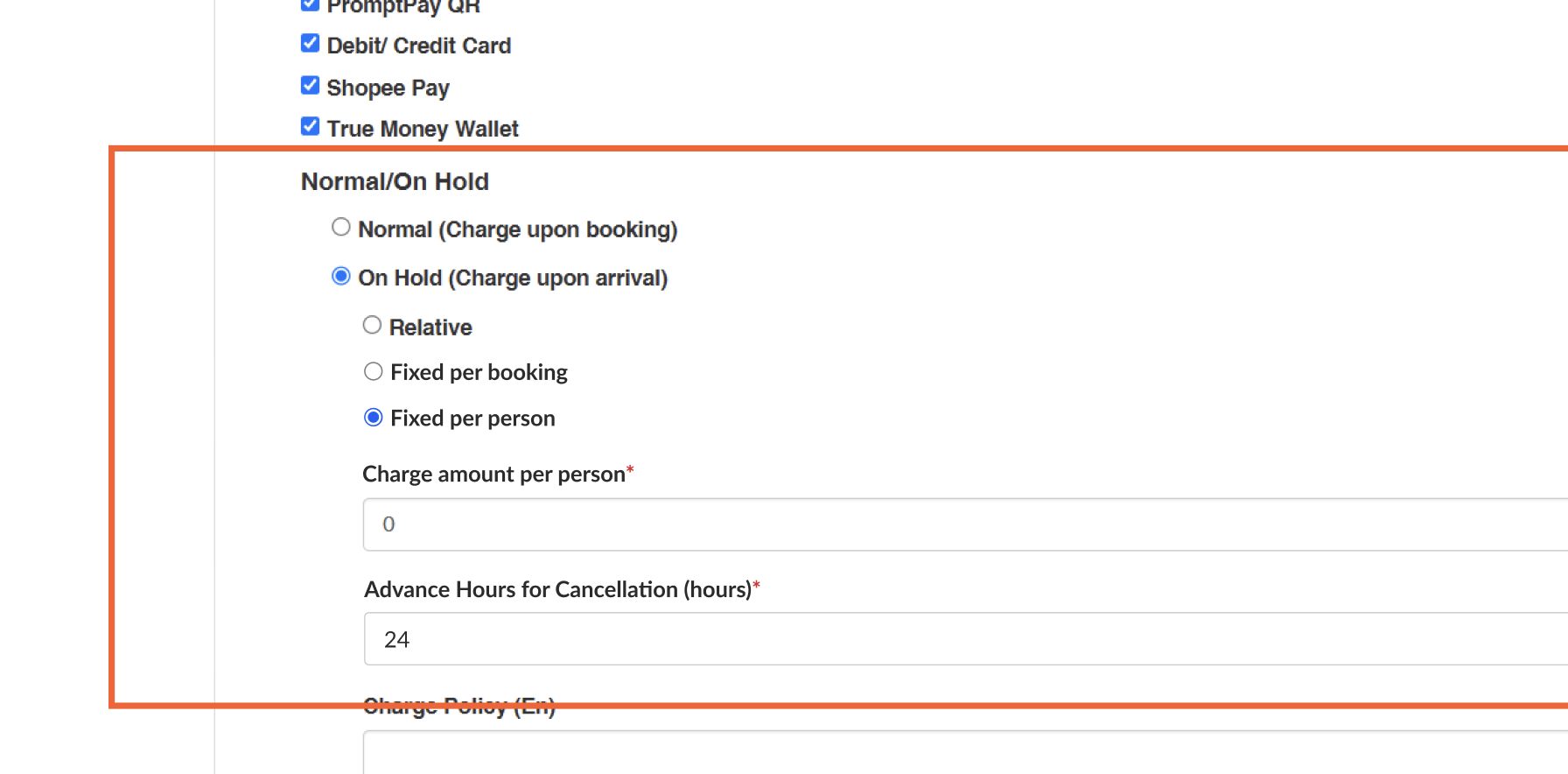
- When Admin set the pricing using, Fixed per person:
- System logic will ignore package qty
- when user book with 1 adult and 1 kids it will count as 2 person (Applied to all of package types AYCE, PP and Experience)
Scope
Admin Dashboard:
- edit package
- edit restaurant
User:
- Store page
- Package detail page
- Checkout page
- Booking confirmation page
- Booking confirmation email
How to set payment on-hold
- Open Admin Dashboard
- Open Packages ➝ Pick package type ➝ Pick AYCE package ➝ Edit
* Only works on Singapore restaurants
- Set the Package Payment to Require pre-payment and On Hold
* please choose debit/credit card payment
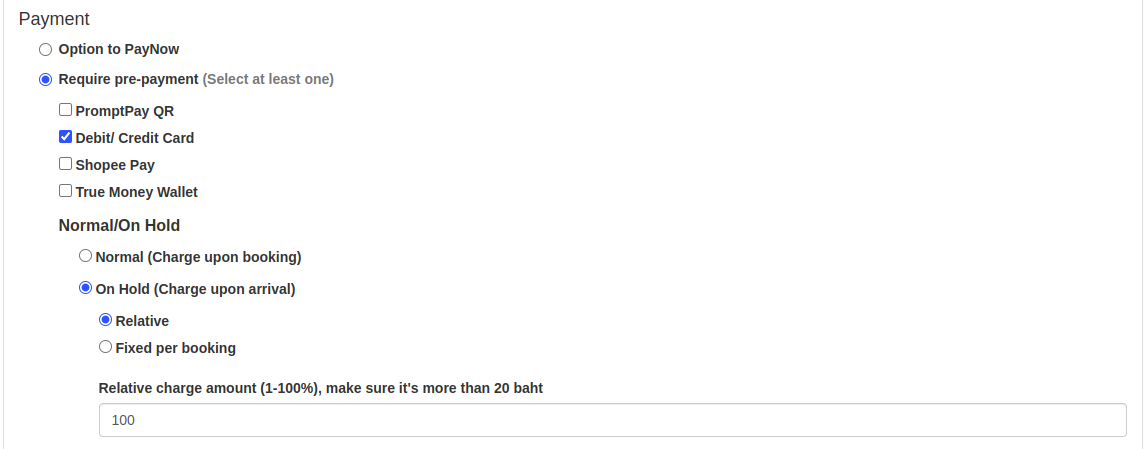
- Insert the Charge amount (either use relative or fixed per booking)
- Open Edit Restaurant (that you want to set the payment to on hold)
- Add the Time in advance to cancel/modify booking (in minutes)
* Please make it a round unit of 1 hour (60 minutes) because we haven’t handled the feature in minutes (like 40, 20, 30), we can still do it in hours.
How to use Credit Card payment with on-hold
https://app.clickup.com/9003122396/docs/8ca1fpw-37636/8ca1fpw-43836
Sequence Diagram / Flow

ERD
N/A — this feature does not require new tables.
Backend Implementation
- Add omise payment for Singapore restaurant
- Add Time in advance to cancel/modify booking (in minutes) on edit restaurant
- Add credit card pre authorization detail on booking confirmation email
- Add require pre authorization on package label
https://github.com/hungryhub-team/hh-server/pull/6148
https://github.com/hungryhub-team/hh-server/commit/dec1fb88c8e75ffd2f1146c83b4e7e476e65f66f
Frontend Implementation
- Add free canselation and pre authorization label under package name and on pacakge detail
- add require pre authorization description under package date available
- Add pre authorization information on checkout page and booking confirmation page
- add AVAILABLE_CURRENCY constant
- Add on hold charge cancel label
https://github.com/hungryhub-team/hh-pegasus/pull/1184
https://github.com/hungryhub-team/hh-pegasus/pull/1187
PRD & Task
https://app.clickup.com/9003122396/docs/8ca1fpw-7922/8ca1fpw-43736
https://app.clickup.com/t/86cx24ydf
Design
API Blueprint
| Method | Path | URL | Description | Payload |
|---|---|---|---|---|
New Query
N/A
DB Schema / Database Migration
N/A
Improvement:
N/A
How to use Credit Card payment with on-hold
- Open Admin Dashboard
- Open Packages ➝ Pick package type ➝ Pick AYCE package ➝ Edit
* Only works on Singapore restaurants
- Set the Package Payment to Require pre-payment and On Hold
* please choose debit/credit card payment
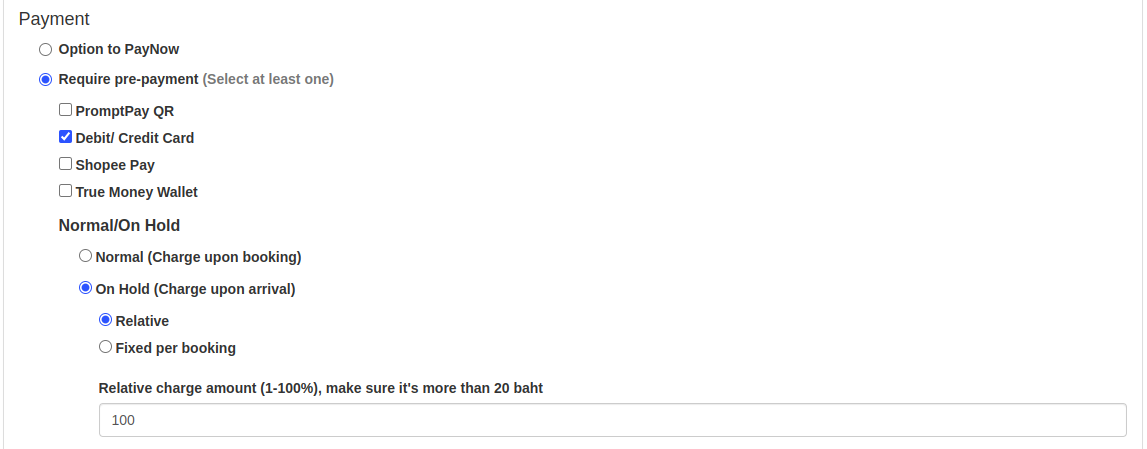
- Insert the Charge amount (either use relative or fixed per booking)
- Open Edit Restaurant (that you want to set the payment to on hold)
- Add the Time in advance to cancel/modify booking (in minutes)
* Please make it a round unit of 1 hour (60 minutes) because we haven’t handled the feature in minutes (like 40, 20, 30), we can still do it in hours.
- User can book the package using cc payment with on hold.
- User can find the
 tag on the restaurant page, under the package name.
- On checkout page, user will find the explanation about the pre-authentication(on-hold) payment
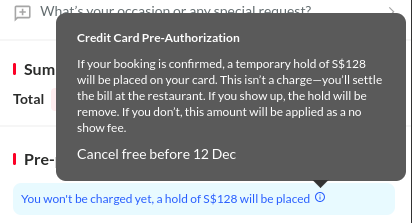
- User need to fill their card information before confirm booking
- User money will be on hold until they arrive to restaurant
- User can still cancel their booking within the given date on the temporary hold information on booking confirmation page