Credit Card Pre-Authorization
Description / Background
We are adding pre-authorisation for on-hold prepayment on Singapore restaurant. A temporary hold of {price} will be placed on the user's card. This is not a charge, user will settle the bill at the restaurant. If user shows up, the hold will be removed. If user doesn't show up, this amount will be applied as a no-show fee.
Glossary
Private (https://app.clickup.com/9003122396/docs/8ca1fpw-35796/8ca1fpw-41516)
Objective
- Singaporean user can book restaurant using on-hold prepayment
- Singaporean user can see the "Pre-Authorization" tag under the package name
- Singaporean user can see the "Pre-Authorization" information on package detail page, checkout page, booking confirmation page and booking confirmation email
- System will hold user money until user settle the bill at the restaurant
- User get free cancelation for certain amount of time
- If user no show, the on hold money will be charged for no-show fee
- Admin can set the free cancelation time on Time in advance to cancel/modify booking in edit restaurant
- Admin should set the package payment method to be pre-payment ➝ on hold and using debit / credit card
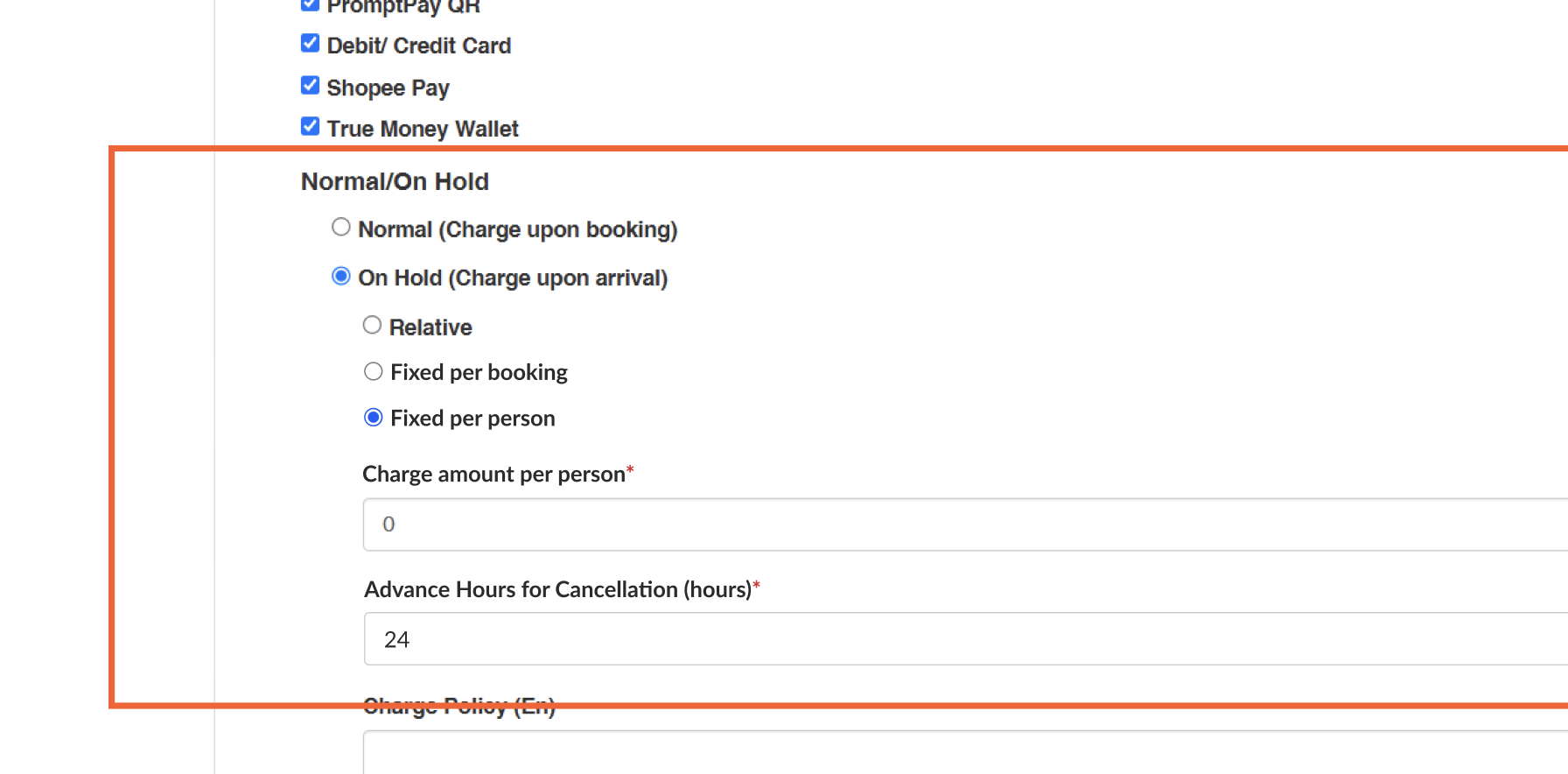
- When Admin set the pricing using, Fixed per person:
- System logic will ignore package qty
- when user book with 1 adult and 1 kids it will count as 2 person (Applied to all of package types AYCE, PP and xperience)
Scope
Admin Dashboard:
- edit package
- edit restaurant
User:
- Store page
- Package detail page
- Checkout page
- Booking confirmation page
- Booking confirmation email
How to set payment on-hold
- Open Admin Dashboard
- Open Packages ➝ Pick package type ➝ Pick AYCE package ➝ Edit
* Only works on singapore restaurants
- Set the Package Payment to Require pre-payment and On Hold
* please choose debit/credit card payment
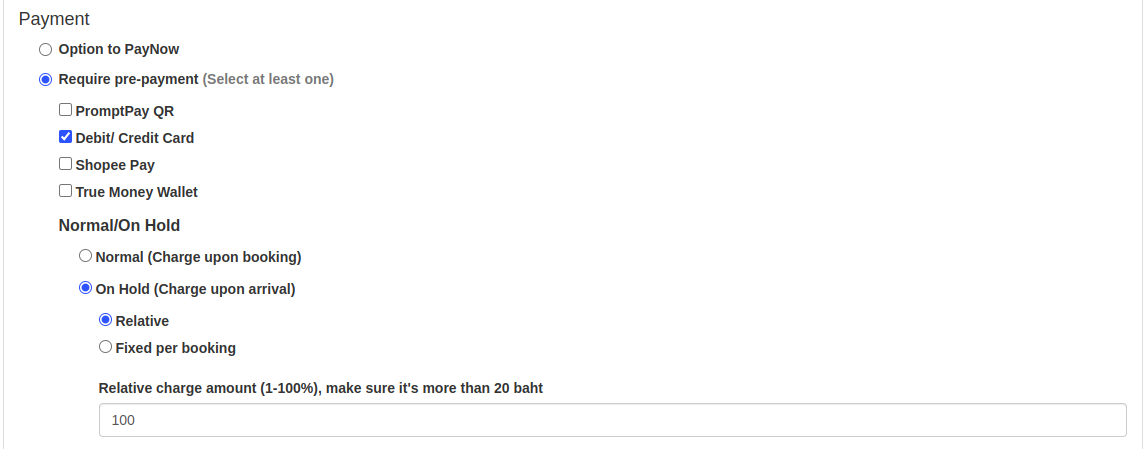
- Insert the Charge amount (either use relative or fixed per booking)
- Open Edit Restaurant (that you want to set the payment to on hold)
- Add the Time in advance to cancel/modify booking (in minutes)
* Please make it a round unit of 1 hour (60 minutes) because we haven't handled the feature in minutes (like 40, 20, 30), we can still do it in hours.
How to use Credit Card payment with on-hold
Private (https://app.clickup.com/9003122396/docs/8ca1fpw-37636/8ca1fpw-43836)
Sequence Diagram / Flow
-
ERD
-
Backend Implementation
- Add omise payment for singapore restaurant
- Add Time in advance to cancel/modify booking (in minutes) on edit restaurant
- Add credit card pre authorization detail on booking confirmation email
- Add require pre authorization on package label
[
github.com
https://github.com/hungryhub-team/hh-server/pull/6148
](https://github.com/hungryhub-team/hh-server/pull/6148)
[
github.com
https://github.com/hungryhub-team/hh-server/commit/dec1fb88c8e75ffd2f1146c83b4e7e476e65f66f
](https://github.com/hungryhub-team/hh-server/commit/dec1fb88c8e75ffd2f1146c83b4e7e476e65f66f)
Frontend Implementation
- Add free canselation and pre authorization label under package name and on pacakge detail
- add require pre authorization description under package date available
- Add pre authorization information on checkout page and booking confirmation page
- add AVAILABLE_CURRENCY constant
- Add on hold charge cancel label
[
github.com
https://github.com/hungryhub-team/hh-pegasus/pull/1184
](https://github.com/hungryhub-team/hh-pegasus/pull/1184)
[
github.com
https://github.com/hungryhub-team/hh-pegasus/pull/1187
](https://github.com/hungryhub-team/hh-pegasus/pull/1187)
PRD & Task
Private (https://app.clickup.com/9003122396/docs/8ca1fpw-7922/8ca1fpw-43736)
Private (https://app.clickup.com/t/86cx24ydf)
Design
API Blueprint
| Method | Path | URL | Description | Payload |
|---|---|---|---|---|
New Query
DB Schema / Database Migration
Improvement:
| Feature Name | Date | What Changed | Description |
|---|---|---|---|
How to use Credit Card payment with on-hold
- Open Admin Dashboard
- Open Packages ➝ Pick package type ➝ Pick AYCE package ➝ Edit
* Only works on singapore restaurants
- Set the Package Payment to Require pre-payment and On Hold
* please choose debit/credit card payment
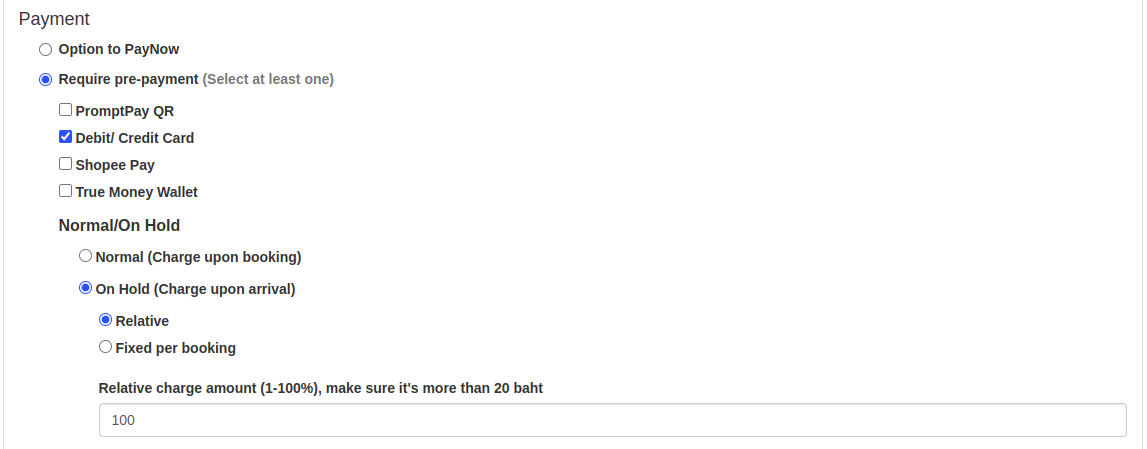
- Insert the Charge amount (either use relative or fixed per booking)
- Open Edit Restaurant (that you want to set the payment to on hold)
- Add the Time in advance to cancel/modify booking (in minutes)
* Please make it a round unit of 1 hour (60 minutes) because we haven't handled the feature in minutes (like 40, 20, 30), we can still do it in hours.
- User can book the package using cc payment with on hold.
- User can find the
 tag on the restaurant page, under the package name.
 - On checkout page, user will find the explanation about the pre-authentication(on-hold) payment
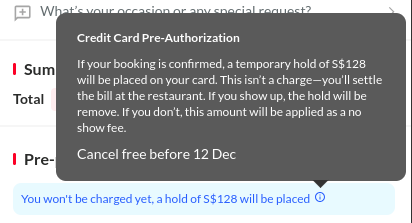
- User need to fill their card information before confirm booking
- User money will be on hold until they arrive to restaurant
- User can still cancel their booking within the given date on the temporary hold information on booking confirmation page