Checkout Page (Hybrid)
Description / Background
As we introduce more features at the checkout stage to increase the booking rate/points & offers usage/prepayment option, it requires a better performance at the checkout page.
Glossary
https://app.clickup.com/9003122396/docs/8ca1fpw-35796/8ca1fpw-41516
Objectives
- User can book
- faster checkout experience
- the more stable checkout experience
- User can open T&C on top right icon on the checkout page
- User can see the countdown timer and if user need more time, the countdown time can be extend 10 more minutes
- user can login or sign up if checking up as a guest
- user can view account information when checkout as a member
- User has option to add special request
- User can see the default guide message to log in or sign up if checking out as a guest and can log in/sign up
- User can view the outstanding Hungry Points with a toggle ON as default to use the max number of points if logged in.
- User can decide not to use the points or use a different amount by clicking on the toggle and the sliding bar will pop up for adjustment.
- User can use both promo codes, points and gift card per booking
- User can select only one promo code
- user can select multiple gift cards
- Marketing promo code only can use 1 per transaction. Gift Card can mix with promo code and points.If promo code disables mix:
- Promo code can’t mix with points
- Promo code can mix with gift cards
- Points can mix with gift cards If promo code enables mix:
-
1. Promo code can mix with point- Promo code can mix with gift cards
- Points can mix with gift cards
- Promo code is more priority than gift card:
Let’s say the package is 1000 using promo code 20% off and gift card 500. The priority calculation is promo code
1000 discount 20% = 800 - 500 giftcard = 300 baht
- User can see one line of the payment section (if user already has saved payment method)
- User can see the
change paymenton the right of the chosen payment method - User can click the
change paymentand redirected to payment method list - User can see the
editon the payment method page - User can click the
editon the payment method page, and the radio button will turn into edit icon - User can click edit button and redirected to card detail page
- User can edit the selected credit/debit card and set the card as default on card detail page
- User can change the default payment from card into other payment method
Scope
checkout page on web and app
Location
Checkout page in the hybrid app (accessible after package selection and date/time confirmation).
Sequence Diagram / Flow
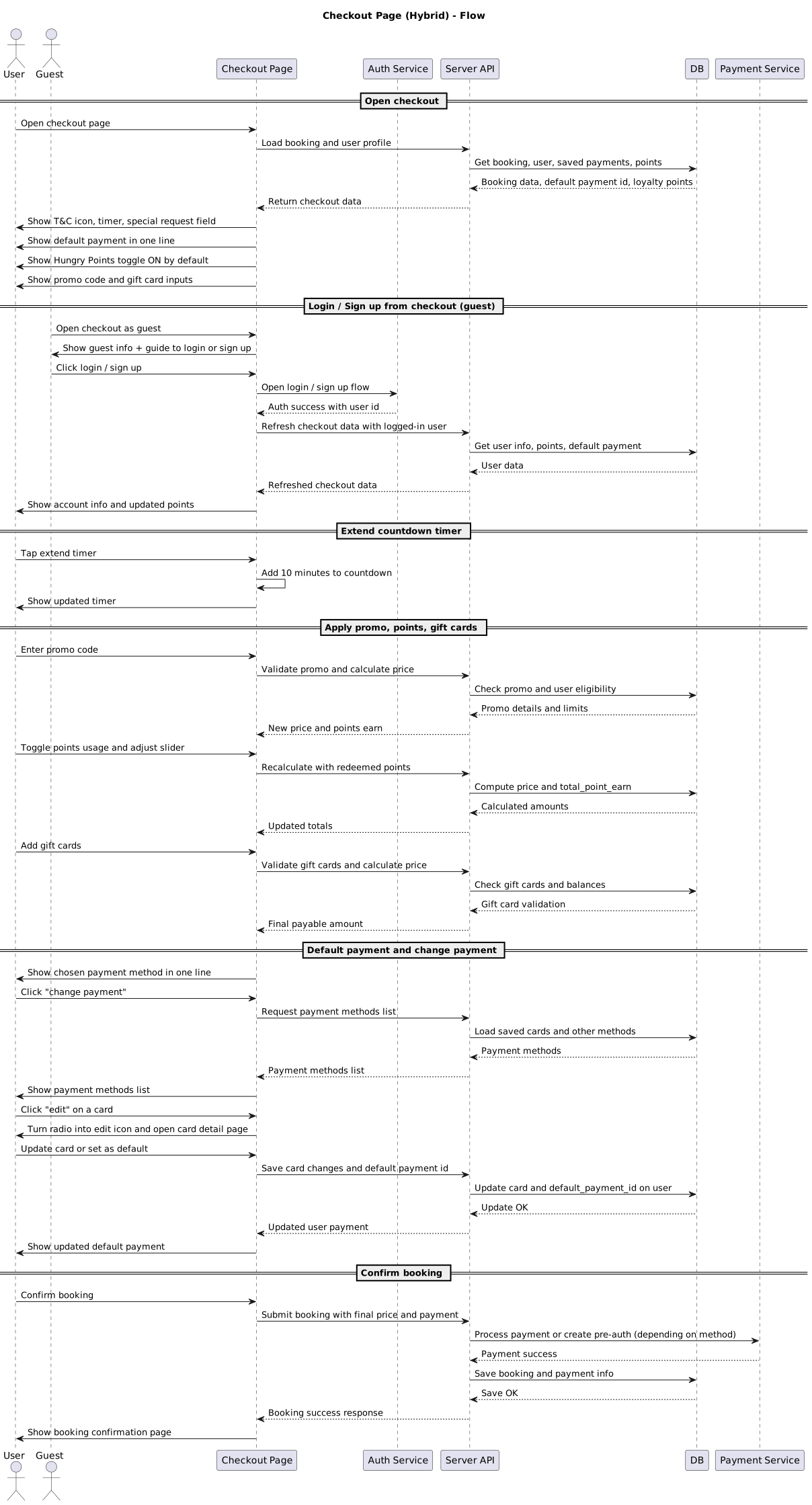
ERD
See PR for schema details.
Backend Implementation
- Add default payment id into user table
- Set default payment to be
promptpayif user didn’t have the default payment - Add default payment type to User Serializer
https://github.com/hungryhub-team/hh-server/pull/5599
Frontend Implementation
https://app.clickup.com/9003122396/docs/8ca1fpw-19042/8ca1fpw-23382
PRD & Task
https://docs.google.com/document/d/1kh9YriTv4p9btTnPpQobaDCStCzoYzpLiJl3KWqHQg0/edit?usp=drivesdk
https://app.clickup.com/9003122396/docs/8ca1fpw-7922/8ca1fpw-35976
https://app.clickup.com/t/860ru8pxy https://app.clickup.com/t/86cvcftgn
Design
API Blueprint
| Method | Path | URL | Description | Payload |
|---|---|---|---|---|
| GET | /users/vouchers.json | For offers can use category like this: “marketing,redemption,first_app_voucher” and gift card like this: “gift” | { “access_token”: “8BxDBftFuFu7G23idgfvmtaptD-UvHHeOpmq_JpzLDQ”, “provider”: “hungryhub”, “page”: { “number”: 1, “size”: 10 }, “minor_version”: “{{ minor_version }}”, “section_type”: “active”, “category”: “gift,marketing,redemption,first_app_voucher } | |
| POST | /restaurants/{id}/calculate_package_price.json | now have total_point_earn, and optional param “access_token” | { “access_token”: “xxxxxxx”, “adult”: 2, “client_type”: “Android”, “distance”: 0.0, “kids”: 0, “package_bought”: [ { “id”: “4001”, “quantity”: 1 } ] } | |
| POST` | /vouchers/validate.json | now have total_point_earn (still has issue multiply with user loyalty level) | { “adult”: 2, “client_type”: “Android”, “distance_to_restaurant”: 0.0, “kids”: 0, “packages”: [ { “id”: “1302”, “quantity”: 1 } ], “cc_number”: “”, “reservation_date”: “2023-01-20”, “restaurant_id”: “997”, “service_type”: “dine_in”, “user_id”: “188149”, “redeemed_points”:0, “voucher_code”: [ “PROMOCODE” ] } | |
| GET | {{ base_api }}/vouchers/check.json | Expected error message: if use gift card code in Offers field = Please use Gift Card codes in Gift Card section if use promo code in Gift Card field = Please use Promo Code in Offers section | { “voucher_code”: “PROMOCODE”, “category”: “marketing/giftcard” } | |
New Query
N/A
DB Schema / Database Migration
N/A
Improvement:
| NO | Date Time | What Change | Description |
|---|---|---|---|
| 1 | 26 Jan 2023 | - | Initial Document |
| 2 | 16 Feb 2023 | Add My voucher filter | |
| 3 | 27 Jun 2024 | Make payment section 1 line, allow edit/delete cc, add set as default payment for user cc account |