Booking Process - Multiple Booking in Same Day
Description / Background
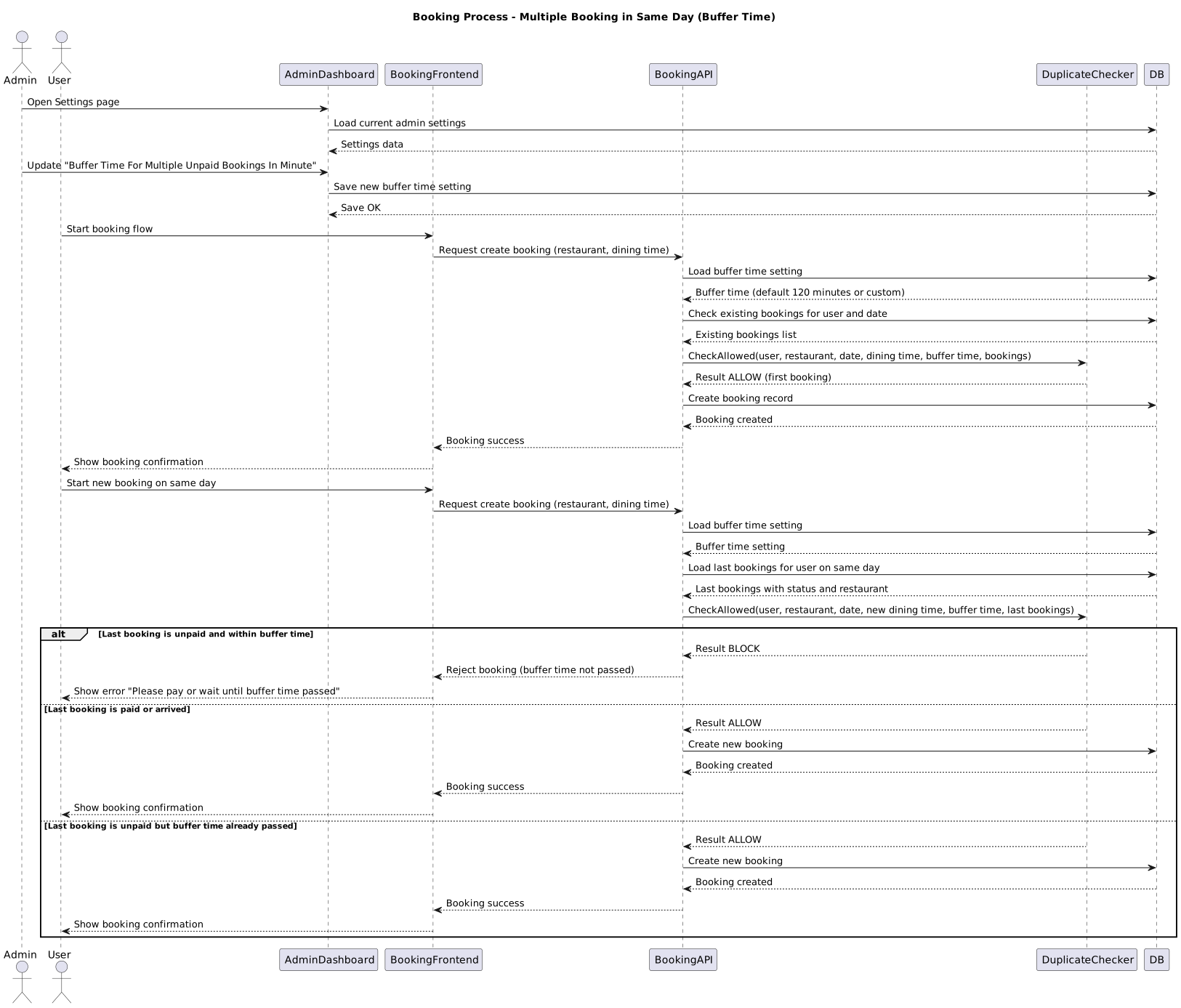
This feature allows users to make multiple bookings on the same day. However, users must pay for their current booking or wait until the buffer time has passed before creating the next booking. Users can book at the same restaurant if their last booking status was “arrived” or the buffer time has already passed. The default buffer time is 2 hours, but Admins can adjust this time in the Admin Settings. This feature was developed to cater to the growing demand for users who wish to make multiple bookings on the same day. It provides flexibility for users planning multiple dining experiences and enhances user satisfaction.
Glossary
TMA= total maximum allowance (old: party size per pack)PAX= party size (as usual)- Buffer Time: The minimum required interval between two consecutive bookings at the same restaurant
- The buffer time is comparing between current and new dining time. Not time that user make a booking in real world
Objectives
- Allow users to make multiple bookings on the same day
- Admin can set the Buffer time on Admin Dashboard.
- There’s buffer time if the last booking is unpaid.
- There is no buffer time if the booking has already been paid for.
- Users cannot make a booking at the same restaurant on the same day if the previous booking has not been marked as ‘arrived’ or the buffer time has not passed.
- Users can create multiple bookings from other restaurants if the buffer time has passed
How to set the buffer time
- Open Admin Dashboard
- Click menu Others ➝ Setting
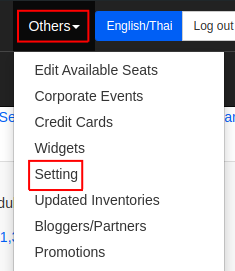
- Change the value of Buffer Time For Multiple Unpaid Bookings In Minute

- Click Submit
Sequence Diagram / Flow
Using New Checkout Single Booking
https://drive.google.com/file/d/1kYoCMgJ38nq_FJGlAcsLgyQLOXita2Dj/view?usp=drive_link
Multiple Booking
ERD
-
Backend Implementation
The backend implementation includes adding a new library for checking duplicate bookings and a setting for buffer time in the admin panel. Detailed code changes can be viewed in the GitHub pull request.
- Add
app/my_lib/duplicate_booking_checker.rb - Add Buffer Time For Multiple Unpaid Bookings In Minute on admin setting
https://github.com/hungryhub-team/hh-server/pull/5363/files
Frontend Implementation
N/A
PRD & Task
https://app.clickup.com/t/86ctzwjbk
Design
https://www.figma.com/file/TcaOzxtkcSELRhYBolGdfY/Booking-Process-%5BMobile%5D?type=design&node-id=2402-37550&mode=design&t=RCl6vmltus0gF8Qa-0https://www.figma.com/file/D6sLY1RWZoO0ppuQeEhQtw/Booking-Process-%5BDesktop%5D?type=design&node-id=0-1&mode=design&t=BqdDQzNcUh5CJ2Vn-0
API Blueprint
N/A
New Query
N/A
DB Schema / Database Migration
N/A
Improvement:
N/A