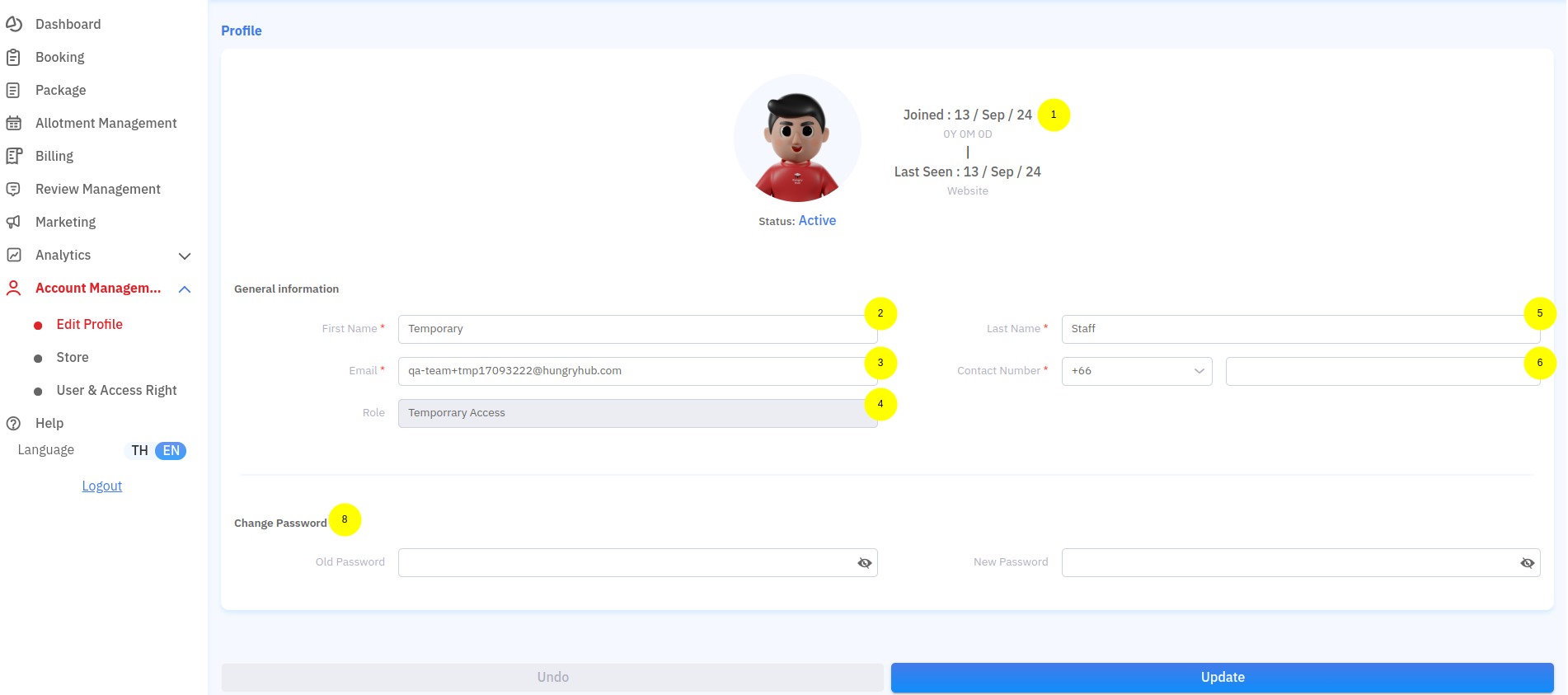
- Joined date and last seen → your account’s joined date and last seen
- First name → your login account first name
- Email → your login account email
- Role → your login account role
- Last name → your login account last name
- Contact number → your login account phone number
- Change Password → to change your password
- Log in to the partner portal
- Open Account Management → Pick Store
- You can edit your store details here. Make sure you fill in all required fields, which are marked with an (*) symbol.
Edit Store Video
- Log in to the partner portal
- Open Account Management → User & Access Right
- Click + Create new user
- Enter the new user data
- Click Create
Create New User Video
- Log in to the partner portal
- Open Account Management → User & Access Right
- Select the user whose password you want to reset
- Click the edit icon
- Click Reset password
Reset Password Video
- Log in to the partner portal
- Open Account Management → User & Access Right
- Select the user you want to edit
- Click the edit icon
- Update the user data
- Click Save
Update User Data Video
- Log in to the partner portal
- Open Account Management → User & Access Right
- Select the user you want to delete
- Click the delete icon
- Click Confirm
Delete User Video