Channel
Glossary
https://app.clickup.com/9003122396/docs/8ca1fpw-35796/8ca1fpw-41516
Features
Channel Screenshot
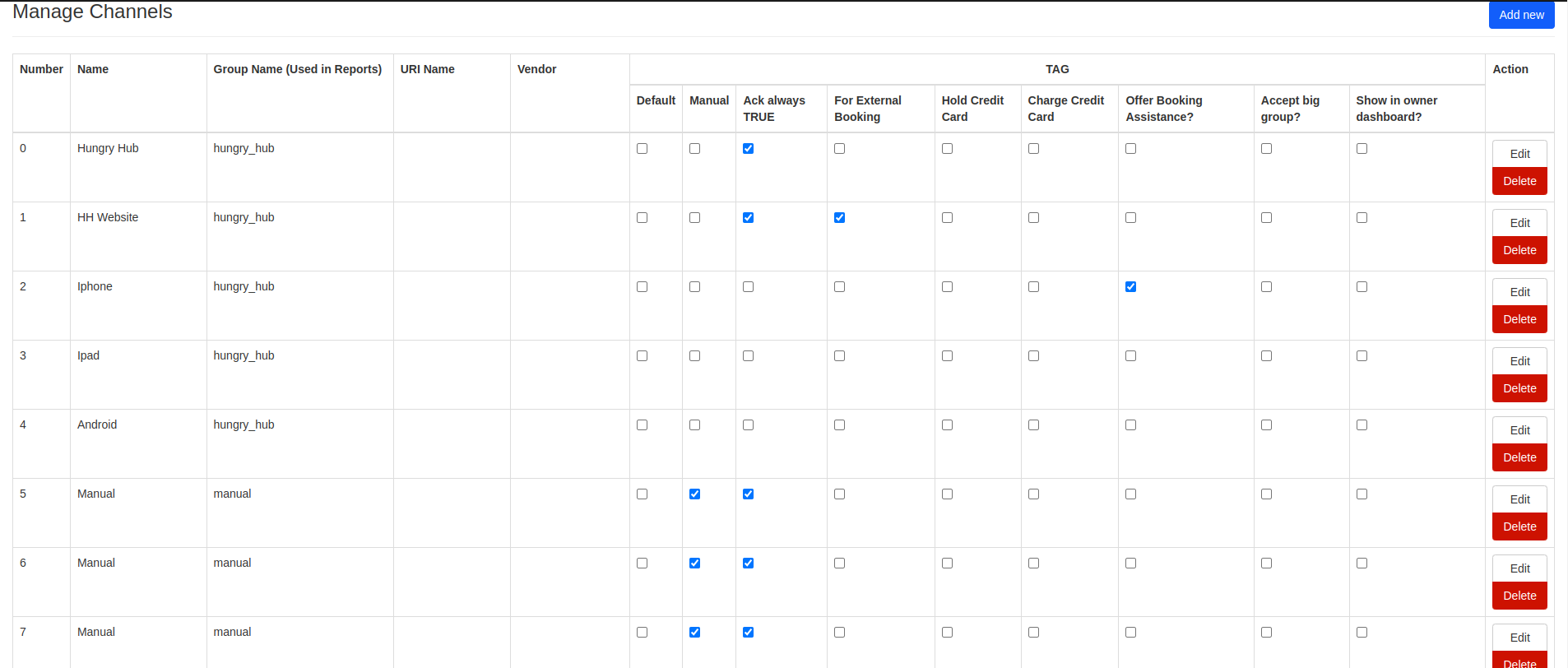
-
Channel is used to classify where the booking came from.
-
Channel tag:
- Group Name (used in reports)
- URI Name
- Vendor: vendor name
- Default: default channel value if no specific channel is linked to the booking
- Manual: marks bookings that were manually added by admin
- Ack always TRUE: bookings made from this channel will be automatically marked as acknowledged
- For External Booking: marks bookings that are not manual channels
- Hold Credit Card: allows bookings from this channel to charge using on-hold payment
- Charge Credit Card: allows bookings from this channel to charge upon booking
- Offer Booking Assistance?: this channel offers the booking assistance widget
- Accept big group?: marks whether the channel accepts big group bookings
- Show in owner dashboard?: shows the channel name on the Partner Portal booking page
-
Other channel settings:
- Name: channel name
- Phone Type: channel phone number source Restaurant means it uses the restaurant phone number. Custom means add a custom phone number (in the custom phone field).

Default means it uses the global channel hotline defined in admin settings.
- Support Dynamic Pricing: marks whether the channel supports dynamic pricing.