User Verification - Delivery
When we do delivery booking if phone number not verified will trigger event:
onVerifyOrChangePhone with response like this:
{
	"success": true,
	"message": "The verification code request has been processed.",
	"data": {
		"phone": "854546789",
		"phone_code": "+66",
		"email": "jonitampan@gmail.com",
		"name": "Joni Playboy",
		"verified": false,
		"otp": 214158,
		"time": "2023-06-12T09:23:49+07:00"
	}
}
Guest User
For guest we will have option to continue booking as guest and register. So, in the beginning we need to save the data from hybrid as temporary guest user data in case we'll use for register:
{
	"phone": "854546789",
	"phone_code": "+66",
	"email": "jonitampan@gmail.com",
	"name": "Joni Playboy"
}
For guest we'll show OTP pop up directly after receive that event:
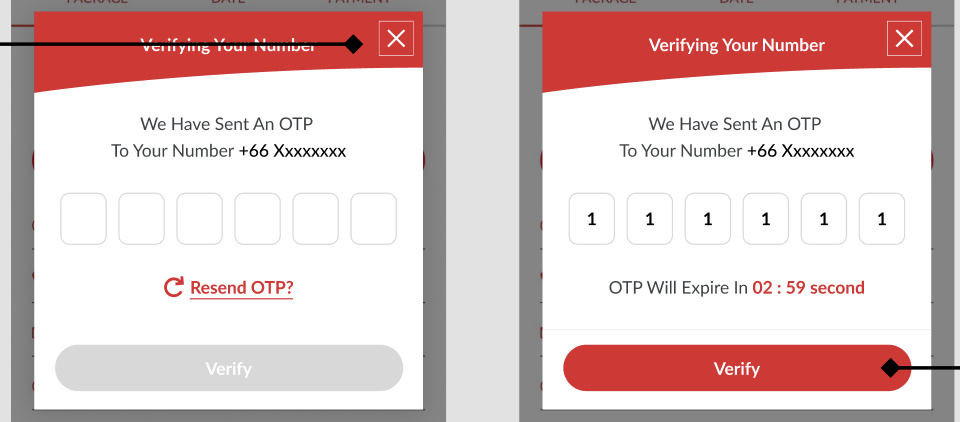
We'll show text like this: We have sent an OTP to Your Number phone_code + (remove 0 in front) phone
If time's up, we can click resend OTP with this API {{ base_api }}/request_verification_code.json
{
	"phone": "+66854546789"
}
And we'll get response like this:
{
	"success": true,
	"message": "The verification code request has been processed.",
	"data": {
		"verified": false,
		"otp": 741311,
		"phone": "+66853364543",
		"time": "2023-06-13T14:19:03+07:00"
	}
}
Note: we need to add ?testing=true query to make OTP value show up. (staging only, don't do in prod)
For verification we'll hit this API: {{ base_api }}/verify_verification_code.json
{
	"phone": "+66853364543",
	"verification_code": "741311"
}
And the response should be like this:
{
	"data": null,
	"message": "Your number has been successfully verified.",
	"success": true
}
After successful verify we will show this pop up:
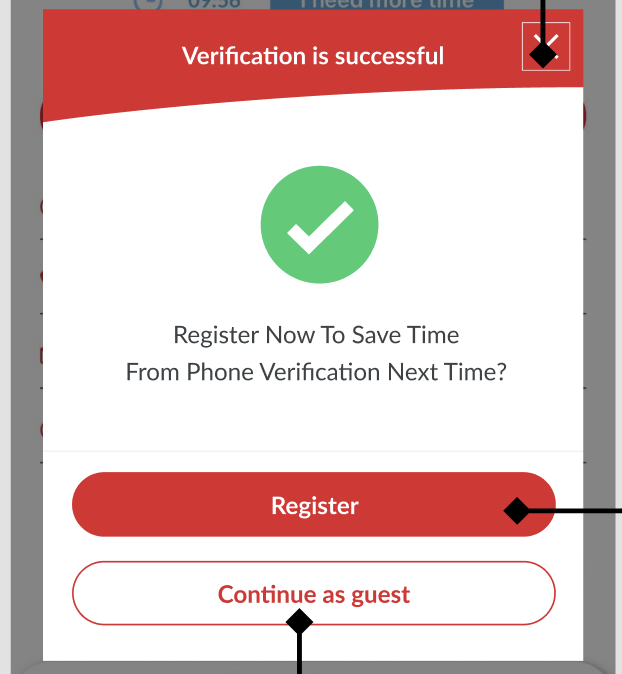
If users choose Continue as guest we'll trigger this event: doContinueBookingAfterVerifyPhone payload:
{
"is_phone_verified":true
}
But if user choose register we'll open register flow:
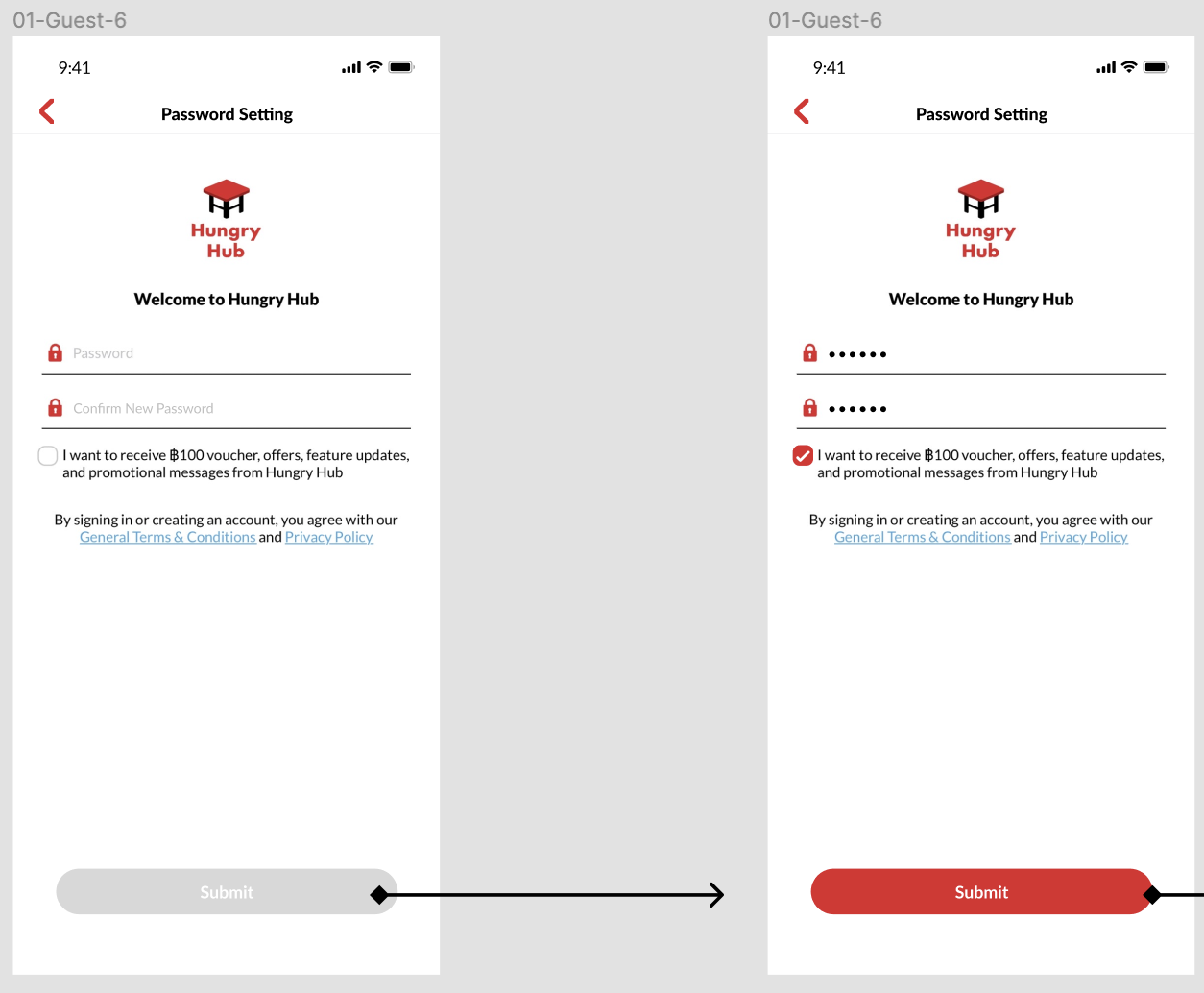 since we already have all previous data from hybrid, on this page we only need to add
- password (from password input)
- subscribe_marketing_email (from checkbox)
- language (from current language that used)
- minor_version (default = 3)
- provider (hungryhub)
{
	"minor_version": "{{ minor_version  }}",
	"name": "Tampan Tiga",
	"password": "sayatampan",
	"email": "tampantiga@gmail.com",
	"phone": "872817281",
	"calling_code": "+66",
	"provider": "hungryhub",
	"language": "en",
	"subscribe_marketing_email": true
}
After successful registration, we'll show After successful registration, we'll show confirmation like this:
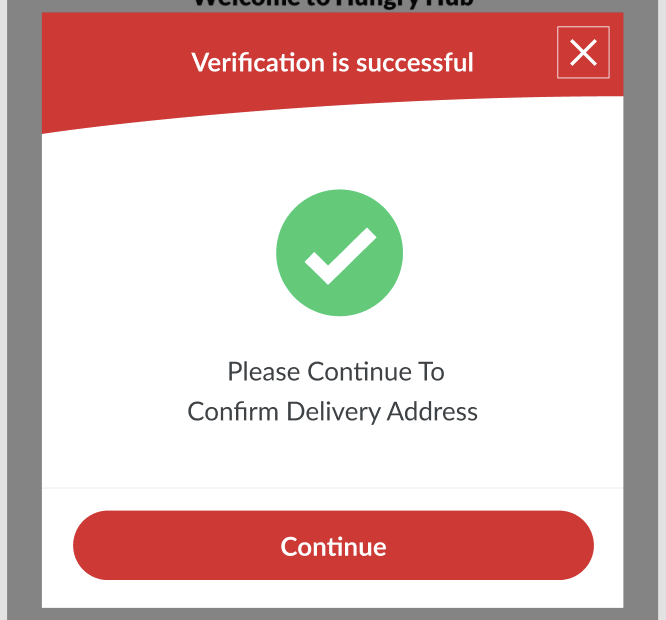 If users click Continue we'll back to previous screen and trigger doSetupData (same as we implement when sign in/sign up on checkout page). After that we need to add timer 1 second and then trigger this event:
doContinueBookingAfterVerifyPhone
payload:
If users click Continue we'll back to previous screen and trigger doSetupData (same as we implement when sign in/sign up on checkout page). After that we need to add timer 1 second and then trigger this event:
doContinueBookingAfterVerifyPhone
payload:
{
"is_phone_verified":true
}
Member
For member we'll show this pop up:
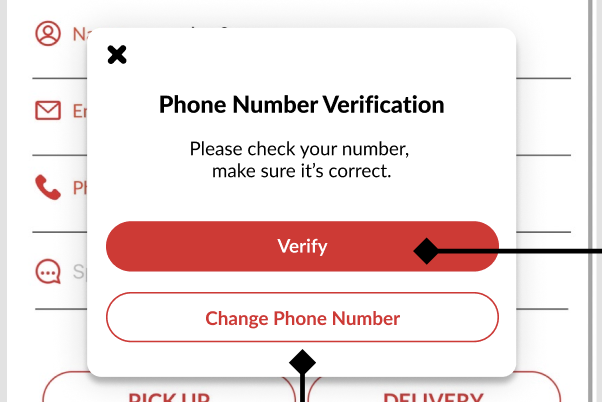
If users choose verify we'll show OTP verification dialog:
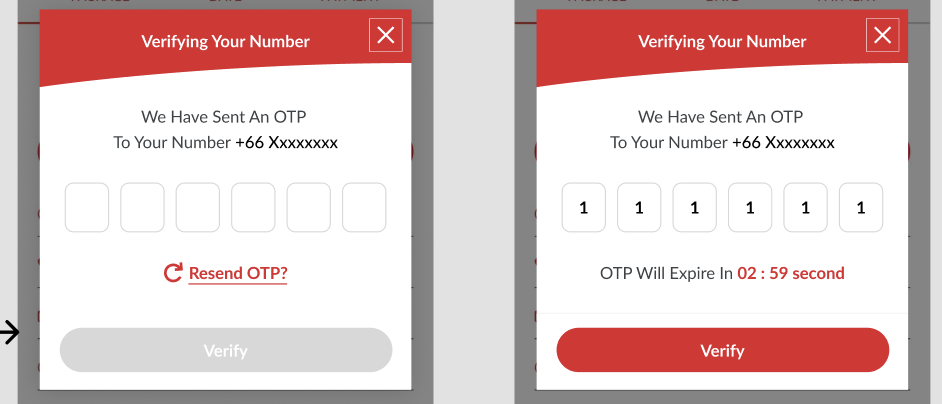
We'll show text like this: We have sent an OTP to Your Number phone_code + (remove 0 in front) phone
If time's up, we can click resend OTP with this API {{ base_api }}/request_verification_code.json
{
	"access_token":"Y6WyGAZOS6WYsmt64zrlZPZ22xxMV4-L1FtnrbtydxQ",
	"phone": "+66854546789"
}
And we'll get response like this:
{
	"success": true,
	"message": "The verification code request has been processed.",
	"data": {
		"verified": false,
		"otp": 741311,
		"phone": "+66853364543",
		"time": "2023-06-13T14:19:03+07:00"
	}
}
Note: we need to add ?testing=true query to make OTP value show up. (staging only, don't do in prod)
For verification we'll hit this API: {{ base_api }}/verify_verification_code.json
{
	"access_token":"Y6WyGAZOS6WYsmt64zrlZPZ22xxMV4-L1FtnrbtydxQ",
	"phone": "+66853364543",
	"verification_code": "741311"
}
And the response should be like this:
{
	"data": null,
	"message": "Your number has been successfully verified.",
	"success": true
}
After successful verification, we need to hit this event to hybrid: doContinueBookingAfterVerifyPhone payload:
{
"is_phone_verified":true
}