Homepage Icon Features
We’ll have a new section for homepage icons like this:
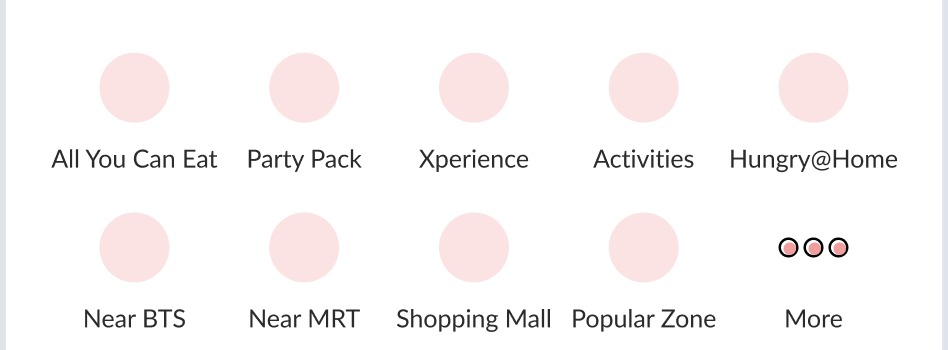 API:
API: {{ base_api }}/homes/deals.json
Response:
{
	"data": [
		{
			"id": "1",
			"type": "deals",
			"attributes": {
				"title": "Hotal Restaurant",
				"icon_url": "https://hh-engineering.my.id/uploads/restaurant_tag/cover/6/ayce.jpeg",
				"type": "tag",
				"target_url": "https://web.hungryhub.com/restaurants/search?city_id=4&dining_style_id[]=1644&dining_style_name[]=Hotel%20Restaurant&locale=en"
			}
		},
		{
			"id": "1",
			"type": "deals",
			"attributes": {
				"title": "Near Me",
				"icon_url": "https://hh-engineering.my.id/uploads/restaurant_tag/cover/6/ayce.jpeg",
				"type": "logic",
				"target_url": "https://web.hungryhub.com/restaurants/near-me?locale=en"
			}
		},
		{
			"id": "1",
			"type": "deals",
			"attributes": {
				"title": "Rooftop",
				"icon_url": "https://hh-engineering.my.id/uploads/restaurant_tag/cover/6/ayce.jpeg",
				"type": "group",
				"target_url": " "
			}
		}
	],
	"success": true,
	"message": null
}
Navigation Types
We have several types of navigation, and we mostly use existing deeplinks.
tag: Opens search page with tag-based query params (for example: cuisine, location, facility).logic: Opens behavior-based pages (for example: near me).group: Opens a group landing page.target_urlmust be a valid group URL and cannot be blank.
Web Event: onDealsClicked
{
	"target_url": "https://web.hungryhub.com/restaurants/group/rooftop-promotion-rooftop?locale=en"
}
Client apps will handle that target_url and route to the specific group landing page.
{
	"target_url": "https://web.hungryhub.com/restaurants/near-me?locale=en"
}
Client Apps will go to search by latitude and longitude. Auto Generate URL from tag:
- Cuisine: https://web.hungryhub.com/restaurants/search?cuisine_id[]=11&cuisine_name[]=Japanese
- Dining Style: https://web.hungryhub.com/restaurants/search?dining_style_id[]=1647&dining_style_name[]=Buffet
- Location: https://web.hungryhub.com/restaurants/search?location_id[]=1596&location_name[]=Pathum%20Wan
- Shopping Mall: https://web.hungryhub.com/restaurants/search?location_shopping_mall_id[]=1269&location_shopping_mall_name[]=Amarin%20Plaza
- Popular Zone: https://web.hungryhub.com/restaurants/search?location_popular_zone_id[]=1468&location_popular_zone_name[]=Rajdamri
- BTS Route: https://web.hungryhub.com/restaurants/search?location_bts_route_id[]=1734&location_bts_route_name[]=BTS%20Asok
- MRT Route: https://web.hungryhub.com/restaurants/search?location_mrt_route_id[]=1055&location_mrt_route_name[]=MRT%20Sukhumvit
- Others: https://web.hungryhub.com/restaurants/search?tag_id[]=304&tag_name[]=Pet-Friendly
The following examples show URL structures containing tag data:
Cuisine
sample URL: https://web.hungryhub.com/restaurants/search?city_id=4&locale=en&cuisine_id[]=11&cuisine_name[]=Japanese payload on doSearch:
{
	"cuisine_ids": [
		{
			"id": 11,
			"name": "Japanese"
		}
	]
}
Dining Style
sample URL: https://web.hungryhub.com/restaurants/search?city_id=4&locale=en&dining_style_id[]=1647&dining_style_name[]=Buffet payload on doSearch:
{
	"dining_style_ids": [
		{
			"id": "1647",
			"name": "Buffet"
		}
	]
}
Location
sample URL: https://web.hungryhub.com/restaurants/search?locale=en&location_id[]=1596&location_name[]=Pathum%20Wan&location_total_restaurant[]=89 payload on doSearch:
{
	"location_ids": [
		{
			"id": 1596,
			"name": "Pathum Wan",
			"type": "location"
		}
	]
}
Shopping Mall
sample URL: https://web.hungryhub.com/restaurants/search?locale=en&location_shopping_mall_id[]=1269&location_shopping_mall_name[]=Amarin%20Plaza&location_shopping_mall_total_restaurant[]=62 payload on doSearch:
{
	"location_ids": [
		{
			"id": 1269,
			"name": "Amarin Plaza",
			"type": "shopping_mall"
		}
	]
}
Popular Zone
sample URL: https://web.hungryhub.com/restaurants/search?locale=en&location_popular_zone_id[]=1468&location_popular_zone_name[]=Rajdamri&location_popular_zone_total_restaurant[]=164 payload on doSearch:
{
	"location_ids": [
		{
			"id": 1468,
			"name": "Rajdamri",
			"type": "popular_zone"
		}
	]
}
BTS Route
sample URL: https://web.hungryhub.com/restaurants/search?locale=en&location_bts_route_id[]=1734&location_bts_route_name[]=BTS%20Asok&location_bts_route_total_restaurant[]=52 payload on doSearch:
{
	"location_ids": [
		{
			"id": 1734,
			"name": "BTS Asok",
			"type": "bts_route"
		}
	]
}
MRT Route
sample URL: https://web.hungryhub.com/restaurants/search?locale=en&location_mrt_route_id[]=1055&location_mrt_route_name[]=MRT%20Sukhumvit&location_mrt_route_total_restaurant[]=60 payload on doSearch:
{
	"location_ids": [
		{
			"id": 1055,
			"name": "MRT Sukhumvit",
			"type": "mrt_route"
		}
	]
}
Price Filter
sample URL: https://web.hungryhub.com/restaurants/search?locale=en&min=0&max=500&price_type=per_person¤cy=%E0%B8%BF payload on doSearch:
{
	"price_filter": {
		"min": 0,
		"max": 2900,
		"price_type": "per_person"
	}
}
Other
sample URL: https://web.hungryhub.com/restaurants/search?tag_id[]=304&tag_name[]=Pet-Friendly payload on doSearch:
{
	"facility_ids": [
		{
			"id": 304,
			"name": "Pet Friendly"
		}
	]
}
Sorting
sample URL: https://web.hungryhub.com/restaurants/search?sort=most_reviewed&locale=th payload on doSearch:
{
	"sort_by": "most_reviewed"
}
Multiple Price
sample URL: https://web.hungryhub.com/restaurants/search?multiple_pricing=true&locale=th payload on doSearch:
{
	"multiple_pricing": true
}
Offers Ticket (VIM)
sample URL: https://web.hungryhub.com/restaurants/search?offer_ticket=true&locale=th payload on doSearch:
{
	"offer_ticket": true
}
Additional for Detail Page We still can use this event when click deals data: onDealsClicked
{
	"target_url": "https://web.hungryhub.com/restaurants/group/rooftop-promotion-rooftop?locale=en"
}
Also for package type can use the same but with this format URL:
{
	"target_url": "https://web.hungryhub.com/restaurants/search?city_id=1&package_type[]=ayce"
}
You can replace package_type[] with package_type_code data if the endpoint supports it.
For tags data we can use onTagClicked event. Web Event: onTagClicked Response:
{
	"id": "6",
	"type": "restaurant_tags",
	"attributes": {
		"cover": {
			"url": "https://hh-engineering.my.id/uploads/restaurant_tag/cover/6/cuisine-indian.jpeg"
		},
		"title": "Indian",
		"title_en": "Cuisine:Indian",
		"tag_type": "cuisine",
		"total_restaurants": 1
	}
}